See an update to the release status in the Remote Builder thread with info on new features to be included in the original release.
1 Like
I have released SmartGrid as part of Remote Builder Advanced. If you have tables of lights or switches you will probably find these make an excellent replacement.
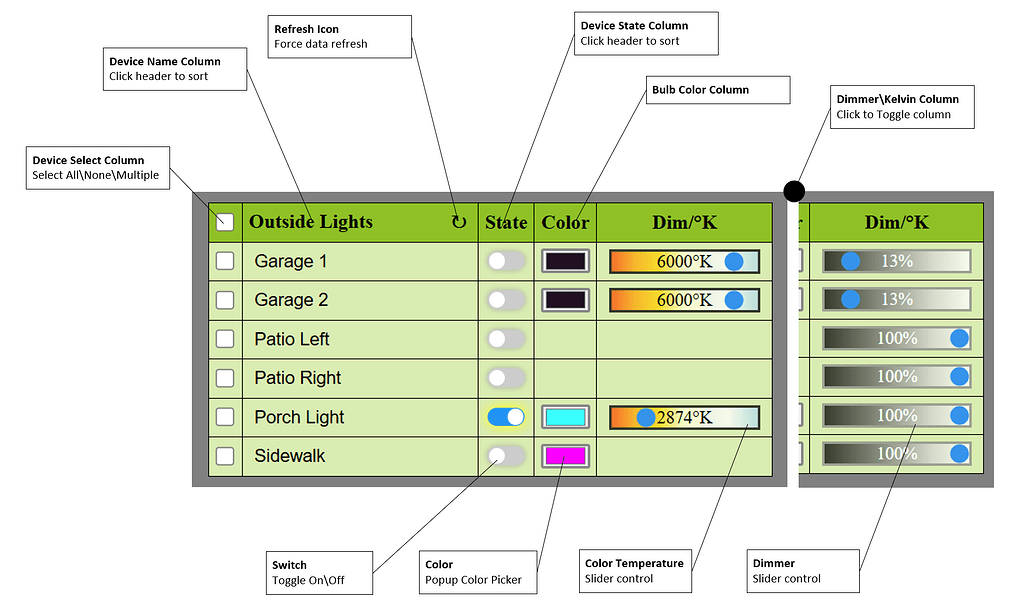
See this post for more info.
3 Likes
Here is a preview of the greatly improved version of Remote Builder SmartGrid with lots of additional features and supported devices.
This is a demo running on my old C-7 with a bunch of virtual devices.
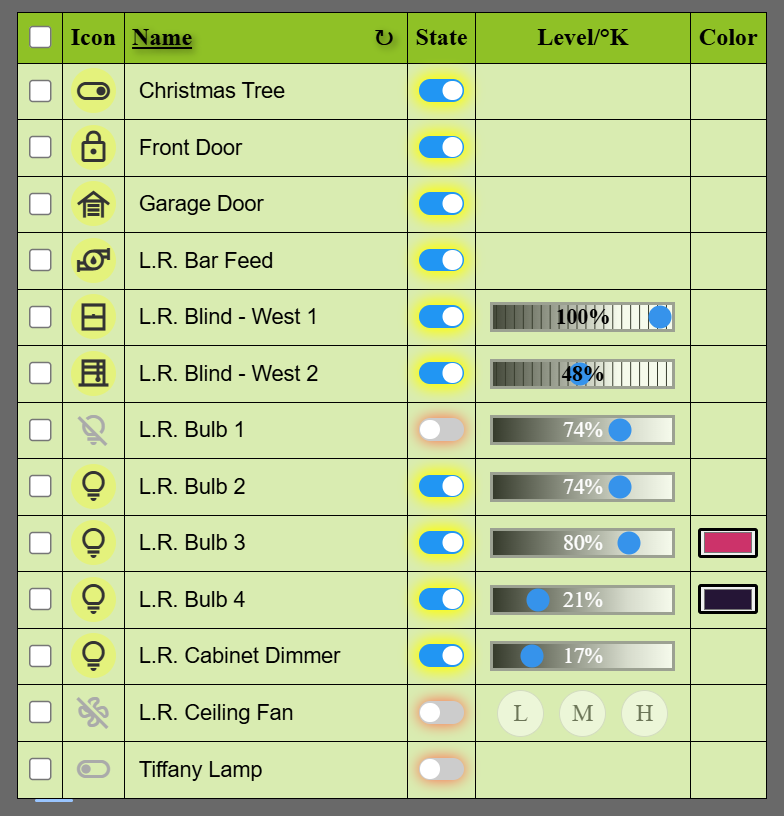
You can experiment with this setup this cloud endpoint.
You can find additional info on this here.
2 Likes
wow! this works so smoothly. TY Gary!
1 Like
Tile Builder is largely passive display of device information. You can do a few things with hyperlinks to control devices (via Maker API) but they were kludgy.
Remote Builder is more to do with control (Remote as in remote control). I started out with simple button controllers with no status feedback which were relatively easy, send a command and don't worry what happens after that.
SmartGrid is the evolution of that where I have figured out how to send commands through a nice interface but also get back the device status and display it accordingly without the need for Maker API which is an added bonus.
3 Likes
I've noticed the solid opening icons used in rooms appear to be segmented. Maybe 1 pixel gaps. Is this intentional? Gaps appear regardless of rotation, color or zoom.
Thx
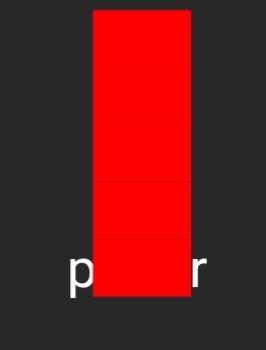
It uses a Unicode character that most completely fills the glyph, but not 100%. It was about efficiency really as your example is only 5 bytes which is pretty cheap in the scheme of things.
1 Like
'pretty cheap' is not a good marketing slogan. 
That's true. Just to clarify, when I say cheap I mean in the 1,024 byte budget.
1 Like
Gary - Super aware you're working on a major release of tools central to my HE world!
Wanted to pass on a feature change request I think you may take note of regarding Tile Builder Grid. Maybe this thought flows through to what your already up to.
In TB grid - I create a custom grid and use some features to chop off the prefix of names.
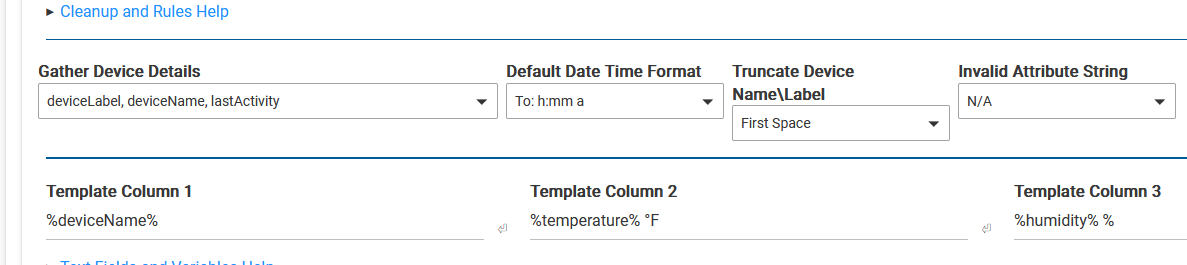
as you can see in my screen cap, I truncate at 'first space'. The result comes up out of alphanumeric order.
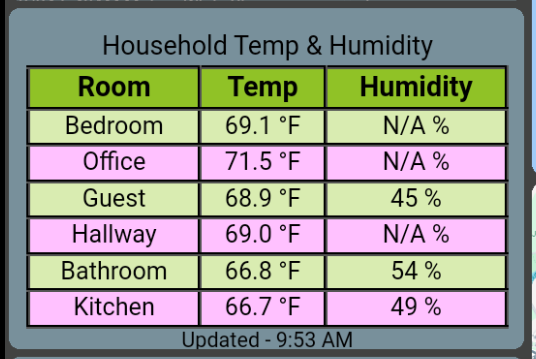
In this case, my 'device' is prefixed with 'Virtual ' for Bathroom and Kitchen. So they sort correctly prior to the truncation. I was hoping you might consider moving the sort to after the truncation?
For now, I think I've got a work around by customizing the Device Name / Labels but its not a clean solve for me. Thanks for what you do/are doing! This is unimportant!
It's too bad I can't pull '%deviceRoom%... - ah. rooms. the lost child...
1 Like
I have it on my list to add the Device Rename capabilities that are in Attribute\Activity Monitor to the DeviceGroup mode of Grid. I assume that is what you are using?
So you have something like "Virtual Bathroom Sensor" and you use the "replace characters" to remove it but it leaves a leading space on the name causing it to sort differently. Have you tried including a space in therepace characters field?
My SmartGrid has been getting all my attention but I have a little laundry list of things to clean up on a few Tile Builder modules and I'll start doing that in January after I launch this SmartGrid update.
1 Like
Thanks G - glad your keeping lists... sorta like Santa!
@garyjmilne Happy Holidays Gary!
Some feedback - long term use stuff. Currently I run 3 TB Storages. Just for cleanliness, I use basic Tile stuff in Storage 1, Multi and Attribute tiles in Storage 2, and Grid, Thermostat, room in Storage 3.
I've gotten some 'busy' notices and a few other hiccups on Storage 1. I believe the amount of tiles within the storage may have some limitations - this is a subjective comment.
Currently, 10 tiles in Storage 1.
I plan on cutting Storage 1 in 1/2, making a 4th Storage and remaking 5 tiles in Storage 4. Do you think there could/should be some performance characteristics I should monitor to keep storages performing well?
The number of tiles is limited to 25 but I think what you are referring to is more to do with I/O limitations. Certainly there will be some practical limit. Here I think are the main factors.
-
Number of events being captured by the various tiles. Each event wakes up the child app and will result in an update to the storage device. One of this best things you can do here is increase the eventTimeout for publishing. Without no eventTimeout 10 bulbs going off would result in 10 separate events. With a suitable eventTimeout of 1-2 seconds that would probably be reduced to a single IO to the storage device.
-
Small tiles that are stored in the storage device are going to take a little more CPU and I/O than larger tiles which are stored in the Endpoint or the filesystem and only a small token link is saved the storage device.
-
Of course the nature of the devices that you are monitoring contributes to the frequency of events. Does it make sense to regenerate a table when a sensor goes up by 0.1 degrees? Not to me it doesn't because they are not that accurate. So if the device driver allows for any control over event notification I'd make use of that.
-
The other feature built in is the Republish Delay which basically rate limits the number of times a table is eligible to be refreshed.
I'd probably look at making sure your publishing is optimized before splitting or moving anything because there is no easy move option.
My TB use is organized like yours into logical groupings and I've had no issues that I can recall regarding busy notices. But I am on a C-8 Pro which I'm sure makes a difference.
Hope that helps.
Release updates:
Thermostat (1.0.3): Updated to 1.0.3. Corrects error where Publishing information was being sent to the log even when Publishing logging was turned off. Per @jshimota
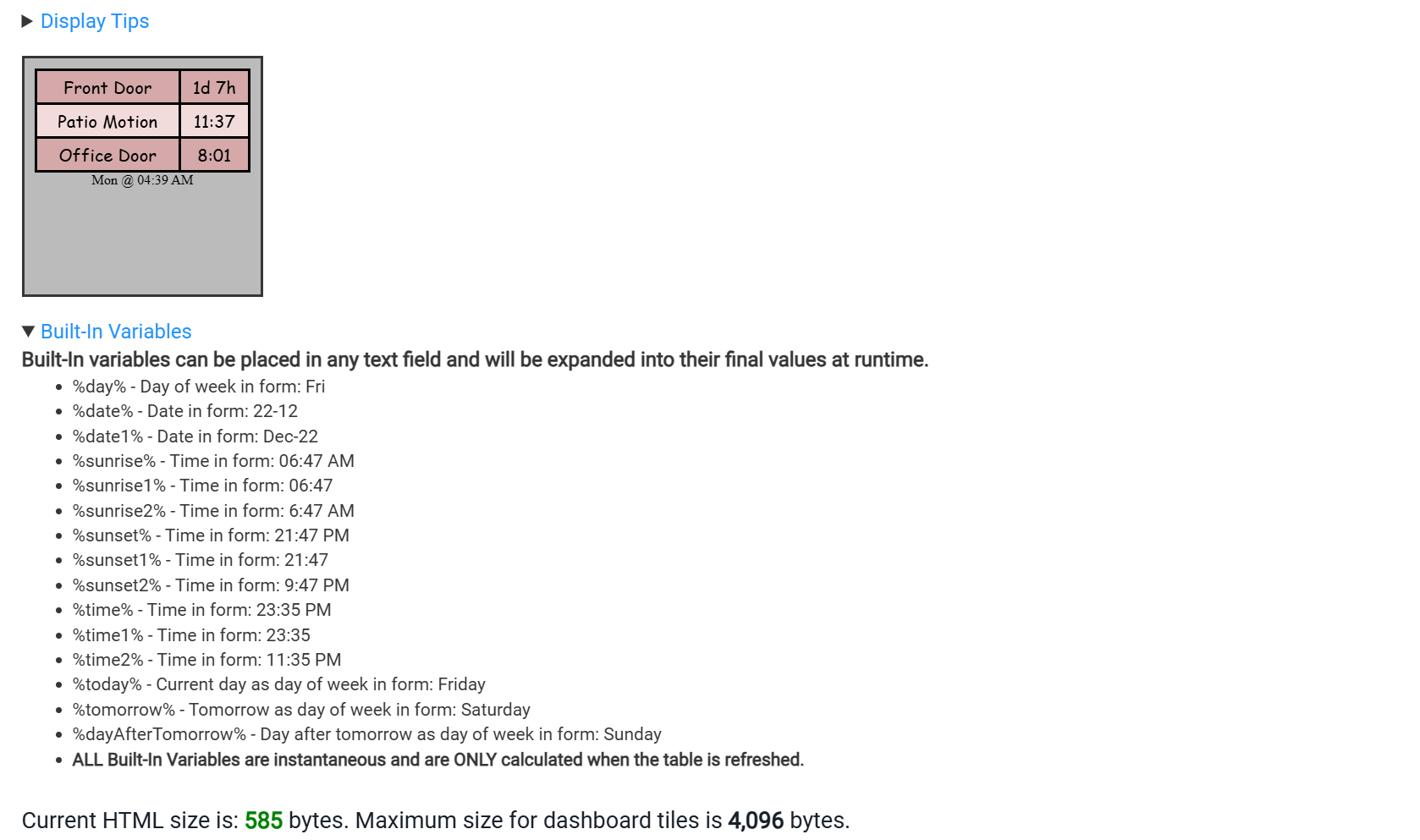
Activity Monitor and Attribute Monitor (1.5.4): Incorporates all of the date time built in variables found in Grid to AM as shown below. Per @John_Land
In line help for this can be found here within the app:
Grid (2.2.0): Adds the much requested option for device name modification when in Device Group mode.
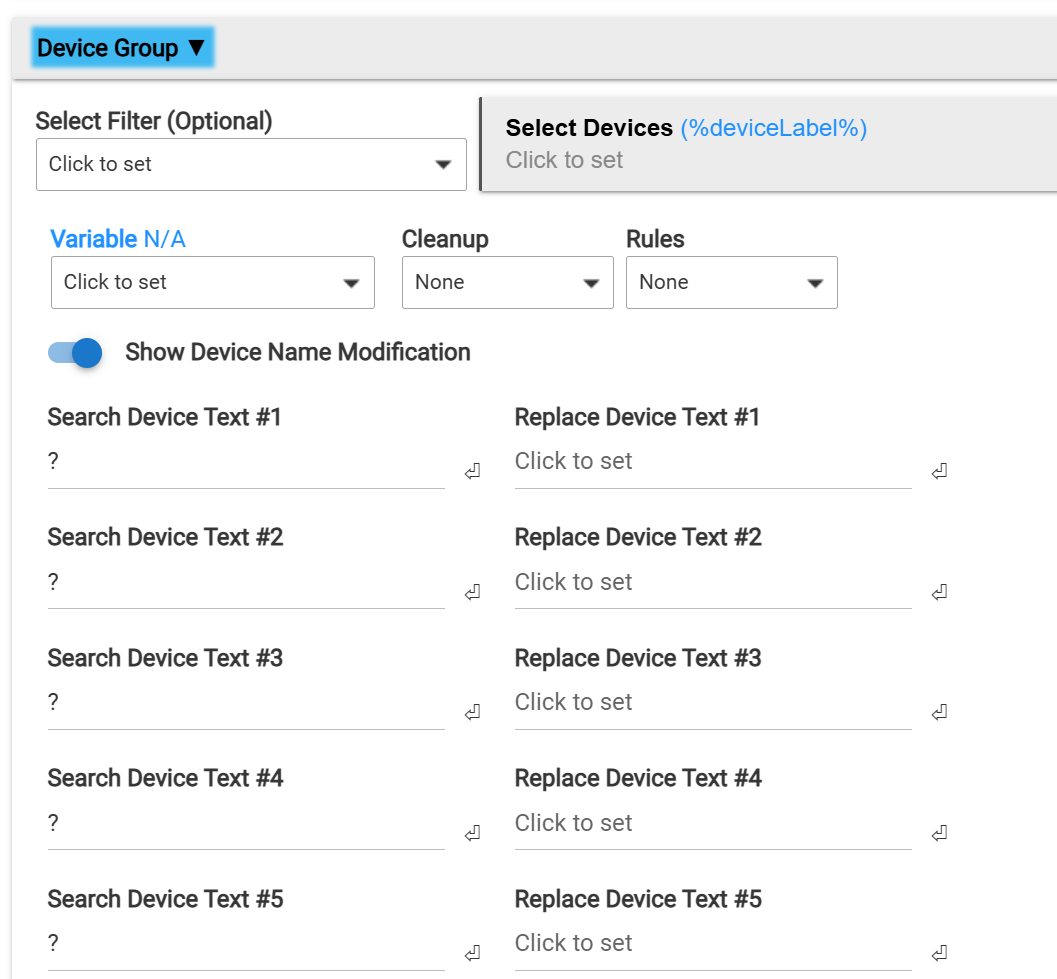
Restores Footer class.
Adds %count% as a built-in variable.
Per @John_Land and others.
Fantastic updates! Really love the addition of "device name modification" in Grid.
One tiny nit: In "Attribute Monitor - Advanced", the selected Units don't append to the displayed value. Example, with "%" selected as the Units:

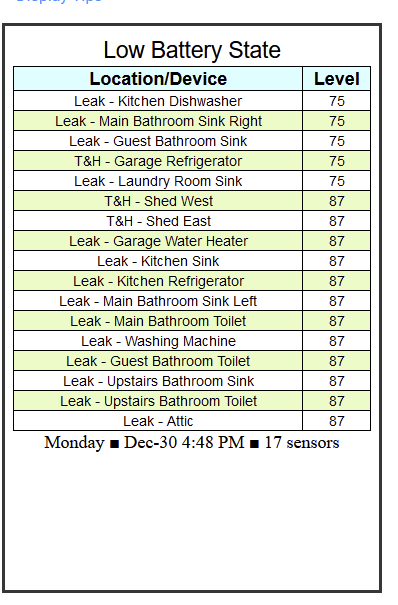
Or did I miss some required setting?
You are halfway there. After selecting the Units you must elect to Append Units to Data in the Rows customization options.
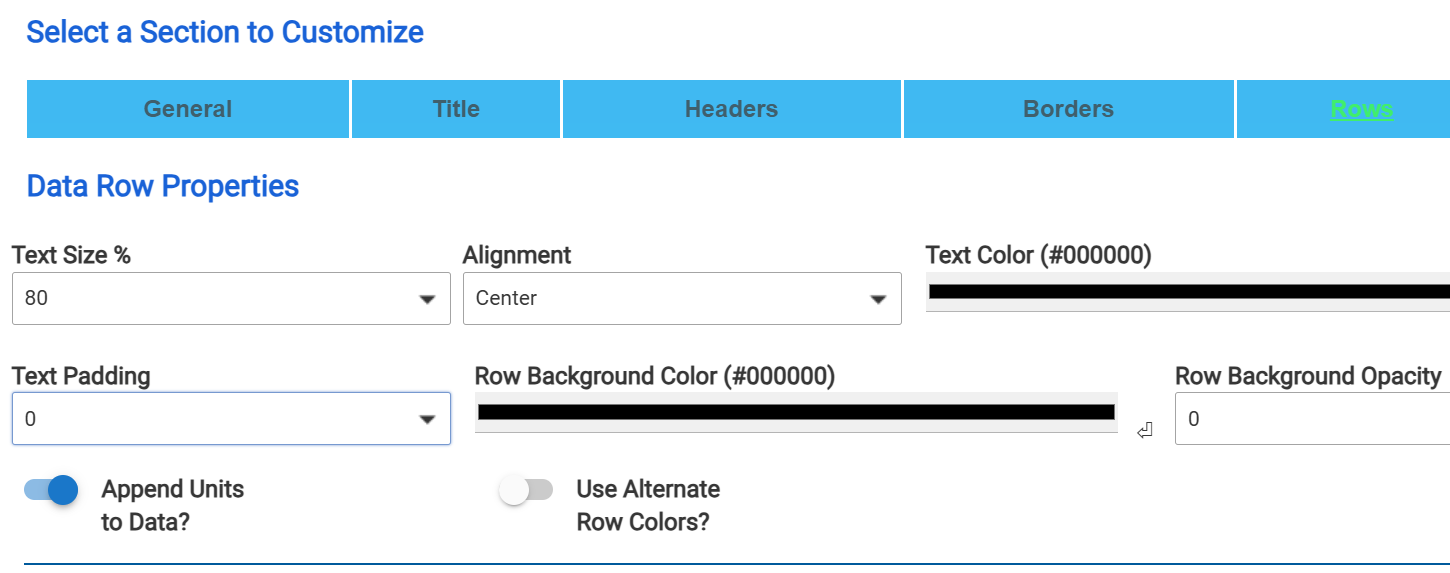
Alternatively you could configure a threshold that will affect all the results and have it append the text of your choice, such as shown in the example below.
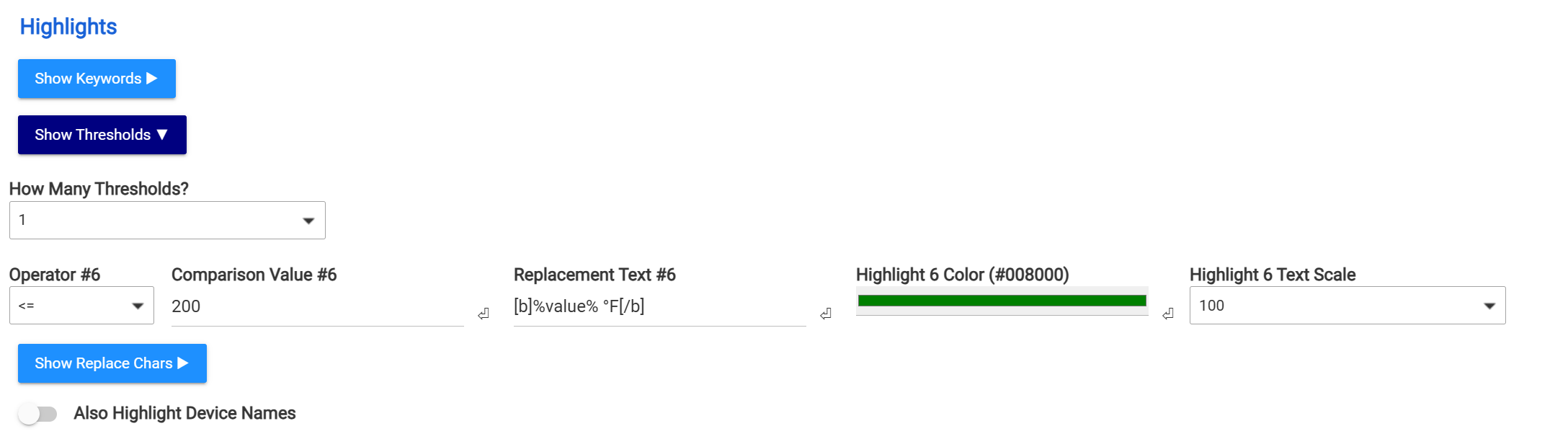
%value% tells it to take the the value that would be in that cell and then you can modify what surrounds it.
Thank you for the quick response! I had overlooked the fact that the Rows section even had that option switch.
Somehow I have the app installed twice but didn't notice until I had several tiles defined and setup. Trying to figure out how to remove the extra copy without messing everything up.