Performance issues are tricky... since they're hard to track down without logs... but the logs themselves cause a significant load on the hub.
Did a few changes here to hopefully quiet things down a bit more. I'm suspicious that the "discovery" stuff is continuing to run after exiting the app.
Also added a few bits to split up the "secondaryConfiguration" into chunks so it doesn't run in a long sequential block. Now it's broken into pieces and each run 1 second apart, giving the hub some time to do other things and hopefully avoiding the error @bobbles mentions.
If there's logs you can PM me from issues on 0.10.5, that is always helpful. Try just "debug" first, as "trace" logs are stupidly verbose and even if things are running smoothly, having that on will likely cause issues all on its own.
Hi Daniel,
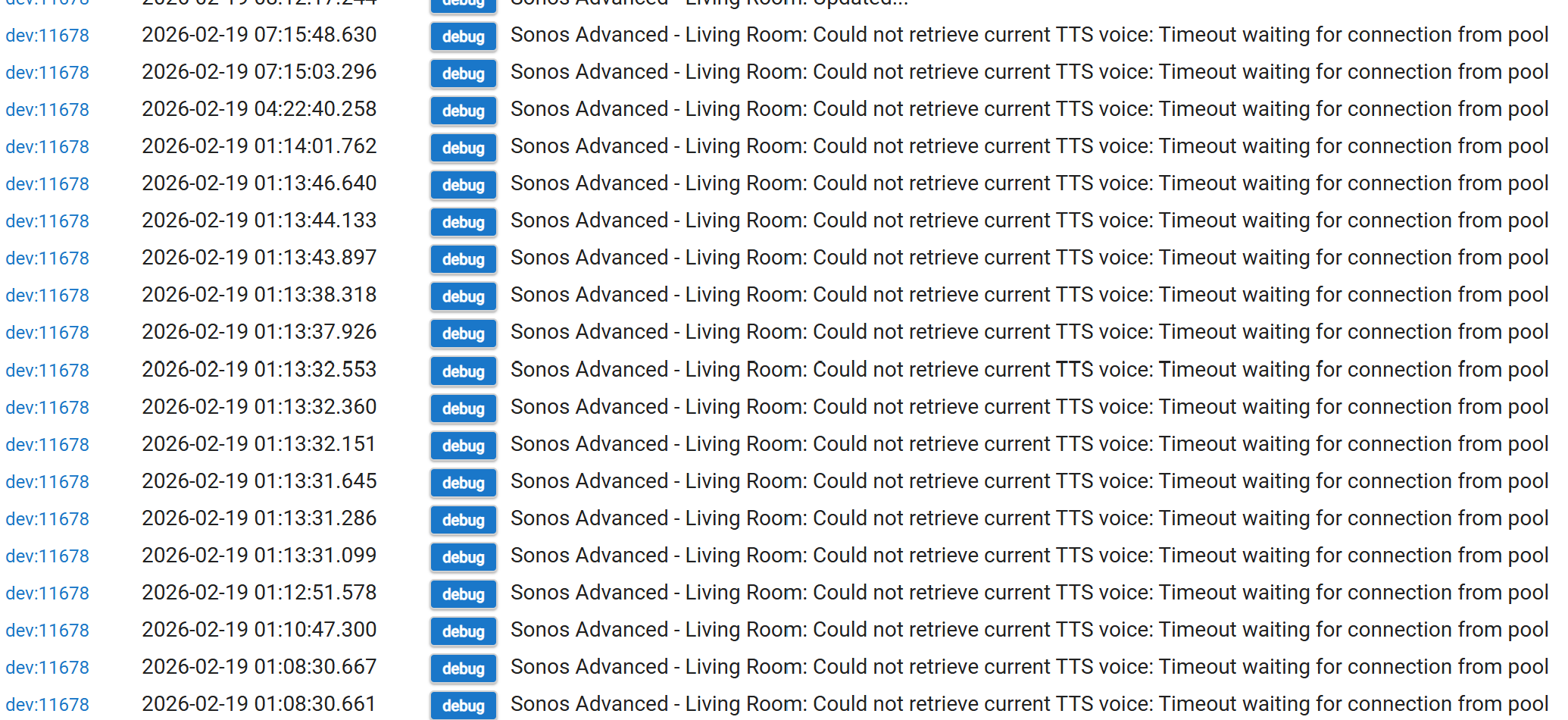
These are the debug logs that came in through the night.
I also had numerous 'hub load high' messages come through from a WC piston I configured to report high load.
I realised that the logging switch on the App isn't global (e.g. I had to go into each device and turn off debug logging), this seems to have alleviated the sluggishness.
Will monitor over the next few hours.
Edit: slowness is back - I'll capture the logs and DM them to you @daniel.winks (save redacting them for this public forum)
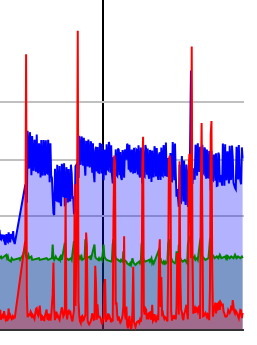
Just for info, this shows the load on the hub in red.
The blue line is free memory and shows when I rebooted yesterday when the hub load increased after updating the Sonos app.
When the red line flattens out again is when I disabled the App.
The secondaryConfigurationPhase4 callback is part of a chain that runs when the player device is first created, or when clicking on "initialize()" or "configure()". Initialize runs at bootup, too. Is there something causing this to be invoked around 8:12? Are you possibly calling one of those functions in an automation/rule/piston?
Looking into the other issues listed here recently. Just wondering why this seems to be getting called on your hub. It doesn't seem like it should be called that often. It should still not be taking "too long" to complete and causing an error, but I'm also just wondering if it's somehow being called more often than I would expect it to (which is only at boot up or when initially creating a device).
The only way I call Sonos to do something is with a button press or when we come home and mode changes from Away. None of these events happened this morning.
I did notice that there were four events scheduled in the devices after I had disabled the app.
I should have taken a screenshot so that you could confirm if these were expected or not.
Looks like JsonSlurper isn't thread-safe and uses a shared character buffer internally, and since Hubitat runs all the instances of a particular driver on the same JVM (and thus sharing the same global scope fields), there may have been issues there. A 'thundering stampede' issue, where multiple devices might have been fiddling with the same internal character map at the same time. So I changed it to instead give separate instances of JsonSlurper to each device. They're still getting re-used, which helps performance, but now it's just re-used per Player, rather than per Hubitat.
There's also a number of other changes, cacheing the favorites and playlists and updating it once a day (or on-demand, there's a button/command you can click if you need an immediate update of either). Previously it was re-querying these every track change. I don't know about the rest of you, but I'm not changing my favorites anywhere near that often.
Moved a few other things around, so they're more sensible. Stuff that only needs ran 'at device creation' was moved out of 'per hub reboot' path.
Also cached the TTS voices, updated at hub boot. There's no button to update that since it won't need it, as these voices would only change during a hub update, which requires a hub boot.
Just for information.
I updated, enabled the app and then ran through the configuration setup again just to make sure things were set up correctly.
I then got this error message.
Early indications seem to be good.
There was an increase in load after I ran the configuration setup again but now things have settled to 'my normal' CPU load.
Thanks for all you have done with this app. Brilliant work.
I posted an issue with Sonos Advanced Controller in the incorrect topic area...
...if anyone is interested in reading it.
Now that I've found the correct topic for this integration, and have seen this latest update, which I just installed, I'm hoping my issue will also be resolved. Will confirm in next 24 hours. Thank you @daniel.winks
New update with a fair number of fixes, and hopefully some meaningful performance improvements. It's harder and harder to find and improve performance, without removing the feature causing it. I'll look into gating a few features behind a preference setting, so folks can turn off things they're not using and Hubitat has a bit less processing to do.
This update brings in a bit more 'aggressiveness' in dropping "subscriptions" when they're no longer needed. If your "household" has players in states where this app was previously maintaining 'useless' subscriptions on a large number of players, then dropping those (and entirely removing all the XML/JSON parsing that those subscriptions would have been creating), then this should bring a measurable reduction in processing. If your "household" has players that are usually in a state where the subscriptions are actually needed, then there won't be much difference since it'll still be maintaining those subscriptions. It's just checking for "do I really need group media renderer for this speaker right now" and dropping it if it's not needed, among other subscriptions. We don't need updated on "group volume" if the group is a single speaker, the "speaker volume" in that case is sufficient. It's things like that this new version more aggressively drops.
With any luck, this will help alleviate/eliminate the various performance issues people have noted recently. I think this update brings thing pretty close to the bare minimum of processing needed to function the way things do.
As always, let me know if there's more that needs looked into or fixed up.
A few more fixes, particularly around group "player" device state updates. Also, with some of the other changes to minimize the amount of processing SAC does, I found I was able to reduce the "currently playing favorite" display down to 0 seconds, rather than having the 5 second delay it previously had. Previously things needed a few seconds to "settle", but with the way it processes in the incoming data now, that's no longer needed so the fav can be displayed much faster.
Also cleaned up the coordinator -> other players and coordinator -> group devices with that coordinator paths, reusing most of the update pathway so there should be a bit less CPU usage on this update. Now both use the same "gather up all the state data -> flush data via sendEvent()" in a single batch.
Hi Daniel,
Sorry to be a pain but I updated to the latest version and I'm afraid I am seeing elevated hub load warnings again.
No errors are being reported just elevated load.
Any thoughts or is there something I can look at for you to see what is causing it.
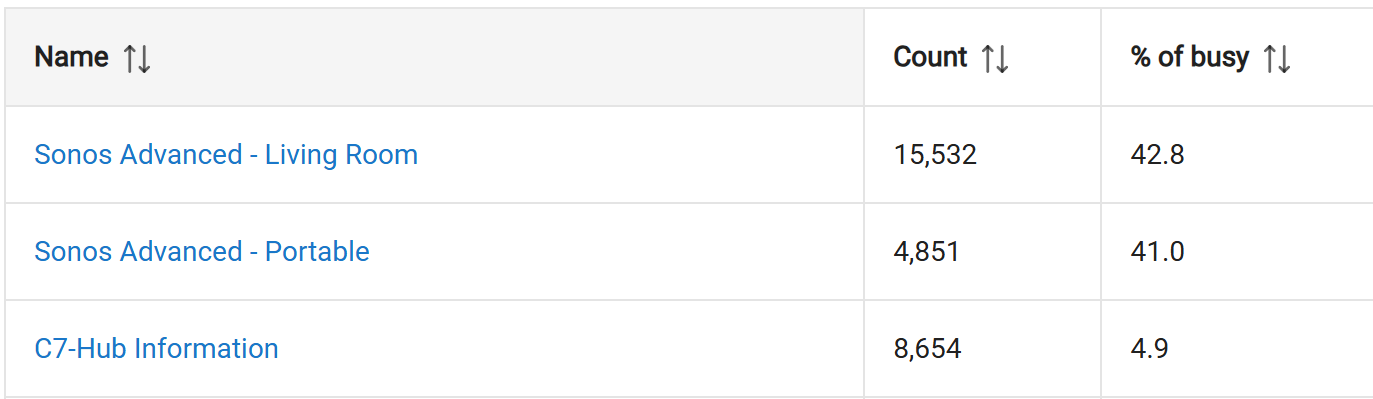
In device stats my 2 Sonos devices are top of the list for busy percentage.
If there's no errors and things are working OK, if you have logging on you can try disabling the logging on the device. The logs are very "heavy" in terms of CPU usage, so mostly you want to have them turned off. I'd only have them on for troubleshooting... turn them on, repeat the steps that resulted in an error, capture all the logs, then turn back off. Keeping them on 24/7 can definitely slow things down.
If they're already off, then run things for a bit with them on, with trace level, and PM me with some sample logs.