++ 1,000. Huge appreciation to @daniel.winks for this crazy amazing work.
2 Likes
OK, 0.6.0 on HPM. It uses a streamlined version of the coordinator -> parent -> follower logic that was used in 0.4, rather than the hub-crushing mess that 0.5 used. I didn't have any of the excessive load issues others reported on 0.5, so my apologies for that. Had I known it would cause issues for some people, I wouldn't have tried that method to get events from device to device.
In addition to changing how coordinators get events to their followers, 0.6 also fixes the issue where 'nextArtist' etc was getting stuck when switching from something that has a 'next' field (ie, playlist) to something that doesn't (ie, streaming radio).
Also fixed issue where favoritesMap could be null and not get updated automatically.
Not sure about the trackData stuff in regard to SharpTools/WebCORE @bthrock let me know if there's still an issue here. It looks fine, but I don't use either SharpTools or WebCoRE.
Hopefully there's no excessive load or semaphore issues on this version. Then I can focus on just ironing out some minor bugs and getting Playlist and Snapshot features added.
1 Like
So the reason for these issues is basically that Sonos Advanced can't coexist with the built-in Sonos app.
S2 players, when sending "NOTIFY" messages send them with an X-SONOS-SERVICETYPE header. S1 do not. To work around this and allow S1 players to work, I add a path on the subscriptions, to let me determine which of the subscriptions a particular notification is. For example, on AVTransport messages I subscribe to them with /avt as the path and the notify messages come in as NOTIFY /avt HTTP/1.1 rather than NOTIFY / HTTP/1.1.
The built in Sonos app doesn't do that, and so they come in with just that / path and there's no way to tell which subscription each message is for. I'm not sure what the built-in app does in its parse(), but it must just parse everything in one big block.
If you want to try Sonos Advanced without uninstalling the built-in one, you should first disable it, so it doesn't send in subscription requests to your speakers. Due to how port 39501 works, my Sonos Advanced integration gets anything coming in to port 39501 with the MAC address that matches your speakers. The built-in Sonos uses the hex-encoded IP address of your speakers to do the same. But the bottom line is the conflict with each other.
It's mostly an issue when you have S1 speakers. I have S2 only and while the two Sonos apps have conflicts, it's much more minor.
If you have Sonos Advanced running, and the built-in one disabled, click on "initialize()" on each Sonos Advanced speaker to redo all of its subscriptions.
Also, it might take a couple hours for the subscriptions from the built-in Sonos app to expire. In the meanwhile the speakers will keep sending Hubitat notify messages with / paths and confusing Sonos Advanced. With the built-in Sonos app disabled, the "Could not determine service type for message" are harmless anyway, since it should still be getting its own subscriptions with paths like /avt, /zgt, etc on the headers.
As for the transport controls not working, let me know if that's still the case with the built-in one disabled and everything in Sonos Advanced 'initialized'. The controls just send the commands down the websocket connection, but if that doesn't work on S1 players then I can switch it to use HTTP instead.
Also note that I haven't put in any checks to prevent you from trying to use "send text and restore" or "send text and resume" TTS on S1 speakers. This uses the loadAudioClip API which S1 speakers don't have. It's on the list to have it detect when an S1 speaker tries to use that API and instead have it use the standard method. "send text" should work on your S1. The grouping/ungrouping stuff should also work. But the non-interrupting TTS is an S2 only thing and only Sonos can do anything about S1 not having it.
Lastly, I'll toss in a bit to fix the no-players-selected issue on the app. Yeah, it should be possible to delete all players with that screen, so I'll make sure that option works too.
Devices can send data to child devices, there isn't any need for an app to play middle man here.
Can the coordinator become a device with direct children?
The regression from the update on 1/14/24 is still present. At the time, the trackData attribute was presented in "name":"value" pairs instead of the name=value format that attributes is using now. webCoRE cannot parse this format and it's not working with SharpTools either.
See this post and those surrounding it for more.

Thanks for the feedback. I will give this a try and report back.
At some point as well, (again not super critical), can I suggest that in the pinned post at the top to add differences/limitations between the S1 and S2 systems. I thought I read somewhere in the 500 some odd items in this thread so far as I researched the issue that the S1 systems don't support the text over sound capability (Is that right?) and it also looked like there were lots of people with a mixture of S1 and S2 in the same system as well. So items like that and also the conflict as you noted above with the built in integration vs Advanced could be called out so users would know right off the top. Thanks again for the hard work. Much appreciated!
Nope. The coordinator changes, as do the followers. Just depends on what group(s) you currently have setup in Sonos.
I have 7 speakers. Let's say I have my Office speaker in a group with the Bedroom and Kitchen. The Office is the coordinator and it is the only one of the 3 that gets any of the AV transport or group rendering control messages (this is just how Sonos works and I have no control over that). So in order for the other two player to correctly display current artist name, current album name, etc, is to get sent that information from the coordinator speaker.
The built-in Sonos app on Hubitat just displays the (rather useless) 'x-rincon-stream' as what's playing on the followers, as that's the only thing they get from the AV Transport messages. Basically, the followers only know "I'm playing a stream of bits being sent to me by the coordinator" and that's all they know. In order for them to have the correct info and have it be something useful they need to get it from the coordinator.
I can't just make the other two players child devices of the coordinator because they're not always followers. I could remove my office speaker from the group at which point Sonos will promote one of the followers to coordinator (randomly, I think). So now I have the Kitchen and Bedroom in a group and the previous coordinator (the office speaker) is not part of that at all.
I mean, sure, I could have Sonos Advanced dynamically create child speaker devices, but that's useless for any sort of automation, since they've be getting created and destroyed every time there's any sort of group topology changes.
As an example of exactly how having the followers not just display the "x-rincon-stream" thing the built-in Sonos app does, let's say I have a den, and I want the lights in the den to be 80% and 2700K when I'm playing my favorited Jazz station, and 100% and 4000K when I'm playing my 'workout rock' station. I don't care if the den speaker is coordinator or follower, I just care what the currently playing album/artist/track/etc is.
So in short, no, they cannot be parent/child devices. They all must be 'sibling' devices exactly the same way the built-in Sonos app works. And whatever speaker is a coordinator needs to be able to send (at present) 19 different events to the follower speakers so they have the correct info and the only way they can get these events is to be sent it from the coordinator since it's the only device in the group receiving the information.
3 Likes
Got it... simple fix. 0.6.1 out with that.
0.6.1: Jsonify trackData for SharpTools/WebCoRE. No other changes.
2 Likes
Hey been on 6 for about an hour and everything looks good! Thank you again. You rock!
1 Like
Additionally: both my Sonos Advanced app and all of the Shelly Blu drivers I'm working need a better way to get information/events to other devices on Hubitat. My Sonos Advanced has the benefit that everything falls under a parent app.
The Shelly drivers I'm working on (the official ones, hosted on the Shelly GitHub) have to use a super duper roundabout way to get messages from one device to another (neither of which are under any parent app whatsoever).
It would be absolutely fantastic if I could get a method like this:
void sendNamedEvent(Map properties) which would work exactly the same as void sendLocationEvent(String attributeName, Map properties, Map data), but rather than being a "location" event, it would just be putting events into a named event stream.
Then, instead of subscribing to it like this void subscribe(Location location, String attributeName, handlerMethod, Map options = null) I would subscribe to it like this: void subscribe(String namedStream, handlerMethod), and additionally be able to use this subscribe in a driver in addition to apps.
This way I could have one driver pumping events into named stream(s) and others able to subscribe to them. Since it would require sending and receiving drivers to use the same "named stream name" in both, it would not allow just randomly injecting events into unrelated drivers. You'd have to specifically subscribe to get the events.
My Sonos Advanced has a parent app to leverage (tho this has been causing "could not obtain semaphore" issues for whatever reason that's unknown to me). But my Shelly ones currently use a roundabout way to do this and being able to set up pub/sub event streams between drivers would be super handy. And in the case of the Shelly drivers, using a parent app really isn't an option. But for both having this sort of pub/sub would be really nice.
2 Likes
Yes. This is the my Sonos device.
As I've said above, I've resolved the issue and it was more of an information post for you to have a look at and fine tune your app should it need to.
If you haven’t, I’d consider updating to the latest version. Others are reporting it fixed the excessive load issue for them.
2 Likes
I must admit, I thought I was at the latest, but I wasn't. 
Just updated and will see how it goes.
No big deal for me just thought I'd report what I noticed today after the HE update.
If I remember I'll try and replicate the same scenario as I do an HE update and see what happens.
In all fairness, this is the first time I've seen any errors of any kind from your app. 
1 Like
I had to open the app and done through it and run the setup command on the driver.
Before that when I ran it I got errors. Everything currently settled now.
This was the events just incase it's useful
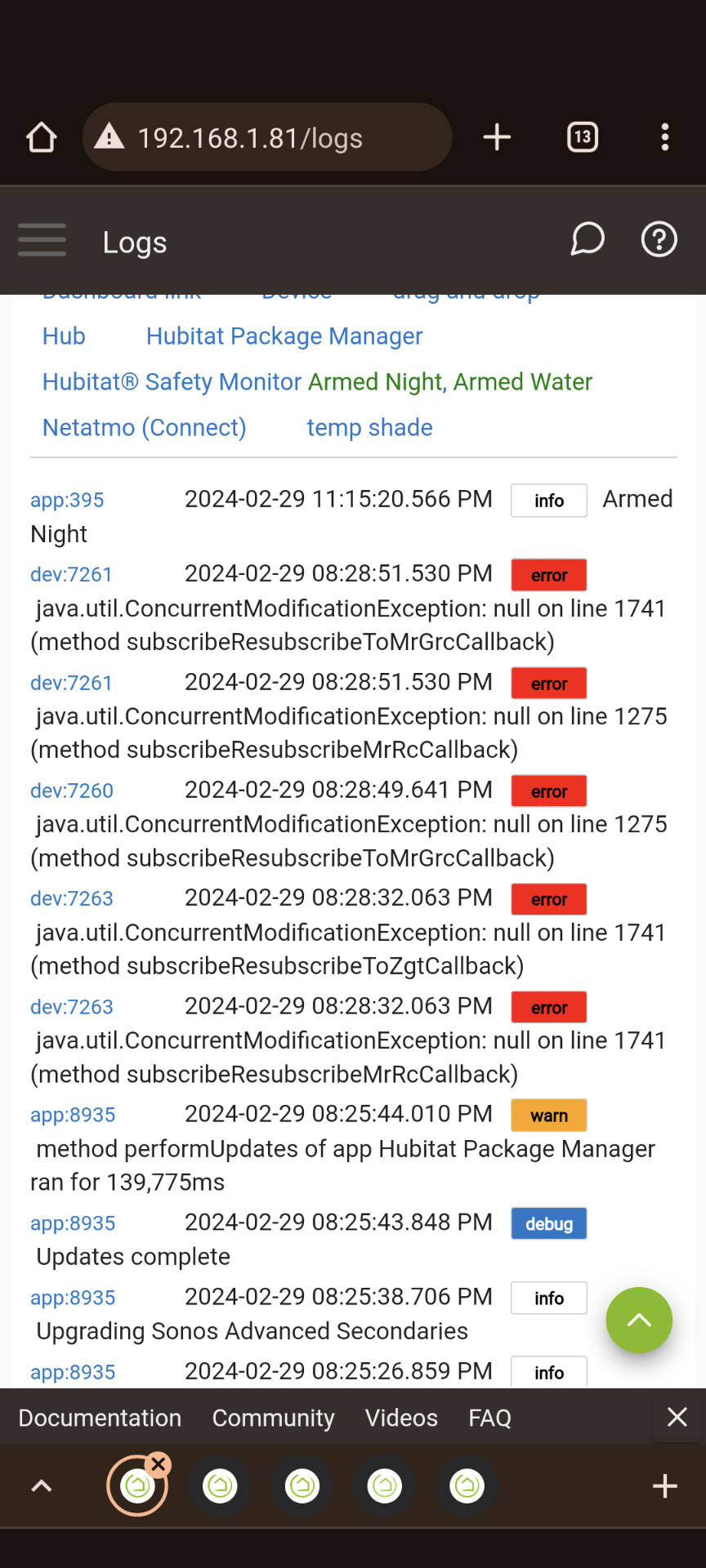
Yeah, I saw that on my C7 earlier for one of those.
I think I'll need to put an explicit semaphore around those subscribe methods. Seems like HE is running multiple instances of the driver if I turn off 'singleThreaded: true' on it and that's the one spot where it complains.
So far so good! No errors or excessive load issues so far. Huge thank you for this!
2 Likes
0.6.2 added semaphore locks around getDataValue/updateDataValue calls. This should prevent any of these concurrentModification exceptions.
No other changes on 0.6.2.
1 Like
Thanks! I run this on my HE and use it for my Sonos too... so I'm just as invested in this dang thing working right as everyone else here. 
3 Likes
I'm heading to bed, but just wanted to let you know that I turned night mode and dialog enhancement on and off with Postman earlier tonight, and added most of the code to Sonos Advanced to allow it to do that as well.
Seeing as these two settings are specific only to Arc, Beam, and Ray (well, I know Arc has them, presumably the others do too), I'll add it as optional 'generic component switch' child devices to them. I don't want to put "night mode on" and "night mode off" commands that are non-functional on everyone's speakers that don't have those settings.
Things like "crossover" are both optional child devices and buttons on the main player device because they're something that every speaker supports, but for night mode and dialog enhancement I'll have to make them purely child device only.
So anyway, just need to add the preferences and child-device creation stuff to handle it, but I did find where to control these settings so it's a "for sure this will be added soon" thing. Maybe tomorrow, maybe this weekend.
I want to be able to turn these on and off via automation too, it's been on my short list of enhancements I want for my own use.
Edit:
Have it pulling in current state for these now:
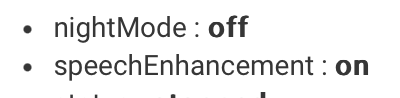
Just need to wire up the child device stuff.
4 Likes
Alright, I was going to release the Night Mode and Speech Enhancement stuff as 0.6.3 but I got a bit carried away.
So 0.7.0 is out on HPM now.
It adds the aforementioned Night Mode and Speech Enhancement controls for Arc/Beam/Ray devices.
Additionally it hides preferences for devices that don't have support for them. So no longer will you see an option for creating a right-channel child device on anything that's not a stereo pair. You won't see options for Night Mode or Speech Enhancement on things that aren't sound bars. You won't see options for battery stats on anything that doesn't have a battery. And you won't see options for the non-interrupting TTS stuff on S1 devices. Functionally it's the same, since none of those thing would have worked on the devices they're hidden on now, but it's a fair bit cleaner. Let me know if there's any preference missing from a device that should have it. There's some auto detection logic involved that might need a tweak, but since it's all just based on the capabilities the speaker itself spits out, it should be good.
Additionally if you try to use a non-interrupting TTS on an S1 device, instead of it failing it'll just use the interrupting version. Once (if) I manage to get the Snapshot devices working, I'll have it snapshot what's playing first then (attempt) to restore it, but until then if you accidentally use "Play Text and Restore" on an S1 device it'll at least play the text rather than just failing entirely.
Also fixed a bug where removing a device from a group would sometime leave 'currently playing' stuff from the previous group displayed until something new is played on the recently removed device. Now it defaults everything to "Not Available" until the speaker plays something new.
Fixed a race condition where, when joining speakers to a group, sometimes it would send the 'currently playing' stats from the newly joined follower to the coordinator instead of the other way around. Now when joining speakers to a group the only speaker that attempts to update the others is the coordinator, as it should be.
Fixed a couple bugs related to all child device switches. Previously they would not get the correct state sent to them when first created, nor would they get updates for their on/off state when used. Both of those are fixed.
Split the try/catch block that surrounded all of the code within parse() up into smaller try/catch for each section. This what if there's an issue caught by that try/catch it provides a much more narrow area where the issue originated from.
And finally added a fix for a favorites matching issue. I hadn't noticed but favorites were only being matched on speakers that had a favorites child device created ON THAT SPEAKER. That wasn't intentional. The favorites matching uses a ConcurrentHashMap that's shared across all speakers. Only one speaker needs to have a favorites child enabled for all of them to have the ability to do favorites matching. That was the original intent when I put the code in, but it was broken and consequently required a favorites child on each device for it to work. So if you have a favorites child on every device, you shouldn't need that anymore. Just one device should be fine.
8 Likes