Been using this app for a while, love it. With the update I was checking over all my settings and can not figure out what exactly this is does? Set for Specific modes? Does that disable refreshes at specific modes like the switch option below it?
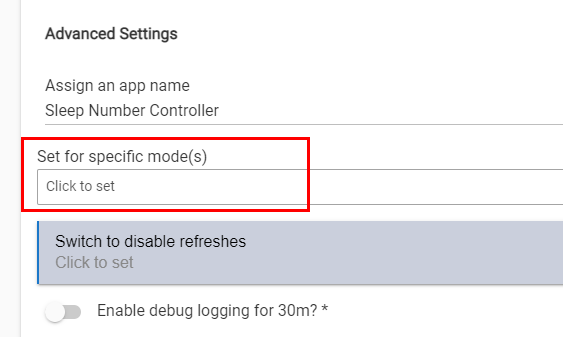
Been using this app for a while, love it. With the update I was checking over all my settings and can not figure out what exactly this is does? Set for Specific modes? Does that disable refreshes at specific modes like the switch option below it?
Sorry that's not a very clear description -- yes, it governs the refresh timing such that if any mode is selected there then it will only refresh for that mode (and not others). Alternately, you could use a switch to disable polling or you can use both.
As an example use case - I have my modes set to everything but Away and since my modes change normally when I'm on vacation if I have a house sitter present (which we do sometimes due to pets), I use a switch to allow me to disable refreshes while I'm on vacation (which is controlled via RE).
Not specific to the Hubitat controller, but I noticed that Responsive Air support was added and I was curious what that was. From their website they say:
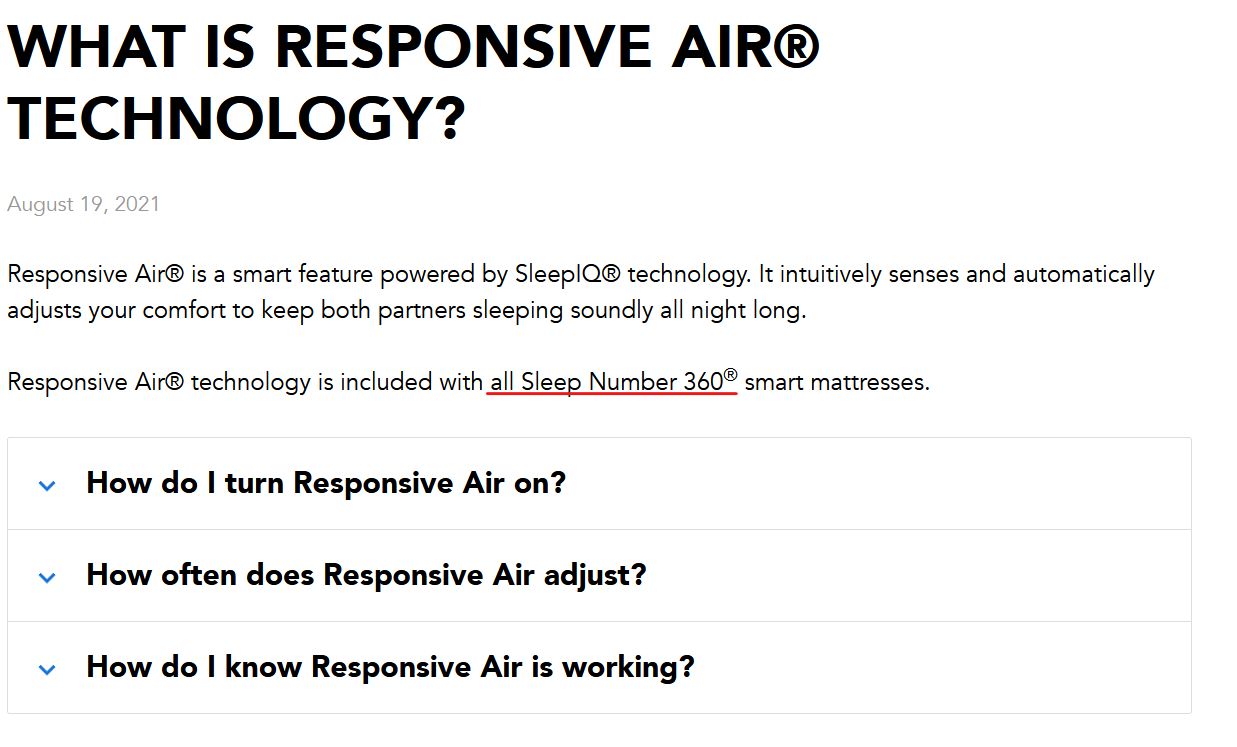
Responsive Air® is a smart feature powered by SleepIQ® technology. It intuitively senses and automatically adjusts your comfort to keep both partners sleeping soundly all night long.
Responsive Air® technology is included with all Sleep Number 360® smart mattresses.
When I looked at how to enable it, it says it should be an option in the app:
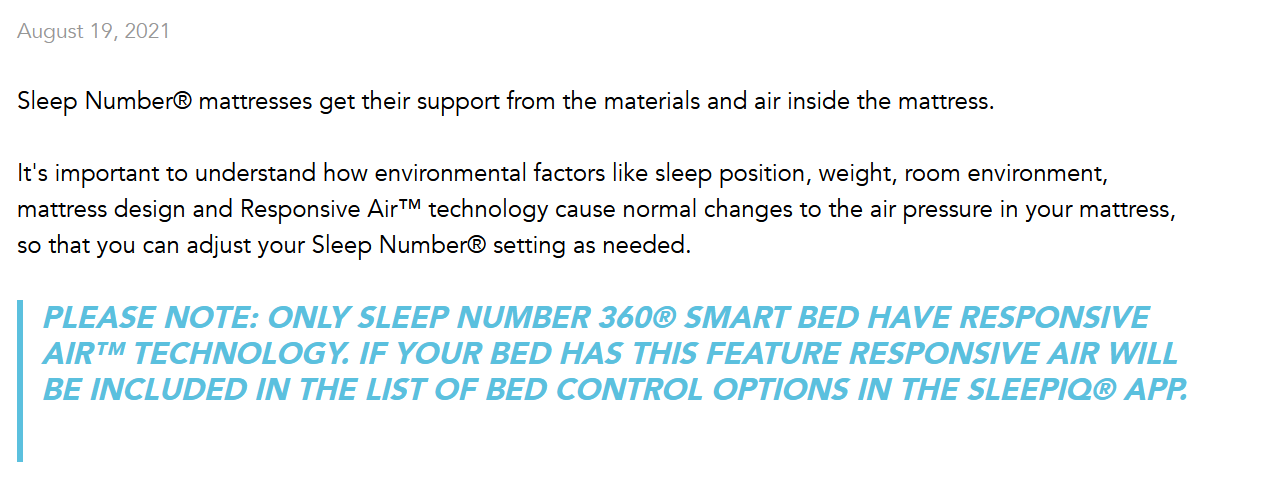
To turn Responsive air on, first, get your bed is online, then toggle the switch in the SleepIQ app to turn Responsive air on or off.
No matter where I look in the app, I don't see any option to toggle it on. What am I missing? Seems it should be available to all beds.
Huh, I thought so their mattresses were considered 360 mattresses. I didn't think it was a specific model. Bummer!
Interesting. Same time I bought mine. But mine has responsive air (It is a 360 mattress).
Seems like I'm getting read timeouts from Sleep Number even though the native Sleep Number mobile app works fine. Been doing this over a day per the logs. I tried switching between auth modes and had the same result. On the latest version of the Hubitat Sleep Number app but this was happening before I updated. Also seems to be incurring extra load on Hubitat.
app:296 2023-01-11 12:19:06.435 Error making request [uri:https://prod-api.sleepiq.sleepnumber.com, path:/rest/bed/<REDACTED>/sleepNumberFavorite, requestContentType:application/json, contentType:application/json, headers:[Host:prod-api.sleepiq.sleepnumber.com, User-Agent:SleepIQ/1669639706 CFNetwork/1399 Darwin/22.1.0, Cookie:AWSALB=<REDACTED>;, DNT:1, Accept-Version:4.4.1, X-App-Version:4.4.1], query:[_k:<REDACTED>]] java.net.SocketTimeoutException: Read timed out

dev:356 2023-01-11 12:19:01.653 com.hubitat.app.exception.LimitExceededException: App 296 generates excessive hub load on line 526 (method setStatus)
The native app usually connects over Bluetooth if you're near the bed for everything but sleep score info. I have tried adding backoffs to the requests so that a service outage doesn't have adverse impact to either Sleep Number or the hub but yours seems to be acting in a way I've not seen. You could try going into the app and hitting done again (which will cause it to re-initialize things) and see if that helps. Otherwise if you want to PM me more of the logs I can try to see why it might be retrying more or what else may be spiking the load.
I will say, on my hub I do see that the app takes up a bit more processing time than other apps but I am not experiencing any load issues or messages. I have mine set to poll every minute at night so I attribute the time spent to that. I do have a pending pull request to try to optimize some of this but I've not had the time to go through it in a lot of detail yet since the changes are quite extensive. TBD if (or how) that helps.
Hi. I just purchased a hubitat and installed this skill. thanks for putting it together.
Kindof a newb though. How do I use the skill? I really want to be able to have alexa move the head up and down.
Welcome to the community! You'd need to add this app to your HE first. Then you can use the built-in Amazon Echo Skill app to expose the head device(s) (or other devices) to Alexa.
Thanks. What is an HE and how do I add the app to it?
Sorry, HE = Hubitat Elevation (your hub). To add built-in apps, see the documentation here. To see how to install the Sleep Number app, I suggest using Hubitat Package Manager (details and link here)
Gotcha. Yes, I have done all that. I cannot figure out to operate the bed through the hubitat or alexa though.
Can you start by outlining what you have done? For example, it sounds like you've added the Sleep Number app but have you set up the bed? If you have, you should have some number of devices the app created for you (and you named during setup). Have you set up the Amazon Echo Skill? If you have and you've set up the bed then you should be able to open the Skill app and pick the devices you want to expose to Alexa there - so you'd pick one or more of the bed devices to expose. I can try to provide some screenshots and such if I know which parts you've done already.
Yes, so under devices, I have wife and me each as a user. under each of us there is a "me head" and "me footwarmer" and then "wife head" and "wife foorwarmer" Under the alexa app skill on hubitat I have thjose same 6 entries.
The bed is a split top fyi.
Perhaps what I am lacking is the correct terminology to be using. How would I ask alexa to turn on my wife's foot warmer to high? Or what would I asl alexa to move my head up a certain amount?
I don't actually use Alexa so I can't say for sure but I'm going to assume it's similar to Google. If so, you'd say something like "Alexa, turn on wife footwarmer" to just turn on footwarmer to the parent device's preference for Foot warmer level for 'on') or "Alexa, set me head to 50" to set the head to level 50. To set the footwarmer to high you'd use "Alexa, set wife footwarmer to 3" (valid values are 1, 2 and 3 for low, medium and high).
Thank you for that information. It did not do anything, but alexa seems to think that they were legit commands. I would guess that the hubitat is not communicating with the bed. Is there a way I can test and control the bed through the hubitat itself?
Yes, if you go the devices page you should see those individual devices and each one should have buttons you can interact with to drive the various functionality. If it still doesn't work, try enabling debug logging on the SleepNumber app page and then checking the logs to see what might be wrong.
It does not do anything through hubitat either. I checked the logs and here are some errors I found from today:
java.lang.IllegalArgumentException: null on line 672 (method componentSetLevel)
Download the Hubitat app