@dmitry.rozovik great work on these drivers was hoping for a little help
I have just bought some Shelly RGBW PM controller with the intention of replacing some/all of my Fibaro RGB controller 2 devices.
The driver for this decision is that I want to have my own light sequences and when using the z-wave devices they flood my network.
I hoping that with some scripting I will be able to off load the light sequence control onto the device.
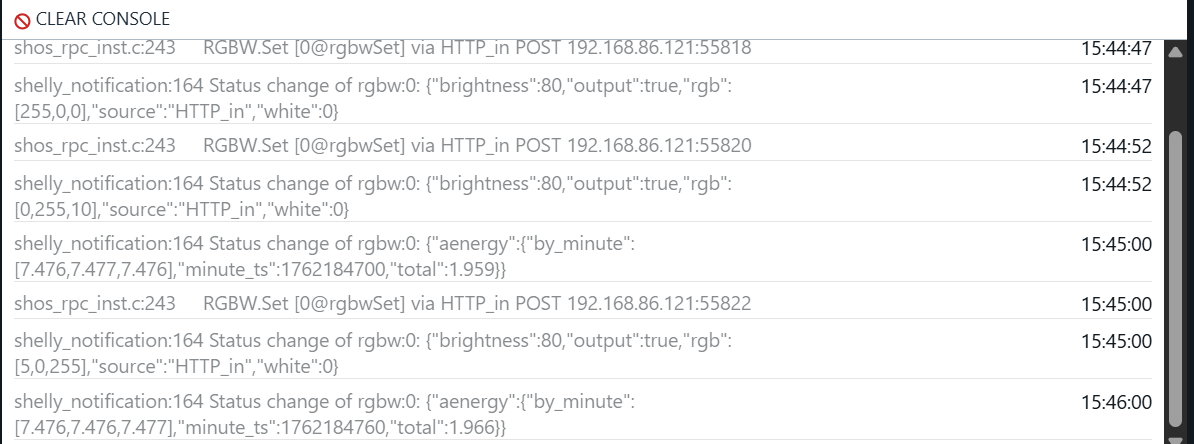
I have the device RGB control working as expected but I was hoping to be able to use the hubitat button to trigger the script however when I push the button in the hubitat nothing happens on the shelly device. (see logs belows)
Thanks for the report. Looks like the GitHub Actions pipeline needed a bit more work. I got that cleared up so it should be properly versioning things, and including the proper "release" files in packageManifest.json for HPM to use.
Give that a spin and let me know if there's any further issues on HPM.
I installed this driver for the Shelly devices. I am running a garage door opener on mine. The secondary inputs are used for a reed switch on the door to let me know when it is open or closed.
I had 5 or 6 child devices that were installed at first, and I couldnt get anything to show accurate status of the Reed switch. I deleted them all and added them back in and then there were only two.
Garage Door Opener Switch 0
Garage Door Opener Shelly Parent - Input Switch 0
Input switch doesnt seem to do anything and I see no way to get any response from it.
The first one lets me hit the ON button to move the garage door. The OFF button does nothing? When the door opens, the reed switch is read as OFF, and when the garage door is closed it shows ON.
I have created routines that read it and give me everything I need. There is one problem. If the door sits closed (ON) for a period of time, the switch reports as OFF. It is like the device sleeps, and the status goes off.
The Shelly app has me set up the trigger with a momentary switch to activate the door. It creates an auto off after 1/2 second.
I control the door by hitting the ON button in the first child device listed. The state shows on or off. When the door physically closes, it reports ON. When reed switch is disengaged it shows off.
But the secondary Inputs that the reed switch is on is using the automatic Off routine as well as the door motor button.
So the door closes and reports ON. That is fine. Shortly after, it goes to off as the toggle in the app is now toggled for auto off.
I can turn auto off OFF, but next activity it is back on again.
update
I figured it out. I dug through the got hub repo and ended up manually creating the script on the Shelly plug as it wasn’t getting created through the plug driver.
I have a new Shelly Plug US running firmware v1.7. I've enabled BLE gateway on the plug and added a Blu1 Button however I can't for the life of me figure out how to get the button to show up in Hubitat.
Steps I used:
Installed the Plug driver along with the Bluetooth Helper app from HPM.
Installed my plug and added the button to my plug using the web app.
Added the Plug to Hubitat and configured the IP address.
Opened the Bluetooth Helper app to see if there are any events and I see nothing.
Here's the output from my plug debug logs.
dev:212026-04-18 04:51:43.923 PMerrorjava.lang.RuntimeException: java.sql.SQLException: NULL not allowed for column "DEVICE_NETWORK_ID"; SQL statement:
dev:212026-04-18 04:51:43.901 PMdebugDining Room BT Outlet: Device has an IP address set in preferences, updating DNI if needed...
dev:212026-04-18 04:51:43.899 PMdebugDining Room BT Outlet: Starting configuration for a non-child device...
dev:212026-04-18 04:50:38.304 PMdebugDining Room BT Outlet: Websocket connection established (240511ms to connect)
dev:212026-04-18 04:50:38.297 PMdebugDining Room BT Outlet: Connectivity check started 1776552637
dev:212026-04-18 04:50:37.023 PMdebugDining Room BT Outlet: Sending connectivityCheck websocket command...
dev:212026-04-18 04:46:56.566 PMerrorjava.lang.RuntimeException: java.sql.SQLException: NULL not allowed for column "DEVICE_NETWORK_ID"; SQL statement:
dev:212026-04-18 04:46:56.546 PMdebugDining Room BT Outlet: Device has an IP address set in preferences, updating DNI if needed...
dev:212026-04-18 04:46:56.544 PMdebugDining Room BT Outlet: Starting configuration for a non-child device...
dev:212026-04-18 04:46:53.826 PMwarnDining Room BT Outlet: No configure() method defined or configure() resulted in error: java.lang.RuntimeException: java.sql.SQLException: NULL not allowed for column "DEVICE_NETWORK_ID"; SQL statement:
dev:212026-04-18 04:46:53.813 PMdebugDining Room BT Outlet: Device has an IP address set in preferences, updating DNI if needed...
dev:212026-04-18 04:46:53.811 PMdebugDining Room BT Outlet: Starting configuration for a non-child device...
dev:212026-04-18 04:46:53.810 PMdebugDining Room BT Outlet: Device preferences saved, running configure()...
dev:212026-04-18 04:46:40.091 PMdebugDining Room BT Outlet: Websocket connection established (2299ms to connect)
dev:212026-04-18 04:46:40.085 PMdebugDining Room BT Outlet: Connectivity check started 1776552399
dev:212026-04-18 04:46:39.991 PMdebugDining Room BT Outlet: Sending connectivityCheck websocket command...
Please advise on any other steps I can take to get this working.
In the BLE Helper script there is mention of active scanning. If I have my Blu buttons in beacon mode is this enabled? I’m mainly using these as presence sensors.
I’ve added PR’s to the github repo to address some bugs and to add a new feature.
Bug: I use the Shelly Blu1 Buttons in beacon mode as arrival/presence sensors to replace my old zigbee smarthings arrival sensors. When away the button’s would keep flip flopping between Present and Not Present. The issue stems from the helper app providing a stream of real events. When away the no real events arrive so a self referential loop occurs with the button. A PR to the Shelly Library was made to address this.
Feature: I wanted a custom timeout for presence rather than the hardcoded 300 seconds. I submitted two PRs to add this feature. A PR to the Blu1 Button device and another to the Shelly Library to accommodate the device PR.
I’m having issues updating as well. If you manually make a change to a driver file and save it throws an error relating to an error in the library file. I don’t have it handy but it’s related to a Java error.