[RELEASE] Shelly Device Drivers (NO MQTT NEEDED)

Hey everyone, still working on these drivers. Recently I've been re-writing my library to support more devices. It's coming along pretty well, but I'm very pressed for time, so it's just an hour here and there.

I've got a long weekend coming up, so I should have some time to work on things. I've added support for inputs, temperature and humidity sensors, devices with multiple relays, and a few other things recently to my library code. I'll take a few minutes to test out what I have working presently and get an update pushed from my working dev-branch to the main branch. This should have a good number of devices working, as I've got them working on my system right now... just need to make sure there's no bugs or broken features before putting it out for everyone to use.

1 Like

Yes, Shelly Flood is supported. I've got it working on my Hubitat right now, just need to test thoroughly before pushing out the driver for wider use.

Hi, I think I can add "unit" to the events raised for temp and that should clear up the instances where it's missing the units for display. I'm adding that right now, so soon as I can test what I currently have and release an update, it should fix this up.

Hey, it's been a bit, had to focus on non-Hubitat stuff for a while, but I've got a Gen1 Uni working on my Hubitat presently. I can do a thorough test and get this driver released, most likely this weekend.

To make sure I have your use-case covered, what are you doing with the Uni? Right now, I have it working with 2 child devices for the relays, 2 child devices for the inputs (both buttons or switches), child devices for temperature sensors (DS18B20) or child device for temperature&humidity (DHT22), but this requires polling due to how the Gen 1 Uni works. The ADC also has a child device for it. It makes little difference in Hubitat, in terms of CPU usage, if a device is sending Hubitat an update every minute or if Hubitat polls it every minute, so polling isn't really that bad.

There's also web hooks on the Gen1 Uni for ADC over/under a certain value, temp over/under, and humidity over/under, so the driver will (optionally) create a child switch device for each of these, with under being 'off' and over being 'on'. These do not require polling, so depending on what you're using the ADC or temp/hum sensors for, it's a bit less work on Hubitat to use these rather than the polling sensors.

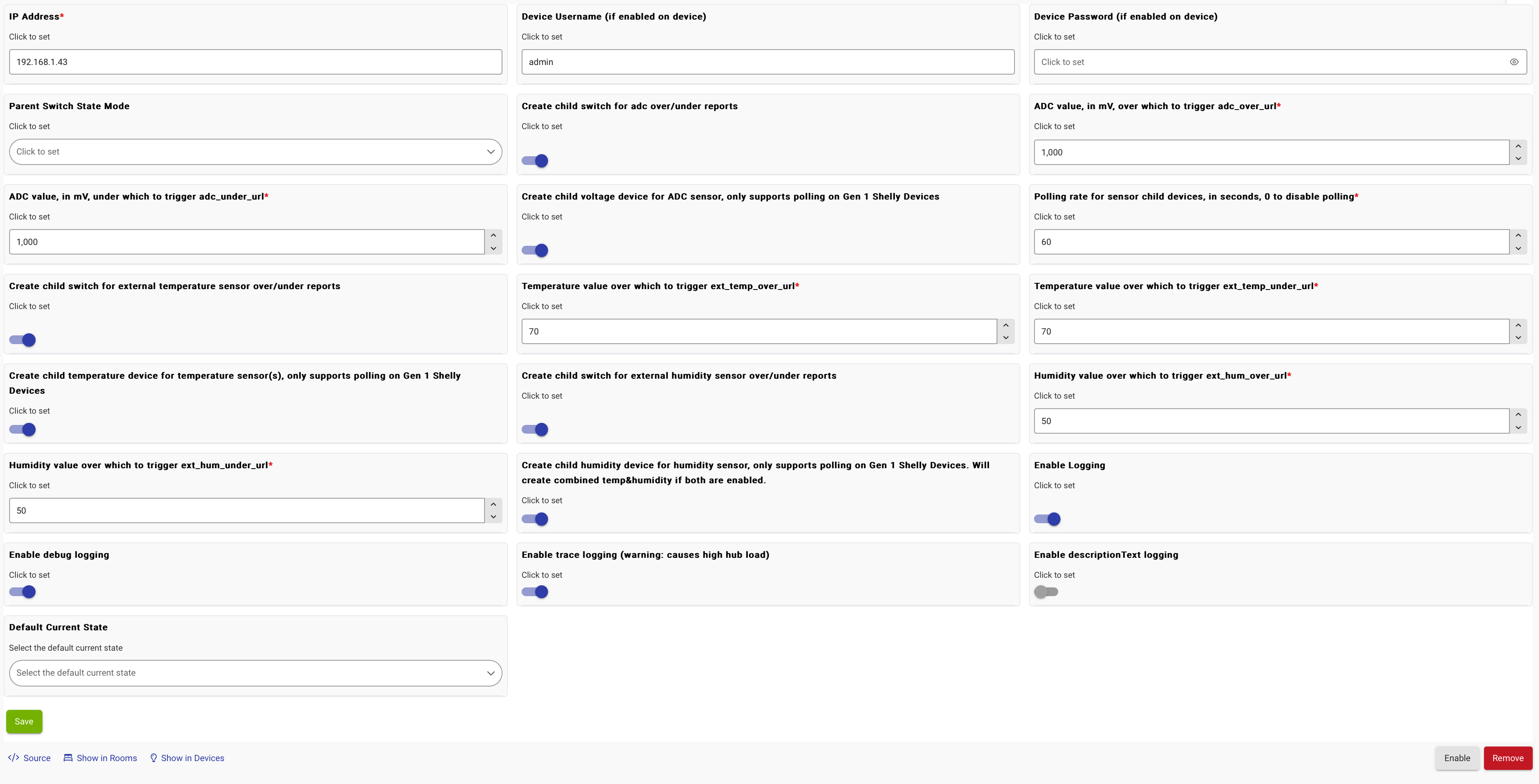
The driver will create web hooks on the Uni for whatever you've got set as enabled in Hubitat, but I'm not (at least presently) putting every available setting on the Shelly into the preferences for the device on Hubitat. There's settings right now for setting the "over" and "under" levels for those web hooks, since that's actually part of the hook itself. Note that it's totally possible to have a dead-zone on the cut off, such as "under 1000mV" being 'off' and "over 2000mV" being 'on', at which point the ADC would need to go over 2000 before turning the child switch on, and it won't turn off until it's under 1000mV. Or you can set it to 1000mV for both hooks, at which point there's no dead-zone.

Here's everything currently on the preferences in Hubitat:

Let me know what your use-case is, and I can double-check to make sure I'm not leaving anything out that you would need. Thanks!

2 Likes

HI Daniel,

nice to see you are back, I actually got some "plus" units on my desk but did not get around to replace the older gen1 UNIs when summer comes back around (there are used on my boat to monitor the batteries, shore power (only if it's plugged or not) and was planning on adding temp/humidity inside the cabin.

Also planning on bilge pump monitoring but this will need the plus version to get instant feedback to monitor how many times in goes on/off (detect ahead of time if I have a leak around the drive shaft or other thru hull problem) and keep a chart of this info and alarm if it turns on more than x times per hour.

So I will test it for sure when it's out and summer is back, might setup a spare one to test on the bench before hand?

I don’t think you’ll need the plus. The Uni gen 1 driver I have working right now only uses polling for the ADC, temp, and humidity sensors. The switches and inputs report back to Hubitat instantly via web hooks.

I’ll need a few hours to iron out a few things before I post an updated version to HPM with support for the Unis, but it’ll be this weekend almost certainly.

3 Likes

@daniel.winks i just purchased a few of the Shelly Gas NG sensors. Is the driver complete or still a work in progress?

I have them setup in HA and they update there and not so in HE.

Is this using a web socket integration or polling? My Uni Plus uses websocket and I was toying with the idea of using MQTT for the gas sensor for more real time updates.

I'm using one Uni to control my garage door, inputs on the closed and open contacts and one to activate the motor. Pretty basic.

I have another just reading the contacts of a garage door remote that I use as an arm/disarm button in my car. Even more basic.

The drivers I'm using at the moment are terrible at detecting momentary closes from the garage remote relay.

I'll be releasing a rather large update this weekend, so it might be good to wait until that is out, but what's on HPM right now should be functional for everything other than valve control.

The Shelly Gas is a Gen 1 device, which doesn't have websocket. The way this driver works is when you configure the device in Hubitat, it creates a bunch of web hooks on the Shelly device. Then when there's something that triggers a web hook, it calls out to Hubitat, and the driver receives the update and updates the device in Hubitat. There's no polling. Updates are effectively instant.

The only drawback (which probably isn't a concern for Hubitat users) is (at least for Gen 1), the Hubitat driver will likely overwrite any custom web hooks ('Actions', on the Shelly web UI) that might be set. There's little use for this when you have a central hub like Hubitat, since the main use for custom actions would be to have something like a Shelly Motion directly invoke 'turn on' and 'turn off' on a Shelly wall switch or something. But with Hubitat, there's no need to do anything like that, especially since it's not particularly flexible compared to just running everything through Hubitat. But it is possibly a concern for someone using a bunch of custom Actions on Gen 1 devices.

On Gen 2+, the driver prefixes the name of the actions it creates with "hubitat_" so it shouldn't affect using custom Actions on those like it would on Gen 1 stuff. Part of the update I'm wrapping up to get out this weekend will allow for selectively using websocket or web hooks on Gen 2+ devices.

For example, the Shelly Plug US I have sends out status updates over WS every couple seconds (not configurable), mostly for the power monitoring. If you want power monitoring, that's great. But if you have a plug that you just want to turn on/off from Hubitat and don't care about the power monitoring, then using WS forces Hubitat to process events on the driver every few seconds for no reason. Using web hooks instead would reduce the load on Hubitat from the driver by 99.999% assuming you only turn it on/off once or twice a day.

I'm also working on an option for polling power monitoring option on Gen 2+. Let's say you do want to track total energy use, but you don't care for having the plug sending WS updates every few seconds for instantaneous power/voltage readings. If you would rather have updates every 5 or 10 minutes, then a polling driver would again be around 99.9% less CPU usage on Hubitat. Combined with web hooks for on/off status updates, you still get instant feedback for the switch turning on/off. This is my exact use-case for a Shelly Plug, as I'm purely interested in turning it on/off a couple times a day and tracking the total energy usage, with no use for power or voltage readings.

2 Likes

If that's due to polling, then these drivers I'm writing will fix it. On a gen1 Uni, there's (optional) polling child devices for the ADC, and temp/temp&humidity sensors. The inputs and switches are all web hook updates. So long as the Uni itself registers the input, it will call the web hook and update Hubitat, basically instantly, and every time (barring network issues).

Now there is the issue of any input on any device needing a minimum amount of time to register on the physical device. There's a minimum number of electrons that have to flow before a device registers that you've pressed down a momentary switch. If you have a fast enough 'tap' on a switch, there's a good chance it'll not register on the device, and that's not a Shelly thing, that's just how all electronics work. Usually even a millisecond or two is enough, but if you're on the very low end of the voltage needed to work, I've seen it take a solid quarter second to register button presses, sometimes more.

If you're having issues with the Uni itself registering a press, then the only way to remedy that is to make sure the input voltage is high enough and make sure the input is closed long enough. If the Shelly is registering the press but your driver in Hubitat is missing it due to it falling between 2 polling instances, well then this driver will fix that right up since it doesn't use polling for the inputs, it uses web hooks.

The relay pulls shut for at least 1 second, so i think electrically its fine, it's just the driver that's not designed for quick responses like you expect from a garage door button, I think.

Yeah, that's not an issue with my driver. I've just got a pair of wires on the input on my Uni for testing, and if I tap them together for even a fraction of a second it updates in Hubitat. A full second is more than enough. I'm guessing the driver you're currently using just polls for input changes, and if the input is "off" on one poll and goes "on" and back "off" before the other poll then both polls would just show as "off" with HE having no idea that it was "on" in between. Since my driver uses web hooks from the Uni, that's not a concern. Give me a few days here this weekend to put in some cleanup and a bit of testing and I'll get a big update on this driver package out that includes the support for both generations of Uni.

My dream:
Fire a power event only when the value changes more than x%.
=> Very fast reaction, but very few events.

Sadly I don't think that's (currently) possible with Shelly Gen 2 devices. At least not the Plug US, which has 2 ways to get power monitoring data: via WS or polling. There's also MQTT, but that's exactly what I'm not using specifically because I want these drivers to require nothing other than a Hubitat and a Shelly device. Also there's outbound websocket, CoIoT, and UDP, but none of those apply to Hubitat since there's no way to utilize them in Hubitat without Hubitat themselves adding support for those. It's not possible to add it via Groovy, it would be a platform level change.

Websocket is 'all or nothing', since it's just a single connection to the Shelly and once established the Hubitat driver is getting everything the Shelly sends, which is a lot. My drivers are quite optimized, so it's very little CPU usage regardless of the very high number of message it's processing. Polling is still going to be vastly less CPU usage, as it's still the same code doing the processing, just it's doing it 1% as much, if that.

The only way to do something like "more than x%" would be if Shelly added an Action for that. Right now on the Plug US for example, the only hooks available are "on" and "off" for the relay. Honestly tho, that's plenty since web socket gets everything immediately, and if you don't need/want that, on/off hooks + polling gives you immediate updates for switch state and infrequent updates for power monitoring. Or if you don't want power monitoring at all, then the on/off hooks are all that's needed.

1 Like

Alright folks, long weekend is over and I'm pushing out a big update.

158 Commits, 4,203 additions, and 2,063 deletions later and I've got support for a lot more things added.

Both Shelly Uni have drivers, Gen 1 and 2. That includes child devices for "Input Buttons" on them, "Input Switches", "Input Count", and "Input Analog". The Gen 1 Uni has what I call "OverUnder" switches, too. Basically there's web hooks on the Gen 1 for when the ADC, Temperature, or Humidity sensors (if you have them attached) go above/below a certain value. So when set up, if they are 'below' the switch is 'off' and if they are above the limit set the switch is 'on'. The Gen 2 uses Websocket for the Inputs, so it doesn't use the OverUnder switch. Additionally, the Gen 1 has optional polling child devices with configurable polling interval, for polling the values of the ADC, Temp, and Humidity sensors, since there's no webhooks available for them to send updates on. Again, the Gen 2 uses Websocket for these, so there's no need for polling on it.

There's support for the DS18B20 Temperature sensor(s) and DHT22 Temperature/Humidity sensor when attached to a Plus Add-on. This is auto-configure "magic" and will create child sensor devices on anything Gen 2+ that has said sensors attached.

The Valve control for Shelly Gas has been added.

Shelly Pro 3 has been added.

Shelly PM Mini (Gen 2 and 3) are supported.

"Cover" has been added, also auto-configured as a child device, on any Shelly Gen 2+ device that supports a Cover profile. Note that I do not have a way to test cover mode for use as a window-shade control, where GoToPosition is used. I'm working on getting a test bench set up for this, in the meanwhile I'll work on getting it added, but if anyone plans on utilizing this, please let me know so I can make sure it's working properly.
2 Likes

Maybe with the help of some Shelly Scripting? :thinking: :wink:

I've been watching this thread for a while, great to see some updates ship, thanks Daniel!

Tried the new drivers with Shelly Plus 2PM, but had problems with authentication. Password in logs was correct but calls received HTTP 401 Unauthorized. Any ideas?

dev:111  2025-01-22 09:42:48.932 PM  warn   Dining Room Shutter (Experimental): Exception: groovyx.net.http.HttpResponseException: status code: 401, reason phrase: Unauthorized
dev:111  2025-01-22 09:42:48.783 PM  info   Dining Room Shutter (Experimental): Device authentication detected, setting authmap to [algorithm:SHA-256, nc:1, nonce:439, qop:auth, realm:shellyplus2pm-<device_id>]
dev:111  2025-01-22 09:42:48.780 PM  warn   Dining Room Shutter (Experimental): Exception: groovyx.net.http.HttpResponseException: status code: 401, reason phrase: Unauthorized
dev:111  2025-01-22 09:42:48.620 PM  debug  Dining Room Shutter (Experimental): New settings: { "ipAddress": "192.168.30.20", "devicePassword": "<correct_password>", "enableBluetoothGateway": true, "logEnable": true, "debugLogEnable": true, "traceLogEnable": false, "descriptionTextEnable": true }
dev:111  2025-01-22 09:42:48.618 PM  debug  Dining Room Shutter (Experimental): Device IP address not changed, sending preferences to device...
dev:111  2025-01-22 09:42:48.616 PM  debug  Dining Room Shutter (Experimental): Device has an IP address set in preferences, updating DNI if needed...
dev:111  2025-01-22 09:42:48.613 PM  debug  Dining Room Shutter (Experimental): Starting configuration for a non-child device...
dev:111  2025-01-22 09:42:48.611 PM  debug  Dining Room Shutter (Experimental): Device preferences saved, running configure()...

Yeah, I've looked into the Shelly Scripting briefly, and it does look like it should be possible to write some scripts to allow for stuff like using a Shelly Plug with the power monitoring reporting via web hook.

Websocket is just not reliable in my experience. There's a number of things to do with it on Hubitat for things like handling time outs, disconnects, etc, and my library code does all those things. But there's instances where it just stops working for one reason or another and the webSocketStatus method doesn't receive anything, and if it doesn't get anything when there's a disconnect, there's no real way for a driver to know the socket is disconnected. It's not common, but I have seen it happen more than a few times in the 5+ years I've been using Hubitat.

On some of my other drivers I actually have a watchdog of sorts that forcibly reconnects the socket if there's been more than X amount of time since the last incoming message. I'm not sure if the socket is getting disconnected, if the data stops flowing from the socket at the hub level down into the driver's parse method, or what, but it does happen and there's no real good way to detect it.

Plus Shelly WS connection is CHATTY. I'd wager that most people don't actually need/want power monitoring updates every second, but that's what WS sends, and there's no configuration for it. It's all or nothing.

It should totally be possible with scripting to gather a bunch of readings together, take an average of them, and report the "last 5 minute average" or whatever to Hubitat. It might actually be better to use the script to create a few custom HTTP endpoints that Hubitat could poll/refresh manually with "last 5 minute average" or "hourly average" or similar. That way there's no need to fiddle with changing a script every time you want to increase/decrease how often Hubitat gets updated. Changing polling interval in a driver is dead simple. Changing it in a Shelly Script would involve a fair bit more work, at least if you'r wanting to be able to change the interval from the driver settings page on Hubitat.

1 Like

Hmm, I haven't changed anything regarding the auth stuff since I implemented it, so it should work, but obviously it's not. I'll set up auth on a gen 2 device here later today and see if I broke something on the latest release.

So I think it's just a logging issue. The way the auth works is you just have to try to send an HTTP request, it fails with a 401 that contains a nonce. You use that nonce and a few other bits and resend the request with the auth added.

I tested my Shelly Plug US with auth enabled and saw the 401 messages in the logs. Device works as expected, so I think I just need to suppress those 401s from the logs since they're actually expected.

Edit: put out a patch level update on HPM to change logging level on a few things to keep the logs cleaner. Doesn't look like anything was broken, just the warning messages should have been suppressed in the case of getting a 401 error, since those are expected.

Double checked on one of my Gen 2 devices and auth works over both WS and HTTP channels.

