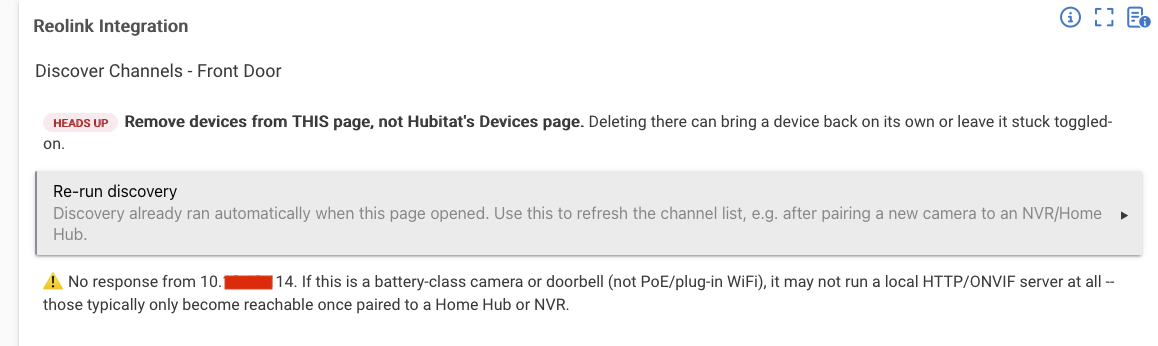
DM me the parent app snapshot please. Stand alone has not been tested as much as NVR/Hub.
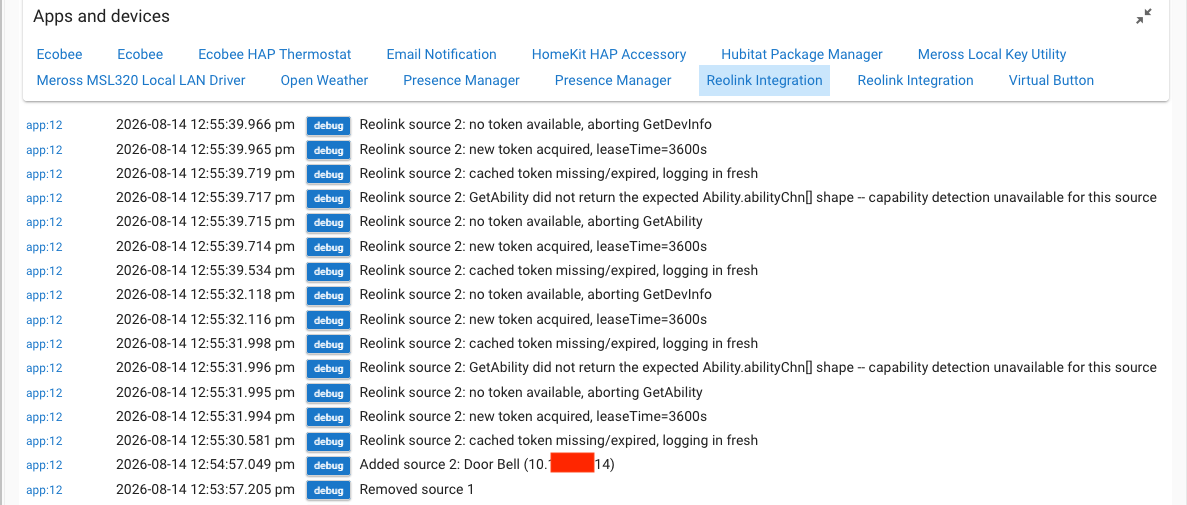
Turn on full debug Then go to the app's discover page and add the source from scratch (or re-trigger discovery if it's already added), and grab everything logged from the moment you click in through the page finishing loading.
Whether it shows up at all on the discover page does it show up when you click discover?
The full debug-log capture of one complete discovery attempt (still haven't gotten past the 9-line stub)
Can you ping or reach the doorbell's IP from another device on the same network — that alone would confirm or rule out a few things.
Confirm the IP is static/reserved, not DHCP-floating
Is the user credentials added to the integration correctly?
I am currently running an overhaul of this integration and will be coming out of the BETA tomorrow and releasing to the community. If there is a stand alone issue, i would love to get you fixed before then.
Did you click DONE when you first set this up? i know that's mundane but a must in HE.
May be worth removing this integration and adding it back via the install user integrations.
I will release a low hanging fruit patch with tomorrows integration update and see if it clears for you.
There will be instructions for the community on how to complete the 1.3.8 integration update since it will change how the devices are created and managed. It will require deletion of all children devices.
Real-time updates, PIR control, and several bug fixes. Read the "Important" section below before you update.
Important: this update changes how your devices are set up
Problem:
To support real-time updates (instead of just checking in every few seconds), each camera and doorbell now needs to live under a new "bridge" device instead of connecting to the app directly.
The Fix:
Starting with this version, your cameras and doorbells are created under a "Reolink Device Bridge" device. If you have a Hub or NVR, all its channels share one bridge. If you have standalone cameras or doorbells, each one gets its own bridge, but they all group together under one "Reolink Standalone Devices" entry so your device list stays tidy.
Action needed:
After updating, you'll need to:
Open each source's Discover page in the app and delete its existing camera/doorbell devices.
Run discovery again to recreate them under the new bridge.
Update any dashboards or Rule Machine rules that pointed at the old devices, since they'll have new device IDs.
Sorry for the extra step! It's a one-time thing, and it's what makes the real-time updates below possible.
What's new
Cameras and doorbells now update in real time instead of just polling every few seconds. If the connection ever drops, it falls back to polling automatically and reconnects on its own.
New PIR on/off control for cameras, so you can pause a battery camera's motion trigger without removing the device.
If you have more than one standalone camera or doorbell, they now group together under one "Reolink Standalone Devices" entry in your device list, instead of each one showing up separately and nested under a Device Bridge.
What's fixed
A camera with no PTZ (pan/tilt/zoom) could sometimes show a PTZ command it didn't actually have. This is fixed.
A login issue where a failed sign-in could look like it succeeded in the logs, then quietly fail every request after. Fixed, and failures now show the real reason.
Some log messages weren't following the app's Log level setting and could flood the logs even when set to Errors Only. Fixed.
As always, questions and bug reports welcome below. Thanks for testing along the way!
Bug fixes and quality-of-life improvements based on real-world testing.
No setup changes needed if you're already on 1.3.8.
What's fixed:
Fixed a crash ("Unexpected Error") that could happen the first time you opened a newly added camera or NVR to pick its channels. A few different causes, all fixed:
The app was creating a device too early, before you'd picked anything, which could collide with a leftover device from a previous setup attempt.
On a large NVR, checking each new channel for a battery could take so long it caused the page to time out. This check is much faster now.
Removing the whole integration didn't always clean up properly behind the scenes.
Fixed a false "connection trouble" warning that could show up when checking a wired camera's battery status during setup. Wired cameras don't have a battery, so this is expected and no longer treated as an error.
Fixed the Check Battery command succeeding but not actually updating the battery number shown on the device page.
Fixed a leftover setting that could cause a new camera to silently try connecting on the wrong port.
What's new:
Full logging now shows a quiet heartbeat every 25 seconds, so you can tell it's genuinely working even when nothing else is happening.
Cameras and doorbells with a battery can now check their battery level automatically, on a schedule you control (default every 12 hours, or turn it off entirely). Previously this only happened if you ran Check Battery yourself.
Battery-powered doorbells (e.g. Doorbell Battery, Gen 2 doorbells) can now show a battery level which wasn't available for doorbells before. (BETA)
Thanks to everyone who tested this past release and reported issues, it made a real difference. Questions and bug reports welcome below!
Fixed battery percentage getting permanently stuck on some devices and never auto-updating.
Problem:
On some devices, the periodic battery check (Auto battery check interval, default 12h) would silently never run. The battery percentage stayed frozen at whatever it was when the device was created, sometimes far off from reality, with no warning anywhere. Running the Check Battery command manually always worked fine, which is what made this easy to miss.
The Fix:
The battery scheduler required an internal batteryMode flag to say "battery" before it would ever check. If that flag was ever unset, it silently skipped the check forever instead of erroring. It now treats a missing flag as "unknown, go find out" instead of "not battery," runs one check to fill it in, and proceeds normally from there.
Action needed: None required, but recommended: after updating via HPM, open the Reolink Integration app and tap Done once (no settings need to change). That triggers a one-time migration that clears the old stale battery-check schedule, so the fix takes effect within seconds instead of however long is left on the old schedule. Without doing this, any affected device still self-heals on its own eventually. It will be when the current battery-check interval naturally runs out (up to batteryCheckIntervalHours, default 12h).
Fixed standalone camera/doorbell connections silently failing to start, and added a new charging-status attribute for battery devices.
Problem:
Two issues turned up during additional real-hardware testing after 1.4.0 shipped:
A standalone (non-Hub) camera or doorbell's real-time event connection could fail to even start, due to an unrelated logging bug that threw an error the moment the connection tried to log its own status.
There was no way to tell whether a battery device was actively charging.
The Fix:
The internal "Reolink Standalone Devices" driver was missing two logging methods that every standalone bridge relies on to report its own connection status. Added.
A new chargingStatus attribute (charging / not_charging / unknown) is now populated any time Check Battery runs, manual or scheduled -- confirmed against real hardware, plugged in and unplugged.
Also updated the app's Tips page with confirmed findings on standalone (non-Hub) battery-device support . Short version: it's not supported, for one of two different reasons depending on the specific model, and a Home Hub or NVR is required either way.
Action needed:
None. This release is a straightforward update from 1.4.0 -- no migration or manual steps needed.
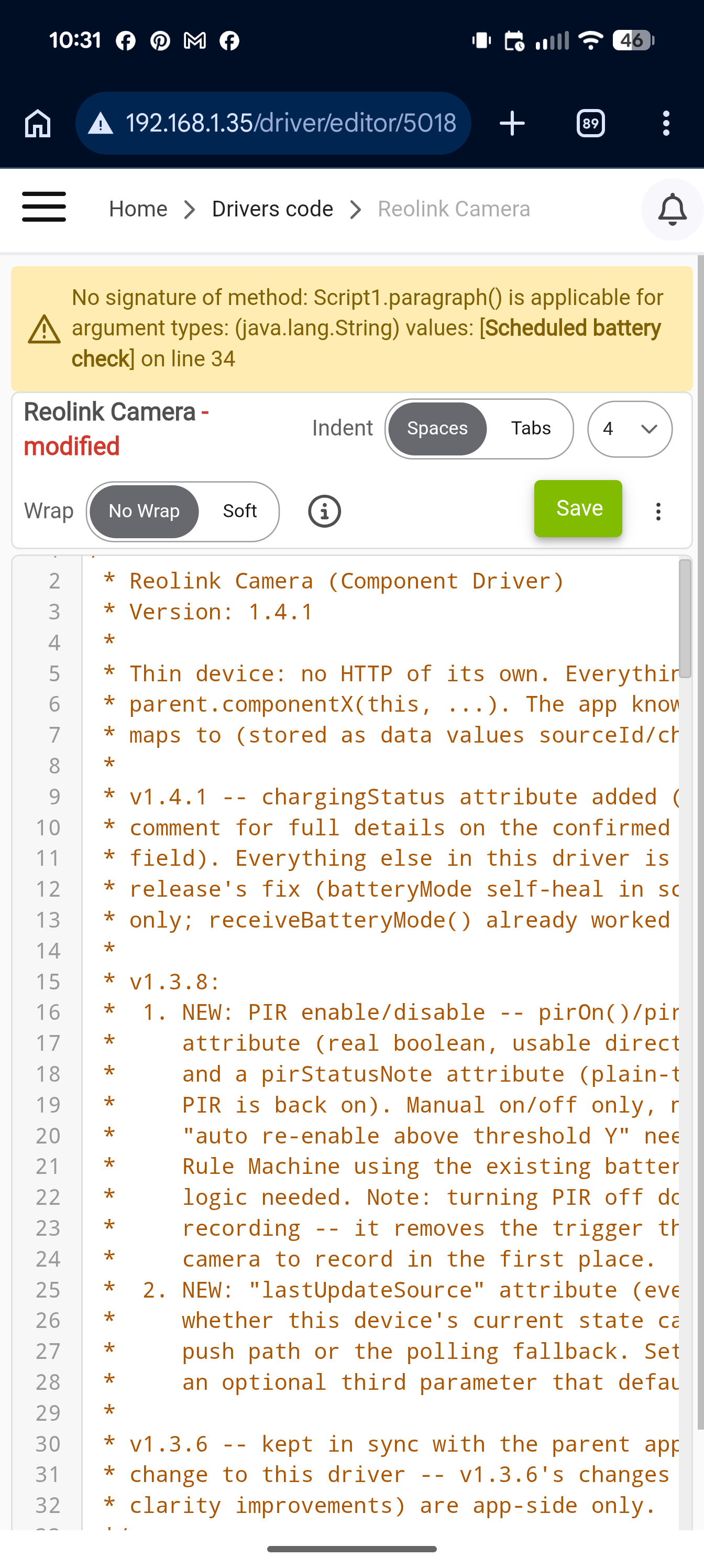
Hey @JdThomas24 when trying to update to the latest camera driver through HPM I get a fatal error when I try to upgrade through the driver page (copy and paste from github) I get the error below
Fatal error updating the Camera and Doorbell drivers, plus a preferences page layout cleanup
Problem:
Updating the Camera or Doorbell driver to 1.4.1, whether through HPM or pasting the code into the driver editor, threw a fatal compile error, "No signature of method: Script1.paragraph()," and blocked the update entirely. Separately, once that's fixed, the Scheduled battery check and Event-triggered battery check section headers on the device preferences page were landing out of place in the 3-column layout instead of lining up with their own settings.
The Fix:
Both drivers' preferences blocks used a bare paragraph("text") call for the two section headers. That works in Hubitat locally, but it doesn't exist on a driver's compiled script, which is what caused the crash. Switched both headers to the driver-compatible input(type: "paragraph") form. While in there, reordered the preferences so each header starts its own row, with Poll interval and Snapshot interval moved to the end, so the page now lays out cleanly instead of the headers landing beside unrelated settings.
Action needed:
Update to 1.4.2 via HPM.
No device deletion or re-discovery needed, this is a driver code fix only.
I just installed a Reolink RLN16-410 NVR with (6) Elite Wifi floodlights and (1) Gen2 battery wifi doorbell. All recording is done on the NVR. No recording is done on the devices themselves. My hub is a C-8 Pro.
For the time being, I simply want to put the NVR on continuous record when I am away via the hub Mode Manager, and also dusk to dawn. Will your integration allow me to toggle the NVR's Surveillance-> Record on and off?
Good questions, both worth having on the thread for anyone else running into the same thing.
Toggling Record on the NVR:
Not yet, sorry.
Right now everything I've built talks to individual channels via motion/AI, PTZ, spotlight, siren, PIR, battery. Nothing touches the NVR's own recording schedule or manual record on/off. But Reolink's API does have commands for that, I just haven't gotten around to building and testing them. If you're up for testing once I've got something (especially since I don't have an RLN16-410 here to try it on myself), that would help. I can line out something in BETA with a link you can access and manually install.
Triggering it from a Mode: yep, totally doable, just not something the integration handles on its own. This would be part of Rule Machine, same as it would be for literally any switch. Once I add the record toggle, it'll probably just be a simple Switch device (On = start recording, Off = back to normal). The integration's whole job stops at "here's a switch you can flip" and it has no idea what your Modes even are, and honestly no integration does.
The rule itself would be pretty simple once the device exists:
Trigger: Mode changed
IF Mode is Away → turn the switch On
Else → turn it Off
Dusk-to-dawn would just be another trigger (Sunset/Sunrise, built into Rule Machine) layered in however you want it to interact with the Away logic.
So bottom line:
Even with the toggle built, there's no "record when Away" checkbox inside the app itself, you'd still be setting that up with a little Rule Machine rule like above.

 Important: this update changes how your devices are set up