[RELEASE] Muse Bridge
Chat with your house — and have it talk back.
Muse Bridge connects your Hubitat hub to Muse, Meta's personal AI assistant, and doubles as a full spoken alert-rule engine that runs entirely on your hub.
In 30 seconds: ask your house plain-language questions ("is the garage door closed?") and give it plain-language commands ("set the house to Night mode") · build spoken alert rules with real conditions — mode, thermostat state, time windows, days of week · everything also works standalone, with no assistant at all.
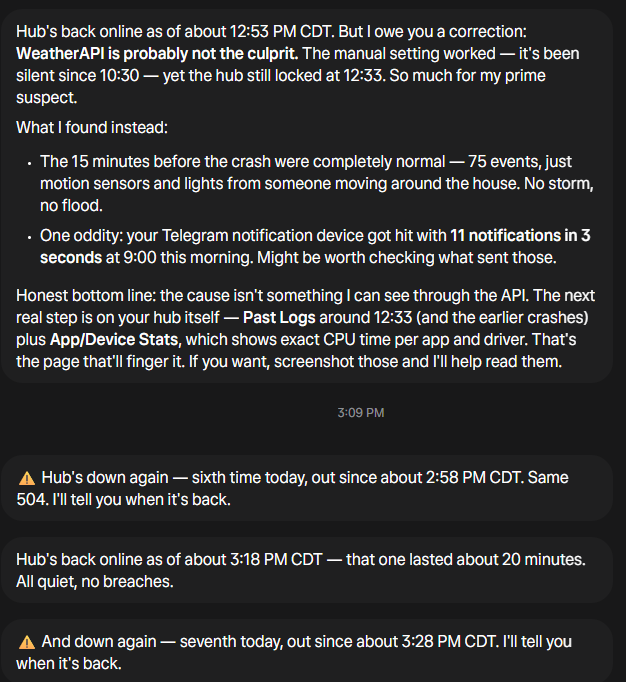

Muse helping diagnose a real hub issue — analyzing event data and advising on next steps.
Hand Muse your cloud API URL and token (the app's Link with Muse page generates a ready-to-paste setup message), and you can ask things like "is the garage door closed?", tell it "set the house to Night mode", or say "alert me if any window is open more than 15 minutes while the heat is on" — and it builds the rule for you via the API.
No assistant? No problem. The on-hub rule engine, device health digest, and REST API all work standalone. MIT licensed.
I built this while diagnosing my own hub's issues — it's been genuinely useful day to day.
Version 1.1.0 released 10/7/2026
This app is a "community app" and is not supported by Hubitat. Contact @rayzurbock for support. Use at your own risk.
Features
- REST API (local LAN + Hubitat cloud): list devices with live attributes, send any device command, read recent events, list/set location modes, HSM status/arm, spoken announcements
- Alert rules: watch a device attribute and announce when it stays in a state longer than a duration you pick — or clears sooner than it should; conditions on mode, thermostat operating state, time window, and days of week
- Three notification channels per rule: speech on your speakers, push to individual phones, Muse chat. Urgent flag, repeat announcements, and "cleared" notices
- Speaker handling: volume per announcement (app default, per-rule override, per-call), minimum-volume floor, optional restore afterwards
- Device Health: daily push-only digest (never spoken) of low batteries and quiet devices — configurable thresholds, top-N limit, per-device ignore lists, day-of-week schedule
- Command passcode: security-sensitive actions (unlock, garage open, valves, sirens, mode changes, HSM) require a second passcode and fail closed when unset
- Hubitat Package Manager support
Code
GitHub repo: GitHub - rayzurbock/hubitat-muse-bridge: Muse Bridge for Hubitat: expose devices, modes, and HSM to Muse (or any REST client) via local + cloud API, with an on-hub alert-rule engine. · GitHub
Latest release: Releases · rayzurbock/hubitat-muse-bridge · GitHub
Installation
Install via Hubitat (click to expand)
Login to your Hubitat web interface
Click Apps Code
Click New App
Click Import, paste the URL below, click Import, then Save
https://raw.githubusercontent.com/rayzurbock/hubitat-muse-bridge/main/apps/muse-bridge.groovy
Enable OAuth (the API needs an access token):
In Apps Code, click Muse Bridge to open the code editor
Click the ⋮ three-dot menu (top-right) → OAuth → Enable OAuth
Click Apps → Add User App → Muse Bridge
Choose exposed devices — the picker has text search, a device-type filter, and an opt-in "hide devices quiet for N days" filter
Set a command passcode on the main page (until you do, sensitive actions are refused)
Create alert rules if you want them (optional)
To link Muse: open the Link with Muse page, set your monitoring preferences, and copy the setup message to Muse in chat
Install via Hubitat Package Manager (click to expand)
Search for Muse Bridge in Hubitat Package Manager and install;
Updating (click to expand)
Apps Code → select Muse Bridge → Import → paste the code URL → Save
Or update through HPM
Alert rule examples
Garage door left open while the A/C runs — the canonical example:
- Devices: Garage Door (contact sensor)
- Attribute
contactisopen, alert when it persists longer than 10 minutes - Condition: thermostat Downstairs, state cooling
- Message:
The %device% has been %value% for 10 minutes and the A/C is running. - Spoken on the kitchen speaker, repeated every 5 minutes until closed.
Water leak — water sensor water is wet, duration 0.1 minutes (≈6 s), no conditions. Immediate announcement.
Sump pump short-cycling — pump switch switch is on, alert when it clears sooner than 1 minute (i.e. it ran less than a minute). Catches a pump that kicks on and right back off.
Night mode reminder — back door contact is open longer than 5 minutes, condition: mode is Night, time window 22:00–06:00.
Intrusion while secured — front door contact is open, duration 0.1 minutes (≈6 s), condition: HSM is armedAway (or mode Away), URGENT priority, channels: speech + push + Muse chat. Immediate, can't-miss announcement on every channel.
Device health
A daily, push-only health digest — never spoken on speakers:
- Low batteries — warns at or below your threshold (default 20%).
- Quiet devices — warns when a device has no events for your N days (default 7), including devices that never reported.
- Each check has its own per-device ignore list.
- Runs daily at your chosen time (default 9:00 AM) on the days you pick (default: every day — e.g. weekends only); one summary listing the most urgent devices first.
- Top-N limit — the notification lists only the most urgent 5, 10, 15, 20, or all devices (default 10); anything beyond the limit is summarized as "…and N more" instead of spamming your phone.
Donations
Muse Bridge is free. If you'd like to support it:
- Cash.me/$Lowrance
- Venmo @BrianLowrance
- PayPal.Me
 the same way.