No issues from my side. I used to have Hubitat slow down issues (way prior to this app), but they seemed to have addressed it in one of the recent updates.
packageManifest.json added -- PR pending with the integrated HPM listings: Add dkilgore90 repository.json by dkilgore90 · Pull Request #56 · dcmeglio/hubitat-packagerepositories · GitHub
p.s. I don't use HPM myself -- but it seems straightforward. I'm sure y'all will let me know if something is off!
3 Likes
Is the yale/nest lock part of this api? Thanks!
Nothing in Google's documented api (yet).
Any one else notice that a notification from hubitat triggered by nest motion comes about 2 seconds faster than the notification from the nest app itself.
1 Like
I have noticed that everything regarding the nest runs a lot faster than it did previously with the old integration. Not sure the reason behind that, but I’m definitely not complaining!
Showing up in HPM for me. So when we get an update will be the real test. Thank you for doing this.
Hey,
Not getting very far on the google side of things (before I even make it to Hubitat). For clarity (and my own sanity) the readme states:
*Follow the [Get Started QuickStart](https://developers.google.com/nest/device-access/get-started) from Google*
it then goes on to say:
*Click on the blue "Enable the API and get an OAuth 2.0 Client ID" and follow the directions immediately above that blue button, with the following modification*
My question is, does this mean follow the full quick start guide from top to toe then return to the read me or is it open the quick start guide but use the parameters in the readme?
Just a FYI, I noticed today that if I use the RM to adjust a thermostat, and I pick a temperature that would "conflict" the heat/cool deadband, it will just log an error.
IE. Heat = 20C Cool = 22C, Nest deadband between heat/cool = 2C
If I try to do heat=21C, and not set cool to 23C, it has an error. You need to manually set both the heat and cool values if the new value will invalidate the deadband. Nest hubs just push the opposite deadband up or down accordingly.
Fair, this could be clearer. Reviewing the page, I think you'll need all of those setup steps (the whole page), making sure that the hubitat link is specified as an Authorized redirect URI in your Google Cloud Project OAuth configuration.
The initial setup documentation was put together after I already had everything done (and re-worked a couple times) -- any feedback you have as a new user is welcome, to help make it clearer for future setups!
1 Like
I know I'm late to the announcement of this by about 3 weeks, but holy crap you just made my night. I was just about to sit down and start writing this out myself (new immigrant to HE from ST). I even just read through all of the OAuth / bearer token process and got all the URLs and params / headers figured out in postman for quick referencing later. I am already in love with this community. Thanks for the incredible work @dkilgore90!
Welp, it looks like I'm in the unable to access the image attribute camp as well. I've got three cameras and none of them seem to be returning that attribute after I step into the view. I did notice that when I tried to force a delete and re-subscribe to the pub/sub settings it was returning errors (though there might be a bug in our debug statements for the groovy code as the error wasn't very clear, I'm attaching a screenshot for reference in case it helps).
I know that I'm able to successfully authenticate, pull down my thermostat and cameras as devices, and even access the base attributes (including: lastUpdated, imgWidth and imgHeight). I just can't seem to get the actual dynamic image attribute to ever be created.
Definitely open to ideas and happy to help with this in anyway that I can. Thanks again for all of your hard work that's gone into this so far!
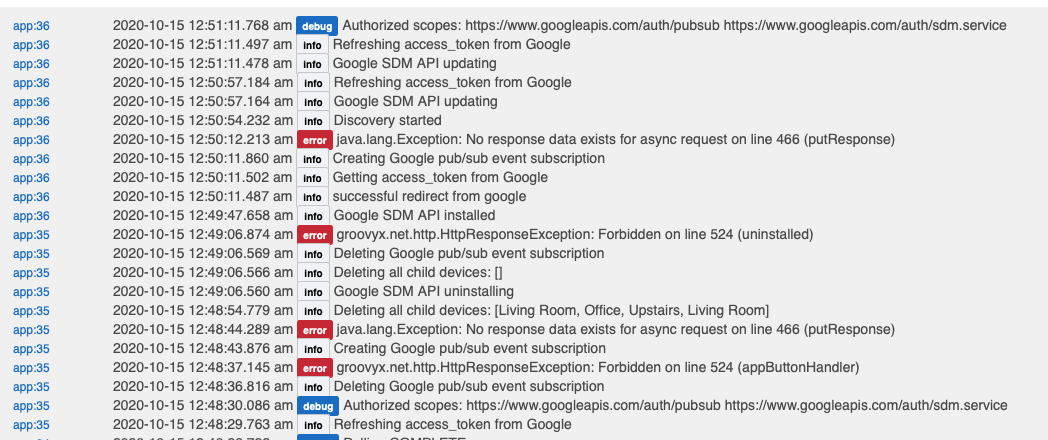
403 Forbidden when deleting the event subscription, I suspect you may be hitting the same on creation -- the log is hitting an exception since there is no body to parse.
Double-check that you enabled the PubSub api for your GCP project?
Go to the Cloud Pub/Sub API page, and enable the Pub/Sub API for your Google Cloud Platform (GCP) project.
3 Likes
Hi dkilgore90, just followed the instructions yesterday and it's working perfectly (Nest 3rd gen Thermostat).
At first I haven't understood you needed to do the whole Get Started Quickstart guide. So I haven't at first, after paying the fee, generated a Device Access project... So when I was setting up the Google SDM API, I took the Google Cloud Project ID from credentials.json instead of the Google Device Access project ID and of course it failed when trying the Auth link.
I deleted everything from Hubitat and Google Cloud, and followed the Quickstart guide fully and that time it worked !
Thanks a lot for your work 
2 Likes
Thanks. I had already enabled the Cloud Pub/Sub API via the SDM UI, but apparently I missed a step or they didn't mention needing to turn on the actual GCP PubSub API service. This seems to have worked a charm!
New updates! Thanks to @gassgs for the ideas and base code -- each event type from Google now maps to an individual device capability/attribute in HE!
Motion -> motion
Sound -> sound
Person -> presence
Chime -> button 1
Mix and match these attributes in RM to trigger different actions.
Along with this, preferences toggles to control whether each event type triggers an image download (ex. perhaps you want to disable this for "Sound").
6 Likes
Love that I can turn off the image capture. I do not really have a need for it in HE. Is there a way to delete the last image and raw image values without deleting and adding the devices back?
Also love the different attributes. I updated my "motion on person" rule in RM to now just detect "person". VASTLY simplified the code in RM.
Once an attribute has been set, HE doesn't have a way to remove/null it. Best I can do is to reset them to a minimal string when all image capture toggles are set to false. Will add this capability in the next update
Thanks, wasn't necessarily asking for a change. Was just wondering if it could be done. I just prefer the video from the app over the images in HE. (I can see where it might be useful in HE for some.... just not used by me)
1 Like
It's easy enough -- and reduces clutter in your device page if you're not using it...