[RELEASE] - Denon HEOS Integration

Then the devices gave:

Heos - 7 Left

dev:2702021-04-12 17:14:26.266 debugTelnet Message: [heos:[result:fail, message:eid=-2001&text=Cannot connect to Web Services, command:system/sign_in]]

dev:2702021-04-12 17:14:26.247 debugTelnet Message: [heos:[result:fail, message:eid=-2001&text=Cannot connect to Web Services, command:browse/browse]]

dev:2702021-04-12 17:14:17.343 debugTelnet Message: [heos:[result:success, message:command under process&un=mtate@marcnet.net&pw="blank-blank", command:system/sign_in]]

dev:2702021-04-12 17:14:17.331 debugTelnet Message: [heos:[result:success, message:command under process&sid=13, command:browse/browse]]

dev:2702021-04-12 17:14:17.319 debugTelnet Message: [heos:[result:fail, message:eid=2&text=ID Not Valid&sid=1, command:browse/browse]]

dev:2702021-04-12 17:14:17.300 debugTelnet Message: [heos:[result:success, message:sid=10, command:browse/get_search_criteria], payload:[[name:Artist, scid:1, wildcard:no], [name:Album, scid:2, wildcard:no], [name:Track, scid:3, wildcard:no, cid:SEARCHED_TRACKS-, playable:yes], [name:Playlist, scid:6, wildcard:no]]]

dev:2702021-04-12 17:14:17.285 debugTelnet Message: [heos:[result:success, message:sid=6, command:browse/get_search_criteria], payload:[[name:Artist, scid:1, wildcard:no], [name:Album, scid:2, wildcard:no], [name:Track, scid:3, wildcard:no, cid:SEARCHED_TRACKS-, playable:yes]]]

dev:2702021-04-12 17:14:17.264 debugTelnet Message: [heos:[result:success, message:sid=9, command:browse/get_search_criteria], payload:[[name:Accounts, scid:7, wildcard:no], [name:Track, scid:3, wildcard:no, cid:SEARCHED_TRACKS-, playable:yes]]]

dev:2702021-04-12 17:14:17.246 debugTelnet Message: [heos:[result:success, message:sid=5, command:browse/get_search_criteria], payload:[[name:Artist, scid:1, wildcard:no], [name:Album, scid:2, wildcard:no], [name:Track, scid:3, wildcard:no]]]

dev:2702021-04-12 17:14:17.232 debugTelnet Message: [heos:[result:success, message:sid=7, command:browse/get_search_criteria], payload:[[name:Artist, scid:1, wildcard:no], [name:Shows, scid:5, wildcard:no], [name:Track, scid:3, wildcard:no]]]

dev:2702021-04-12 17:14:17.218 debugTelnet Message: [heos:[result:success, message:sid=2, command:browse/get_search_criteria], payload:[[name:Artist, scid:1, wildcard:no], [name:Album, scid:2, wildcard:no], [name:Track, scid:3, wildcard:no, cid:SEARCHED_TRACKS-, playable:yes]]]

dev:2702021-04-12 17:14:17.196 debugTelnet Message: [heos:[result:success, message:sid=3, command:browse/get_search_criteria], payload:[[name:Station, scid:4, wildcard:no]]]

dev:2702021-04-12 17:14:17.191 debugSending HEOS command: heos://system/sign_in?un=mtate@marcnet.net&pw="blank-blank"

dev:2702021-04-12 17:14:17.186 debugSending HEOS command: heos://browse/browse?sid=13

dev:2702021-04-12 17:14:17.184 debugSending HEOS command: heos://browse/browse?sid=1

dev:2702021-04-12 17:14:17.182 debugSending HEOS command: heos://browse/get_search_criteria?sid=10

dev:2702021-04-12 17:14:17.179 debugSending HEOS command: heos://browse/get_search_criteria?sid=9

dev:2702021-04-12 17:14:17.177 debugSending HEOS command: heos://browse/get_search_criteria?sid=7

dev:2702021-04-12 17:14:17.175 debugSending HEOS command: heos://browse/get_search_criteria?sid=6

dev:2702021-04-12 17:14:17.173 debugSending HEOS command: heos://browse/get_search_criteria?sid=5

dev:2702021-04-12 17:14:17.170 debugSending HEOS command: heos://browse/get_search_criteria?sid=3

dev:2702021-04-12 17:14:17.167 debugSending HEOS command: heos://browse/get_search_criteria?sid=2

dev:2702021-04-12 17:14:12.101 debugConnecting to HEOS

dev:2702021-04-12 17:14:12.099 debuginitializing

dev:2702021-04-12 17:14:12.052 debugInstalled with settings: [debugOutput:true]

All the others had Similar to this:

dev:2712021-04-12 17:14:12.391 debuginitializing

dev:2712021-04-12 17:14:12.344 debuginitializing

dev:2712021-04-12 17:14:12.216 debuginitializing

dev:2712021-04-12 17:14:12.172 debugInstalled with settings: [debugOutput:true]
Finally, the most important speaker, which is my HEOS Soundbar (192.168.1.45), was detected initially like all of them, for the list, but then got skipped along with another rear speaker and a sub-woofer... It's as though the processing doesn't get to the end of the list. 7 devices in total - of which only 5 got created.

NB: Don't know it matters but both rear speakers and the sub-woofer are configured with the Soundbar to act together.

And just now Denon Heos Integration is giving me this:

app:2582021-04-12 19:12:17.688 errorjava.lang.NullPointerException: Cannot invoke method sendEvent() on null object on line 218 (distributeMessage)

app:2582021-04-12 19:12:17.681 debugreceived message from master: [pid:-1456612931, state:stop]

app:2582021-04-12 19:12:17.649 errorjava.lang.NullPointerException: Cannot invoke method sendEvent() on null object on line 218 (distributeMessage)

app:2582021-04-12 19:12:17.640 debugreceived message from master: [pid:-1007877587, state:stop]

app:2582021-04-12 19:12:17.568 errorjava.lang.NullPointerException: Cannot invoke method sendEvent() on null object on line 218 (distributeMessage)

app:2582021-04-12 19:12:17.562 debugreceived message from master: [pid:-484880324, state:stop]

app:2582021-04-12 19:12:17.537 errorjava.lang.NullPointerException: Cannot invoke method sendEvent() on null object on line 218 (distributeMessage)

app:2582021-04-12 19:12:17.529 debugreceived message from master: [pid:252928979, state:stop]

app:2582021-04-12 19:12:17.487 debugreceived message from master: [pid:809193108, state:stop]

app:2582021-04-12 19:12:17.466 errorjava.lang.NullPointerException: Cannot invoke method sendEvent() on null object on line 218 (distributeMessage)

app:2582021-04-12 19:12:17.453 debugreceived message from master: [pid:-2270740, state:stop]

--- Loading Past Logs... ---

So finally, after a significant number of tries/tests. I have been able to add most of the devices. The HEOS bar wants to be the master. By adding and removing the App a few times in a row, I was able to cheat and get also 2 x Heos 7s and one Heos 5 all added. What is clear is that the remote rear Heos 1s pair, and the sub-woofer, which are all linked to the Heos bar in a multi-speaker config, are not really available to your app. This in itself is not a problem as they are 'driven' by the Bar.

Is there any thought to add a sensitivity or management of Heos Rooms (i.e. groups of speakers)?

And unfortunately, the authentication module is still rather flakey and unreliable.

Some way to manually add devices and manage their IPs would be cool, too. All mine have fixed IPs...

I'm curious, what would you be looking for with groups? Not opposed to adding support, just not sure what that functionality would do.

Very strange, I'm not doing anything weird here, just calling their login API.

I'm not actually sure this would work because discovery is via SSDP. Basically the way this works is you send out a message saying "any HEOS speakers out there?" And I wait for them to respond "yup, I'm here on IP:port" so having the IP isn't enough, I need the device to tell me what port to connect to to connect to it to get its device information. So I don't just need the IP, I also need the port (which could be dynamic and change). I've noticed the speakers are flaky when it comes to SSDP discovery. This doesn't just happen in Hubitat, I get this same problem in the HEOS app. I set everything on static IPs too hoping it would help, and I even moved all my speakers over to ethernet instead of wifi to rule that out, same thing. I've had it sometimes take a few minutes to detect all my devices, not sure how long you actually waited while testing?

There's a bug here I need to resolve. Basically, if you choose not to add all of your speakers into Hubitat (certainly possible, or in your case because it didn't detect them all) and we receive a message from HEOS about one of those devices, this error will occur. I'll get this resolved this weekend.

Hi, and thanks for getting back to me.

For groups, I've been using the (now dying) Harmony hub where you can build groups on start up. HEOS groups are unfortunately not persistent once established in the Heos App. Ideally, it would be good to have a way to 'group' the apps when RM runs to ensure that they are all playing, and not have to trek over to the app to check / fix them. I have a single heos 5, a stereo-linked pair of Heos 7s, and a Heos Bar driving 2 x remote Heos 1 rear speakers L + R and a subwoofer. In three separate Heos Rooms.

For the authentication, I see the following behaviour: I restart the app with the saved working credentials from the initial installation, it fails when it goes out to look for new speakers, saying the password is incorrect. I run it again a couple of times, and sometimes it will authenticate, sometimes not. Often I have to delete the app profile and re-launch to get it to take the same password. All very strange.

When I was testing, I waited for a few cycles of checking, and could see the full list of speakers, including the ones linked to the HEOS bar, which actually function as a single unit (might be worth hiding these if you can tell somehow). Nevertheless, it would only let me add about 50% of the list, no matter how many I selected. I wound up just adding one at a time to get the core ones, and abandoned the task once I had the Heos Bar in. Had to recreate the profile a couple of times to get around the password glitch above, too...

Hope this helps.

I am new to Hubitat, switching over from Smartthings. Have anyone looked into adding Sirius/XM or can it be added from a Favorite?

Thanks

Hello, Guys Fresh Noob to Hubitat, I have the Heos app working correctly but Im having trouble displaying the album art, I assume I have to grab one of the variables or attributes and add them to a tile but so far no luck. Any help with this would be highly appreciated

I'm just trying this for the first time, but I'm getting "Station search not supported by Amazon Music" in the logs. Has something changed?

Not that I know of. I’m out of town today but I’ll try to look tomorrow.

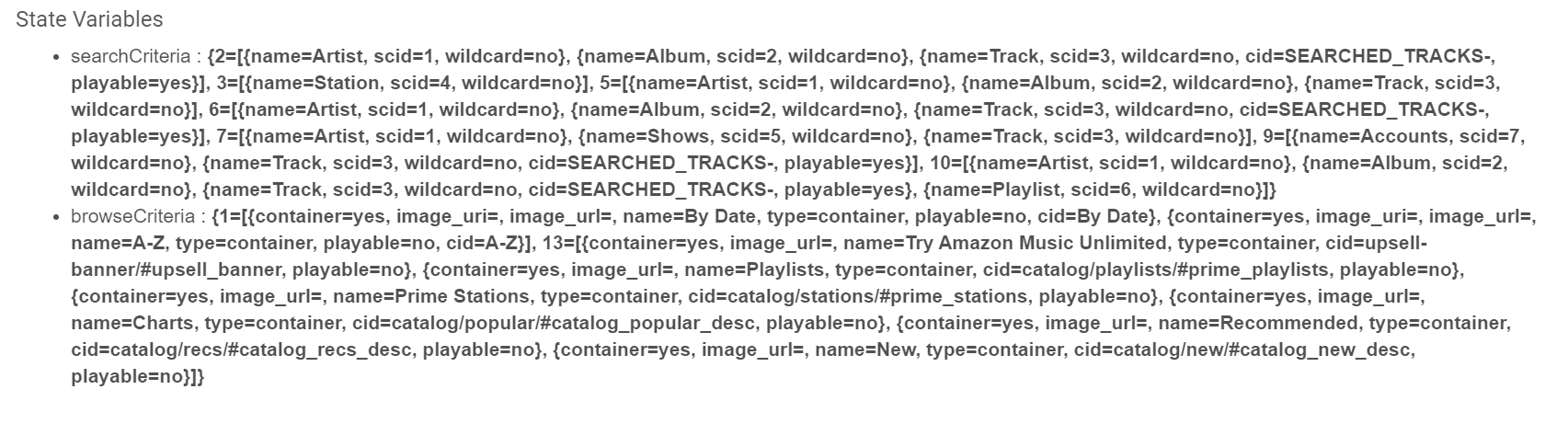
It's working for me. What I need to see is, if you go through your speaker devices, one of them will have state variables like this. Could you paste them here?

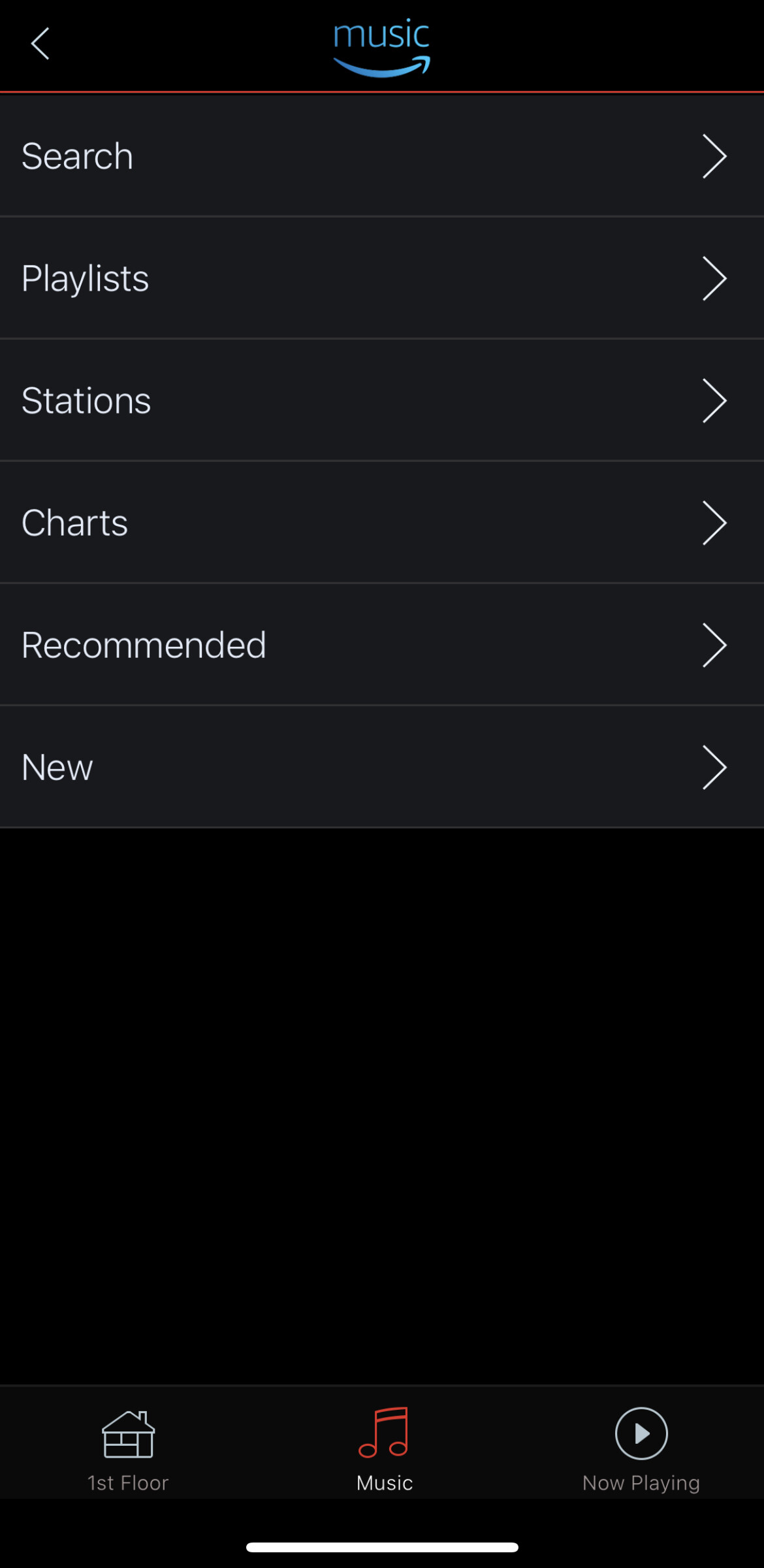
Coincidentally, I just setup some new HEOS devices and was looking at this for the “master” on the system. Here’s what mine looks like, in case it helps to compare. I use Amazon music with my HEOS system but haven’t tried to search for anything using the Hubitat device.


Nothing looks wrong there to me. But it is interesting your names are different. That might be the cause. I wonder why that is. Do you have HEOS or Denon Home devices?

1 Like

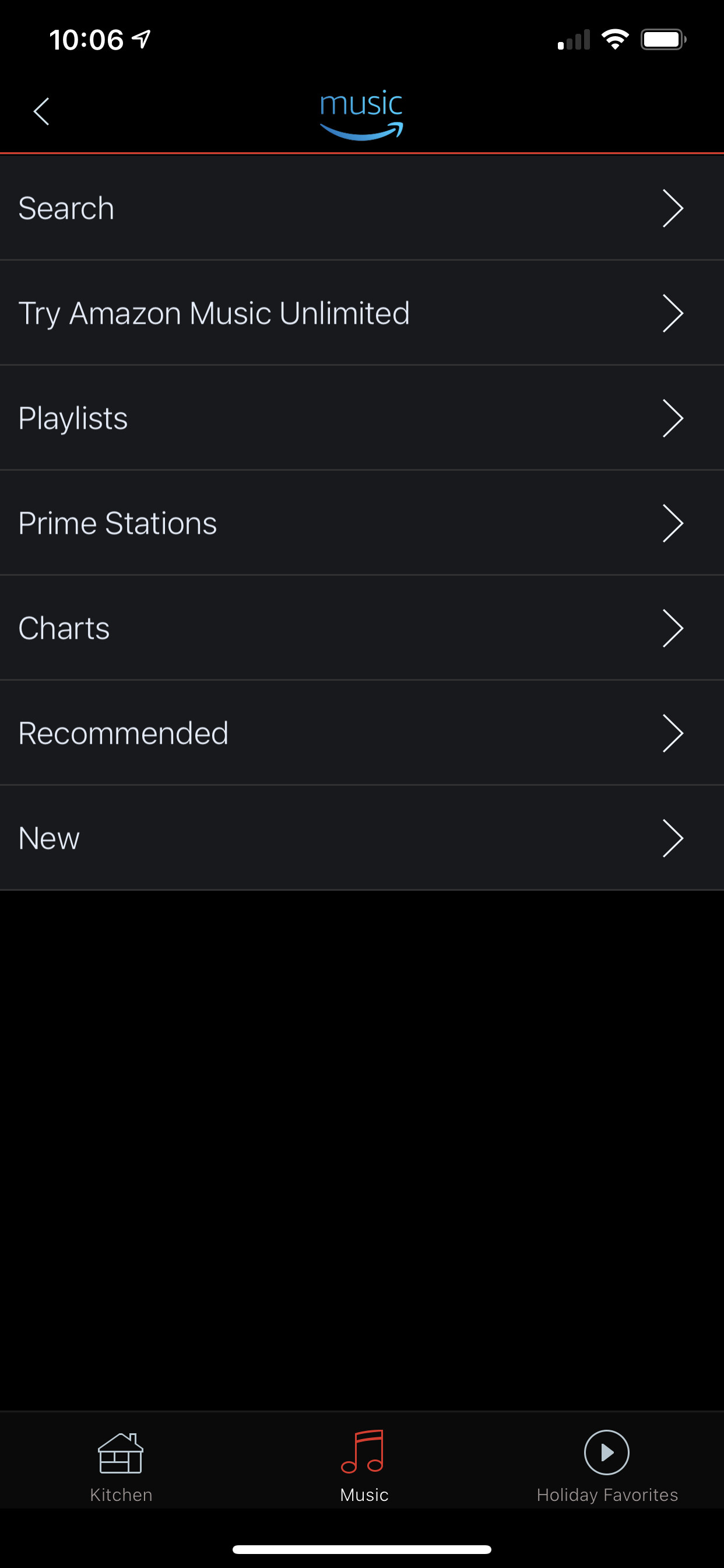
What does the HEOS app show when you go to Amazon. Mine shows this

Similar, I have Amazon music unlimited.

I wonder if that’s why. @eelton do you subscribe to unlimited? The key difference here is mine is prime stations and yours is stations which will break it.

It’s a mix of HEOS and a Marantz AVR. The master is a HEOS device.

Yes, I do have unlimited.

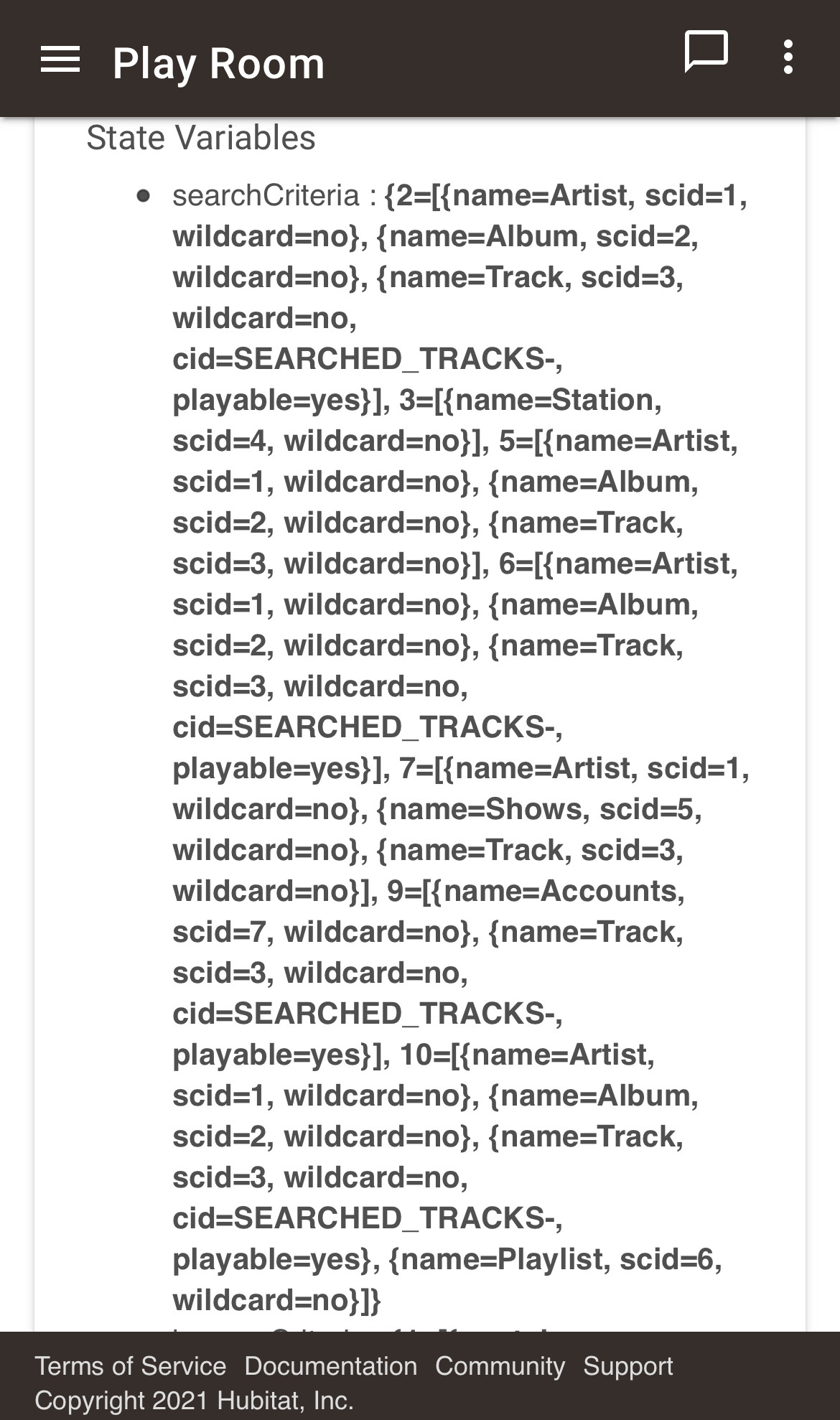
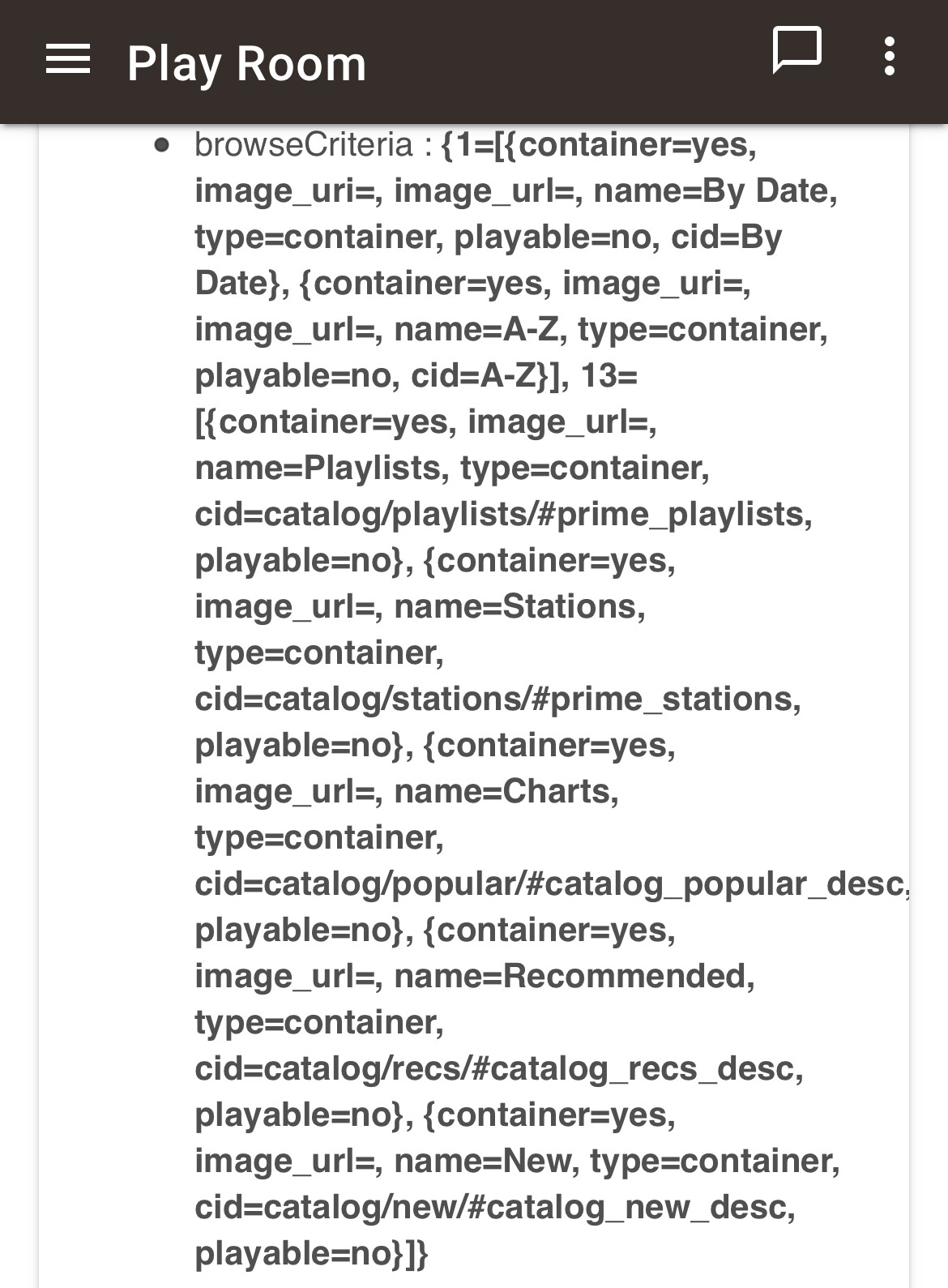
Here are the state variables (I had requested to play the station Alternative):

State Variables

  • searchString : alternative
  • searchCriteria : {2=[{name=Artist, scid=1, wildcard=no}, {name=Album, scid=2, wildcard=no}, {name=Track, scid=3, wildcard=no, cid=SEARCHED_TRACKS-, playable=yes}], 3=[{name=Station, scid=4, wildcard=no}], 5=[{name=Artist, scid=1, wildcard=no}, {name=Album, scid=2, wildcard=no}, {name=Track, scid=3, wildcard=no}], 6=[{name=Artist, scid=1, wildcard=no}, {name=Album, scid=2, wildcard=no}, {name=Track, scid=3, wildcard=no, cid=SEARCHED_TRACKS-, playable=yes}], 7=[{name=Artist, scid=1, wildcard=no}, {name=Shows, scid=5, wildcard=no}, {name=Track, scid=3, wildcard=no}], 9=[{name=Accounts, scid=7, wildcard=no}, {name=Track, scid=3, wildcard=no, cid=SEARCHED_TRACKS-, playable=yes}], 10=[{name=Artist, scid=1, wildcard=no}, {name=Album, scid=2, wildcard=no}, {name=Track, scid=3, wildcard=no, cid=SEARCHED_TRACKS-, playable=yes}, {name=Playlist, scid=6, wildcard=no}]}
  • browseCriteria : {1=[{container=yes, image_uri=, image_url=, name=By Date, type=container, playable=no, cid=By Date}, {container=yes, image_uri=, image_url=, name=A-Z, type=container, playable=no, cid=A-Z}], 13=[{container=yes, image_url=, name=Playlists, type=container, cid=catalog/playlists/#prime_playlists, playable=no}, {container=yes, image_url=, name=Stations, type=container, cid=catalog/stations/#prime_stations, playable=no}, {container=yes, image_url=, name=Charts, type=container, cid=catalog/popular/#catalog_popular_desc, playable=no}, {container=yes, image_url=, name=Recommended, type=container, cid=catalog/recs/#catalog_recs_desc, playable=no}, {container=yes, image_url=, name=New, type=container, cid=catalog/new/#catalog_new_desc, playable=no}]}

Could you try replacing the device driver with this version and let me know if it works? https://raw.githubusercontent.com/dcmeglio/hubitat-heos/heos-fixes/drivers/Denon_HEOS_Speaker.groovy