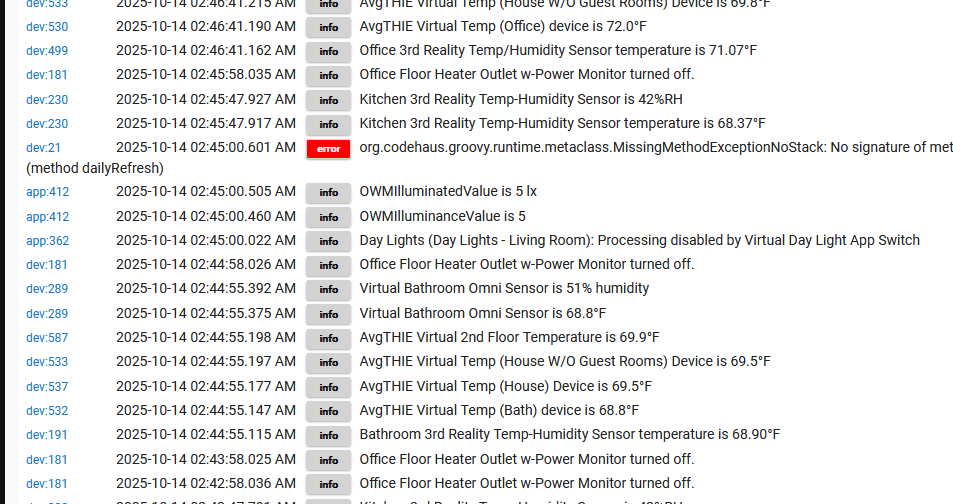
There is no line number in any of the errors above.
No, this would have come from the driver (not necessarily this one, but definitely one that was used with the device at some point).
The workaround you found would work, or the solution I suggested above would, too. Either option would result in effectively the same outcome, either the scheduled job getting erased or just doing nothing, resulting in nothing, which is basically how it is already (just with an error to go along with it) since the scheduled job can't do anything if the method it's supposed to run doesn't exist (or does but does nothing).
In another thread, I thought I learned that's what the number meant. Knowledge corrected. Thank you.
The driver's intent is to update once a day. For @xavib57905, I'm wondering how the date information is refreshing if the dailyRefresh isn't happening. Is it a manual update? For me, since my update happens every 5 minutes, I don't see any negative effect of the missing function.
Back to report that I read everyone's suggestions with interest and can say that removing the scheduled job (which reappears) didn't stop the error message. But it helps to know it's benign and the driver code can be patched.
It only stood out in my case because my hub doesn't log much otherwise. Thanks for the info!
Hi - thanks for your patience. It's been a ridiculous period in my life! I was moving into a new house, but there were issues with the past tenants and my move in date got extended 3 weeks farther. I'm moved in (not really sorted out but at least have bed/bath and coffee).
Over the next week - I'll dig into this and get to the bottom. thanks for all the input, I'll lean on that to come up with a resolution.
Honestly, I think I inadvertently cleared the error previously, so I'm not able to recreate this. I hadn't touched this code in long time - so unclear what and when it got induced.
I did clear the device driver by changing it to 'device'. then mash the buttons to clear everything then save, then change to driver back to the date time driver. I think that is what cleared mine in the first place.
I've added some debug text to watch it run through - this is super simple code in the first place! If you still have error 24 hrs after let me know, I'll could try to parse off your logs.
Version 0.3.6 pushed. Fix to move daily schedule update outside of range of hour skipped by HE during DST. In fairness, I believe this is the first year HE got this right. Still no log entry by HE that this DST hour move occured, have to manually verify.
Suggest 'refresh' after update.
Would like the option to set the Daily Refresh time to a different time of day. I'd like to have it at 3:01 AM.
I'd like to have a 60 minute refresh rate. I'm not sure that your driver creates so much CPU load that it needs a refresh rate that is a prime number
Sorry for the mistake, meant non-prime numbers for the frequency can more easily cause the app to run at the same time as other apps that have a repeating schedule.
As for 3:01, I would use the first available time after 3AM that doesn't interfere with nightly system processes.
3AM is the first time that is guaranteed to happen once during daylight savings time changes. Spring forward skips from 2AM to 3AM. Fallback repeats 1AM.