Sorry for the slow response. I don't have one of these locks so I'm kinda guessing based on the debug info you sent. I've updated the Lock Device driver. Please use the HPM Update option to update the driver. Also, use the YoLink mobile app and insure the YoLink lock has the latest firmware. Thanks.
No worries, Steve! Completely understand and appreciate whatever we can accomplish.
Updated the driver successfully, but the same error. I tried to get a bit more info, but it's not much. I did a poll and then tried unlocking again, so the full debug is below. It may not matter, but the only think I noticed is a few parameters are unknown.
dev:154 2025-07-29 01:44:40.976 AM error error unlocking the lock
dev:154 2025-07-29 01:44:40.967 AM debug Parsed: Lock=locked, RSSI=-54, Source=app
dev:154 2025-07-29 01:44:40.966 AM debug Lock currently: locked
dev:154 2025-07-29 01:44:40.965 AM debug Lock state type V2
dev:154 2025-07-29 01:44:40.964 AM debug state: [lock:locked]
dev:154 2025-07-29 01:44:40.961 AM debug formatTimestamp(): 'MM/dd/yyyy hh:mm:ss a' = '07/29/2025 01:44:40 AM'
dev:154 2025-07-29 01:44:40.959 AM debug setLock(): pollAPI() response: [code:000000, data:[loraInfo:[devNetType:A, gatewayId:d88b4c160303150a, gateways:1, netId:010202, signal:-54], source:app, state:[lock:locked]], desc:Success, method:LockV2.setState, msgid:1753771480492, time:1753771480492]
dev:154 2025-07-29 01:42:23.734 AM debug Parsed: Online=true, Battery=50, Lockset=null, Lock=[door:null, lock:locked], Timezone=-5, Firmware=1607, Source=app, Alert Type=null, User=app
dev:154 2025-07-29 01:42:23.725 AM debug parseFetch([code:000000, data:[deviceId:d88b4c01000ae27c, online:true, reportAt:2025-07-29T06:42:23.081Z, state:[alert:[source:Fingerprint, type:UnLockFailed], attributes:[autoLock:180, enableSetButton:true, openRemind:0, rlSet:right, soundLevel:1], battery:2, hwVersion:0402, loraInfo:[devNetType:A, netId:010202, subnetId:null], loraP2PHash:0, source:app, state:[door:null, lock:locked], tz:-5, version:1607]], desc:Success, method:LockV2.fetchState, msgid:1753771343202, time:1753771343202])
dev:154 2025-07-29 01:42:23.670 AM debug getDevicestate() fetch> pollAPI() response: [code:000000, data:[deviceId:d88b4c01000ae27c, online:true, reportAt:2025-07-29T06:42:23.081Z, state:[alert:[source:Fingerprint, type:UnLockFailed], attributes:[autoLock:180, enableSetButton:true, openRemind:0, rlSet:right, soundLevel:1], battery:2, hwVersion:0402, loraInfo:[devNetType:A, netId:010202, subnetId:null], loraP2PHash:0, source:app, state:[door:null, lock:locked], tz:-5, version:1607]], desc:Success, method:LockV2.fetchState, msgid:1753771343202, time:1753771343202]
dev:154 2025-07-29 01:42:23.574 AM debug Fetching device state
I should also mention, locking works fine, it's just unlock.
I see this lock has totally different responses/commands than the previous locks. There is no documentation on it in the programming manual. I'm going to have to see if anyone else has worked with it. May take a while, but hopefully I can find something. Thanks.
Is this a YS7616-UC with a lever or just a deadbolt?
@SteveBarcus any chance you are working on using the Yolink Local Hub? I just ordered mine. Hopefully I can ditch my regular yolink hub and get everything local. (Water Leak Sensors, Out Door Contacts, Temp/Humidity, Power Failure) Also thinking about getting their thermostat and ditch the centralite we have as wife does not like it)
1 Like
Just FYI, I have been using a local hub for a while (not via Hubitat). It works well with local API calls and MQTT (my primary interface to it). There is some differences in the URLs (apart from the host), but I think if someone tries to adapt the hubitat drivers it wouldn't be terribly hard (easy for someone not doing the work or familiar with groovy to say).
That said, there is a discord channel I think hosted by yolink, where I have seen some feedback that I think indicates a slight weakness. I don't know that there is a way to add new devices (local hubs or end devices connected to local hubs) without going through the central servers. After they are joined to the local network, they function fine without an internet connection, but this is a real limitation if yolink ever goes out of business and one wants to make significant changes to your devices.
2 Likes
Ya that is a weakness, hopefully that fix that. I should bet my device Saturday, so Sunday will become fun day. I curently have 14 of their devices so it will be interesting to switch over and get working. I will see how much A.I. can help. 
So I finally got my local hub, and hubitat does not find it via matter. But i did start to take your code for the initial parrent app and have been able to get it to pull an access token and find the device connected, however the stuff after that seems to get a bir complicated with MQTT and the diver creation and hub creation. Any chance if I sent the Local API part I have working sent over to you, you might be able to finish modifying everything over to work on the local api. I was using ai and i gave it a headach, plus I would want to run both cloud and local at the same time so I can move a device over one by one.and verify they work.
Willing to help test what I can, but from what I gather there are just minor changes to make. mainly the App and the MQTT driver as the rest should still be called the same way since you passing the drivers rhough to the MQTT Listener.
Im just over my head on this.
There have been several inquires regarding additional device drivers, as well as supporting YoLink's new Local Hub. The YoLink customer experience manager (Eric) left the company several years ago. We had an unwritten agreement that YoLink would provide their new devices to me for free so that I could write the code to support them in Hubitat. Upon release of the new Local Hub I wrote YoLink Customer Support identifying myself and sent a copy of the email agreement we had. I asked that a Local Hub be sent to me (  ). Supposedly the new person that took over Eric's spot is named, Kevin. But I can't find any contact information for him.
I started this development because I wanted to get a switch to work on my mailbox 300 feet away, Then several other devices came up that I wanted to use, like monitoring my refrigerator and freezer temps. As new devices were released, I would purchase them, contact Eric with the order number, and he would refund my purchase. Since I can't get any devices for free, I'm probably not going to support any future devices. I already have a box of devices that I keep for debugging purposes and they just sit there in the box unless someone reports a problem with the driver.
I am 66 years old and on a fixed income. While I do appreciate the donations people have made (Thank you!), after 3 years of working on this, all the donations combined that I've received would barely buy the new hub. I am still mulling over whether or not to get the Local Hub. There were a lot of problems with it when it was first release, but it seems to be getting more stable. I probably will get one since I'd like to have the independence from their cloud. Wintertime is when I do most of my development as spare time is easier to find.
Thank you for your support and interest in this effort. 
8 Likes
Thank you for all that you have done for the comunity, You are the only reason I have purchased any of their devices as I am sure same with many others. I will continue to look at your code and see if I can get the local api to work I do have it grabbing the Access token and able to pull a list of devices, now it is figureing out the MQTT part and from the way you did your code I belive your drivers should work for the local as from what I see they work with the mqtt driver. So I will work on what I can, and should you get a local hub and beat me to it ya, if not I will continue to do what I can, when I can. And I will will post back here and tag you should I get it working. (All code will still continue to have your info listed an will not pubish them without your permission)
Quick update: I’ve successfully created the Parent App for importing devices from the local hub. MQTT is now fully operational and receiving updates. The first device—a contact sensor—is initializing correctly, populating its data, and reporting both open/close status and battery level. Now to update the contact code more and then move on to the other ones I have. (All thanks to you @SteveBarcus for all the heavely lifting. there was alot I had to modify, but your code is still the basis of the new local version.
2 Likes
I have just started using Yolink in the past week to use their water leak sensors. I made an update to your interface to have the Yolink names used in Hubitat. I am changing the label to a simpler name that is easy to understand.
Just after I made the change, the hub started getting an error every time there is an update.
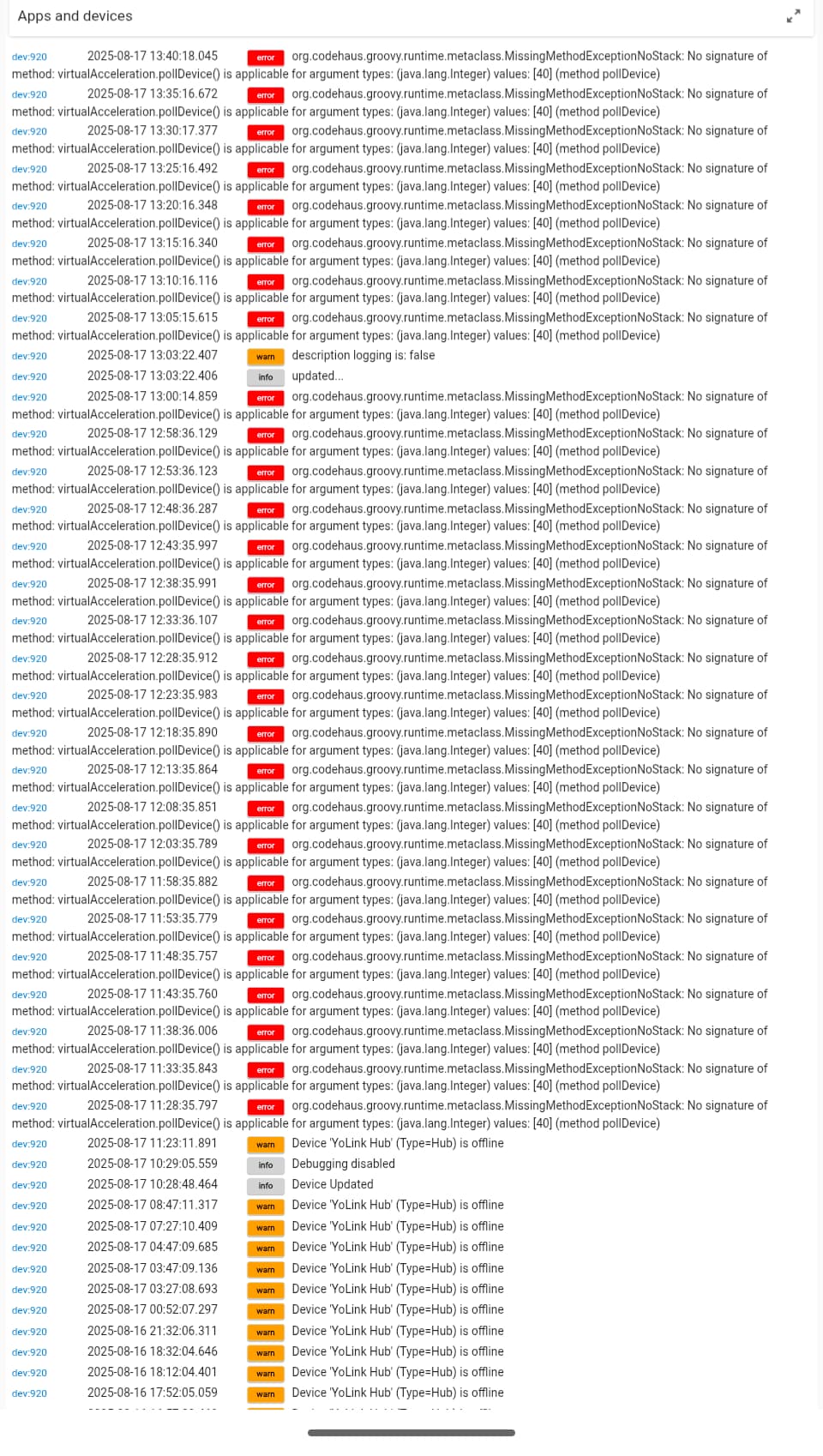
Is this an issue. What can I do to stop the error from occuring?
What does "made an update to your interface" mean? Did you changed the "YoLink LeakSensor Device" driver code, the "YoLink Device Service" app code, or the device's definition created by the YoLink Device Service app? I have never seen a "virtualAcceleration" device created by my code as shown in the log.
Did you create the device by selecting it in the YoLink Device Service app?
What "label" are you referring to? When the device is created by the app, it takes the device driver name and adds the name from the YoLink mobile app, e.g., "YoLink LeakSensor - Leak Sensor" and makes that the device label. You can change the device's label by opening the device's definition on Hubitat and changing the label there.
1 Like
After installing this driver to get my water leak sensors in Hubitat this error message started for the hub device every 5 minutes (the hub scan interval)
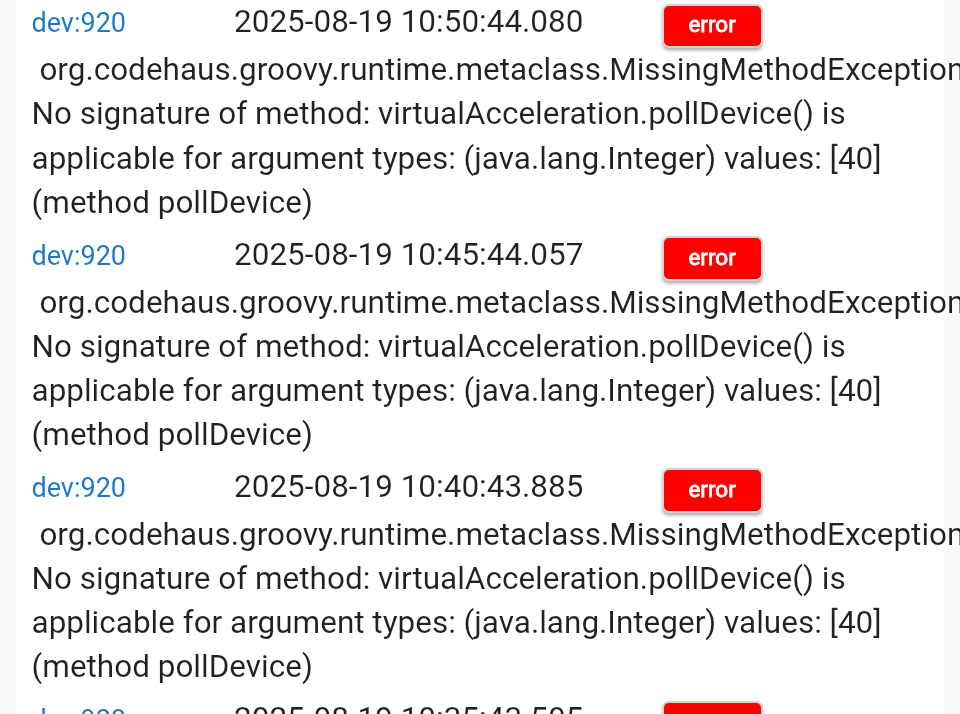
It may be related to unlinking the Hubitat device names.
I would suggest the following:
- Run the YoLink Device Service app on Hubitat:
- Uncheck all of the YoLink devices in the selection box.
- Run the app to completion.
-
In the Devices list on Hubitat, manually delete any Hubitat devices that are related to YoLink devices (there shouldn't be any).
-
Run the HPM app and perform a "Repair" on the YoLink Device Service app
-
REBOOT THE HUBITAT
-
Run the YoLink Device Service app on Hubitat again:
- Check all of the YoLink devices you want to install in the selection box.
- Run the app to completion.
Look at the logs and see if there are any errors and/or warnings from the YoLink Device Service app. Check that the devices are working.
If you want to change the name of the device, open the device definition on Hubitat and edit the "Device name" and/or "Device label" on the "Device Info" page.
If they are still not working:
- Run the YoLink Device Service app on Hubitat again:
- On the first page, set "Enable Debugging" to "True"
- Just keep clicking Next to run the app until you get to the "YoLink™ Device Service Diagnostics" page.
- Set " Enable collection of diagnostic data to local file." to True and click Next.
- Follow the instructions on the " Diagnostic data has been collected" page to send me the collected diagnostics.
1 Like
My Hub reports going offline and online at the specified polling interval in the logs and events for the hub device. I am using the recommended 5 mins. Is this normal? Thanks.
Is this for real?
Their local hub requires an internet connection (and presumably Yolink servers that are reachable and functioning) to onboard new, locally connected devices?
The reason I can't answer is that I already had everything in the internet dependant infrastructure before I got my local hub. Then I made them local, but my experience during the transition gave me the impression that maybe it needed the central servers for initial setup.
This is not a problem for eliminating ongoing dependency, but doesn't solve the problem of things like resale and reuse if they were to go out of business and no longer have the central servers in place.
Sorry I can only give impressions and not definite answers.
1 Like
I have been reading up on the local hub but it seems that some of the comments on their web site indicate that it has to use matter for local control? I don't use matter yet but I suppose I will have to jump into this soon.

