[RELEASE] Android TV Remote: Google TV and Android TV local control

NOTE: Upcoming platform release 2.5.3 will include built-in TV Remote integrations, including for Android/Google TVs. This community integration may continue to be maintained if there is both value and interest.

Android TV Remote is a driver for Google TV and Android TV devices. It talks to the TV directly with the protocol Google's TV remote app uses.

  • Power: on and off. switch follows the power state the TV reports.
  • Keys: sendKey takes any Android key name (HOME, BACK, DPAD_UP, LAST_CHANNEL, TV_INPUT_HDMI_1, ...), with or without the KEYCODE_ prefix, or an Android key code. For the digit keys use KEYCODE_0 to KEYCODE_9: a bare number is a key code.
  • Text (experimental): sendText types into the text field that has focus on the TV.
  • Apps: launchApp opens an app from its deep link, such as https://www.youtube.com. currentApp shows the app in the foreground and updates on every change.
  • Volume: volumeUp, volumeDown, mute, unmute and setVolume.
  • Connection: the driver finds the TV on the network, and follows it to a new IP address. It reconnects on its own after the TV drops the session, goes quiet or loses power. Pairing survives a TV power cut.

Status

NOTE: status changed from BETA to RELEASE 2026/11/07

Several TV sets and set-top boxes have been tested.

Tested TVs and boxes

Tester reports in this topic:

  • Google TV Streamer
  • NVIDIA SHIELD Android TV (four reports)
  • Sony BRAVIA 4K AE3
  • SEI Robotics FRC1 (Eastlink box)
  • TCL Smart TV Pro (Google TV): stays reachable when off only with Energy Modes = Increased
  • onn. 4K Plus Streaming
  • Technicolor EBOX TV

In use, no tester report yet: Hisense 50H5BG

Mock TV profiles (the driver is tested against each before a release): every model above (TCL in both energy modes), plus models built from Home Assistant reports:

  • Chromecast with Google TV
  • Sony BRAVIA 4K VH2
  • TiVo Stream 4K
  • Xiaomi Mi TV Stick
  • Freebox Player POP

Run the Android TV Remote Tester on your TV and post the report here: each new model becomes a profile.

Known limits:

  • Set-top boxes that pass volume to the TV over HDMI-CEC never report a volume level. The volume keys work there, but setVolume can't.
  • Package names (com.google.android.youtube.tv) no longer launch apps: since a Google Play update in August 2026, TVs refuse the market://launch?id= link a package name is sent as. Use a link the app handles; the README lists links for common apps.
  • After a wrong pairing code, press Connect to resume the session.
  • If the TV loses power and comes back with a different IP address, the hub may not find it until the hub restarts (a platform issue, reported). A DHCP reservation rules that out.
  • Some TVs leave the network when turned off, so the driver can't turn them back on; the switch shows off and the driver reconnects once the TV is on. On a TCL Google TV, Settings > System > Power & Energy > Energy Modes = Increased keeps it reachable.

Install

With Hubitat Package Manager: search for Android TV Remote.

By hand: in Drivers Code, choose New Driver, then Import, and paste https://raw.githubusercontent.com/hubitrep/hubitat/refs/heads/main/androidtv/AndroidTVRemote.groovy. Tested on platform versions 2.5.2.x and 2.5.3.x.

Setup

"The TV" here is the device running Android TV or Google TV: with a box such as an NVIDIA Shield or a Chromecast, the box, not the screen it plugs into.

  1. Add a virtual device with the Android TV Remote driver and click Save Preferences, leaving the IP address blank. The driver finds the TV on the network and fills in its address; reload the page after a few seconds to see it. With several TVs, a TV list appears: pick one and save again.
  2. Press Start Pairing. A 6-character code appears on the TV.
  3. Enter it with Submit Pairing Code. The device shows pairing: paired and connects.

If the driver doesn't find the TV, the log says so. The TV must be on and on the same network as the hub; the search doesn't cross VLANs or subnets unless the router repeats mDNS. In that case, enter the TV's IP address instead, and give the TV a fixed address (a DHCP reservation in your router), since the driver can't follow it to a new one without the search. Find TVs searches again.

After a hub restore or migration, the driver asks you to pair again.

Help wanted: test it on your TV

The package includes an optional app, Android TV Remote Tester, that runs the driver through a fixed set of tests and reports where your TV behaves differently from what the driver expects. Install it with HPM (it is an optional component), or import https://raw.githubusercontent.com/hubitrep/hubitat/refs/heads/main/androidtv/tests/AndroidTVRemoteTester.groovy in Apps Code.

  1. Add the app, select your Android TV Remote device and click Run.
  2. The default tests take about 3 minutes and change what is on the screen. They include a Discovery test: whether the TV announces itself on the network, and whether it still does while off.
  3. Optional tests cover a long standby, a wrong pairing code (shows a pairing dialog on the TV) and a power cut (select the smart plug that feeds the TV; the app turns it off for 30 seconds).
  4. Copy the report from the app page into a reply here, with your TV's make and model.

Reports from TVs with Google TV built in (e.g. Hisense), set-top boxes such as Chromecast with Google TV, Philips, Xiaomi and Fire TV-class would help the most.

Documentation: README

Questions, bugs and reports are welcome in this thread.

I go a few errors in the beginning from me not remembering to renew my IP after my reservation. :wink:

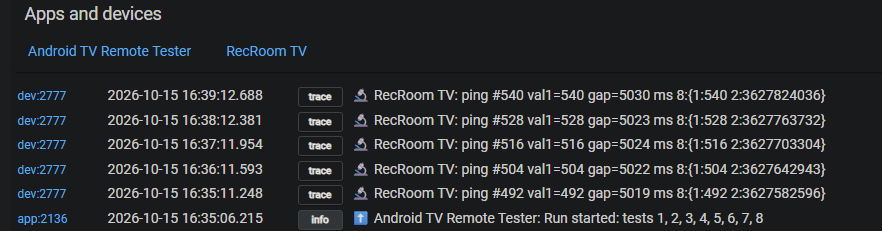
But I did get this after that was done. Could have just been my timing.

image

Interesting. I thought I had fixed that one.

Would you mind installing the test app and run it, then send me the report ?

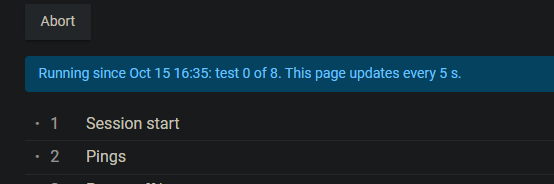
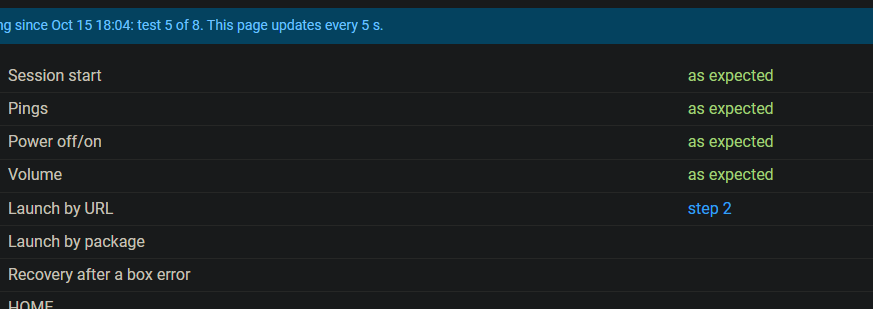
Tests seem to be stuck, no page update here.

Logs seem to be just pinging.

Waiting for Abort to kick in.

How does one kill an app? Task manager isn't here. :wink:

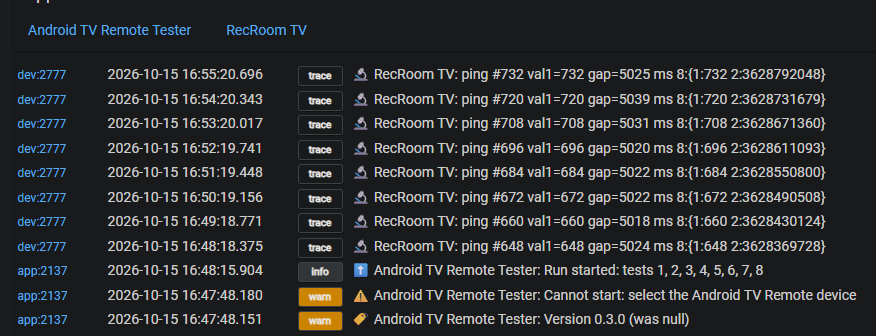
Finally got this and back to pinging.

image

Finally stopped the app and started again.

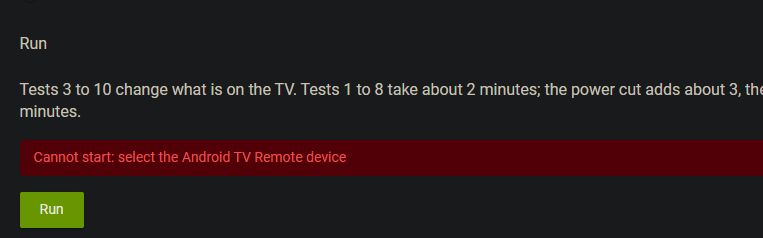
I have to click Run twice, first time I get this error:

Hmmm, did you hit "Done" at least once? (still a bug)

No, I stayed in the app as it 'promised' updates every 5 seconds. :laughing:

I hit Done now on my second attempt; still just pinging like mad.

Aborted worked after Done and going back into the app.

Since I Aborted the app I'm still getting pings so this is just part of the driver Network Status and not the testing?

The logging is a side effect of the first problem you had. You can go into the driver details preference page and turn off trace logging. Sorry about that.

Yeah, I did already.

Pinging continues, in the logs, even with the trace off.

Updates (install with HPM → Update)

0.1.4: driver 0.1.2, tester 0.3.2

Driver

  • Trace logging now records the first ping and unusual gaps only, instead of a line every minute.
  • Right after pairing, the log shows an error java.lang.InterruptedException (method socketStatus). The hub logs it when the pairing connection closes, outside the driver's code. It is harmless: the remote session connects right after.

Tester

  • One run at a time: Run is disabled while a run is in progress, and extra presses are ignored.
  • The TV and plug can't be changed during a run.
  • A run that stops making progress ends as "stalled", and the TV's logging settings and the plug are put back.
  • Removing the app during a run cleans up first.

0.1.3: tester 0.3.1

  • The tester works without pressing Done first. Before, a run started from an app that had never been saved stayed at its first step and left trace logging on.
  • The device you pick is saved right away, so the first Run press works.

If a run started with an earlier version still shows as running, press Abort, then Run.

Testing with update.

Step starts off at step 2 most of the time and gets a bit confused.

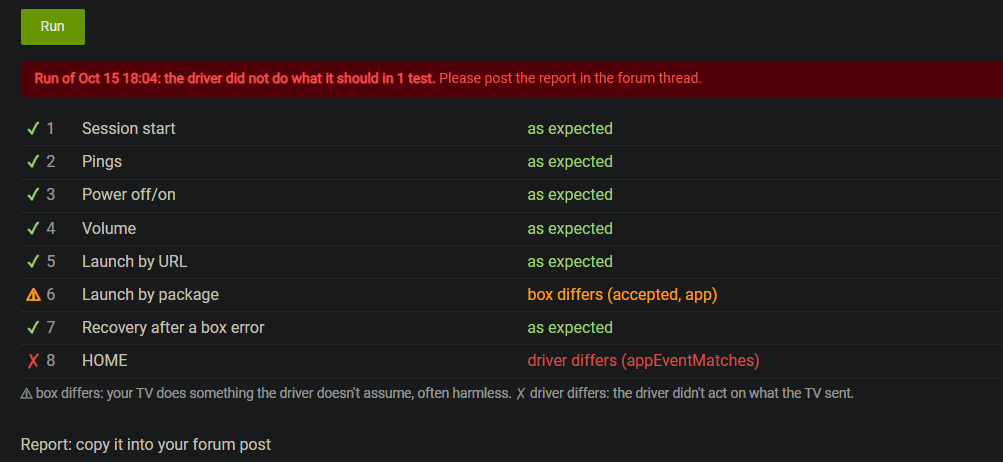
Android TV Remote Tester report
app 0.3.2 · driver 0.1.2 · hub firmware 2.5.2.139
box: Google Google TV Streamer · Android 14 · remote service 7.00.956317615 · features 2687
run: done · slowest log read 124 ms
box differs: the TV does something the driver doesn't assume · driver differs: the driver didn't act on what the TV sent

1. Session start — as expected
   startMs=971 firstMessages=1,2,50,40,20 features=2687 remoteService=com.google.android.tv.remote.service appReported=true vendor=Google androidVersion=14 appEvent=true switchEvent=true powerReported=true model=Google TV Streamer setupFirst=true remoteServiceVersion=7.00.956317615 onlineEvent=true

2. Pings — as expected
   loggedGaps=0 firstPingMs=4992

3. Power off/on — as expected
   sessionKept=true offEvent=true onEvent=true volumeDuringChange=true offReportMs=1378 onReportMs=314

4. Volume — as expected
   volumeReported=true volumeLevel=4 volumeEventMatches=true volumeEvent=true volumeRange=15

5. Launch by URL — as expected
   app=com.google.android.youtube.tv appEventMatches=true launchMs=278 appEvent=com.google.android.youtube.tv accepted=true errorCode=null

6. Launch by package — box differs (accepted, app)
   app=null appEventMatches=true launchMs=41 appEvent=com.google.android.apps.tv.launcherx accepted=false errorCode=7
   trace:
     18:05:29.928 Key 3
     18:05:29.933 tx 10:{1:3 2:3}
     18:05:30.155 rx 20:{1:"b$com.google.android.apps.tv.launcherx"}
     18:05:34.040 Launch market://launch?id=com.google.android.youtube.tv
     18:05:34.044 tx 90:{1:"market://launch?id=com.google.android.youtube.tv"}
     18:05:34.074 rx 3:{1:7 2:{90:{1:"market://launch?id=com.google.android.youtube.tv"}}}
     18:05:34.077 TV rejected 90:{1:"market://launch?id=com.google.android.youtube.tv"} (error 7); reconnecting
     18:05:34.079 This TV can't launch apps by package name; use the app's deep link instead, such as https://www.youtube.com
     18:05:35.878 remote connect returned after 748 ms
     18:05:35.918 rx 1:{1:2687 2:{1:"Google TV Streamer" 2:"Google" 3:1 4:"14" 5:"com.google.android.tv.remote.service" 6:"7.00.956317615"} 3:1}
     18:05:35.921 TV Google Google TV Streamer supports features 2687; using 615
     18:05:35.951 tx 1:{1:615 2:{3:1 4:"1" 5:"atvremote" 6:"1.0.0"}}
     18:05:35.966 rx 2:""
     18:05:35.969 tx 2:{1:615}
     18:05:35.988 rx 50:{1:2369 2:9 3:"Google TV Streamer" 4:1}
     18:05:35.996 rx 40:{1:1}
     18:05:36.005 rx 20:{1:"b$com.google.android.apps.tv.launcherx"}

7. Recovery after a box error — as expected
   boxError=7 reconnectMs=1962 onlineEvent=true nextCommandOk=true

8. HOME — driver differs (appEventMatches)
   homeApp=com.google.android.youtube.tv appChanged=true appEvent=com.google.android.apps.tv.launcherx appEventMatches=false
   trace:
     18:05:53.837 Launch https://www.youtube.com
     18:05:53.842 tx 90:{1:"https://www.youtube.com"}
     18:05:54.007 rx 20:{1:{12:"com.google.android.youtube.tv"}}
     18:05:59.988 Key 3
     18:05:59.991 tx 10:{1:3 2:3}
     18:06:00.198 rx 20:{1:"b$com.google.android.apps.tv.launcherx"}

Awesome, thank you.

0.1.5 (driver 0.1.3, tester 0.3.3)

Driver

  • The trace log shows app changes correctly on TVs whose home app has a long package name, such as the Google TV Streamer (com.google.android.apps.tv.launcherx). Before, it logged them as text, and the tester's HOME test reported "driver differs" even though currentApp was correct.

Tester

  • The HOME test reads the app the TV switched to correctly on those TVs.
  • Progress shows "step n of m". Before, it showed the next step number while waiting after each step, so it often read "step 2".

0.1.6 (driver 0.1.4, tester 0.3.4)

  • After an update through HPM, the driver reconnects to the TV by itself within about 30 s. Before, it lost its connection to the TV and stayed that way, still showing online, until you pressed Connect or saved the device's settings.
  • Package names no longer launch apps: since a Google Play update in August 2026, TVs refuse the market:// link a package name is sent as. Use a link the app handles with launchApp, such as https://www.youtube.com. The driver's README lists links for common apps and how to find others.
  • Tester: "Launch by package" now expects the TV to refuse the link.

Great work, I can finally control my Hisense 50H5BG!

How can I open tizentube?

test: TV rejected 90:{1:"market://launch?id=io.gh.reisxd.tizentube.cobalt"} (error 7); reconnecting

@dnickel 's test results appear to confirm this:

I've got a CCWGTV and today I've put this driver through it's paces and I have to say great work @hubitrep it's very robust and fast. No ADB or developer Wireless debugging, super simple. I'm going to miss my workaround though of using a Harmony home hub, with downgraded developer software, using a virtual Nvidia Shield remote, added to the CCWGT, then using the Harmony API on a Raspberry Pi, then calling commands via webcalls from Hubitat!

Between this and the new AppleTV Community Integration, I am going to be pulling stuff out of Home Assistant left & right!!!!

The TV, or the nVidia Shield TV?

Good point, it should read "The Google TV device". Will fix, thanks.

You might have guessed from my recent posts that my setup is an Android TV box hooked up to a Samsung TV :rofl:

Shield TV test. Samsung TV, use Harmony hub/remote to control the Shield and attached soundbar and woofer.

Android TV Remote Tester report
app 0.3.4 · driver 0.1.4 · hub firmware 2.5.2.139
box: NVIDIA SHIELD Android TV · Android 11 · remote service 7.00.956317615 · features 639
run: done · slowest log read 1309 ms
box differs: the TV does something the driver doesn't assume · driver differs: the driver didn't act on what the TV sent

1. Session start — as expected
   startMs=813 firstMessages=1,2,40,50,20 features=639 remoteService=com.google.android.tv.remote.service appReported=true vendor=NVIDIA androidVersion=11 appEvent=true switchEvent=true powerReported=true model=SHIELD Android TV setupFirst=true remoteServiceVersion=7.00.956317615 onlineEvent=true
   trace:
     21:51:22.768 remote connect returned after 714 ms
     21:51:22.801 rx 1:{1:639 2:{1:"SHIELD Android TV" 2:"NVIDIA" 3:1 4:"11" 5:"com.google.android.tv.remote.service" 6:"7.00.956317615"} 3:1}
     21:51:22.805 TV NVIDIA SHIELD Android TV supports features 639; using 615
     21:51:22.811 tx 1:{1:615 2:{3:1 4:"1" 5:"atvremote" 6:"1.0.0"}}
     21:51:22.828 rx 2:""
     21:51:22.831 tx 2:{1:615}
     21:51:22.841 rx 40:{1:1}
     21:51:22.853 rx 50:{1:111 2:9 3:"SHIELD Android TV" 4:1}
     21:51:22.860 rx 20:{1:{12:"com.google.android.tvlauncher"}}

2. Pings — as expected
   loggedGaps=0 firstPingMs=5013

3. Power off/on — as expected
   volumeEventOk=true changeVolumeRange=15 offEvent=true volumeEvent=false longestPingGapMs=null sessionKept=true volumeTrusted=false onEvent=true volumeDuringChange=true pingGaps=0 playerModel=SHIELD Android TV offReportMs=2518 changeVolumeLevel=12 onReportMs=298

4. Volume — box differs (volumeReported)
   volumeReported=false volumeLevel=null volumeEventMatches=true playerModel=null volumeEvent=false volumeRange=null
   trace:
     21:52:11.297 Key 24
     21:52:11.300 tx 10:{1:24 2:3}
     21:52:13.327 Key 25
     21:52:13.330 tx 10:{1:25 2:3}
     21:52:15.355 Key 164
     21:52:15.359 tx 10:{1:164 2:3}
     21:52:17.380 Key 164
     21:52:17.384 tx 10:{1:164 2:3}

5. Launch by URL — as expected
   app=com.google.android.youtube.tv appEventMatches=true launchMs=1019 appEvent=com.google.android.youtube.tv accepted=true errorCode=null

6. Launch by package — as expected
   app=com.google.android.tvlauncher appEventMatches=true launchMs=151 appEvent=com.google.android.tvlauncher accepted=false errorCode=7

7. Recovery after a box error — as expected
   boxError=7 reconnectMs=2058 onlineEvent=true nextCommandOk=true

8. HOME — as expected
   appEventMatches=true homeApp=com.google.android.tvlauncher appEvent=com.google.android.tvlauncher appChanged=true

9. Long standby — box differs (pingGaps)
   drops=0 pingGaps=2 longestPingGapMs=7599 onWorked=true onEvent=true
   trace:
     21:53:20.512 Key 26
     21:53:20.515 tx 10:{1:26 2:3}
     21:53:23.204 rx 50:{1:2 2:2 3:"SHIELD Android TV" 4:2 5:0 6:15 7:12 8:0}
     21:53:23.207 volume 12/15 not in answer to a volume key; ignored
     21:53:23.647 rx 40:{1:0}
     21:53:25.536 ping #5 val1=5 gap=7126 ms 8:{1:5 2:292254885}
     21:55:28.711 Key 26
     21:55:28.714 tx 10:{1:26 2:3}
     21:55:29.027 rx 40:{1:1}
     21:55:29.166 rx 50:{1:130 2:9 3:"SHIELD Android TV" 4:1}
     21:55:33.741 ping #30 val1=30 gap=7599 ms 8:{1:30 2:292383085}