[RELEASE] Abode Alarm system driver 2024

Thanks - I can confirm the same. In my testing I thought I saw a ping coming from the server and wrongly assumed EIO=4. A red herring.

So I have still been unable to understand my core issue. I had the driver installed and working on hub1 for some time, then it one day stopped working. Initially hub rebooting cleared it but now it won't work at all. Moved it to hub2 and same pattern - working, and then didn't. So it is now installed on hub3 and working for now.

On the hubs that it doesn't work a reboot doesn't clear it, changing device driver name and back again doesn't work, and deleting and reinstalling no go.

The driver connects to the WebSocket successfully, but the sendPing job scheduled via runInMillis(state.webSocketPingInterval, sendPing) at namespace connect (parse case 40) never fires. Without the ping, the server disconnects after 85 seconds . The connection then cycles repeatedly. On the working hub, the identical driver works correctly — sendPing appears in the scheduled jobs with a future nextRun time, checkSocketTimeout has a populated prevRunTime, and the connection stays alive.

Scratching my head right now

I’ve been getting the below error message associated with Abode. What does this mean?

image

ETA: Looks like the above message appears in the log every time
a) the Abode sensor that measures humidity, temperature and lux sends an update to the hub
and
b) most times, but NOT every time, that one specific motion sensor is triggered active

Abode automations linked to Hubitat stopped working this evening. Checking the Abode parent device, I can confirm it still shows in Abode as "Logged In." I see the following:
In Events - What does "API Call" mean??image

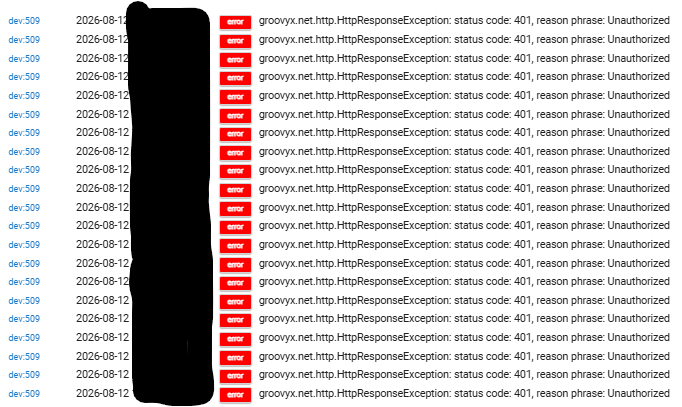
Then in logs, I see all the below, yet NOTHING has changed in my Hubitat rule! I'm fairly certain the below are triggers that should have run automations...

What should I do to fix this??

The above noted peculiar behavior continued into today, with my connected automations not working so I had to experiment.

During this entire time, the parent device Commands Page, in the Current States section, for the "IsLoggedIn" variable, reported TRUE. However, I could not change the system status from Hubitat. Also, the Events that usually show in the events tab (such as motion sensor trigger, even when the system is in standby mode) were not showing on the Events page.

So on the same parent device Commands page, I clicked "Refresh". That resulted in suddenly allowing me to change the system status again, as well as the events now appearing on the Events page, so I thought the issue was resolved.

However, now what I see in the logs is repeated of the following line:
error java.lang.ArrayIndexOutOfBoundsException

These may have been there before the problem started 14 hours ago with the API call (that I did not initiate but maybe the Abode hub did???)

What does this error messages mean and how do I resolve it?

One other data point I noticed:
If I go to the Abode child devices on the Hubitat device list, their Hubitat names are all "Abode: Name_of_Device_in_Abode", so Hubitat has given each device a prefix of "Abode:" which is fine.

However, if I go to the parent device Events page, the first part of the Value and Event field for each event is the device, and in this list the device is usually as "Name_of_Device_in_Abode". HOWEVER, there are random duplicate entries for various devices, that do not trigger consistently, that show on the event log as "Abode: Name_of_Device_in_Abode." Whenever it is on the event log with the prefix "Abode:" it is a duplicate. Could this be the source of the error message and if so how is it supposed to be resolved?

I don’t use Abode so not personally familiar with these drivers, but in general API means application programming interface, which is what allows unrelated systems to interact with each other.

So Abode publishes information about how their API works, which Hubitat developers can use to create an integration with Hubitat such that the hub can now communicate and exchange useful information with your Abode account and the devices associated with it.

Every time your hub sends or receives information to/from Abode’s servers, it’s “making an API call.”

If you are getting errors related to API calls, it’s possible something changed in Abode’s API and these drivers will need an update, or perhaps something is otherwise wrong with their servers that’s affecting their API functionality.

So I was seeing the same issue in logs "error java.lang.ArrayIndexOutOfBoundsException". If you ever see a 401/Unauthorized in logs. You should Logout/Login.

I did a Logout/Login and the OutOfBounds on a refresh went away. Even if it says isLogged in True... Abode sometimes closes the event socket, so even if you are logged in the event socket is shutdown and things won't work.

Under the state variables, there is the webSocketConnected which should be true. It does show up (sometimes) in the Event logs too.

But try a Logout/Login to refresh it all. That's the first thing you'd want to try.

@x86cpu Thanks!

  1. I did the Logout/Login. Got another "out of Bounds" less than 5 minutes after the event socket reconnected....What does the "out of Bounds" mean?
  2. Recently I added a new Abode device. In checking upthread, my understanding of the correct procedure is to go to the Preferences tab, enable trace logging, and then hit save. I just did that. Perhaps not doing this right after the device was added was causing the issue?
  3. What does the 401/Unauthorized in the Logs mean?

401 Unauthorized, means bad user or password. OR .. Abode is having issues. The new device should show up like you did. Even just a "save" in prefs should discover the new device. The trace/debug is only needed if you want to see the entire list of what was discovered on the Abode side.

I'm not sure where the Out of Bounds is coming from. If you enable trace/debug, there should be lines around that message that indicate what it is doing at the time. Is it a new device that's not supported yet? (or Abode is changing things too).

Abode does not publish the API, so hard to know if they start to change things drastically this entire integration may break.

My response above may have inadvertently implied that all APIs are published.

Some APIs are not intended for usage by any external system. They exist, for example, to allow an official mobile app to interact with the service through the internet.

APIs can also be reverse-engineered, as it appears this one may have been. Unfortunately that can increase the likelihood of breaking changes without warning.

Thanks! That is very helpful info.

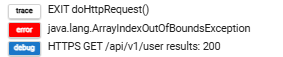
I've enabled debug and trace logging and get the following around the out of bounds error:

image
where the blacked out portion is the identifier for a temp/humid/lux sensor. I've had errors on this device in the past; (see June 16 post above)

image

The errors were driving me nuts, so I asked Chat GPT for a fix. It gave me the below edits to the parent driver, which I've implemented. I'll post back to advise if it works.

Find this section in the parent driver:

// LM (Multi Sensor)

if ( reply[0] != null && getChildDevice(reply[0]['id']) != null && reply[0]['type'] == 'LM' ) {

childDevice=getChildDevice(reply[0]['id'])

Inside that section, there are three sensor blocks: humidity, temperature, and lux.

1. Replace the entire // humidity: block

Find:

// humidity: humidity:20 %

if ( reply[0]['statuses']['humidity'] != null ) {

if (logTrace) log.trace "humidity: "+reply[0]['statuses']['humidity']

tmp=reply[0]['statuses']['humidity'].toString()

(a,b) = reply[0]['statuses']['humidity'].toString().split(' ')

if ( a.toInteger() >= 0 && b == "%" ) {

  childDevice.sendEvent(name: "humidity", value: a.toInteger(), unit: '% RH', descriptionText: "${childDevice.displayName} humidity is "+ a + "%")

  alert_value = reply\[0\]\['name'\] + "humidity =" + a

  message = reply\[0\]\['name'\] + " humidity " + a + "%"

  sendEnabledEvents(alert_value, message, "LM")

}

}

Replace it with:

// humidity: humidity:20 %

if (reply[0]['statuses']['humidity'] != null) {

if (logTrace) log.trace "humidity: " + reply[0]['statuses']['humidity']

def humidityParts = reply[0]['statuses']['humidity'].toString().split(' ')

if (humidityParts.size() >= 2) {

  a = humidityParts\[0\]

  b = humidityParts\[1\]

  if (a.isInteger() && a.toInteger() >= 0 && b == "%") {

     childDevice.sendEvent(name: "humidity", value: a.toInteger(), unit: '% RH', descriptionText: "${childDevice.displayName} humidity is " + a + "%")

     alert_value = reply\[0\]\['name'\] + "humidity =" + a

     message = reply\[0\]\['name'\] + " humidity " + a + "%"

     sendEnabledEvents(alert_value, message, "LM")

  }

}

}

2. Replace the entire // lux: block

Find:

// lux:  lux:0 lx

if ( reply[0]['statuses']['lux'] != null ) {

if (logTrace) log.trace "lux: "+reply[0]['statuses']['lux']

(a,b) = reply[0]['statuses']['lux'].toString().split(' ')

if ( a.toInteger() >= 0 && b == 'lx' ) {

  childDevice.sendEvent(name: "illuminance", value: a, unit: 'lx', descriptionText: "${childDevice.displayName} lux is "+ a)

  alert_value = reply\[0\]\['name'\] + "lux =" + a

  message = reply\[0\]\['name'\] + " lux " + a

  sendEnabledEvents(alert_value, message, "LM")

}

}

Replace it with:

// lux:  lux:0 lx

if (reply[0]['statuses']['lux'] != null) {

if (logTrace) log.trace "lux: " + reply[0]['statuses']['lux']

def luxParts = reply[0]['statuses']['lux'].toString().split(' ')

if (luxParts.size() >= 2) {

  a = luxParts\[0\]

  b = luxParts\[1\]

  if (a.isInteger() && a.toInteger() >= 0 && b == 'lx') {

     childDevice.sendEvent(name: "illuminance", value: a.toInteger(), unit: 'lx', descriptionText: "${childDevice.displayName} lux is " + a)

     alert_value = reply\[0\]\['name'\] + "lux =" + a

     message = reply\[0\]\['name'\] + " lux " + a

     sendEnabledEvents(alert_value, message, "LM")

  }

}

}

Do not change the temperature block. The two confirmed unsafe array assignments are the humidity and lux ones.


Ok... I adjusted the package now. I added the Leak sensor too (i do not have, so cannot test)

Having some odd behavior with my Hubitat / Abode integration. In troubleshooting, I noticed that a device I retired is still showing up in Hubitat, even though it was deleted from Abode, and even though I have since gone through the process of, on the parent device, enabling debug & trace logging, save and refresh.

If I retire a device, do I just delete it from Abode ? Want to make sure that won't cause a new problem...

In trying to troubleshoot the odd behaviour of my Abode / Hubitat integration, I figured out that none of the door sensors have reported activity in Hubitat since 9/6/26 (ie nothing in the logs, and nothing in the events), despite being opened and closed multiple times since 9/6/26. Hubitat is definitely still connected to Abode, as the automations connected to Abode's mode, as well as the automations associated with the Abode motion sensors both still work.

  1. Is anyone else having this issue? (@x86cpu?)
  2. What are the suggestions for resolving?

Set your abode hub logging to debug in the hubitat driver. If you are like me there will be errors and your will see messages that the contacts are getting to hubitat. But the driver issues are not allowing device updates. Ideally the driver needs to be updated as is has been left behind by updates elsewhere.

Ok... Thanks for alerting me on this. I checked and mine too has not updated for contacts since about 9/6. I will need to investigate to see if I can get them working again.

I hope to be able to work on this soon. Poor timing too as I broke my ankle requiring surgery. However I hope to.be able to debug and use a laptop. Will just e slightly harder as I cannot easily open/close doors anymore to test.

This driver is "not dead yet"....

THANK YOU!!

And best wishes for a speedy recovery - I've been where you are - the break, the subsequent surgery, etc. PT after the surgery, as soon as the doc approves, did wonders - highly recomend.

Let me know if there is something I can do to help with the driver.

In the meantime - do you happen to know offhand the proper protocol for deleting retired devices?

I am in no way an expert in debugging stuff (also 9/6 is when my contacts stopped reporting), but I changed line 162 in the driver to "Open" and "Opened", and that seemed to work. Originally the bracketed option was just [Opened].

if ( reply[cnt]['type'] == 'Door Contact' && reply[cnt]['status'] in ['Open', 'Opened'] ) childDevice.sendEvent(name: "contact", value: "open", descriptionText: "${childDevice.displayName} is open")

Thanks. Made the edit to the main Abode driver and saved, then refreshed the main Abode driver. Still do not get anything in the child device event logs, although it now appears in the main driver events logs....

Also noticed ALOT of errors that mostly (but not all) coincide with the Humidity, Temperature and Lux Sensor reporting changes, and all state this:
"java.lang.ArrayIndexOutOfBoundsException: Index 1 out of bounds for length 1"

Do you have "Abode Contact Sensor" or "Door Contact" in the lines around line 718ish? Or just Panic Alarm, Glass, Smoke, Water Sensor, Occupancy Sensor?