I have tried for the last 3 days and I get the same thing every time. I have had this setup for the last 3 years with no issue. I have also tried to delete the driver and reinstall both drivers too.
Here are my logs
2026-09-21 12:15:42.399 am
error
HTTPS GET /api/v1/user result: 403 Invalid API Key
**dev:416**2026-09-21 12:15:40.380 am
error
HTTPS GET /api/v1/user result: 403 Invalid API Key
**dev:416**2026-09-21 12:15:29.721 am
error
java.lang.SecurityException: Subscript property 'metaClass' is not allowed from app or driver code on line 357 (method updated)
C7 Hub on
Abode integration not authenticating
When I use my abode credentials I get a "403 Invalid API Key"
I know my credentials are correct because I get an email everytime i try to login.
Heres what the logs show
2026-09-21 12:15:42.399 am
error
HTTPS GET /api/v1/user result: 403 Invalid API Key
**dev:416**2026-09-21 12:15:40.380 am
error
HTTPS GET /api/v1/user result: 403 Invalid API Key
**dev:416**2026-09-21 12:15:29.721 am
error
java.lang.SecurityException: Subscript property 'metaClass' is not allowed from app or driver code on line 357 (method updated)
I've tried going back to an older firmware but still get the same issue.
I don't own an Abode but the dialog you provide describes the error '403 Invalid API Key'. I'm guessing you need the key to login to Abode and yours is damaged somehow or missing. API keys may be additional to login. It depends on Abode. What do they want to use their server?
Just a username and password, I'll try to reply to the abode driver group and see if they can help
I've been having a couple errors and the drive not working correctly for about a week I believe. Has anyone else been seeing the errors below?
java.lang.ArrayIndexOutOfBoundsException: Index 1 out of bounds for length 1
I was also having issues with the timeline updating and arming home. Disarming and setting away was still working. Was also receiving this message.
java.lang.SecurityException: Subscript property 'metaClass' is not allowed from app or driver code on line 451 (method refresh)
I updated line 451 from:
if (error.metaClass.respondsTo(error, 'response')) {
To:
if (error?.hasProperty('response') && error?.response != null) {
That seemed to have the error code go away and the system worked as expected. This update was recommended by Gemini as I'm not an expert in coding. So not sure if this is an actual fix but at least got it working temporarily.
I'm suddently getting dozens of these a day:

Anyone know what this is all about and more importantly, how to fix it?
Answering my own question: The above issue of the "OutofBoundsException: Index 1 out of bound for length 1" resolved itself after I updated to the newest Abode driver update via HPM.
HOWEVER, doing that has now created the same Error @dmorehead1988 reported, every 10 or 20 minutes:
java.lang.SecurityException: Subscript property 'metaClass' is not allowed from app or driver code on line 451 (method parse)
Has anyone who understands this reviewed @dmorehead1988 's Gemini recommended change for line 451, and if so does it make sense and seem safe / unlikely to create new issues?
@dmorehead1988 Has your Gemini recommended fix worked and not created any other errors?
Did you ever get this resolved?
I'm having the same issue - it also happened after I tried to update...
FWIW: I've tried refreshing, logging in again, turning MFA off and on, shutting down the hub and restarting, etc. I was also getting the "A new device has signed into your account" emails, but now Abode won't even let me log in via their website - says something about "we are having trouble keeping up with your changes..." but I'm not changing anything...
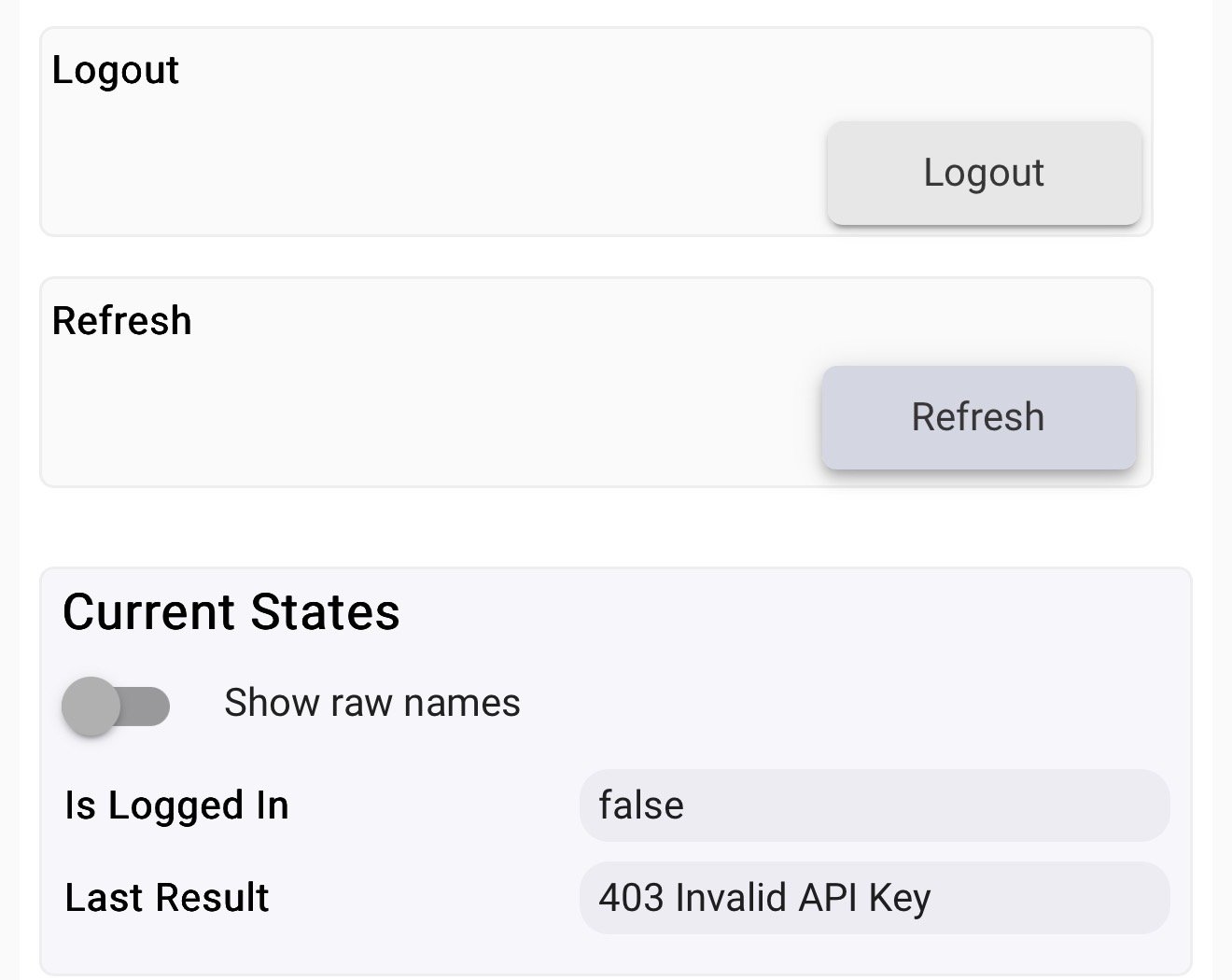
Update: Have waited 18 hours so the "having trouble keeping up with your changes" message went away, but I still cannot connect Hubitat to Abode - I get the 403 Invalid API Key as the "Last Result"

In the log, I get the below errors. I truncated the last entry since it has ALOT of personal data

@x86cpu or @croweflight Can either of you help? I really need to get this connected again...
I'm gonna have to investigate some of this. I'm seeing out of bounds too ... And most my contacts are not updating. I've just been very busy with life lately.
Appreciate it! Let me know if I can help with any data.
Ok.... I had to "throw in the towel" ... not really. But I used Claude to track down ALOT of what is going on. Also to try to add some more features to it as well as more debug/logging for other events that have not shown yet. But confident that the 403 API error will be fixed as well as my issue of contacts not showing correctly either. And the out of bounds being fixed.
So... after my testing .. lots of fixes incoming.
2.1.0 is up on GitHub / HPM.
Two things that were actually broken:
Child devices weren't updating. Abode started sticking the device name on the front of the timeline event_type, so "Opened" became "Garage Inside Door Opened" and all the string matches in the driver stopped matching. Contacts, smoke, water, doorbell - none of them changed state. Motion was fine, it comes in on a different path. Now it uses event_name_v2, falls back to the old way if that's missing, and logs anything it doesn't recognize instead of just dropping it.
Cookie parsing blew up. The Expires date in a Set-Cookie has a comma in it, the split choked, and every cookie after that got dropped. If SESSION was one of them you'd start getting 403 Invalid API Key on everything after.
Other stuff:
- Direct Arm is no longer a requirement. The README used to tell you that you had to set Arm Fault Type to Direct Arm, because the driver couldn't answer the fault prompt. It can now, so set it however you want.
- Confirm Arm. Abode kicks back a 615 when you arm with something faulted - same thing the app shows you with the list of open faults and continue/cancel - and the driver sends the confirm. Default is on, so it behaves the way Direct Arm always did. Pref to turn it off if you'd rather it didn't arm past a fault on its own.
- Automation keeps arming, and you still have to confirm by hand if you've got that set in the app.
- Faults, bypass, tamper, low battery now show up on the child devices. New armedWithFaults attribute.
- Smoke child could get stuck on "detected" - the clear never got scheduled.
- Doorbell as a pushable button. Not tested, I don't have one.
- Bunch of normal events that were logging as errors aren't anymore.
Heads up on rate limiting. If you cycle login/logout a lot - messing with preferences, testing, whatever - Abode will eventually start telling you "we are having trouble keeping up with your changes". That's a rate limit, not the driver falling over. Someone reported it earlier in this thread and I hit it once myself, didn't grab logs. I left Abode alone for a while and it sorted itself out. So if things go sideways after a bunch of saving and re-saving, back off before you assume it's broken.
Still need logs from people. Glass, smoke, water, doorbell, panic - I wrote those off the event data, not off actually setting one off. I've got glass and smoke here but no good way to trigger them, and no water sensor or doorbell at all. If you can set any of those off, turn trace logging on, do it, and paste what you get. Trace shuts itself off after 30 min so flip it on right before.
THANK YOU. Truly very grateful for this. VERY. Thank you.
Going to install now!
THANK YOU!
-
IT WORKS AGAIN!!! This is the overwhelming issues, so that is terrific. THANK YOU!
-
I'll help get logs to the extent I can... I can offer the following:
a. Glass/shock - I'm able to trigger the GB by seating a battery into my Ryobi vac when the system is armed to detect glass break (don't ask me how I know). I think the way to do this is to turn all the sirens to silent, turn on trace logging, trigger the sensor which should set the system into alarm, then use the keypad to cancel the alarm within 30 less than seconds so the monitoring center does not call. Have I missed anything?
b. Smoke - not sure how to trigger this
c. Water - I should be able to trigger this.
d. Doorbell - I can trigger the button on this tomorrow. Mine is currently charging. You are smart to not have one of these as it does not work well and constantly needs charging.
e. Panic - I have one of these. Triggering is easy; I need to look into how to preemptively cancel the monitoring company from sending help before I test. -
Thank you so much for including the low battery warnings in this update. Much appreciated!
You should be able to put your abode system in test mode. That should prevent the call center calling. I am not sure about the panic button though.
Any logs would be great... preferably txt vs images.
Also one other thing added... Most sensitive information in logs is in now scrubbed, and only should show [retracted] which will help sharing logs now.
Did not know about the test mode! Thank you.
Turns out it does not prevent the monitoring center from calling. There is a big message stating that my emergency contacts will be called and should know that the system is in test mode. Makes me wonder that the point of test mode is, but I guess it's to confirm they actually do make the call. Since a call is involved I'll have to do this during the daytime...
@x86cpu Sending you PM's.
ETA: Sent you glass break, water and doorbell logs.
Have not yet tested the panic. Will try to do it later this weekend and send.
I've been thinking about how to test the smoke listener. It responds to a T3 sound. Perhaps someone can find a T3 sound on the internet, turn on trace logging, then play that T3 sound REALLY loud and close to the Abode smoke listener. Theoretically, that should trigger it, right? Anyone else up for trying this? I'd have to wait until I was the only one in the house, as the HAF of me doing the above would be VERY low...