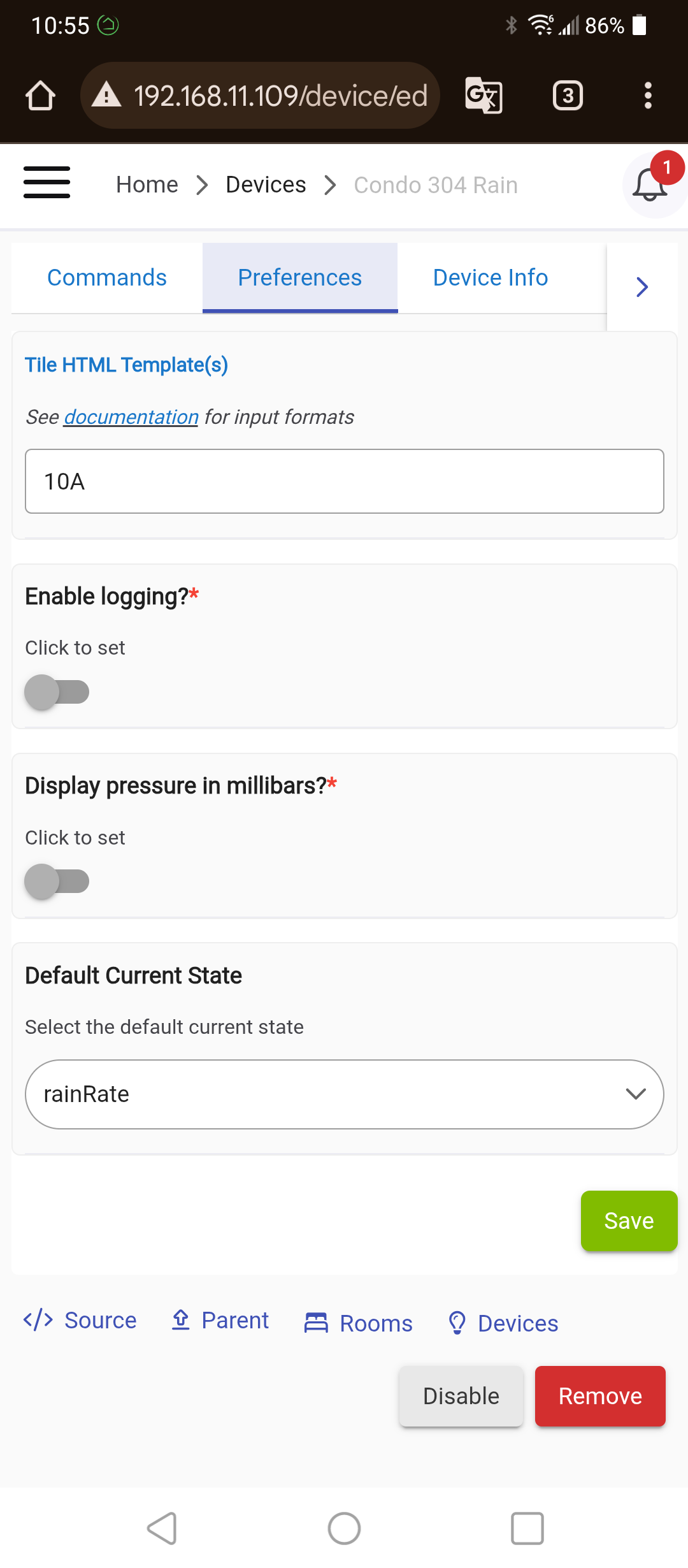
That's just how the driver has been developed. The preference settings are all part of what goes in to defining the driver, and in this case it was decided to include a logging level setting in the gateway device driver, but not one per sensor device. This makes sense in one respect, as a lot of the work is being done in the gateway device to interpret the single data feed that includes all the sensor data. I could maybe see some benefit to indicating if you want logging for just one sensor, particularly one's with calculations being done on top of the raw sensor values, but the benefit would be minimal IMHO.
So there is nothing wrong, it's just how it was done in this case.
pretty hard to do this without having the device and i really have no pressing need for it or to spend 100 bucks.. maybe to monitor the snow pack in upper mich. (when i get there this summer) anyway if someone wants to send me one i will implement the code for it but otherwise you are on your own...
Impressive amount of detail on the HA request. I am the same as @kahn-hubitat I don't have one myself and no pressing need for one. At a glance the trace log with the data feed may be enough, but I'm not sure...
I’ve been using Ecowitt temperature sensors that I’ve shared with the Alexa integration via Hubitat for quite some time now. However, I recently discovered that the Echos no longer have the ability to pull in the temperatures. When I check the Alexa app, the temperatures are now displayed as unavailable. Is this issue affecting anyone else? Interestingly, other devices that I’ve shared via Hubitat are functioning correctly. The temperatures are being pulled into their respective sensors on the Hubitat side, but for some reason, they aren’t being transmitted to Amazon.
All I can offer is the useless "I have not seen this myself".... Admittedly I don't use Alexa, so can only hope others that do can comment on their experience, positive or other. The best I could offer as an interim solution could be to try setting up a virtual temperature sensor that mirrors the reading of the EcoWitt sensor you want exposed in Alexa. Not advocating this as a permanent solution, just something to (hopefully) get you by while we work out what's happening.
I created a virtual temperature sensor, manually set the temp to 55 and shared it with Alexa via the Hubitat skill. The new sensor was discovered, but this does not work as well. At this point I don't know if the problem is with Amazon or Hubitat.
I have just started exploring Ecowitt for a rain sensing solution and ended up here to check HE integration.
I have various temp/humidity sensors all coming from different sensor types/drivers. Tuya based sensors, Tasmota based, etc. They all report correctly to Alexa, humidity is not supported yet.
I ran into something similar.
I would suggest deselecting the sensors from the HE Alexa skill app, then checking the Amazon Alexa app devices to make sure they have been removed. Then reselect the sensors in the HE Alexa skill app, then back to the Amazon Alexa app to make sure they have been found properly. You may even want to edit the found device in the Amazon Alexa app, assign a room, rename the sensor, etc. Then check the voice response.
Note: You can rename the device in Amazon Alexa app to something different then What it is named in HE. In case anyone didn't know.
What I suspect was the HE skill and Amazon Alexa got out of sync.
Thanks. I had removed one then added it back in, but that didn't resolve. I'll try again by removing everything and confirming their removal in Amazon by rediscovering devices then adding them back in. Its been frustrating as I do tend to check temps in rooms via Alexa more than I thought and having to go to the Ecowitt site to confirm has been a PITA.
I tried these steps and still not working. It should also be noted that I have Honeywell TCC thermostats and using them only connected to Alexa app (not via Hubitat) and Alexa can't tell me the temps on them but oddly can turn on heat, set temp values. I think that this is a bigger issue with my account for some reason spontaneously not being able to tell me the temperature value on any thermostat either Hubitat or Honeywell ... very strange.
Depending on your setup @Tim-in-Ca and willingness to try this suggestion, another option might be to post your issue under it's own new topic. Not that I am saying it is not somehow related to this driver, more that a fresh topic may get more visibility by others on the Community who may be able to offer some advice. Happy to still help where I can, but I don't own any Amazon devices, so will be difficult for me to troubleshoot this myself.
Thanks for the reply. Further review of the issue is showing that no device details or controls are accessible using the Alexa app are working. It’s not restricted to Hubitat devices only. Oddly, Voice control of devices is working (except for temps). This appears to be an issue on the Amazon side, I had support submit a ticket to the engineering team, but I fear that they will tell me to remove all devices from my Amazon account and add them back which will be a complete PITA. I’ll create a new thread if anything points to Hubitat integration issue.
Im stumped and brain is fried. I just realized my Ecowitt hub hasn't been talking to hubitat since Mid February. Does anyone have a suggestion where I start looking to figure what happened?
Check the Ecowitt app to see if the IP address it’s sending data to, matches your hub IP address. If you don’t have an IP address reserved for your hub, it might have picked up at New address at some point.