@snell This is one of the best drivers & forum support I have used so far!!
This is not to take away from the drivers created by other users btw.
Thank you so much for the time and effort you have put into creating this driver, really appreciated as I can see by other users with Hubitat.
Does anyone using this driver have any examples of the rules they are using at present or Dashboard examples please?
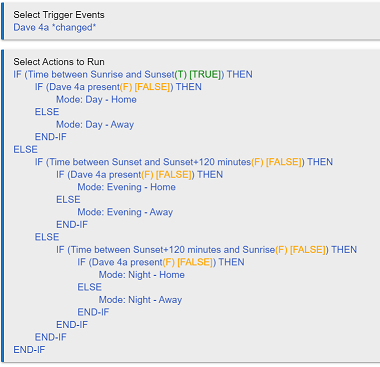
Here is a Rule example:
1 Like
I seem to have solved this - without any additional Login calls. My change -- add at line 193 in updated:
def DelaySecond = (Second + 5) % 60
I then updated each schedule call (except Login) to use DelaySecond, so that they run 5s after Login. With this I was able to remove the schedule calls within Login. Has been 24hrs without hitting the issue
1 Like
Thanks for your work on this. I have an 8-port UNIFI PoE switch and some UAP as well that have been collecting dust after a network update last year. You're welcome to them if you'd cover the shipping cost. It looks like we can't PM on this forum though, so not sure how to send details.
If you have just recently joined the forum prevents private messaging (to minimize spam and such). Cannot remember if there is a time/posts or other requirement to them becoming possible.
I am definitely interested, if only to make a separate "trial zone". Not that my wife will be happy about that. 
It can wait until you have messaging though.
Could ask @bobbyD for a lifting of the restriction
Thank you for @snell for the example rule and sorry about the delay, haven't had a chance to get back to the forums.
Love your work!!
1 Like
No worries. Everybody gets busy and things have to be prioritized. Sure happens to me also.
@snell is there something I can do to remove alarms (and other attributes) that I simply do not need? I am noticing that they are starting to build up and cluttering my database.
There is an Archive Alarms command that should clear them out.
but if I have no need for the attribute at all?
Ah... Um... The quickest method at the moment would be to comment out the attribute and the line that populates it. Lines 146 and 264 respectively.
It would be possible to make a preference that enables/disables populating it... That would have to be a future version if there is interest.
1 Like
Thank you! I hate messing with other peoples stuff. The way you told me is great cause it preserves it.
Yes, but it will not last if I put out an update and could change then as well (the line numbers WILL change). So putting in a preference to disable polling alarms might not be a bad idea.
I only bring it up because in the process of doing this with multiple things in my database I have managed to go from 78Mb to 37Mb.
To be clear, it was not at all just from just yours.
Updated Version(s):
- UnifiAPI.groovy = 0.2.9
Change(s):
- Added a preference to be able to enable/disable showing the Alarms automatically (it enables/disables whether the CheckAlarms is run during a refresh). This will not prevent someone from being able to run the Check Alarms command (since you are manually choosing to do that). The feature defaults to true, meaning it will continue to be part of the refresh data unless you disable it.
- Changed the 5 second delay after a login/Save Preferences to similar to @dkilgore90's versus the paused execution method I had. Did not make a difference for mine but maybe it will help others.
2 Likes
@snell Perhaps I am doing something wrong here. I am attempting to make a rule to block the kid's TVs.
Blocking does not seem to be working. I am using it as a custom action and I have quadruple checked the mac addresses.
I am also getting I correct status message in the device of block and unblock.
On further testing, I can successfully block and unblock from the device page directly. Maybe this is nothing to do with the device but when I run the rule I made I get this error in logs.
2021-03-23 09:34:33.833 am errorjava.lang.NullPointerException: null on line 6877 (allHandler)
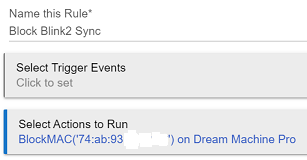
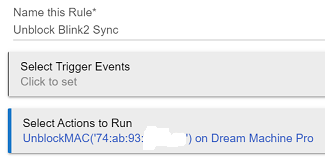
I was able to successfully perform both (using the Run Actions button, since I had no Trigger Events set). Below is what I had for my Rules followed by the log results (I had to redo it a couple time because presence checks kept getting in the way in the logs...). I also hid parts of the MAC, auth token, etc...
Block Rule:
Unblock Rule:
Log results:


