That stinks. I watched a video earlier today about someone that got a Powerwall and while he was happy overall he was very annoyed about the overall install process that had multiple delays and things that should have been dealt with but weren't and added additional delays while those parts (or added work) needed to be done.
Honestly, my install was Frankly a clusterf^&!.
The sales guy said one thing, the Solar Engineer told the sales guy another thing who told me a third thing, the install team then completely changed everything - "the design is a guideline". Oh and the Sales Guy, Solar Engineer, and Install Team are all effectively different pieces of Tesla, Solar City, and who knows what other companies Tesla sucked up.
I had installed expensive new siding on my house not long before my install, and anticipated everything to be put into the garage (with the batteries), and ended up with an array of electrical boxes on the back of my house that are unsightly, and irritating, along with electrical conduit all over the damned place.
What I really wanted was Solar on a ground mount, all the switches and electrical boxes in the garage with the batteries, hard wired ethernet (which I provided and they didn't use), and no ugliness on the outside of the house.
I got roof mount panels and electrical conduits and various boxes on the outside of the house, and WiFi where I had provided Ethernet.
On the other hand, the batteries are great, and the system runs perfectly.
Bottom Line: I would never ask Tesla to install anything in my house again.
LOL
S.
1 Like
My Powerwall install wasn't that bad, but there's definitely a disconnect between the parts of Tesla. The design and website said one thing, the install team did something else. In my case, they backed up my whole house behind the 2 Powerwalls, which is what I wanted (the design called for a second panel for only the "critical loads").
I would definitely recommend people not use Tesla for a Solar PV system for the types of problems you describe. My PV system is 5.5 years old and was installed by a small local company. They were responsive and accountable all the way through. They answer the phone when you call them. When people ask me how to get PV, I tell them to contact several companies for quotes and designs, to pay attention to who goes on your roof to measure tilt and azimuth, and then to deal with company who responds well to you. Tesla would get no PV business based upon that criteria.
I only went with them for Powerwalls because they had the product I wanted, and no local company could install Powerwalls for close to a similar price.
1 Like
I actually only went to them for the Powerwalls as well (and I have 2, I wish I had about 5 or six, but I digress).
I ended up with Solar because it basically made the two batteries free with the Solar Tax Credits.
So, I can't complain too much!

S.
@snell Actually just had solar system/powerwall "die" on my hub today. I had been using another driver/app but switched to yours to get through these issues. There is full authentication and cookie logic built in now. I was able to observe the cookie (via Chrome), and add it to the header of the connectLocal function in order to get things working again.
As a side-note --
I found that around line 300 the code
if( NumberDevices == 4 ){
ProcessData( TempData.site, "site" )
ProcessData( TempData.site, "solar" )
ProcessData( TempData.site, "battery" )
ProcessData( TempData.site, "load" )
}
I changed it to get correct value for all four to
if( NumberDevices == 4 ){
ProcessData( TempData.site, "site" )
ProcessData( TempData.solar, "solar" )
ProcessData( TempData.battery, "battery" )
ProcessData( TempData.load, "load" )
}
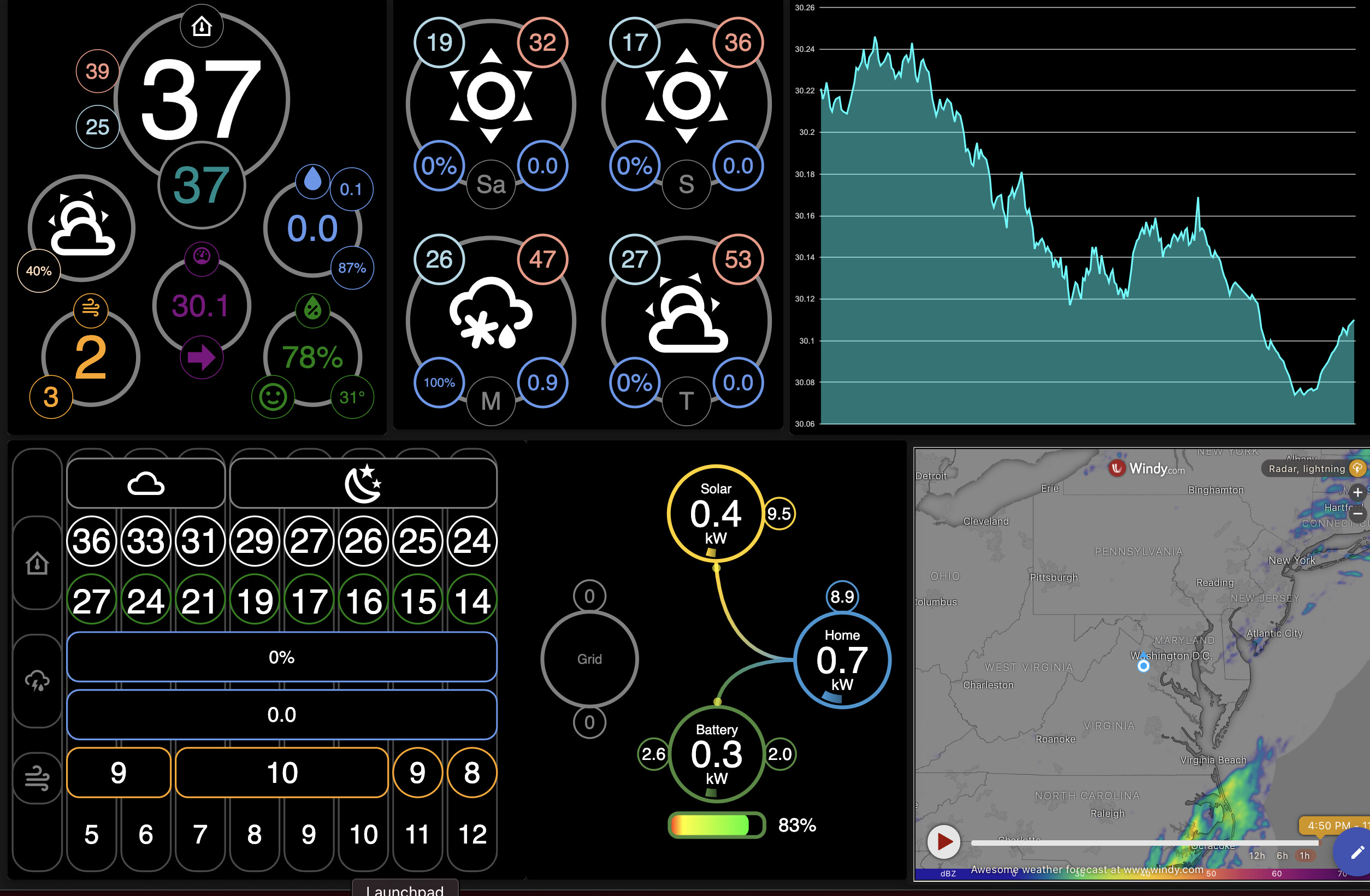
Everything running again! Your driver is excellent @snell. Screenshot below:
I will have to see about the cookies... I do not actually have a Powerwall myself so I have no way to know when they change things (it is not a published API after all). If you do not mind sending me a sample of the header response (with the cookie) I can build it in. Plus, a sample of the TempData would be useful. Those previous 4 were based off what I had been provided for samples before. If Tesla has different versions out there I am going to have to make a way to detect the difference and have the driver provide the correct thing (since I do not want to botch the other users that it is currently working for).
That is a nice looking (if a bit busy for my taste) dashboard. Just to confirm... is that saying you are not drawing any power from the grid at that time?
Yes.
The “business” are some weather widgets I am working on for the wife. (To lazy to crop it). I have been working though the bottom left “hourly” widget for 2 weeks…
In any case, I can provide any data you’d like. It is also possible that the data change with the “upgrade” that hit this morning. I took a look and it seems to parse everything else correctly.
Yes, the graph in lower middle is showing that I am running off the battery and solar, no grid. It updates each minute so the wife can see “what is happening”
I went one step further and added a “midnight” data collection so that the driver can now compute the daily power generation. I am testing it tonight/tomorrow and can send you changes I made over PM if you’d like…
That is pretty awesome (about not using the grid).
As for logging... I was going to ask you to set the logging level to Trace, run a Refresh, then send me the results... but reviewing the driver code it appears I left out the code that should have been a couple lines before that, in ParseAggregates:
Logging( "Device data = ${ resp.data }", 4 )Looks like I need to revise it this weekend (guess I can clean up some other stuff while I am at it).
For the cookie, can you send me a PM with the part you saw (you can cut out your actual cookie if you want)? It would be good to see how the indicate what you need to include from then on. For example, with a Unifi controller (some of which use a cookie) I need to run this code to find the value of the "Set-Cookie" item in the header:
Cookie = resp.getHeaders().'Set-Cookie'Looks like the Oauth thing finally caught up to me. Just noticed all kinds of errors in the logs. 
S.
Ok. Time for me to start looking into it then. Oh well.
1 Like
No rush for me. I never implemented any rules to detect a grid failure with it, so I've never used it for my only "use case" I like having it, more just to see what's what, than for anything else -- but there's no urgency!
S.
1 Like
That virtual inspection failed, had the 5th inspection today in-person,
They passed the electrical, so the Powerwall is finally commissioned and running since about noon today.
It stayed at 0% for 2 hours, then started charging, reached 20%, then discharging now that the sun went down. (Reserve = 10%) My time of use peak cost is 4pm to 9pm, it should stay on battery during that time no problem.
All parameters and state looks good in the device now.
The installation still isn't finished as it's still a mess with holes in the stucco, wood trim and conduit hanging free, I refused to pay out the full amount of the remaining cost until that's done.
Glad that is initially working and they got the Powerwall going.
Of course I have to look into the Oauth thing to make sure it stays working (or gets working again in @scottgu3's case). The problem with working on too many drivers as a hobby... I have too many things going on.
Hey guys...been reading up on your work here...very impressive !!! I am a Hubitat Elevation newbee...just converted over last week from a SmartThings Hub that I had running for years...
I have a Tesla Solar System running firmware v20.49.0 on the gateway...and I'm not having any luck getting the TeslaDriver to connect. I suspect it's the required user name and password...Have you run into this already??? The Event Logs shows "Local Connection Failed".
Thanks for any help! 
Right now my driver does not have any login method, which is also tough for me to check because I do not have a Powerwall myself. But I obviously need to start looking into it. I will try to have something posted soon that you folks can try out.
EDIT:
Updated Version(s):
- TeslaDriver.groovy = 1.1.0
Change(s):
- First attempt at adding a username/password login capability. There is now a Login command that will appear in the parent device. You are required to enter your username/password in preferences now. When you Save Preferences it SHOULD attempt a login (before doing the refresh) in order to obtain a token. This should appear in your State Variables list as Token. Without a Token it will no longer run local connection commands apparently as of Tesla's version 20.49.0 firmware, so the token has been added to all the headers for those commands.
- A Login command has been added that can be run manually. It is the exact same on as that performed when you Save Preferences.
3 Likes
Close!
dev:17932021-03-22 07:33:08.147 pm errorPowerWall - Exception when performing Login: javax.net.ssl.SSLHandshakeException: sun.security.validator.ValidatorException: PKIX path building failed: sun.security.provider.certpath.SunCertPathBuilderException: unable to find valid certification path to requested target
Updated Version(s):
- TeslaDriver.groovy = 1.1.1
Change(s):
- Changed the Login command to ignore the SSL Cert.
1 Like

Updated Version(s):
- TeslaDriver = 1.1.2
Change(s):
- I had the wrong Username (they use a hard-coded one) and it needs email, so that has replaced the Username preference. So you will need Save Preferences again with the correct information.
- Reworked refresh scheduling a bit.
- Changed when Login is called to try to make sure there is a Token before each refresh and if not it will try to Login again (but it will not re-attempt that refresh).