It was previously included as a trigger! I had all of my devices lumped together in the single trigger. Then I realized they needed to be separated which I did.
My experience is that %device% is set to the name of the last trigger OR other rule that ran the actions of the current rule.
Maybe I'll create a completely new rule with a different name.
Why? The name of the current rule has no effect on the value of this built-in variable.
Have you read the docs yet? While RM is a complicated app (and not the first one I'd suggest for most automations), many questions like this one can be easily answered by looking through them. Here are some previous suggestions:
From https://community.hubitat.com/t/please-help-with-rule-logic/155794/12:
From https://community.hubitat.com/t/how-to-set-a-variable-in-the-trigger/155820/8:
From https://community.hubitat.com/t/how-to-set-a-variable-in-the-trigger/155820/31:
As for this particular request, @marktheknife's explanation above is undoubtedly the case. From https://docs2.hubitat.com/en/apps/rule-machine/rule-5-1#local-variables-1:
%device%: name of the device that generated the most recent matching trigger event
So, this just means that was the last trigger event that fired your rule. It has nothing to do with your current trigger list per se (aside from the fact that, apart from drastic rule changes, one of them is likely to have done this in the past).
(Also, while you may not have been asking about this specifically, note that your rule is going to send you a notification for all matching devices when any device triggers the rule, not just the notification for the one that triggered the rule -- as currently written, at least, perhaps why you were wondering about this.)
3 Likes
“Update” the rule a few times. Flip the show current a few rimes.
This will have no effect on %device%, the possible explanations for which are above.
Well then that’s the explanation.
1 Like
Along these lines, I've also merged these posts into your existing topic on what is apparently the same rule -- would have been less guessing if the connection were clearer originally.
3 Likes
So the documentation states:
" %device% : name of the device that generated the most recent matching trigger event..."
So shouldn't the most recent matching trigger event in my rule should be one of these two devices:
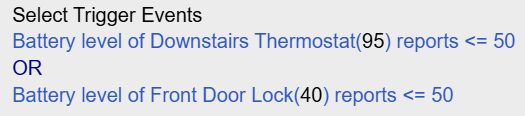
No. You changed the rule. The one that it says would be the last one that actually happened. Changing the rule after the fact has no effect.
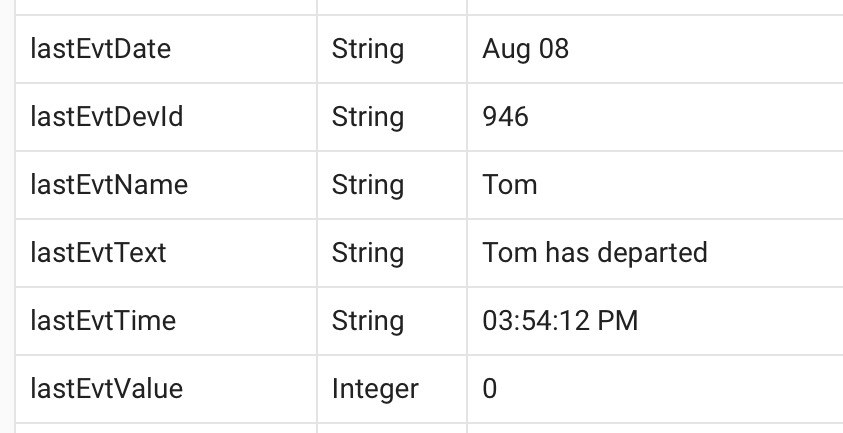
Then how would I get %device% assigned to one of the devices in my rule so I could actually utilize the built in variable? Just explicitly set it?
You cannot manually set built-in variables. They are set as described in the documentation. In this case, the desired device will need to trigger the rule with one of the events you have selected. The value will be then set to the name of the device, exactly as happened previously when you had a trigger device with this name.
It may be helpful to back up and explain why you are concerned about this, otherwise I'd suggest testing the rule (with actual trigger events, not "Run Rule Actions" -- that is not a trigger event) with all logging enabled so you can see what happens, which might facilitate learning. Using a Virtual Battery device or two for testing may be helpful if you don't want to wait for "real" events from actual devices.
Oh! I didn't knwo that "Run Rule Actions" did not trigger an event. That sounds like a good idea with the virtual battery device, I'll give that a try. Thanks for your help.
“Run rule actions” does exactly what it says, nothing more.
2 Likes
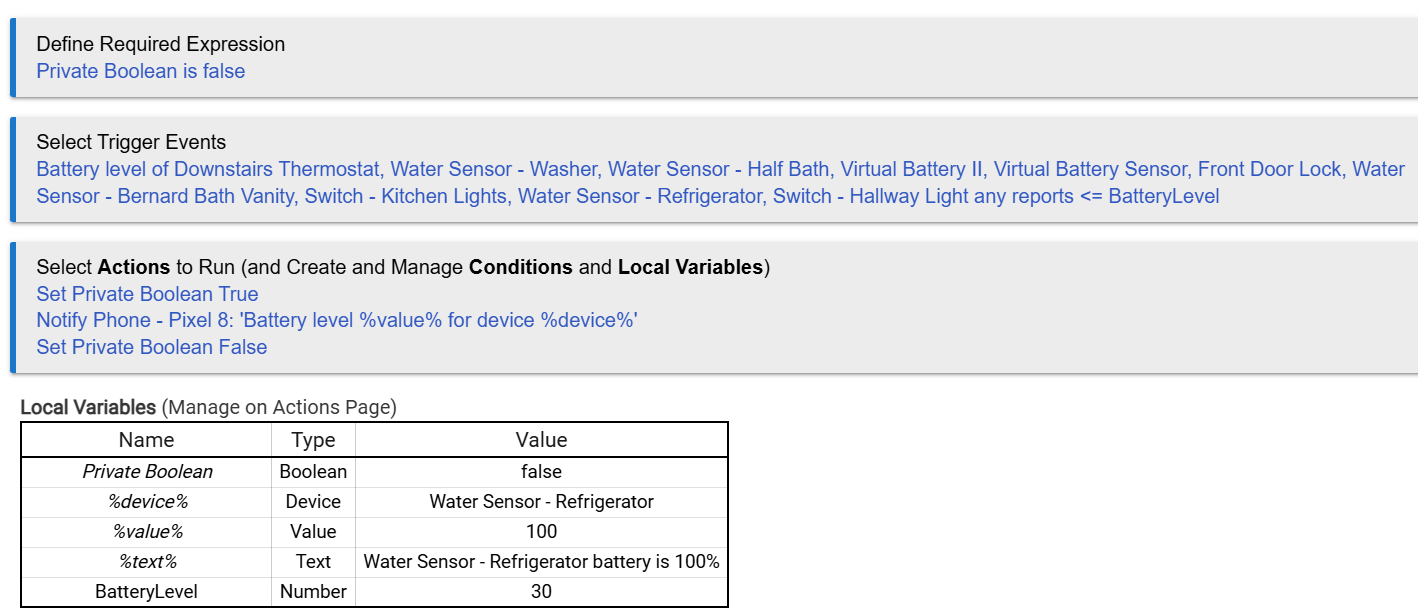
So I added two virtual battery sensors for testing purposes. I've created a BatteryLevel variable with a value of 30. So, I set the battery reading to 10 in the virtual battery sensor and receive a notification. After which I received two additional messages saying:
Battery level 100 for device Water Sensor - Refrigerator
Battery level 100 for device Water Sensor - Dishwasher
I don't understand why this is occurring since the battery level is not <= BatteryLevel (30). If someone could explain how to stop this behavior, I'd appreciate it!
I wasn't sure if I should post a new message but I thought it pertained to my previous post here.
-Thanks
Someone already has:
To be clear, since there seems to be some confusion above, the rule you want to write is identical except that your single trigger event would be replaced a single trigger event for each device, like:
Battery level of Downstairs Thermostat <= BatteryLevel OR
Battery level of Water Sensor - Washer <= BatteryLevel OR
(etc.)
2 Likes
So I need a trigger for each device. Interesting.
-Thanks