I don’t personally have a puck v2 (I only use their bridges). Do we know that this integration supports the puck v2. Has anyone successfully integrated the puck v2 with HE?
How do I revert to .235?
Are you asking how to install an app in Hubitat, or how to find that specific version of the app so you can install it? Or maybe it’s something else.
I was looking for the .235 version so that I can revert back a version.
.236 seems to have a couple of bugs that I cannot troubleshoot right now.
No I get that. I’m just trying to understand what is preventing you from reverting. Is it that you don’t know where to obtain the prior version? Or you don’t know how to install it once you have it? Or maybe it’s something else? Or both?
I’m happy to help – just trying to get clear on the problem first!
Yes. I cannot find the .235 version anywhere.
Where is it located?
I looked on gethub and the only version I can find is the .236 version.
I am by no means a github expert, but I do know if you go to the “commits” label on the right edge of the grey bar across the top of this Flair github repository, you will get a historical time based view of all prior versions. You can scroll to the version you want, click on the browse files icon (<>), and then you get a view of the repository “as was” on that date.
And, to any github experts, please correct me!
@ljbotero @mluck Thanks for the info.
I was able to find the different versions and am trying them now.
Where can I find the descriptions of some of the options in .236?
Like "Spread guardrail" and Spread improvement deadband, and what these do?
And "enable duct cross-coupling" and what this does?
Pre-adjust minimum idle dwell (min)?
Pre-adjust trigger threshold (C)?
How to use "create diagnostic devices"?
Where are the instructions on all the options and how to set them?
I know these features are useful, but without an idea on how to use them they are useless.
Are the uses for these features buried somewhere?
I tried looking at the driver and the comments but wasn't very successful.
I also have a rule that when the stat is in idle, I force all vents open so when my AC runs the fan in circulate, all vents are open.
This is being overridden by this flair app and shuts down some of them, which I do not want to happen.
My stat ( a Daikin one+) has a circulate schedule, and when the fan runs, HE doesn't know that. I change the fan mode in HE from auto to circulate using the thermostat controller app, and tell the flair app to use that "stat" and the fan circulate doesn't indicate when the fan is running, just in circulate mode.
I may have to create a rule for circulate so that the rule will turn the fan on and off, so the flair app will see the fan when it runs, and NOT use the Daikin stat circulate mode, which would be ok, but.....
Here is a screenshot of how I am using thermostat controller app:
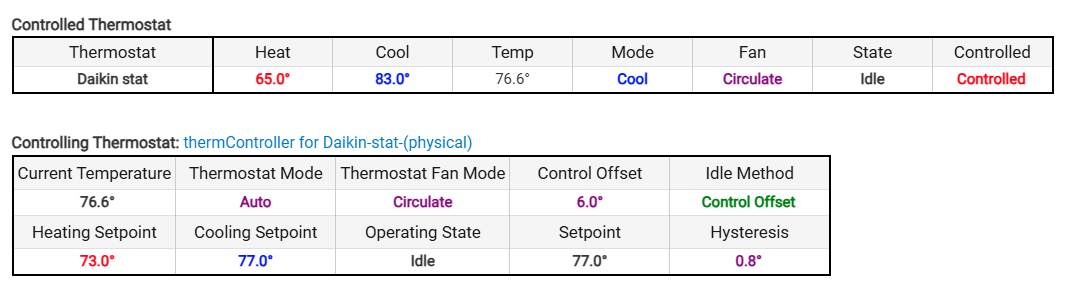
The "controlling thermostat" is what I have selected in the flair app because I am changing what temp sensors I average throughout the day, and not using the sensor on the stat itself, so I don't use that stat in the flair app.
The "controlled thermostat's" Temp is different from the "controlling thermostat's" "current temperature" temp, so the flair app would have the incorrect "room temp" for vent control.
Thanks!
Jaime, congrats on the new version—lots of great improvements! Can I clarify one fundamental thing? For folks like me that used SIDs and multiple app instances to “fake” zones, I assume I need to reassign all my devices to one SID before taking advantage of this new beta. Riiiight?
It’s a nit, but for those, like me, that use bridges rather than pucks, the app discovers bridges too!
Any ideas about my question?
I don’t know the answers to these questions so I’m afraid I have to defer to the OP. Having said that, allow me to offer some helpful words to the wise.
Whenever I hear someone in the community ask about documentation or demonstrate any sense of expectation or presumption, I feel compelled to remind of something I had to learn the hard way (because nobody explained it to me when I was a newbie).
Virtually all of the folks in this community that develop apps and/or drivers do so out of the kindness of their heart. Purely out of selfless generosity. People like me who don’t possess development skills benefit from these amazing contributions. I don’t pay and they don’t get paid. Gulp.
And for the developers, it’s arguably even worse. Because their reward for selflessly sharing their work with the community is that people often ask lots of questions and typically ask for lots of additional functionality. Which means more time more work and more burden Just for trying to help out! 
So when you ask about the documentation, or follow-up after there’s no response for several days, I’d urge you to keep in mind that this is basically charity work for folks like Jaime. I say this with all due respect — after all, some developers do take the time to generate detailed documentation.
I suppose all this is a long way of saying — while all your questions seem totally fair (and I’d love to know the answers too!), we’re both “beggars” and you know what they say about beggars.
Best of luck and hope you receive in the helpful spirit in which it is shared.
I did not expect any documentation, only some kind of explanation as to what the functions perform.
I realize that all these great apps and drivers are provided for free and out of the kindness of their heart.
I am not complaining! FAR from it! I was ONLY asking questions about the features and functions.
I am now going through the process of reverting back to .234 ( I cannot find 235) because I have no idea as to what the different features are, how they perform and how to set them.
I did list the functions that I was curious about specifically also. I did look through the app as it seems to be commented in some detail but was unable to find any answers to my questions.
I also had questions as to my "manual" overrides that "worked" with the older version but do not seem to function reliably with this newer version, hence the reason I am reverting since I have no idea as to what they do with "external" input or overrides.
Hey Jaime, I created an issue in GitHub a few days ago — wanted to make sure that you saw it because I’m dead in the water. Thanks.
Hi @mluck, appreciate the details in the bug report on github, I'll be checking these and pushing an update sometime soon. Also, since I don't have the new pucks, I'm flying blind, but any logs that users can supply in the bug reports, like how you did, are a goldmine for me. These days I'm not using Hubitat as much, but I keep it running mostly to support this project. Happy to keep contributing and I welcome any contributions the community want to make to keep this running.
Thanks for looking into this.
FWIW I don’t use any pucks either. I never have because they require WiFi afaik. I exclusively use their bridges, which are basically higher capacity vent coordinators that work on WiFi or ether Ethernet
@mluck v0.237 (beta) is up, and it should get you un-stuck. Your GitHub report was exactly what I needed (the debug logs pinpointed both problems), thank you!
What was broken in 0.236:
- Discovery died on the first vent with the
NullPointerException ... line 5150error , a battery calculation that behaves differently on the hub's Groovy runtime than in my test environment. That's why you'd never get more than one vent no matter how many times you clicked Discover. Discovery now also processes each device independently, so one bad reading can never abort the rest. - The "request counter stuck at 8/8" message was the app leaking API request slots during routine polling. Once wedged, every Flair call (including discovery) silently starved until a watchdog reset it 5 minutes later. Slot accounting is fixed.
- The "Authenticating…" page now actually refreshes itself instead of sitting there after auth already finished.
- HPM should now show the real version instead of "vnull".
To update: HPM > Update (Beta/Early Release channel), or Repair if it doesn't offer 0.237, or grab flair-vents.v0.237.zip from the GitHub repo. Then hit Discover again; no need to redo authentication or reassign your SID.
@HomeAlone @herrera5981 this likely explains the one-vent discovery and the NPE you both hit on the beta too. If the update doesn't get all your devices in, please send debug logs in a GitHub issue.
Thanks for your ongoing work. The new v0.237 beta now successfully discovers all of my vents and my v1 puck but it still does not find my new v2 puck.
@HomeAlone Do you mind sharing the logs? I should be able to address the V2 puck discovery issues once I get more details from logs
This error is repeating about every 5 minutes:
groovy.lang.MissingMethodException: No signature of method: user_app_bot_flair_Flair_Vents_572.sendEvent() is applicable for argument types: (groovy.json.internal.LazyMap, java.util.LinkedHashMap) values: [[capabilities:[[attributes:[[capability:false, dataType:null, ...]], ...], ...], ...], ...] on line 5102 (method handlePuckReadingGetWithCache)
@herrera5981 You no longer need two app instances, that's what Zones are for. The thermostat picker at the top belongs to the default zone, so set that one to your downstairs ecobee. Then scroll to "Add a zone", name it Upstairs, hit Add zone, and in the new section pick your upstairs ecobee as its controlling thermostat and select the upstairs vents/pucks. Assigning a device to a zone automatically pulls it out of any other zone, and each zone learns and balances independently with its own safety floor. One tip: update to 0.237 first, 0.236 had a discovery bug that made setup painful.