Issue Report: Amazon Echo Skill Problems Following Firmware Upgrade 2.5.1.174 to 2.5.2.135


Hub Hardware Model: C-7
Platform Firmware Version: 2.5.2.135
Integration: Amazon Echo Skill

Issue Summary

After upgrading from firmware 2.5.1.174 to 2.5.2.135, I began experiencing multiple issues with the Amazon Echo Skill integration.

The issues include repeated warning and error messages in the logs, server load warnings associated with Alexa, unreliable device responses, and devices unexpectedly appearing as turned off in Alexa.

I previously encountered the same issues with firmware 2.5.2.128 and reverted to 2.5.1.174, which I had been using before upgrading.

Log Messages

I am seeing the following warning messages in the Hubitat logs:

app:282026-10-11 11:52:26.695 am warn Skipping Alexa.MotionSensor.detectionState for Announcement Blink Deck (VS) (Hubitat attribute motion); attribute is uninitialized and has no cached value: null

app:282026-10-11 11:52:26.692 am warn Skipping Alexa.MotionSensor.detectionState for Announcement Blink Deck (VS) (Hubitat attribute motion); attribute is uninitialized and has no cached value: null

app:282026-10-11 11:49:00.892 am warn Skipping Alexa.MotionSensor.detectionState for Announcement Close Windows Weather (Hubitat attribute motion); attribute is uninitialized and has no cached value: null

app:282026-10-11 11:48:56.303 am warn Skipping Alexa.BrightnessController.brightness for Sonos Group: All House Audio Group (Hubitat attribute level); attribute is uninitialized and has no cached value: null

app:282026-10-11 11:48:52.899 am warn Skipping Alexa.MotionSensor.detectionState for Announcement Its Cold (VS-HE) (Hubitat attribute motion); attribute is uninitialized and has no cached value: null

app:282026-10-11 11:45:05.961 am warn Skipping Alexa.MotionSensor.detectionState for Announcement Blink Day Mode (VS) (Hubitat attribute motion); attribute is uninitialized and has no cached value: null

app:282026-10-11 11:44:21.914 am warn Skipping Alexa.ColorTemperatureController.colorTemperatureInKelvin for Under Bed Lights (Hubitat attribute colorTemperature); value is below 1000: 0

I am also seeing the following error:

app:282026-10-11 12:12:36.224 pm error
org.codehaus.groovy.runtime.typehandling.GroovyCastException:
Cannot cast object '90-100' with class 'java.lang.String' to class 'java.lang.Integer'
on line 1788 (method handleRequest)

Additional Symptoms

  • Server load warnings: I am receiving warnings about server load, with Alexa identified in the associated messages.

  • Unreliable device responses: Devices exposed to Alexa through this integration do not always respond as expected. For example, my motorized shades do not consistently respond to commands.

  • Virtual switch announcements failing: I use the community app Virtual Switch uDTH Lite (user) to trigger Alexa announcements through virtual switches. This functionality is no longer working reliably.

  • Devices unexpectedly turned off in Alexa: Some devices appear to have been turned off in Alexa, although I did not intentionally change their states.

Firmware History

I first encountered these issues after upgrading from 2.5.1.174 to 2.5.2.128. I reverted to 2.5.1.174 to restore my previous setup.

I subsequently upgraded to 2.5.2.135 and am experiencing similar issues with the Amazon Echo Skill.

Assistance Requested

Could someone investigate/review whether there is a firmware-related issue affecting the Amazon Echo Skill integration?

The combination of these issues is affecting the reliability of my Hubitat devices and Alexa automations. Any assistance identifying the cause and recommended resolution would be appreciated.

I currently have zero issues and never had issues after any firmware (beta or regular) upgrade. I am on 2.5.2.135.

Those are problems with your devices, not the Alexa integration; the log entries are new but just explain the reason for any potential problems more clearly now. Any problems wouldn't be new since this could have never worked before, either -- like the message says, most of these mean that your devices declare the "MotionSensor" capability but never populate the "motion" attribute per the capability (or a couple others that are similarly not populating things as expected), so you couldn't have used that particular attribute to do anything on Alexa (or Hubitat in the first place). If your devices work as you need them to on Alexa, you can ignore the log entry; if things aren't working, the best options would be to populate the attribute with something (the driver should really do this; which one are you using for each of these devices?) or switch to a different driver that is a better match.

This part didn't change in 2.5.2, and it's probably something a blind or shade driver reporting its position as a string instead of a number. There are some things the integration could do to work around this, but a better fix would be on the driver side. Any idea which this might be?

Thank for the insight. But are you using the Virtual Switch uDTH Lite community driver becuase it no longer works for me with 2.5.2.135. That appears to be the issue.

No. But as @bertabcd1234 mentions above, it seems your issues are not with the integration itself.

Ok thanks for your insight and help that covers the error issue which I will look into.

But when using the Virtual Switch uDTH Lite community driver it no longer works for me with 2.5.2.135. That appears to be the other log issues I posted above and below These worked in 2.5.1.174. I did use them and now they don't work.

**app:28**2026-10-11 12:17:25.686 pm

warn

Skipping Alexa.MotionSensor.detectionState for Done Viewing TV (VS-HE) (Hubitat attribute motion); attribute is uninitialized and has no cached value: null

**app:28**2026-10-11 12:17:25.603 pm

warn

Skipping Alexa.MotionSensor.detectionState for Announcement Blink Disabled (VS) (Hubitat attribute motion); attribute is uninitialized and has no cached value: null

**app:28**2026-10-11 12:17:25.569 pm

warn

Skipping Alexa.MotionSensor.detectionState for Announcement Blink Manually Armed (VS-HE) (Hubitat attribute motion); attribute is uninitialized and has no cached value: null

**app:28**2026-10-11 12:17:25.471 pm

warn

Skipping Alexa.MotionSensor.detectionState for Echo Message Mute (VS-HE) (Hubitat attribute motion); attribute is uninitialized and has no cached value: null

**app:28**2026-10-11 12:17:25.437 pm

warn

Skipping Alexa.MotionSensor.detectionState for Announcement Blink Manually Disarmed (VS-HE) (Hubitat attribute motion); attribute is uninitialized and has no cached value: null

**app:28**2026-10-11 12:17:25.403 pm

warn

Skipping Alexa.MotionSensor.detectionState for Wakeup1 (5:30am) (Hubitat attribute motion); attribute is uninitialized and has no cached value: null

**app:28**2026-10-11 12:17:25.332 pm

warn

Skipping Alexa.MotionSensor.detectionState for Wakeup4 (7:00am) (Hubitat attribute motion); attribute is uninitialized and has no cached value: null

**app:28**2026-10-11 12:17:25.285 pm

warn

Skipping Alexa.MotionSensor.detectionState for Wakeup2 (6:00am) (Hubitat attribute motion); attribute is uninitialized and has no cached value: null

**app:28**2026-10-11 12:17:25.249 pm

warn

Skipping Alexa.MotionSensor.detectionState for Wakeup3 (6:30am) (Hubitat attribute motion); attribute is uninitialized and has no cached value: null

**app:28**2026-10-11 12:17:25.202 pm

warn

Skipping Alexa.MotionSensor.detectionState for Announcement Front Door Lock Jammed (VS-HE) (Hubitat attribute motion); attribute is uninitialized and has no cached value: null

**app:28**2026-10-11 12:17:25.172 pm

warn

Skipping Alexa.MotionSensor.detectionState for Announcement Front Door Opened (VS-HE) (Hubitat attribute motion); attribute is uninitialized and has no cached value: null

**app:28**2026-10-11 12:17:25.140 pm

warn

Skipping Alexa.MotionSensor.detectionState for Announcement David Home (VS-HE) (Hubitat attribute motion); attribute is uninitialized and has no cached value: null

**app:28**2026-10-11 12:17:25.109 pm

warn

Skipping Alexa.MotionSensor.detectionState for Announcement Front Door Lock (VS-HE) (Hubitat attribute motion); attribute is uninitialized and has no cached value: null

**app:28**2026-10-11 12:17:25.078 pm

warn

Skipping Alexa.MotionSensor.detectionState for Announcement Garage Back Door 15 Min Warning(VS-HE) (Hubitat attribute motion); attribute is uninitialized and has no cached value: null

**app:28**2026-10-11 12:17:25.047 pm

warn

Skipping Alexa.MotionSensor.detectionState for Announcement Garage Back Door Lock (VS-HE) (Hubitat attribute motion); attribute is uninitialized and has no cached value: null

**app:28**2026-10-11 12:17:25.016 pm

warn

Skipping Alexa.MotionSensor.detectionState for Announcement Front Door Remains Open (VS-HE) (Hubitat attribute motion); attribute is uninitialized and has no cached value: null

**app:28**2026-10-11 12:17:24.984 pm

warn

Skipping Alexa.MotionSensor.detectionState for Announcement Garage Back Door Open (VS-HE) (Hubitat attribute motion); attribute is uninitialized and has no cached value: null

**app:28**2026-10-11 12:17:24.954 pm

warn

Skipping Alexa.MotionSensor.detectionState for Announcement Garage Door (VS-HE) (Hubitat attribute motion); attribute is uninitialized and has no cached value: null

**app:28**2026-10-11 12:17:24.923 pm

warn

Skipping Alexa.MotionSensor.detectionState for Announcement Garage Back Door Lock Jammed (VS-HE) (Hubitat attribute motion); attribute is uninitialized and has no cached value: null

**app:28**2026-10-11 12:17:24.892 pm

warn

Skipping Alexa.MotionSensor.detectionState for Announcement Its Hot (VS-HE) (Hubitat attribute motion); attribute is uninitialized and has no cached value: null

**app:28**2026-10-11 12:17:24.862 pm

warn

Skipping Alexa.MotionSensor.detectionState for Announcement Garbage Cans In (VS-HE) (Hubitat attribute motion); attribute is uninitialized and has no cached value: null

**app:28**2026-10-11 12:17:24.830 pm

warn

Skipping Alexa.MotionSensor.detectionState for Announcement Garbage Cans Out (VS-HE) (Hubitat attribute motion); attribute is uninitialized and has no cached value: null

**app:28**2026-10-11 12:17:24.799 pm

warn

Skipping Alexa.MotionSensor.detectionState for Announcement Side Door Lock (VS-HE) (Hubitat attribute motion); attribute is uninitialized and has no cached value: null

**app:28**2026-10-11 12:17:24.769 pm

warn

Skipping Alexa.MotionSensor.detectionState for Announcement Rain Tomorrow (VS-HE) (Hubitat attribute motion); attribute is uninitialized and has no cached value: null

**app:28**2026-10-11 12:17:24.735 pm

warn

Skipping Alexa.MotionSensor.detectionState for Announcement Side Door Lock Jammed (VS-HE) (Hubitat attribute motion); attribute is uninitialized and has no cached value: null

**app:28**2026-10-11 12:17:24.705 pm

warn

Skipping Alexa.MotionSensor.detectionState for Announcement Kim Home (VS-HE) (Hubitat attribute motion); attribute is uninitialized and has no cached value: null

**app:28**2026-10-11 12:17:24.674 pm

warn

Skipping Alexa.MotionSensor.detectionState for Announcement Open Window (VS-HE) (Hubitat attribute motion); attribute is uninitialized and has no cached value: null

**app:28**2026-10-11 12:17:24.643 pm

warn

Skipping Alexa.MotionSensor.detectionState for Announcement Sliding Glass Door Open (VS-HE) (Hubitat attribute motion); attribute is uninitialized and has no cached value: null

**app:28**2026-10-11 12:17:24.614 pm

warn

Skipping Alexa.MotionSensor.detectionState for Announcement Side Door Open (VS-HE) (Hubitat attribute motion); attribute is uninitialized and has no cached value: null

**app:28**2026-10-11 12:17:24.583 pm

warn

Skipping Alexa.MotionSensor.detectionState for Sonos Favorite - 6 (Hubitat attribute motion); attribute is uninitialized and has no cached value: null

**app:28**2026-10-11 12:17:24.539 pm

warn

Skipping Alexa.MotionSensor.detectionState for Sonos Favorite - 8 (Hubitat attribute motion); attribute is uninitialized and has no cached value: null

**app:28**2026-10-11 12:17:24.379 pm

warn

Skipping Alexa.MotionSensor.detectionState for Sonos Favorite - 7 (Hubitat attribute motion); attribute is uninitialized and has no cached value: null

**app:28**2026-10-11 12:17:24.259 pm

warn

Skipping Alexa.MotionSensor.detectionState for Sonos House Group Set (VS-HE) (Hubitat attribute motion); attribute is uninitialized and has no cached value: null

**app:28**2026-10-11 12:17:24.013 pm

warn

Skipping Alexa.MotionSensor.detectionState for Main Bedroom TV (HE-VS) (Hubitat attribute motion); attribute is uninitialized and has no cached value: null

**app:28**2026-10-11 12:17:23.960 pm

warn

Skipping Alexa.MotionSensor.detectionState for Blink Front Door Bell Motion (VS) (Hubitat attribute motion); attribute is uninitialized and has no cached value: null

**app:28**2026-10-11 12:17:23.927 pm

warn

Skipping Alexa.MotionSensor.detectionState for Blink Front Door Bell Rung (VS) (Hubitat attribute motion); attribute is uninitialized and has no cached value: null

**app:28**2026-10-11 12:17:23.924 pm

warn

Skipping Alexa.ContactSensor.detectionState for Blink Front Door Bell Rung (VS) (Hubitat attribute contact); attribute is uninitialized and has no cached value: null

**app:28**2026-10-11 12:17:23.834 pm

warn

Skipping Alexa.MotionSensor.detectionState for Announcement Blink Full Arm (VS) (Hubitat attribute motion); attribute is uninitialized and has no cached value: null

**app:28**2026-10-11 12:17:23.801 pm

warn

Skipping Alexa.MotionSensor.detectionState for Announcement Dining Room Window Open (VS-HE) (Hubitat attribute motion); attribute is uninitialized and has no cached value: null

**app:28**2026-10-11 12:17:23.575 pm

warn

Skipping Alexa.MotionSensor.detectionState for Evening Deck Lights (Hubitat attribute motion); attribute is uninitialized and has no cached value: null

**app:28**2026-10-11 12:17:23.543 pm

warn

Skipping Alexa.MotionSensor.detectionState for Announcement: Main Bedroom Rain Alert (Hubitat attribute motion); attribute is uninitialized and has no cached value: null

**app:28**2026-10-11 12:17:23.512 pm

warn

Skipping Alexa.MotionSensor.detectionState for Sonos Play Control (Alexa) (Hubitat attribute motion); attribute is uninitialized and has no cached value: null

**app:28**2026-10-11 12:17:23.357 pm

warn

Skipping Alexa.MotionSensor.detectionState for Working Outside (VS-HE) (Hubitat attribute motion); attribute is uninitialized and has no cached value: null

**app:28**2026-10-11 12:17:23.327 pm

warn

Skipping Alexa.MotionSensor.detectionState for Front Door Autolock Disable (VS-HE) (Hubitat attribute motion); attribute is uninitialized and has no cached value: null

**app:28**2026-10-11 12:17:23.298 pm

warn

Skipping Alexa.MotionSensor.detectionState for Announcement Sliding Glass Door Remains Open (VS-HE) (Hubitat attribute motion); attribute is uninitialized and has no cached value: null

**app:28**2026-10-11 12:17:23.266 pm

warn

Skipping Alexa.MotionSensor.detectionState for Day Off (VS-HE) (Hubitat attribute motion); attribute is uninitialized and has no cached value: null

**app:28**2026-10-11 12:17:23.235 pm

warn

Skipping Alexa.MotionSensor.detectionState for Media Room TV (VS-HE) (Hubitat attribute motion); attribute is uninitialized and has no cached value: null

**app:28**2026-10-11 12:17:23.204 pm

warn

Skipping Alexa.MotionSensor.detectionState for Sonos Favorite - 5 (Hubitat attribute motion); attribute is uninitialized and has no cached value: null

**app:28**2026-10-11 12:17:23.175 pm

warn

Skipping Alexa.MotionSensor.detectionState for Garbage Out (VS-HE) (Hubitat attribute motion); attribute is uninitialized and has no cached value: null

**app:28**2026-10-11 12:17:22.957 pm

warn

Skipping Alexa.MotionSensor.detectionState for Announcement Leak Condensate Pump (VS-HE) (Hubitat attribute motion); attribute is uninitialized and has no cached value: null

**app:28**2026-10-11 12:17:22.918 pm

warn

Skipping Alexa.MotionSensor.detectionState for Announcement Leak Tankless Water Heater (VS-HE) (Hubitat attribute motion); attribute is uninitialized and has no cached value:
I guess I was not clearly enough sorry for the confusion. I have a number of issues not just the error. That being with Virtual Switch uDTH Lite. See the addational logs I provided @bertabcd1234. These did work and I used them now they do not and are causing warning when I try to use them.

Even with 2.5.2, it should only skip over specific attributes with invalid states, not the entire device, so I'm not sure what's going on there. Debug logging should show even more information for each device if you're curious. It would also be good to know more about what it means to "not work" (they don't show up? the state you're using doesn't update? which one are you using? no states update?).

But the explanation above is still correct, and your log entries still suggest the same:

So I'd suggest fixing this on the device/driver side. Does your driver have a way to set the "motion" attribute? Often this would be a custom command. The virtual motion driver could do it with "Active" or "Inactive," for example (and would be a solution if nothing else in your driver can, but it would be unusual for a driver to have this without any way to change it). That looks like the bulk of your devices. Some of the others might take a bit more but similar work to figure out (0 is not a valid color temperature and one of your blinds or shades appear to be reporting its position as a string instead of a number, for example).

Also forgot to add that, since the major Alexa skill update a few versions back, you can also just remove the "motion" attribute from being exposed to Alexa in the first place (and similar for any device where there is something you don't care about), which might work around the issue entirely. You'd need to enable "Show advanced device type options" if you haven't already, then use the "-" (minus) icon/button remove the Motion Sensor capability for the affected devices -- assuming, of course, that there isn't some other problem that isn't apparent from just the logs above.

Thanks @bertabcd1234 for all your insight.

To clarify my setup, when I started using Hubitat four years ago, my understanding was that two different types of virtual devices were needed, depending on the direction in which the automation was flowing:

  • Alexa to Hubitat (webCoRE): Standard Virtual Switches worked for this direction. You tell Alexa to turn a switch on, and webCoRE detects the state change in Hubitat and executes a piston.

  • Hubitat to Alexa: Alexa Routines and announcements could not natively be triggered by a basic virtual switch. Instead, Alexa required a Contact Sensor (open/closed) or Motion Sensor (active/inactive) to act as the routine trigger.

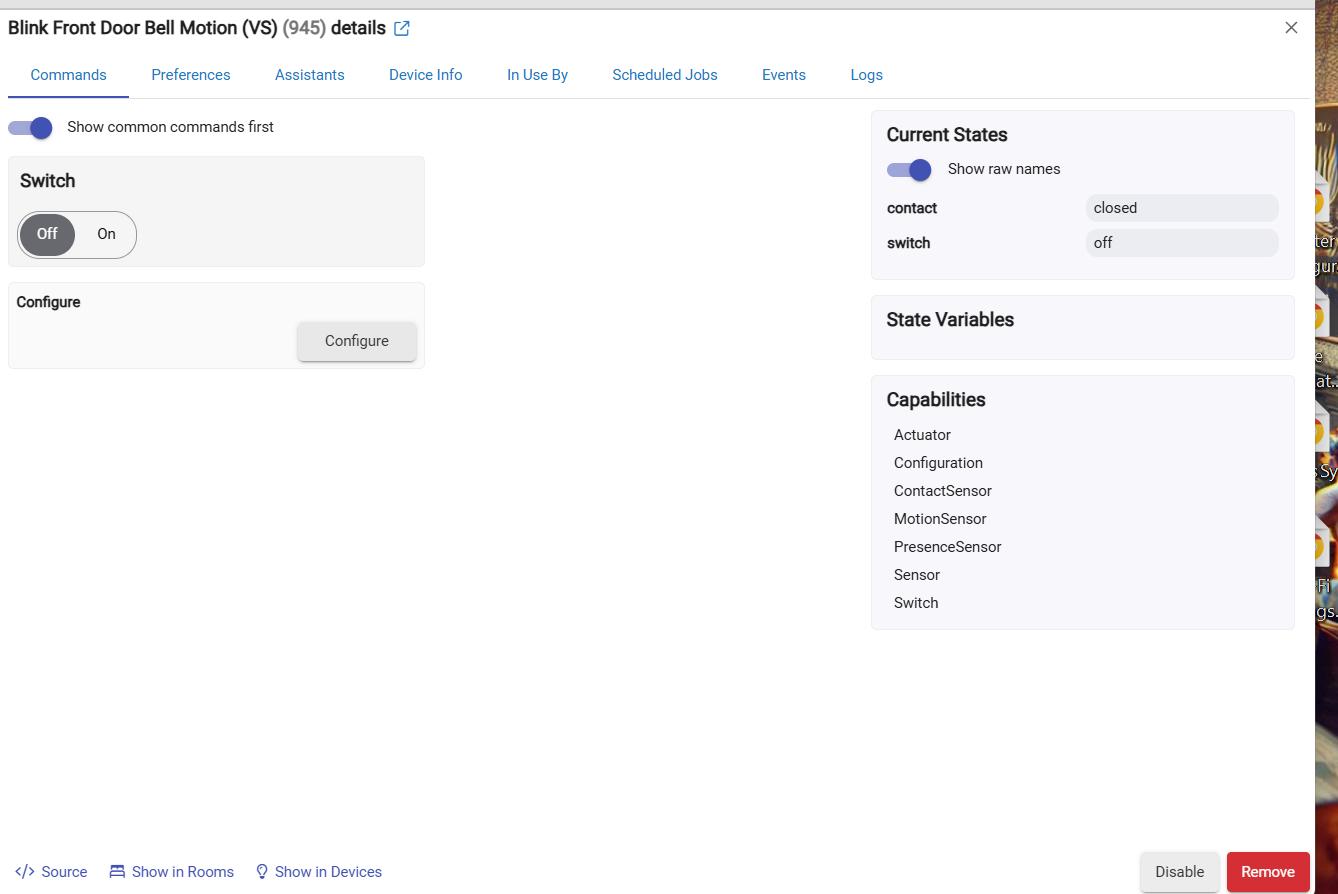
The reason I use the community Virtual Switch uDTH Lite driver is to avoid creating two separate virtual devices for automations. It combines these roles into a single virtual device by exposing the Switch capability alongside either Motion or Contact capabilities on the same device.

This allows me to trigger automations in both directions using a single virtual device on a dashboard. For example, one virtual switch can execute a webCoRE piston while also triggering an Alexa Routine, without having to manage and synchronize two separate devices: a virtual switch and a virtual contact or motion sensor. It also allows a webCoRE piston to trigger an Alexa Routine or an Alexa Routine to trigger a webCoRE piston.

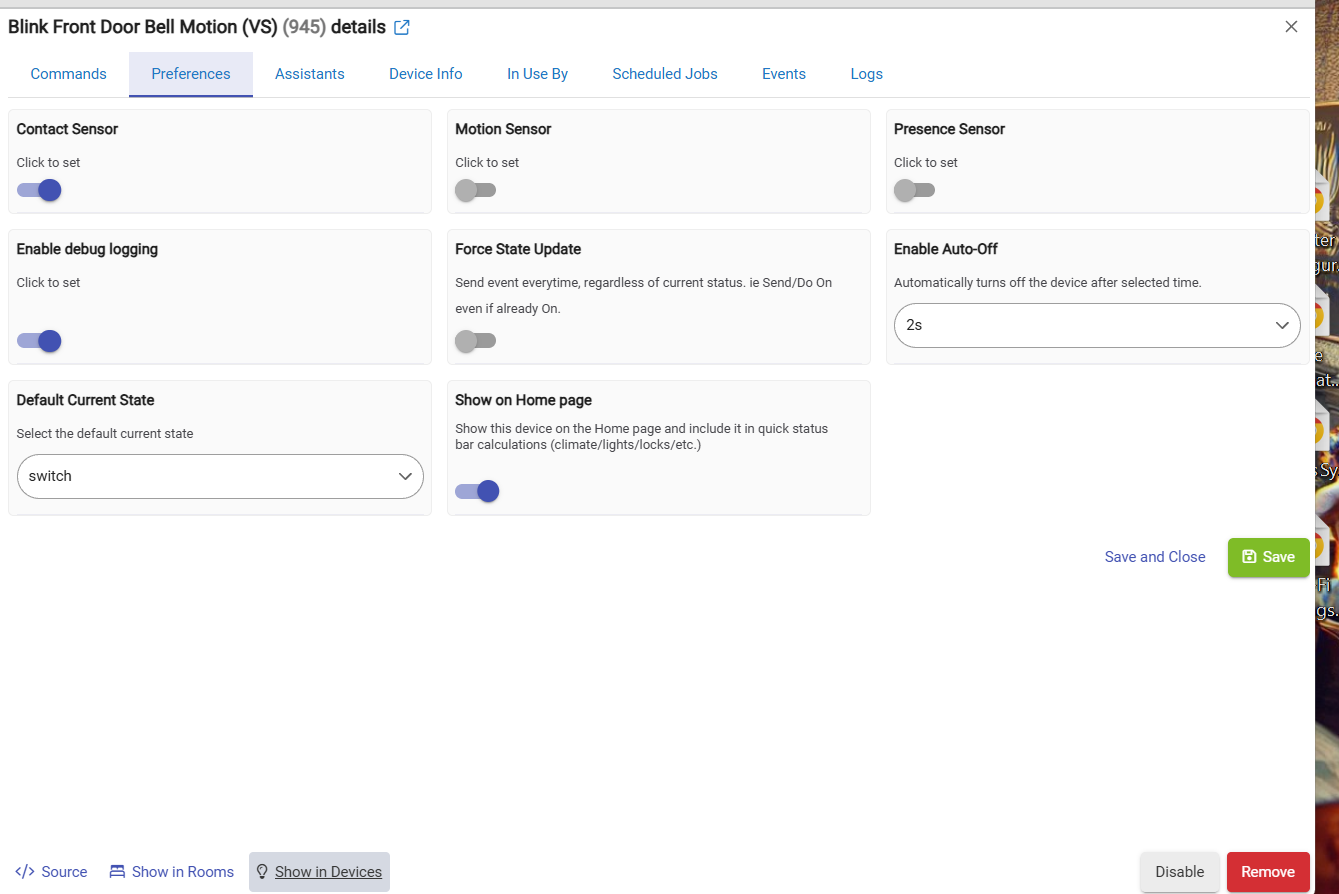
Additionally, when configured in the driver's preferences, the device automatically turns the switch off and resets the contact or motion state after a specified amount of time.

Here are two screenshots for reference, showing the available commands and features:

Commands Screen

Preferences Screen

My understanding of how this works under the hood is limited, but I believe the relevant detail is how the virtual sensor attributes are initialized. Unlike physical sensors, these virtual attributes may remain uninitialized (null) while dormant. When a Hubitat automation turns the virtual switch on, the driver generates a state change, such as motion: active followed by inactive, to trigger the Alexa Routine.

You can review the driver code here:

Perhaps reviewing the code will help clarify the underlying behaviour better than I can explain it.

What changed after the Hubitat firmware update?

To add more detail to my earlier posts, up to and including Hubitat platform release 2.5.1.174, turning on a uDTH Virtual Switch through an automation would send the corresponding virtual contact or motion event to Alexa. The Alexa Routine would then execute as expected, without issue.

However, after upgrading to 2.5.2.128 (and returning back to 2.5.1.174), and moving onto 2.5.2.135, none of my Alexa Routines triggered when using this driver.

The built-in Amazon Echo Skill (app ID 28) logs messages such as:

app:28 2026-10-12 12:13:43.263 pm warn Skipping Alexa.MotionSensor.detectionState for Blink Front Door Bell Motion (VS) (Hubitat attribute motion); attribute is uninitialized and has no cached value: null

Meanwhile, enabling debug logging on the uDTH device itself shows that the driver is still processing the switch state changes as expected:

dev:945 2026-10-12 12:13:42.806 pm info Blink Front Door Bell Motion (VS) turned On

dev:945 2026-10-12 12:13:44.844 pm info Blink Front Door Bell Motion (VS) turned Off

Based on these logs, the driver appears to be processing the switch commands, while the Amazon Echo Skill is reporting that it is skipping the motion attribute because it is uninitialized and has no cached value.

My observations and findings

  1. Nothing changed on my end. I have not created any new virtual switches or modified the settings of my existing uDTH devices. Many of these devices had been working reliably for years and triggering Alexa Routines without issue.

  2. Rolling back the firmware immediately restores functionality. Downgrading from 2.5.2.128 to 2.5.1.174 restored all my Alexa routines without changing a single device or setting. Upgrading again to 2.5.2.135 brought the failure back. This strongly suggests that something in the newer platform releases is affecting the integration's behaviour.

  3. The blockage appears to occur within the Amazon Echo Skill. The uDTH driver logs show the switch commands being processed, but the built-in Amazon Echo Skill (app ID 28) logs indicate that it is skipping the corresponding motion attribute because it is uninitialized. This suggests the event is being blocked at the integration stage, rather than the driver failing to process the switch command.

  4. The platform release notes may provide another clue. The release notes for platform updates 2.5.2.126 and 2.5.1.183 mention changes to the Amazon Echo Skill integration. I wonder whether one of these changes introduced stricter attribute validation or altered how uninitialized virtual sensor attributes are handled. I cannot confirm that this is the cause, but it seems worth investigating, but I am unclear how to.

Given that the driver continues to process the switch commands and that rolling back the platform restores functionality, I suspect this is a platform regression affecting how the built-in Amazon Echo Skill handles these virtual sensor attributes.

Unfortunately, these devices power many automations that I depend on daily. Rather than risk further disruption, I have decided to replace them with standard Virtual Switches and separate Virtual Contact or Motion Sensors, as appropriate, along with a few automations that sync a few together, until a fix is found.

I hope I have explained the issue more clearly this time and provided enough information to so you understand what is happening.

Any guidance or recommendations would be greatly appreciated!

I'm not sure why Alexa is totally ignoring other events from devices with one missing attribute (from what I can see it's just supposed to ignore that one -- which never would have worked anyway -- and just be louder now about the fact that this is what it's doing, since it usually means there is some problem with the device or driver, which there is in this case). I'll see if I can figure anything out there. There might be an unrelated, not-surfacing-in-Logs timing issue with both attributes changing at basically the same time and Alexa only getting one report at a time, with some sort of race between the two, but I can't say for sure without looking at that a bit more.

But ultimately, there should be a solution to your problem. One is the same one I've suggested all along, though thanks to your screenshots, it's a bit easier to suggest what that is exactly. My guess is that temporarily (or indefinitely) enabling the "Motion sensor" preference in your driver, then turning the switch on and off, will at least populate the value. That will take care of the warning, if nothing else. (You can re-disable it after that if you want -- or not, since it won't really matter if you don't use it; like now, you'll just need to know not to.)

As before, I still also think this would also work if you want to attack things from the other direction instead:

You could actually just choose to export it as a contact sensor instead (move it to that list) and remove other capabilities, like Switch, from being exposed to Alexa at all since that's all you need there (and the less you expose to Alexa, the smaller the payload gets and the less likely you are to run into problems adding more devices in the future, though I think I've only seen someone run into that limit once here -- and it's not your problem now).

As I mentioned, removing capabilities with unpopulated attributes will at least eliminate the warning in Logs. If there are more problems (like the race), your actual issue will persist despite that, but leaving only the capability you really need on the Alexa side would be the true test of that.

There are also at least a couple community "virtual contact with switch" and "virtual motion with switch" drivers that do basically what it sounds like you're doing, just pared down to the specific capabilities you'd actually need instead of a "do everything" approach that leaves some attributes in a non-standard null/unset state as this driver apparently does now -- may or may not help, depending on which of the two issues above it is, but probably not a bad idea to look into either way. :slight_smile:

@bertabcd1234, I really appreciate your suggestions. However, what concerns me a bit is your statement about “and just be louder now about the fact that…” I can’t help feeling that we are going in circles and that we may be having what PMI used to refer to as a “broken telephone conversation.” Which i take responsibility for. Let me try to explain my perspective with a specific example.

Up to and including platform version 2.5.1.174, I had no issues with the driver. When I turned on the Virtual Switch through automations, the driver sent an open state to Alexa through the Contact Sensor, which in turn triggered an Alexa Routine. Everything worked as expected.

However, after upgrading to platform version 2.5.2.128, this functionality stopped working, and I began receiving warnings. When I reverted to version 2.5.1.174, everything worked again.

From my perspective, this is a clear indication that the driver was working as expected and that something introduced in platform version 2.5.2.x affected how the driver interacted with Alexa.

Essentially, when functionality works under one platform version, stops working after upgrading to a newer version, and then works again after reverting to the previous version, it seems reasonable to consider whether a platform change may be a contributing factor. I understand your explanation regarding the missing attribute and why Alexa may be generating warnings. However, I think it is also important to consider the change in behaviour following the platform upgrade, as this is what led me to believe the platform change may be involved and was the original reason I posted my request for assistance.

I certainly appreciate that there may be other factors to consider, and I am open to understanding them. However, I believe this sequence of events provides a strong, reproducible basis for investigating what changed between the two platform versions.

I did try your suggestion. For testing, I selected a Virtual Switch that had been in use for more than two years. In the Alexa integration, I removed the Motion Sensor capability because I wasn't using it. I couldn't remove the Presence Sensor capability because it wasn't available as an option, and I left the Contact Sensor capability in place as it is being used as the trigger.

I then turned off the Contact Sensor preference, with debugging enabled, saved the changes, turned it back on, and saved the changes again. After that, I turned on the Virtual Switch. Although the warning no longer appeared in the logs, the Alexa Routine was still not triggered. So, while this appears to have addressed the warning, it did not resolve the original issue I was experiencing. Also, I feel it is important to point out at this time neither was require for version 2.5.1.174 or earlier.

Taking all of this into consideration, I’m going to put my request for assistance on hold for the time being. My availability over the next few weeks is limited, and I need to focus on other priorities.

I try to remind myself that this is a hobby, and that relying on community-developed drivers sometimes comes with limitations and challenges, especially platform upgrades. I appreciate the time and effort that community members put into supporting these integrations, and I’m grateful for your suggestions.

For now, I think it makes sense for me to step back from this issue and revisit it when I have more time to dedicate to it.

As I mentioned earlier, I’m almost finished replacing the affected devices and drivers with standard Virtual Switches and separate Virtual Contact Sensors, as appropriate. I’ll also be updating the necessary webCoRE pistons and Alexa Routines, along with implementing a few automations to keep the relevant devices synchronized where needed.

Once again, thank you for your time and suggestions.

I agree that something broke recently with this driver and Alexa. I use this uDTH virtual driver to trigger an Alexa automation that spoke "wash machine finished". I translate from "power above X" to a uDTH virtual contact, then to Alexa via Echo skill.

When I used the laundry this past weekend, it did not announce when the washer was done. I checked the wash machine outlet, and it is reporting. I went through and did a "Done/Save" on every driver, automation, Echo skill, etc. It still did not work. I cannot manually trigger the uDTH driver and get a response from Alexa. The Hubitat Alexa I have every attribute except contact turned off.

I didn't have enough time to track it down, but there is definitely something that broke regarding this driver and Alexa. @DGBQ you are not going crazy, something is broken here.

Thanks for confirming I’m not going crazy! :joy: I’ve taken off my straightjacket and started peeling the padding off my home office walls. :rofl::winking_face_with_tongue:!

Sorry if I was unclear; in my most recent post, I did mention the sort of race condition that I could see causing something like this when you have two attributes changing at basically the same time (in the case of the uDTH driver, switch and whatever else you have it configured to do). The log entries are still indicative of a problem with this device/driver, but my confusion as to how that particular problem (much as I think it should be addressed in the driver...) could possibly be causing this problem would make some sense if this other issue were the case, too -- and the real cause of the problem you're actually having, which is also clearer now with some information about what that problem is.

I have one idea if it is, in fact, this but want to do some testing to make sure it doesn't break something else (it does look like there was a recent small change that was possibly intended to address something specific, unrelated to these log entries).

That being said, I'd still expect removing the unnecessary/duplicated attributes to fix that, at least if you find the right combination where there isn't any duplication. But if this guess is correct, you won't have to worry about that (though restricting Alexa payloads to the smallest set of data you need is probably good either way :smiley: ).

Quick update: the next beta (and actual release if all goes well) introduces a fix that should help if the multiple simultaneous-ish events on the same device are the problem.

I just updated to the latest release and it has corrected the issue with the Udth Lite driver and Alexa. My virtual devices are now again triggering the Alexa routines. Thanks Team!