This thing would not update. I rebooted a couple of times, still nothing. I tried to update from the settings menu, still nothing. It would start the download and just go so slowly. Then it would give up. I ended up unplugging the hub and it worked fine after that, downloading the update in under a minute. Unplugging it must be a lot different than just a reboot. If I'm going to have to kill the power to get it to update, I will have an issue when I'm remote. How am I going to kill the power remotely? I use zigbee for everything. What do I need to do? I have 2 hubs one in the house and one in the shop. I guess I could put a switch on each hub to kill the power on the other hub but that sure seems silly.
We've had some anecdotal evidence that radios (Zigbee, Z-Wave, and Wi-Fi) can get in a state where a full power cycle would reset them. They run their own firmware on the chip that is not affected by reboots. But it is not reproducible.
One common fix for the slow/failed download of updates is to change a hub networking setting, which seems to get the hub possibly to re-negotiate w/your router and then the update proceeds normally. You basically toggle the Ethernet speed setting below - if it's set at Auto, change it to 100, and if set to 100, change it to auto.
This troubleshooting option doesn't require power cycling the hub and is very often successful.
I have both of my production hubs connected to Wi-Fi plugs that I can trigger when home or remote in case I need to power cycle my hub. Rarely need to do that, but good to have that option (when I'm home saves me getting up off of the couch ).
I have mine plugged into an amazon smart plug, mostly becuase I am too lazy to physically unplug the hubs when I do a shutdown (like @danabw why get up once you get comfortable when you can simply say "turn off/on hubitat hub"). But it has come in handy for when I needed to do it remotely a few times.
I use PoE to power my hubs as well as most of my UniFi network hardware. Thus, I can cycle power to a specific port should the need arise. All of the UniFi hardware is powered by a Cyberpower UPS.
Note Well: If anyone wants to use a PoE splitter to power their Hubitat hub, please review the following thread to see PoE splitter devices that have been tested to work reliably with the HE hubs.
My Ethernet speed sits at 1000 but I have heard this before and tried changing it in the past with no results. I did not try it this time so maybe it would have helped but it's not something I can do remotely.
The Hub speeds are Auto/100/10, regardless of your network speed the hub maxes out at 100 (which is more than enough for its duties).
Yes, you need to enable remote access to the plugs:
Via adding/enabling a VPN on your router
Subscribing to the Remote Admin Hubitat feature (easy)
Using Wi-Fi plugs that have a cloud connection (easy)
Even though I have a WireGuard VPN running on my router I decided to use plugs that have a cloud connection/remote operation capability so that I had options on top of options.
Now I see what you are saying about changing the speed. I thought it meant changing the speed on the line not on the hub. I didn't every try changing the speed on the hub, maybe that would have worked. It sounds like it's common to need the power kill switch so I'll set one up as well in case I need to do it remotely.
It's generally quite successful in resolving the issue you reported.
Not sure "common" is the right adjective, but it is not uncommon.
Depending on your router you may have a VPN pre-installed on it that you can enable if you want to, varies by brand/model of course. If you have that I'd do it regardless of using Hubitat as it can be very helpful to have local access when away/on the road.
Regarding optional Hubitat subscriptions, you can enable both remote access and easy recovery via backups from a hub failure. Info here:
There are also some very interesting hub backup options/enhancements coming to Hubitat soon that will include the ability to have cloud and/or local complete backups of your hub allowing a full restore of your hub.
I share my time between two homes so yes, I have a tailscale vpn. I just don't have any way set up to kill the power on the hubs. Right now the hubs are plugged into a battery backup but it has nothing to kill the power. I'll work on that over the next few days. I don't know yet if I should go wifi or stay with zigbee and do each hub from the other hub.
I'd say stay with zigbee (or in my case Zwave). I have two hubs, each plugged into a Zooz outlet and shared to the other hub. I don't expose the outlet to Home/Siri or Alexa to prevent accidental hub power cut and possible database corruption. On the rare occasion I need to power cycle, I log into the one hub, shutdown, when the message displays that it's safe, log into other hub, and turn the outlet power off. I've set my outlet preferences to auto turn on after 30 seconds of turning off.
That's what I was thinking would be the best but after talking with Gemini about it, she has convinced me that wifi might be safer just to be totally separate from the hubs. I can't even find a zigbee switch that turns back on after 30 seconds of being off. The Kasa wifi switch has good recommendations from the community.
I always do a clean reboot before an update to maximize available memory, don't know if it's necessary but I've never gotten stuck but once, and many had the same problem, it was 2.5.0.143
PS- sonoff makes a Zigbee USB switch, pair one to each hub and let it power the other hub. Although WiFi is more reliable in the case both hubs gert hung up. TP-Link Kasa or Tapo plugs work very well
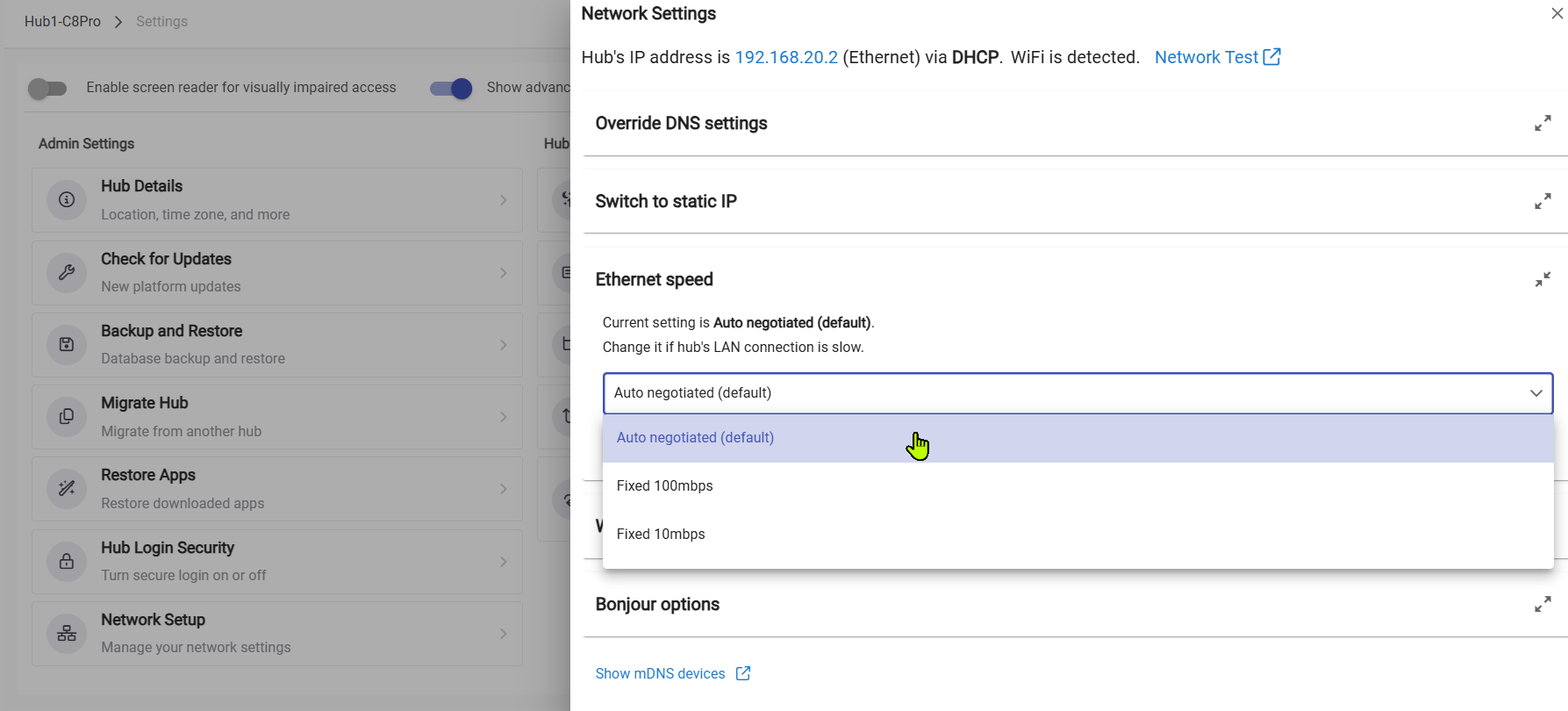
 ).

