A simple reboot doesn't normally help too much with G-Wave radio issues, you have to shut down full power weight 30 seconds and then restore power, that's the only way to clear the radio.
Glad you got things cleared up!
A simple reboot doesn't normally help too much with G-Wave radio issues, you have to shut down full power weight 30 seconds and then restore power, that's the only way to clear the radio.
Glad you got things cleared up!
I’m excited to hear that Hubitat now has a G-Wave radio, although I’m not seeing many G-wave devices available. 

LOL - GeeWiz-Wave devices are the best...
I have had so many problems getting the PC controller to DETECT my Zooz S2 700 Stick. I just cannot seem to get the version number. I have updated the Windows 10 driver. I'm pretty sure I am logged into Silicon Labs website. Can I just log into the Silicon Labs website or do I have to login through Simplicity Studio? Unplugging and plugging the stick back in, clearing the only one showing, refresh, detect.....UGH!
You will create an account on the simplicty studio website. After you install the software, you will use that account within the software. After that install the PC controller add-on. Plug in the zooz stick... (I use the same one)
When I launch simplicity Studio, I do not get a login page.
Removed Simplicity Studio. Re-installed. Got the login page. Back to the same problem. Cannot get version number with Detect.
Did you download the pc controller plug in?
Thanks for your help. I have found that I have to unplug the stick, load Simplicity Studio, run the pc controller, plug in my stick, Refresh, Detect. That sequence seems to work consistently.
Did you get your ghosts removed?
Yes.
I'm not sure if it was mentioned in the previous 371 comments or the PDF, but after I removed all my ghosts, I had to exclude my computer & stick before I was successful pairing my lock.
Thanks SO MUCH for all the info in here. It was very valuable in removing stubborn ghosts. I'm back on track...
I purchased a Zooz 800 stick for purposes of implementing this process.
I only have one Windows 10 pro machine so I tried it there. It did flash the device manager screen indicating something had happened. But nothing showing in USB devices.
I followed a thread above that discussed the need to get updated drivers. But I am not seeing anything in device manager. My understanding are that updated drivers only work when you have a device showing or unknown device? I plan to find a windows 11 machine. But any thoughts from anyone? Thanks.
As I posted in the other thread. Install simplicity studio with the z-wave control module as per the doc and you will see the usb stick properly.
This is fun. I am following the instructions above. It appears that the Zooz 800 stick (ZST-39LR) is showing in Device Manager:
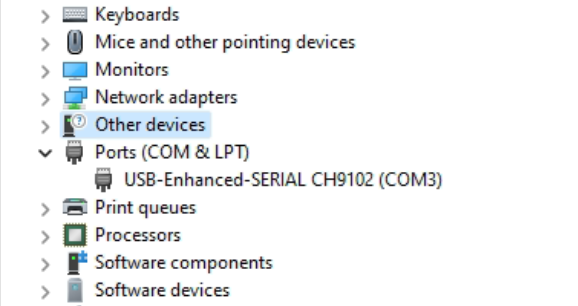
But when I go through the motions with pairing it to the hub it does not work. The Windows 11 PC I am using is a NUC mounted on a wall (it drives a touchscreen) about 10 feet through a floor from the hub.
How close does it need to be to pair? I have to dismount the NUC and it will take some doing to move it but if it needs to be within inches of the hubitat then I will do it. Thanks.
Is it showing in the silabs z-wave control software? You need to initiate pairing from the silabs software.
Yes and yes
you can try moving it closer. I usually have mine plugged into my laptop next to the hub. It won't pair through repeaters.
If only I had a windows laptop.
Works fine on a mac with parallels...Just expose the usb port to the VM (this includes the M1 chip macs) or if you have an intel mac you can simply dual boot to windows.
Download the Hubitat app

