OK. I'm totally confused. I have created the virtual presence device on Hubitat, used the Virtual Hybrid Sensor device driver. It even shows up as both a sensor and switch in Home on iOS. But I can't create an automation that starts with People Arrive or People Leave. They are both greyed out. I have multiple Apple TVs and the Home app can perform switches in Hubitat that work super fast. But what do I have to do to make these presence sensors (switches?) available in Home?
You need a “virtual presence switch” driver. @ogiewon has one in his repo that I used.
This is the one I'm using. Is that not the right one? https://raw.githubusercontent.com/HubitatCommunity/Virtual-Presence/master/Virtual_Presence.groovy
They are the same...
Both were created initially by @Ogiewon. Then independently, we each modified his to be a Virtual Presence.
All of these "hybrid" drivers are the same...  Take a full on basic switch driver and then add on capabilities, attributes and commands that follow or slave to the switch.
Recently there's been a few "universal" drivers created based on a ST DTH released. Same idea but more piled on 
2 Likes
Dang! I even looked at the driver and didn’t see the switch capability. Thanks for correcting me.
Sorry that I didn’t read this more carefully.
Do you have at least one of your Apple TV’s enabled as a Home Hub? I think it’s only greyed out if you don’t have a Home Hub.
1 Like
That's correct. To create HomeKit Automations, there has to be what we'd call a "server" to retain and run them. That's an Apple TV, a HomePod or an always on iPad.
2 Likes
Well, per that article which I read a few days ago, it seems that Apple TVs are automatically setup as hubs. And I have several Apple TVs installed and operating. They are logged in with my AppleID. And remote commands work. But, still, the greyed out People-related issues remain.
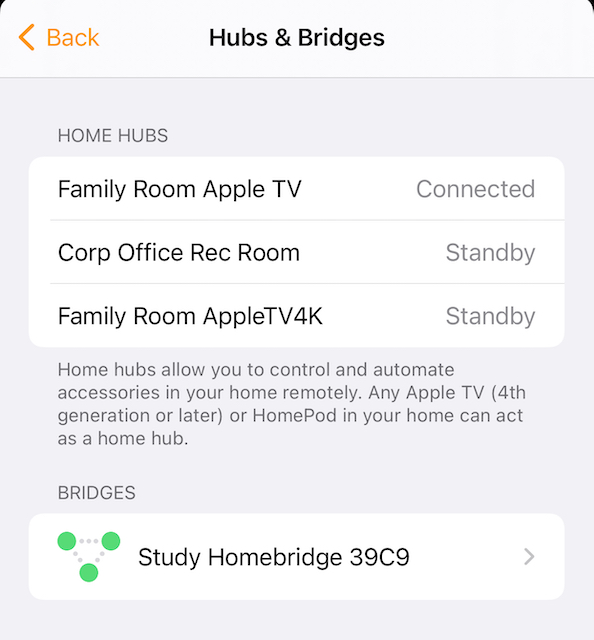
You have the Home App on your iPhone, right? When you tap the Home icon at upper left, a menu opens and you'll tap Home Settings near the bottom. Scroll down and find Hubs & Bridges and tap that. Whew. That final screen will tell you what your Home Hub is.. and what's connected to that hub (server).
Maybe this article will help?
Very helpful csteele. And as I thought, I def have a connected hub. Just can't figure out why I can't write rules around people coming/going.
@wiegout - Maybe it has something to do with "Location Services" on your iPhone/iDevice? Is that enabled?
Note: I just tested this on my iPad - when disabled the leave/arrive automations are grayed out...
Also... the mobile device has to be selected as the device that the automations use. I had a day when, not realizing the significance, I selected my phone then selected an iPad... thinking it was an OR. Oh no, it's a last-one-selected. I never got activity because of course, I left the iPad at home.
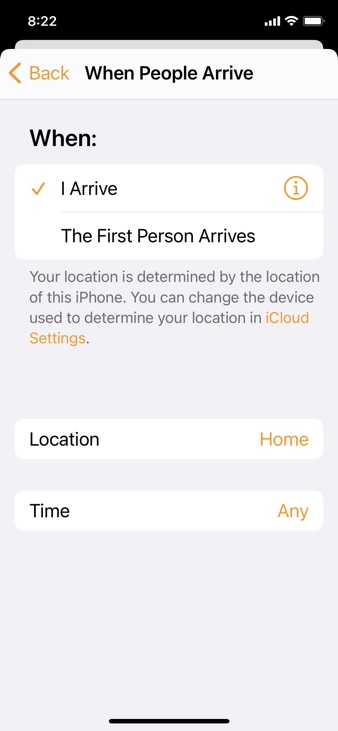
see that message about iCloud settings?? In there.. the "My Location" must be "This Device" -- or the device that will be in motion.
1 Like
So if you were going to incorporate the iPad in addition to the iPhone you'd have to have a separate virtual presence (iPad "home/away") device and handle it on the HE side I guess?
Interesting. Location was turned off for "Home". Interesting the choices for Home. Never, Ask Next Time, or While Using the App. Always is not a choice. I turned on While Using the App and still greyed out. But, that seems like it would be the problem. Thanks for helping here. I'll keep digging.
Mostly Combined Presence is working now. But, I'd like to add Homekit as a third opinion on our whereabouts.
Mmm.. did you check your settings for the iPhone itself - not the Home app?
On my iPad it was under Settings/Privacy/Location Services..

I was making sure @wiegout had "Location Services" turned on.. When I turn that off then the arrive/leave automations get grayed out at least on my iPad..
1 Like
Right, no problem, I was just "cleaning up" for future readers who have found this same menu item a different way and wonder if it's the same or not... it is the same, and being a computer, there's probably a third way
1 Like