Homebridge integration Q

Anyone experience an issue like this trying to install Homebridge-Hubitat- V2 app?

I add the app to Hubitat, no problem. Then, I install the plug-in on Homebridge and fill in all the required info to communicate with the Hubitat app. Everything saves fine. Then, I restart the Homebridge for it to take effect, but it doesn’t run. I instead I get the error “Not Running - View Logs” on the HomeBridge Status page (it should read “running”). Once I delete the plug in, everything initiates correctly. I tried this three different times all with the same outcome.

  • Hubitat App Version: 2.7; platform = 2.3.5.135
  • Homebridge Plugin Version: 2.71
  • Homebridge Version: 1.6.1
  • NodeJS Version: 18.12.1

Since it tells you to look at the logs, what does the logs say?

I am running it on NodeJS Node.js Version v18.16.0 (current LTS) with no issues.

How are you filling the info, directly to the JSON? Maybe run it by a JASON validator?

Should look something like this:

{
    "bridge": {
        "name": "Homebridge",
        "username": "XXXXX",
        "port": 51469,
        "pin": "XXXXX",
        "bind": [
            "eth0"
        ]
    },
    "accessories": [],
    "platforms": [
        {
            "name": "Homebridge-UI",
            "port": 8581,
            "auth": "form",
            "theme": "auto",
            "tempUnits": "f",
            "lang": "auto",
            "platform": "config"
        },
        {
            "name": "Hubitat-v2",
            "platform": "Hubitat-v2",
            "app_url_local": "http://192.168.1.4/apps/api/",
            "app_url_cloud": "",
            "app_id": 681,
            "app_platform": "Hubitat",
            "use_cloud": false,
            "access_token": "XXXXXXXXX",
            "communityUserName": "",
            "temperature_unit": "F",
            "validateTokenId": false,
            "adaptive_lighting": false,
            "consider_fan_by_name": false,
            "consider_light_by_name": false,
            "adaptive_lighting_offset": 0,
            "round_levels": false,
            "logConfig": {
                "debug": false,
                "showChanges": true
            }
        },

With more below that possibly.... otherwise no comma at the end if its the last section.

Hi thanks for taking a minute to respond and try to help me out. I use Homebridge Config UI so I don’t alter the JSON. I select a plug-in to install with a tap of the button and it configs everything automatically — never had an issue with any other plugins working
via this approach.
I can certainly pull the logs, but it seems endless and constantly refreshing. Is there a certain view that I can provide that will help trouble shoot this?

Really hope I can solve for this as I was an original Hubitat user that went back to SmartThings because the dashboarding was in its infancy and now that ST has abandoned custom apps I’d like to get back to Hubitat. Mainly, I want Hibitat to connect to my z wave devices (I have several) and to have local control, but ultimately I want me ecosystem to be powered by Apple Home for its ease of use for the family and voice activation (Alexa is lackluster IMO).

What else can I provide to help solve for this issue I’m having?

Have you looked at the new-ish Homekit Integration? I don't use it, but it looks to have been built for exactly your purposes.

2 Likes

You need to go into the Hubitat app and create the config for the HB plugin, then paste the JSON into the HB config file (which can be accessed via the UI). This is covered in the install instructions: GitHub - tonesto7/homebridge-hubitat-tonesto7: Hubitat Homebridge Plugin

It is saying to check the logs, so there is probably an error in the logs...

2 Likes

I did this already. I didn’t copy and paste directly into the JSON; I used the forms presented in the UI.

Looking at the JSON, I see each of the required settings filled out. Any other options for me to try?

Find the errors in the logs.

Paste your full Homebridge JSON config in here:

It will tell you where your errors are.

Thanks @jkudave. I did but I’m not sure what these errors mean. Perhaps I copied an additional } or ]? This Plugin is the newest I’ve installed, so it’s at the end of the JSON —
Perhaps I copied an additional } or ]?

Error: Parse error on line 22:
... } }],
----------------------^
Expecting 'EOF', got ']'

If I remove the last } and ] I get a “Valid JSON”

So once you have valid JSON does it then work for your config file?

It’s weird, it all checks out in that JSON configurator, but if I copy it into the Homebridge config I still get the same error. Any other ideas?

:point_up:

Are you copying the entire JSON configuration with what comes from the Homebridge app into the validator? You need to validate the entire Homebridge JSON config.

Yup. Copied the whole thing and it says Valid JSON. I’m assuming this isn’t a wide spread thing, which leads me to believe it has something to do with the inputs that I copied from the Hubitat app (I checked twice and they are correct copies), or something else that is preventing this connection. Open to any and all other ideas.

Right, but I don’t understand what that means specifically. The error log scrolls so I have a hard time isolating the red (errors) and then copying them. I can download the whole thing, but it’s long and I have no idea what items may be sensitive to paste on a message board.

Is there a particular error that I should look for?

Not sure how the log is scrolling so fast when it says it cannot start? There has to be an error about it not starting.

And Yes it probably is something you have put in there or the way to the UI is formatting the JSON for that plugin, the instructions say to copy/paste the exact JSON from the HE app into the config for the plugin. I am not sure why you refuse to follow the instructions.

I was going to try and test breaking my config but the UI wont even let you save the config with invalid JSON, not sure about if you use the UI to change values.

I tried to put in some invalid values and see if I could break mine but it continues to work. You probably have something else going on, maybe not installed correctly, not sure. There is probably an error in the logs that says what the problem is. Hence the purpose of the logs.

Any errors, or in particular anything about what the problem is, not being able to start.

I’m not refusing to follow your advice — I literally did what you asked me (copied exactly from Hubitat into the HB config, without using the UI). Everything checks out when I copy the full JSON (the Hubitat plug-in part as well as my other plugins) into the JSON config, but it won’t let me save it in the HB config (it gives me a Config Error: Invalid JSON — again, this was copied from the JSON checker). As a result, I have to back out of the HB configuration (ie not save the JSON because it won’t). This is essentially square one for me — it’s where I get an error message in the status, and my HB does not work unless I turn off the Hubitat app. Could there be an issue with the cut and paste from the JSON checker to HB (ie. not sure if spacing matters, or fonts, or if either can get messed up given that I’m doing this via cut & paste on my phone)

As for the error logs, I understand that this is probably a big piece. What I don’t understand is what to look for in terms of a start up error. I see errors ranging from “connection error”, “failure error, does not contain package json”, “address already in use” and a dozen others. Some of these errors reference other plugins (that typically work fine if I turn off the Hubitat plugin).

How about trying one of the other Homebridge integrations? I use this one and it works very well:

For the plugin install on the Homebridge side, you can simply install from within Homebridge. Go to plugins and search for Hubitat. Install the Homebridge Hubitat Makerapi (homebridge-hubitat-makerapi v0.4.15 (2021-05-24)) plugin.

Use the tool here to help build your JSON for the plugin - https://dantapps.github.io/

Enter your hub IP address and then check the box for "Add MakerAPI Config?".

After that is done, you should have the JSON needed for the plugin. Copy and paste from the tool into the plugin. Once that is done, restart Homebridge and you should be good to go.

1 Like

You leave out key details. If you tried to copy the config and then get errors saving it you are doing something wrong. This is critical info to people trying to help you.

You should take the ENTIRE config (select Config at the top of the HB UI). Put that in a JSON Validator. Make sure it checks out. If not, fix it and get it to save.

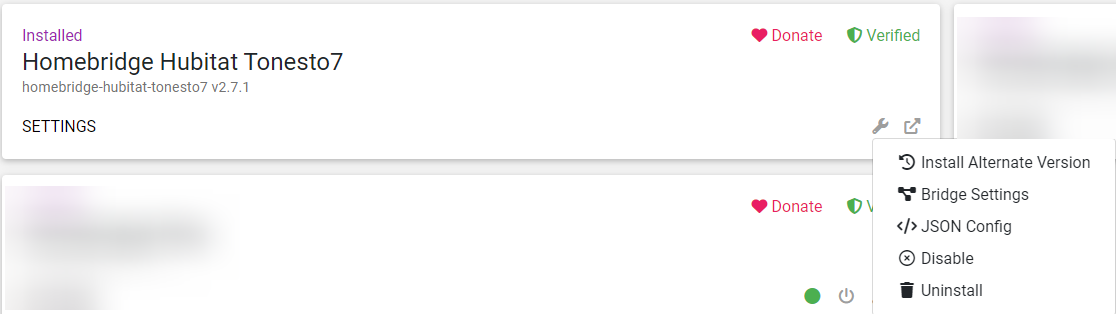
Then go to Plugins, find the Hubitat plugin, select the Wrench icon, then select JSON config.

This will be JUST the Hubitat plugin config. Erase the entire thing. Paste in the full config created from the HE app plugin. Save.

Both of those config screens should not allow you to save an invalid config. So if it wont let you save it, something is messed up. You can use a JSON validator to help find the issues.

I would not edit the config file directly on the filesystem. Use the HB UI JSON editor. When I said not to use the UI I meant not to use the plugin config screen where you can click checkboxes, etc...