Heat Index Calculation Rule - Better Way?

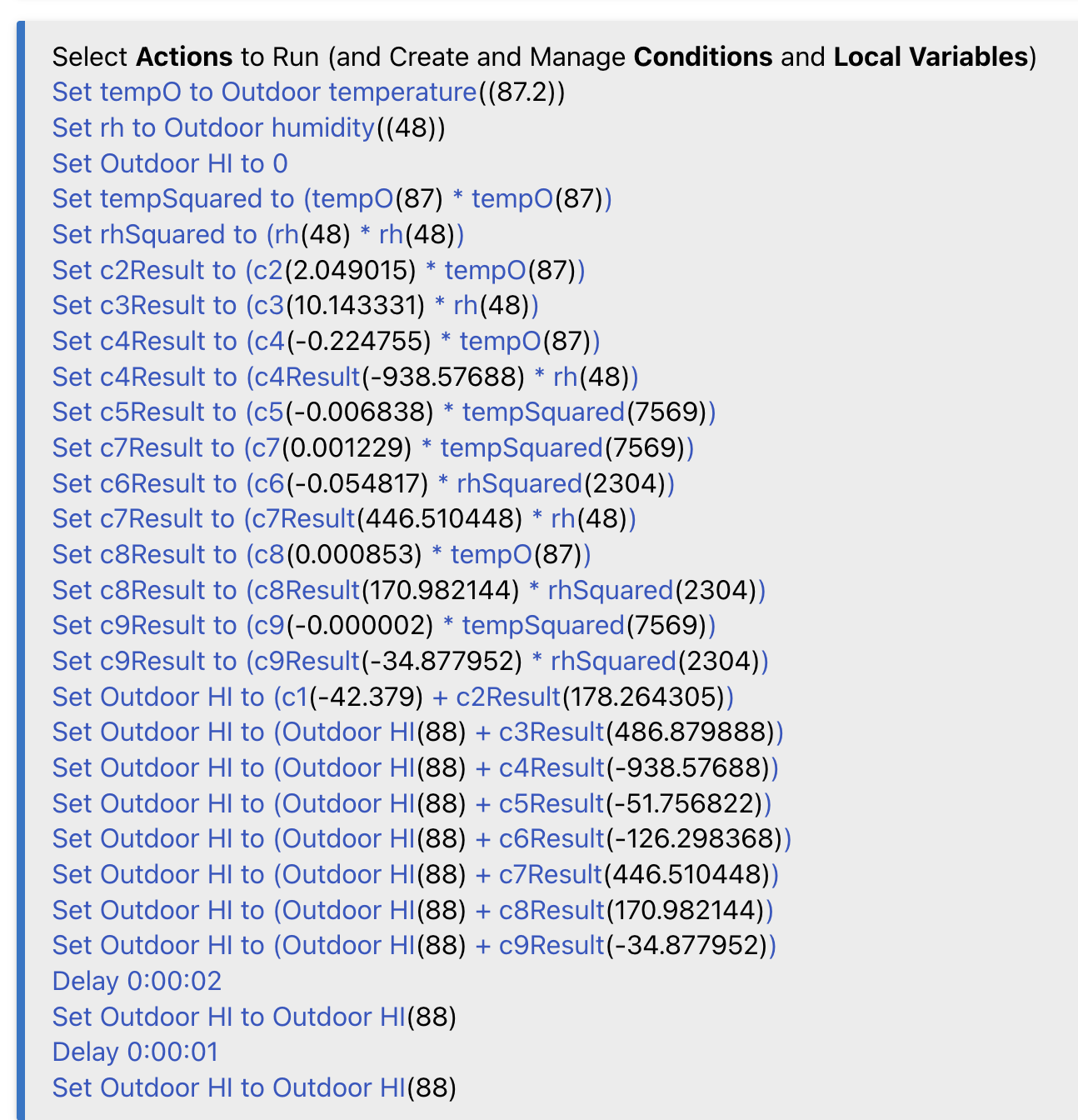
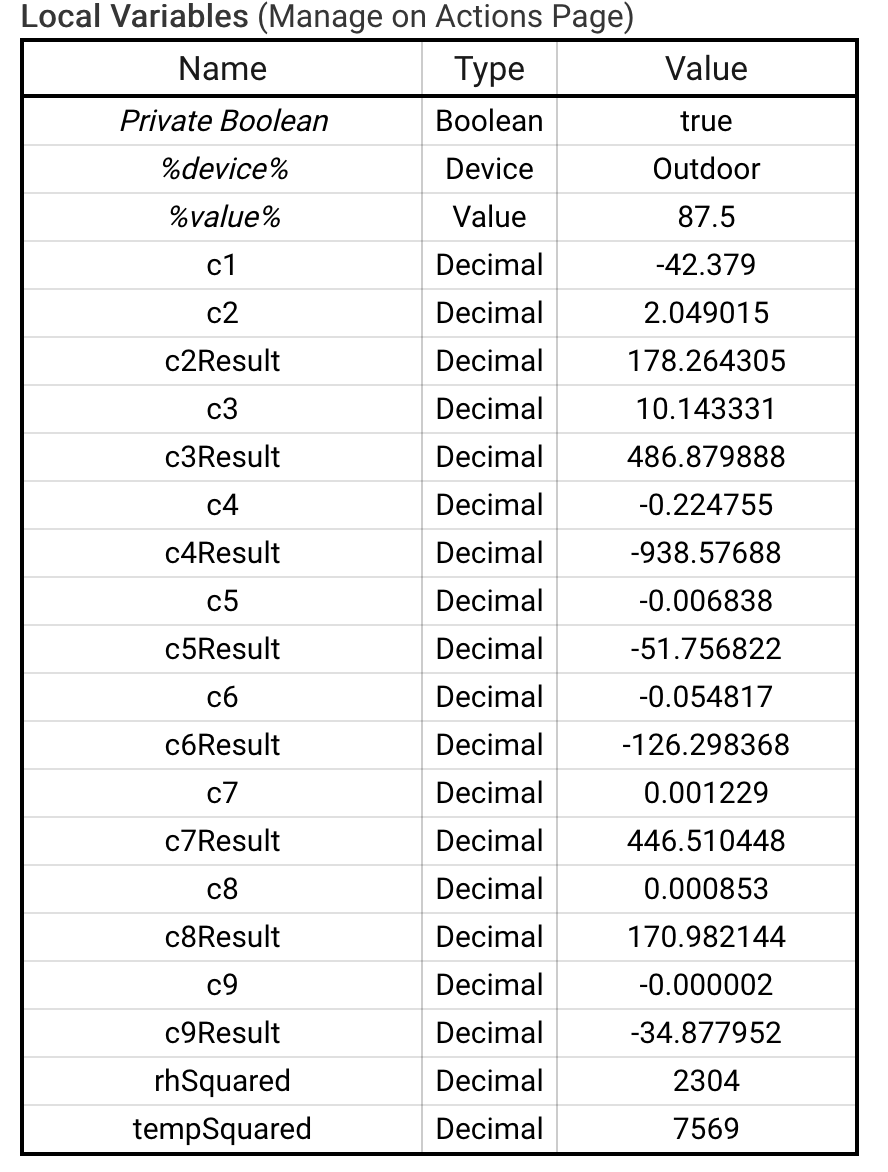
I just climbed out of a RM rule math hole. The rule calculates Heat Index using the Rothfusz regression formula. The rule does work* but I would like to know if there is a more efficient way using RM than this approach. This was my first foray using RM beyond a simple math task.

*it still needs some time/execution tweaks

Thanks.

I wish that someone at Hubitat would look at how Tasker does Maths. I believe it is Java based. You can enter a full equation in a single command, with various trug and math functions.
The lack of Maths drives people into programming.

I once had a rule that I was using to update variables with electricity usage - minimum/ maximum power, cost, energy total etc. As some maths was needed, it ended up very unwieldy. I found it easier to use node-red on a Pi and just pass the values back to Hubitat.

I recently used the Google AI prompt in search to create a Groovy app. Just gave a screen print of each of the RM rules. In my case there were about a dozen rules. It even made suggestions to improve the app. The new app works great and seems to have less CPU load.
Suggest that you use your "favorite" AI to to migrate the rule to an app.

I would also suggest using AI and write an app or driver. I have done this fairly successfully a few times. That said, I was using a paid model to do so, I am not sure what a free model would produce.

For complex things like this, an app (or driver) is a better approach. I tell it how I want to use it in the hub. For example, I might say that I want it for use in rules, for a dashboard display, to control a device or similar.

I would prompt it something like this:

I am am using a Hubitat hub, and I want to calculates Heat Index using the Rothfusz regression formula. I don't know whether an app or driver is more appropriate for this task. I want to be able to use this calculation to [fill in the blank] within my Hubitat hub.

Please analyze my use case first, and suggest some solutions. We can produce the code after I approve or critique your suggestions.

From there, I usually have to ask it to add things like input fields, toggles for C/F, dropdown selection for sensors, adjustment factor input text fields for the formulas, or whatever else.

@johnwill1 @JimB @neonturbo

I realize that another device was possibly a more effective tool but I really do not want to add another device to my mix. I do not have a favorite AI. To date I have not knowingly used AI. A groovy app does seem to be a reasonable way of maximizing rule performance utilizing my Hubitat. I have no coding background whatsoever. The option of utilizing AI is certainly enticing but I like the concept of my having some idea of what the heck is going on under the hood.

My question appears to have been answered by all of you in that there have been no critiques of how I was using or not using the math capabilities of RM. I posted wanting to make sure I had not missed another potential method of using "RM" to execute a mathematical formula as it was my first deep dive.

It appears that I have eked out a solution as best as the math capabilities of RM allows. For the time being it will serve my needs. It is not mission critical. I am not going to use the data to control any HTG/AC equipment. It's intended to help decide whether other or not it is advantageous to open up the house to the outdoors in the AM or button down the hatches as well as gathering some historical data to assist in making some choices of equipment upgrades.

I will keep the thread open for another day or so and then put it to rest.

Thank you all for your input.

Join the crowd! I can sorta read the code, but I don't fully understand it, nor could I properly apply it.

I am not sure that is something I would be qualified to answer, hence the suggestion to go another way.

Here is what I prompted using Gemini:

I am am using a Hubitat hub, and I want to calculates Heat Index using the Rothfusz regression formula. I don't know whether an app or driver is more appropriate for this task.

I am not going to use the data to control any Heating/AC equipment. It's intended to help decide whether other or not it is advantageous to open up the house to the outdoors in the AM or button down the hatches as well as gathering some historical data to assist in making some choices of HVAC equipment upgrades.

I think I want to save and possibly plot or export this data. I want to track indoor temp and humidity and calculate the heat index, and also outdoor temp, humidity, and heat index so that I can compare the data.

Please analyze my use case first, and suggest some solutions. We can produce the code after I approve or critique your suggestions.


Response:

I'd be happy to analyze your use case and suggest an approach for calculating the Heat Index using the Rothfusz regression in Hubitat.

Since your primary goals are gathering historical data, comparing indoor vs. outdoor metrics, and tracking these over time (rather than real-time HVAC control), we can optimize for data organization and logging rather than control latency.

Here is a breakdown of the two approaches and a recommendation based on your needs.

Approach 1: The App Approach

In Hubitat, an App acts as the "manager." You would select your existing indoor and outdoor temperature/humidity sensors within the App, and it would create "Child Virtual Devices" to store the resulting Heat Index calculations.

Pros:

  • Centralized Logic: You manage the Rothfusz equation in one place. If you want to add a third zone (e.g., a garage or basement), you just tick a box in the App, and it spawns a new device.
  • Sensor Agnostic: The App pulls data from your existing real sensors, regardless of what brand or driver they use. You don't have to alter the drivers for your physical devices.

Cons:

  • More moving parts: You are running an App and generating virtual devices.
  • Event clutter: The physical sensor updates, sends an event to the App, the App calculates the index, and then sends an event to the virtual device. This creates a slightly longer event trail in your logs.

Approach 2: The Custom Driver Approach

In this method, you create a new Virtual Device using a custom driver (like a "Virtual Omni Sensor"). You would then use Hubitat's built-in Rule Machine to pass the temperature and humidity values from your physical sensors into this virtual device, where the driver's code performs the Rothfusz calculation and updates its own state.

Alternatively, you could embed the Rothfusz equation directly into the driver of your physical sensors.

Pros:

  • Self-Contained (if using virtual): The device handles its own math once handed the variables.
  • Streamlined (if modifying physical drivers): If you add the code directly to your existing temperature/humidity sensor drivers, the calculation happens the instant the sensor reports, with no App or Rule Machine intermediary.

Cons:

  • Maintenance (if modifying physical drivers): Every time the original driver is updated by the developer, you have to manually merge your Heat Index code back in.
  • Clunky Routing (if using virtual): You have to rely on Rule Machine triggers every time a temperature or humidity value changes to push those new values into the virtual device so it can run the math.

My Recommendation: The App with Virtual Child Devices

For your specific goal of tracking and comparing indoor and outdoor data for historical logging, the App approach is superior.

Here is why it fits your use case:

  1. Clean Separation of Data: By using an App, you leave your physical sensor drivers untouched. The App subscribes to their temperature and humidity events, runs the Rothfusz equation, and pushes the result to dedicated Virtual Heat Index devices.
  2. Export Friendly: Because the Heat Index values live on their own virtual devices, it is extremely easy to map them to Maker API or influxDB (if you are exporting to Grafana for your historical HVAC research).
  3. Apples-to-Apples Comparison: The App ensures that the exact same math is applied to both the indoor and outdoor sensors simultaneously, ensuring your comparison data is solid.

How it would work:

  1. We write a parent App called "Heat Index Calculator."
  2. In the App UI, you select "Indoor Sensor" and "Outdoor Sensor."
  3. When you click "Done," the App automatically creates two virtual child devices: "Indoor Heat Index" and "Outdoor Heat Index."
  4. Every time your physical sensors report a change, the App does the math and updates the virtual devices.

I then asked:

So if we go with the app approach (number 1 above) how many plot points or how long of a history can we have? Could this be configurable?


Response:

Yes, the amount of history you keep is highly configurable, but Hubitat handles this in a somewhat unique way.

Hubitat isn't designed to be a long-term data warehouse. Its database is optimized for speed and real-time execution, not massive historical charting. However, you have two distinct options for plotting and storing this data depending on how long of a history you want to keep.

Option A: Store Locally on the Hub (Short-Term)

Hubitat allows you to configure limits on how much data is kept per attribute, per device.

  • Event History Size: This is the number of events kept in the device's event log.
  • State History Size: This is the number of states kept for a particular attribute (like temperature or heat index).
  • Max Event/State Age Days: This limits the history by time, regardless of the number of events.

The Limits:

By default, recent hub firmwares set these limits around 100 entries or 30 days, whichever comes first. You can increase the Event and State history sizes up to a maximum of 2000.

What does 2000 look like?

If your sensors report a change every 5 minutes (12 times an hour), that's 288 events per day. A limit of 2000 would give you almost exactly 7 days of history before the oldest data is purged.

If you want more than a week of local data, you would need to lower the reporting frequency of your physical sensors to stretch that 2000-event limit over a longer period.

Option B: Export to an External Database (Long-Term)

For gathering historical data to assist in making HVAC equipment choices, keeping a few days or weeks of data might not be enough — you probably want an entire season or a full year to look at trends. To do that without crashing your Hubitat, you should export the data.

This is extremely common in the Hubitat ecosystem and is exactly why the App approach (using virtual devices) is beneficial.

How it works:

  1. Maker API: You can use Hubitat's built-in Maker API app to stream the device events via HTTP POST to an external server.
  2. InfluxDB Logger: There is a very popular community app called "InfluxDB Logger". You install this app, select your new Virtual Heat Index devices, and it automatically writes every new data point to an InfluxDB database.

The Setup:

Most users set up a Raspberry Pi, a NAS, or an old PC running InfluxDB (a time-series database perfect for sensor data) and Grafana (a powerful graphing dashboard). Hubitat feeds the data to InfluxDB, and Grafana plots it.

With this setup, the history length is virtually unlimited (limited only by the hard drive size of your external server), and you can build incredibly complex graphs comparing indoor vs. outdoor heat indexes over entire seasons.

Last prompt:

I want to use local storage for now, please create the app we discussed. Be sure to include selections for both indoor and outdoor sensors, as well as info and debug log toggles. If you can think of any other configurations that would be helpful in the app, like calibrations, math curves on the equation, or similar settings/configurations, please add them.


The response, then the app:

To calculate the Heat Index and store the data locally on your Hubitat hub, we will use the parent App and Virtual Child Device architecture.

I have included the standard U.S. National Weather Service (NWS) Rothfusz regression equation, including the specific adjustments for extremely high/low humidity and temperature ranges.

To give you more control, I added Calibration Offsets for both temperature and humidity on the indoor and outdoor sensors. This is particularly helpful for outdoor sensors that might read artificially high if they catch direct sunlight at certain times of the day, or for aligning the baseline of two different brands of sensors before comparing their data.

You will need to install the Driver first, followed by the App.

1. The Virtual Device Driver

This driver creates the virtual device that holds the temperature, humidity, and the calculated heat index. It requires no configuration once installed; the App handles feeding it the data.

1. The Virtual Device Driver

This driver creates the virtual device that holds the temperature, humidity, and the calculated heat index. It requires no configuration once installed; the App handles feeding it the data

/**
 *  Virtual Heat Index Sensor
 *
 *  A virtual device to hold Temperature, Humidity, and calculated Heat Index.
 */
metadata {
    definition (name: "Virtual Heat Index Sensor", namespace: "custom", author: "User") {
        capability "TemperatureMeasurement"
        capability "RelativeHumidityMeasurement"
        capability "Sensor"
        capability "Refresh"
        capability "Initialize"
        
        attribute "heatIndex", "number"
    }

    preferences {
        input name: "txtEnable", type: "bool", title: "Enable descriptionText logging", defaultValue: true
    }
}

void installed() {
    log.info "${device.displayName} installed"
}

void updated() {
    log.info "${device.displayName} updated"
}

void initialize() {
    log.info "${device.displayName} initialized"
}

void refresh() {
    if (txtEnable) log.info "${device.displayName} refresh requested. Contacting parent app..."
    // Ping the parent app to force a recalculation for this specific device
    if (parent) {
        parent.childRefreshRequest(device.deviceNetworkId)
    } else {
        log.warn "No parent app found to handle refresh request."
    }
}

void parse(String description) {
    // Virtual devices do not parse physical inbound data
}

// Internal method used by the parent app to set all values simultaneously
void setValues(BigDecimal temp, BigDecimal humid, BigDecimal hi) {
    // isStateChange: true forces Hubitat to log the data point even if the value hasn't changed.
    // This is critical for keeping periodic graphs plotting smoothly without gaps.
    
    if (txtEnable) log.info "${device.displayName} setting temperature to ${temp}°"
    sendEvent(name: "temperature", value: temp, unit: "°F", isStateChange: true)
    
    if (txtEnable) log.info "${device.displayName} setting humidity to ${humid}%"
    sendEvent(name: "humidity", value: humid, unit: "%", isStateChange: true)
    
    if (txtEnable) log.info "${device.displayName} setting heatIndex to ${hi}°"
    sendEvent(name: "heatIndex", value: hi, unit: "°F", isStateChange: true)
}

2. The Hubitat App

This App subscribes to your existing physical sensors, applies any offsets you configure, runs the NWS Rothfusz calculations, and pushes the results to the child devices

/**
 *  Heat Index Calculator
 *
 *  Calculates the NWS Rothfusz Heat Index for selected Indoor and Outdoor sensors 
 *  and outputs the results to dedicated Virtual Child Devices. Supports multiple 
 *  sensors per location, averaging, and custom attribute names.
 */
definition(
    name: "Heat Index Calculator",
    namespace: "custom",
    author: "User",
    description: "Calculates Heat Index using the Rothfusz regression for indoor and outdoor sensors.",
    category: "Utility",
    iconUrl: "",
    iconX2Url: ""
)

preferences {
    page(name: "mainPage", title: "Heat Index Calculator", install: true, uninstall: true) {
        section("<b>Indoor Sensor Configuration</b>") {
            input "indoorTempSensors", "capability.temperatureMeasurement", title: "Select Indoor Temperature Sensor(s)", required: true, multiple: true
            input "indoorTempAttr", "text", title: "Indoor Temperature Attribute Name", defaultValue: "temperature", required: true
            input "indoorHumidSensors", "capability.relativeHumidityMeasurement", title: "Select Indoor Humidity Sensor(s)", required: true, multiple: true
            input "indoorHumidAttr", "text", title: "Indoor Humidity Attribute Name", defaultValue: "humidity", required: true
            
            input "indoorTempOffset", "decimal", title: "Indoor Temperature Offset (°F) [Applied to Average]", defaultValue: 0.0, required: true
            input "indoorHumidOffset", "decimal", title: "Indoor Humidity Offset (%) [Applied to Average]", defaultValue: 0.0, required: true
            input "indoorRefresh", "enum", title: "Periodic Update Interval", options: ["0":"Disabled", "5":"5 Minutes", "10":"10 Minutes", "15":"15 Minutes", "30":"30 Minutes", "60":"1 Hour"], defaultValue: "0", required: true
        }
        
        section("<b>Outdoor Sensor Configuration</b>") {
            input "outdoorTempSensors", "capability.temperatureMeasurement", title: "Select Outdoor Temperature Sensor(s)", required: true, multiple: true
            input "outdoorTempAttr", "text", title: "Outdoor Temperature Attribute Name", defaultValue: "temperature", required: true
            input "outdoorHumidSensors", "capability.relativeHumidityMeasurement", title: "Select Outdoor Humidity Sensor(s)", required: true, multiple: true
            input "outdoorHumidAttr", "text", title: "Outdoor Humidity Attribute Name", defaultValue: "humidity", required: true
            
            input "outdoorTempOffset", "decimal", title: "Outdoor Temperature Offset (°F) [Applied to Average]", defaultValue: 0.0, required: true
            input "outdoorHumidOffset", "decimal", title: "Outdoor Humidity Offset (%) [Applied to Average]", defaultValue: 0.0, required: true
            input "outdoorRefresh", "enum", title: "Periodic Update Interval", options: ["0":"Disabled", "5":"5 Minutes", "10":"10 Minutes", "15":"15 Minutes", "30":"30 Minutes", "60":"1 Hour"], defaultValue: "0", required: true
        }
        
        section("<b>Manual Actions</b>") {
            input "btnRefresh", "button", title: "Force Immediate Update"
        }
        
        section("<b>Logging</b>") {
            input "txtEnable", "bool", title: "Enable Info Logging", defaultValue: true
            input "logEnable", "bool", title: "Enable Debug Logging", defaultValue: false
        }
    }
}

void installed() {
    if (logEnable) log.debug "Installed with settings: ${settings}"
    initialize()
}

void updated() {
    if (logEnable) log.debug "Updated with settings: ${settings}"
    unsubscribe()
    unschedule()
    initialize()
}

void appButtonHandler(String btn) {
    if (btn == "btnRefresh") {
        if (txtEnable) log.info "Manual update triggered from App UI."
        forceInitialUpdate()
    }
}

void initialize() {
    // Create child devices if they do not exist
    String indoorChildId = "HeatIndex-Indoor-${app.id}"
    String outdoorChildId = "HeatIndex-Outdoor-${app.id}"
    
    if (!getChildDevice(indoorChildId)) {
        addChildDevice("custom", "Virtual Heat Index Sensor", indoorChildId, null, [name: "Indoor Heat Index", label: "Indoor Heat Index", isComponent: true])
        if (txtEnable) log.info "Created Virtual Device: Indoor Heat Index"
    }
    
    if (!getChildDevice(outdoorChildId)) {
        addChildDevice("custom", "Virtual Heat Index Sensor", outdoorChildId, null, [name: "Outdoor Heat Index", label: "Outdoor Heat Index", isComponent: true])
        if (txtEnable) log.info "Created Virtual Device: Outdoor Heat Index"
    }

    String iTempAttr = (indoorTempAttr ?: "temperature").trim()
    String iHumidAttr = (indoorHumidAttr ?: "humidity").trim()
    String oTempAttr = (outdoorTempAttr ?: "temperature").trim()
    String oHumidAttr = (outdoorHumidAttr ?: "humidity").trim()

    // Subscribe to physical sensors for event-driven updates using specified attributes
    if (indoorTempSensors) subscribe(indoorTempSensors, iTempAttr, indoorTempHandler)
    if (indoorHumidSensors) subscribe(indoorHumidSensors, iHumidAttr, indoorHumidHandler)
    
    if (outdoorTempSensors) subscribe(outdoorTempSensors, oTempAttr, outdoorTempHandler)
    if (outdoorHumidSensors) subscribe(outdoorHumidSensors, oHumidAttr, outdoorHumidHandler)
    
    // Setup cron schedules for periodic updates based on user preferences
    if (indoorRefresh != "0") {
        if (indoorRefresh == "60") schedule("0 0 * * * ?", indoorTimerHandler)
        else schedule("0 0/${indoorRefresh} * * * ?", indoorTimerHandler)
    }
    
    if (outdoorRefresh != "0") {
        if (outdoorRefresh == "60") schedule("0 0 * * * ?", outdoorTimerHandler)
        else schedule("0 0/${outdoorRefresh} * * * ?", outdoorTimerHandler)
    }
    
    // Force an initial update slightly delayed so the database finishes creating child devices first
    runIn(2, "forceInitialUpdate")
}

void forceInitialUpdate() {
    if (indoorTempSensors && indoorHumidSensors) calculateAndPush("indoor")
    if (outdoorTempSensors && outdoorHumidSensors) calculateAndPush("outdoor")
}

void indoorTimerHandler() {
    if (logEnable) log.debug "Running periodic scheduled update for Indoor Sensors."
    calculateAndPush("indoor")
}

void outdoorTimerHandler() {
    if (logEnable) log.debug "Running periodic scheduled update for Outdoor Sensors."
    calculateAndPush("outdoor")
}

void childRefreshRequest(String dni) {
    if (logEnable) log.debug "Received refresh request from child device: ${dni}"
    if (dni.contains("Indoor")) {
        calculateAndPush("indoor")
    } else if (dni.contains("Outdoor")) {
        calculateAndPush("outdoor")
    }
}

void indoorTempHandler(evt) {
    calculateAndPush("indoor")
}

void indoorHumidHandler(evt) {
    calculateAndPush("indoor")
}

void outdoorTempHandler(evt) {
    calculateAndPush("outdoor")
}

void outdoorHumidHandler(evt) {
    calculateAndPush("outdoor")
}

BigDecimal getAverageValue(sensors, String attribute) {
    if (!sensors) return null
    BigDecimal sum = 0.0
    int count = 0
    
    // Handle both single selections and multiple selections natively
    def sensorList = sensors instanceof List ? sensors : [sensors]
    
    for (sensor in sensorList) {
        def val = sensor.currentValue(attribute)
        if (val != null) {
            sum += (BigDecimal) val
            count++
        }
    }
    
    if (count == 0) return null
    return (sum / count).setScale(2, BigDecimal.ROUND_HALF_UP)
}

void calculateAndPush(String location) {
    BigDecimal tempOffset = 0.0
    BigDecimal humidOffset = 0.0
    BigDecimal avgTemp = null
    BigDecimal avgHumid = null
    String childId = ""
    
    String iTempAttr = (indoorTempAttr ?: "temperature").trim()
    String iHumidAttr = (indoorHumidAttr ?: "humidity").trim()
    String oTempAttr = (outdoorTempAttr ?: "temperature").trim()
    String oHumidAttr = (outdoorHumidAttr ?: "humidity").trim()
    
    if (location == "indoor") {
        avgTemp = getAverageValue(indoorTempSensors, iTempAttr)
        avgHumid = getAverageValue(indoorHumidSensors, iHumidAttr)
        tempOffset = indoorTempOffset != null ? (BigDecimal) indoorTempOffset : 0.0
        humidOffset = indoorHumidOffset != null ? (BigDecimal) indoorHumidOffset : 0.0
        childId = "HeatIndex-Indoor-${app.id}"
    } else {
        avgTemp = getAverageValue(outdoorTempSensors, oTempAttr)
        avgHumid = getAverageValue(outdoorHumidSensors, oHumidAttr)
        tempOffset = outdoorTempOffset != null ? (BigDecimal) outdoorTempOffset : 0.0
        humidOffset = outdoorHumidOffset != null ? (BigDecimal) outdoorHumidOffset : 0.0
        childId = "HeatIndex-Outdoor-${app.id}"
    }
    
    if (avgTemp == null || avgHumid == null) {
        if (logEnable) log.debug "Skipping ${location} calculation: unable to calculate average temperature or humidity."
        return
    }
    
    BigDecimal t = avgTemp + tempOffset
    BigDecimal rh = avgHumid + humidOffset
    
    // Cap humidity bounds between 0 and 100 just in case offsets push it over
    if (rh > 100.0) rh = 100.0
    if (rh < 0.0) rh = 0.0
    
    BigDecimal heatIndex = calculateRothfusz(t, rh)
    
    if (logEnable) log.debug "Location: ${location.capitalize()} | Avg Temp: ${avgTemp}, Offset Temp: ${t} | Avg Humid: ${avgHumid}, Offset Humid: ${rh} | Calculated Heat Index: ${heatIndex}"
    
    def child = getChildDevice(childId)
    if (child) {
        child.setValues(t, rh, heatIndex)
    } else {
        log.error "Could not find child device: ${childId}"
    }
}

BigDecimal calculateRothfusz(BigDecimal t, BigDecimal rh) {
    // First, try the simple formula
    BigDecimal hi = 0.5 * (t + 61.0 + ((t - 68.0) * 1.2) + (rh * 0.094))
    
    // The Rothfusz regression is only valid if the simple HI is 80 F or higher
    if (hi >= 80.0) {
        hi = -42.379 + (2.04901523 * t) + (10.14333127 * rh) - (0.22475541 * t * rh) -
             (0.00683783 * t * t) - (0.05481717 * rh * rh) + (0.00122874 * t * t * rh) +
             (0.00085282 * t * rh * rh) - (0.00000199 * t * t * rh * rh)
             
        // NWS Adjustment for Low Humidity and High Temperature
        if (rh < 13.0 && t >= 80.0 && t <= 112.0) {
            BigDecimal adjustment = ((13.0 - rh) / 4.0) * Math.sqrt((17.0 - Math.abs(t - 95.0)) / 17.0)
            hi = hi - adjustment
        } 
        // NWS Adjustment for High Humidity and Lower Temperature
        else if (rh > 85.0 && t >= 80.0 && t <= 87.0) {
            BigDecimal adjustment = ((rh - 85.0) / 10.0) * ((87.0 - t) / 5.0)
            hi = hi + adjustment
        }
    }
    
    // Round to one decimal place for cleaner logging and graphing
    return hi.setScale(1, BigDecimal.ROUND_HALF_UP)
}

Once both are installed, navigate to the App section, add "Heat Index Calculator", and select your respective sensors. It will immediately generate the two child devices. The values will populate on the child devices the next time your physical sensors report a change in temperature or humidity.
I didn't test any of this code, but I assume it will work, at least on some level.

Maybe try it, and see what happens? Compare to your Rule Machine rule, and see if they are close?

@neonturbo

Thanks to you and Gemini. :slight_smile: for the code. My RM exercise has inspired me to explore further possibilities.
The Gemini generated App and Driver installed successfully. I did manage to display Indoor and Outdoor Heat Index Readings. They were off somewhat from what my rule was generating. That was not unexpected. Alas there was some "funky stuff" going on and I had to uninstall the App and Driver and revert to a backup made prior to installation. It does certainly appear to have promise but the devil is in all the little details. For now I am going to leave well enough. AI groovy code will require more attention than I can give it at this time.

Thank You for sharing that kickstart.

@neonturbo

I wanted to explicitly say Thank You for handing me his app and driver, essentially on a silver platter. Yesterday's glitch was likely PEBUAK. I reinstalled driver and app again this morning successfully and was able to create tiles displaying results. I have since uninstalled driver and app so I can reinstall. For reason/s I have yet to ascertain, I am finding setup somewhat awkward relative to other driver and app installations I have done. My second use attempt was problematic. (Driver and App code always properly install). It's the subsequent communication between sensor, driver and app that is fuzzy. I am installing driver first per Gemini and enabling debug and live logging as I go. Sometimes I just need to repeat processes over and over to get it through my skull. Will update as I think it could very well be a winner.

Install the driver code only. The actual driver should automagically create two new devices. No need for debug logs etc.

In the app, pick your sensors, if you want to do a periodic polling of sensors, and then just hit Done. You should get two new devices.

@neonturbo

I have it successfully installed.

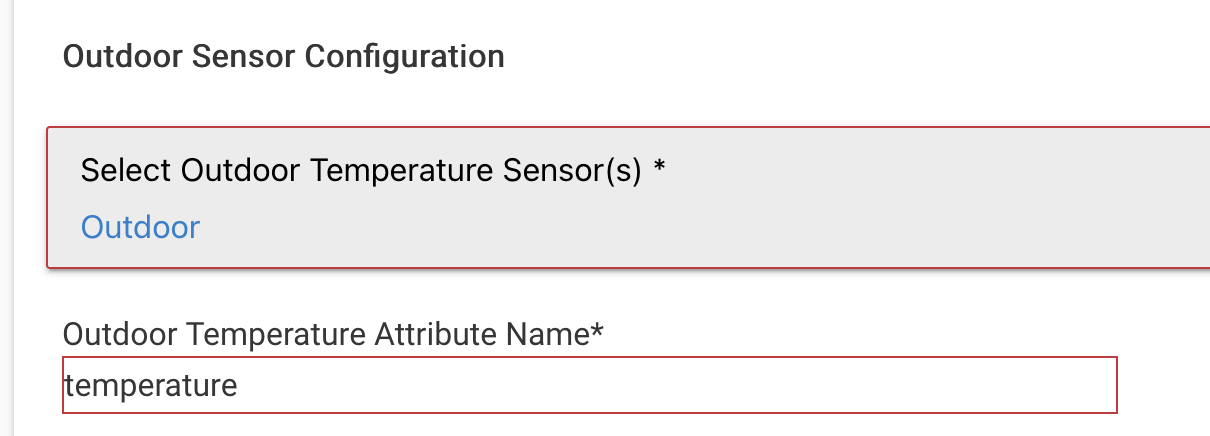
I traced the inconsistency of my installs to my customizing the name of attributes. Though seeming to be an option editing the attribute name apparently prevented proper communication between driver, sensor and app.

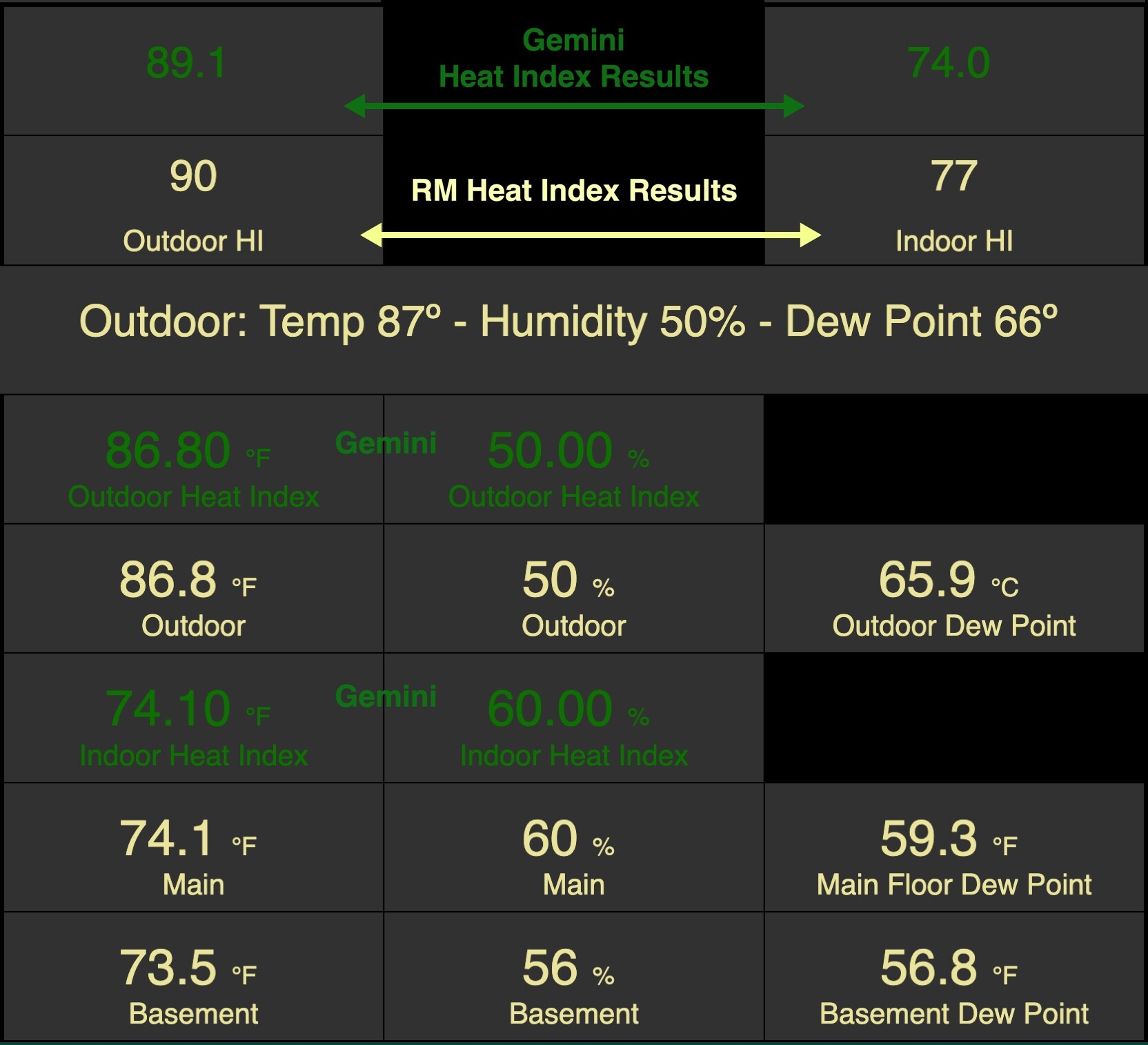
Here's a dashboard sketch of the output from sensors, RM and Gemini Groovy. What has my attention now is the difference in the Indoor Heat Index result. The formula constants in Groovy and RM match. The RM Indoor HI result corresponds with spreadsheet app result.

07/31/26 Update - mea maxima culpa

My RM rule for calculating Indoor Heat Index is at fault NOT groovy app. The rule was cloned from Outdoor Heat Index Rule. Though the temperature sensor was updated. The local variables still contains a reference to the outdoor sensor. Triggering the Indoor rule (NOT using Run Actions) does not seem to clear old data that may have been migrated during the clone. My journey speaks to why RM math is not suitable for anything beyond simple math as pointed out by
@JimB @johnwill1 @neonturbo

Thanks to all, closing this thread out.
Charlie