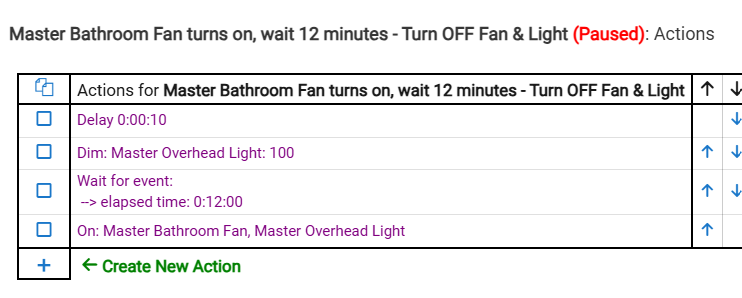
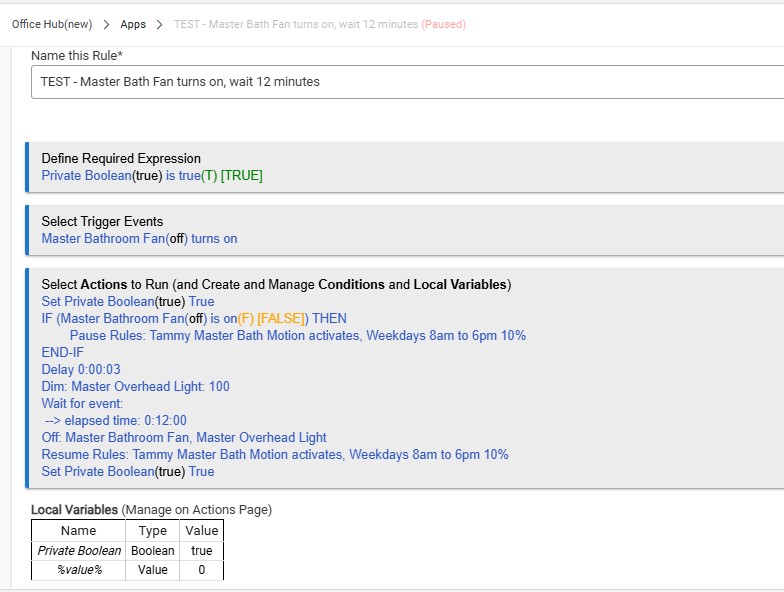
My Basic Rule is working perfect! After that was working perfect in BR I imported it into RM, and to my surprise, it did not work. My question is why? Does RM not transfer rules sometimes? I checked over the in RM (Red Boxed on screenshot) In the (Green Box is the Basic Rule)
I am going to use the Basic Rule for now, but in the future I may want to build a rule in BR. And get it into RM for added power.
FYI I know the screenshot shows RM paused. I do that so I don’t confuse the hub. Tested each 2 times. Without it paused of course.
Main problem is the Master Bath Motion. If someone walks into the bathroom while someone else is taking a shower – it dims the light to 10% and turns the light off in 3 minutes instead of the 12 minutes at 100%.
I highlighted what I think needs to be changed. I only have one rule to be pause right now. If this is correct will add the other.
Recap: The idea is when the master fan is turned on and the overhead light goes to 100% for 12 minutes no other rule will disturb it. So it someone walk through the motion for example it will not change to 10% for 4 minutes.
In your first screenshot above, the first action needs to be Set PB = False. Otherwise, the PB never changes.
For that rule's second action, there's no reason to have that Fan = On conditional -- that was the rule's trigger, so it doesn't need to be a conditional in the rule itself.
Several issues with this particular set of automations. I would start with the discussion you had a day or two ago under a thread called "manage conditions".
I also do not want to be rude or dismissive. But, you are making some of the same mistakes in this rule that you made in the other.
Firstly, you are trying to use the private boolean. The main use case for this is to prevent the rule from triggering again while it is already running. It is not meant to be used as a trigger and I am frankly not even sure it could be effectively. So, you need to remove it from your triggers. Maybe if you were passing it from another rule. Even then, it should be used as a required expression, not a trigger. Note: If that is what you are trying to do, then you have to select the other rule when you are setting up the action to set the value of the private boolean.
Secondly, you did the same thing here that you did in the other discussion. The first step of the actions should be to Set Private Boolean to FALSE Not true.
Again, I am not trying to be disrespectful or dismissive. However, it has been recommended several times for you to do some research and learning around private booleans and Rules in general.
I would suggest you may want to start with basic rules until you get a feel for how the logic works, and then start building on that. There is nothing wrong with being a beginner and trying to learn. However, just like in anything else, you need to be aware of your own limitations and work your way up.
There are video primers that I linked for you before: Tutorials - Hubitat Specifically watch the video on basic rules, and the three on Rule Machine. If there are things you don't understand in there, then come back and ask those questions. But right now, it looks more like you are using a shotgun approach, adding elements to rules that you don't understand, and asking others to do your homework for you.
No, this time I thought I did my homework. Also I have different people telling different ways. I am going through the videos now, however I think I will have more questions. I am going to build a very simple rule bypassing another rule and STOP. After I get that figured out the rest should be easy.
There is very often more that one way to skin the cat when it comes to building an effectively working rule.
Sometimes the different ways are entirely equally effective, and sometimes one way may be better overall, but the difference isn't something showstopper-y per se.
As you get more familiar with the various rule-building options, you'll better understand the nuances of when one particular approach makes more sense than another in a particular situation.
Gaining that experience just takes time in the trenches - it's not something you can really learn instantaneously.
Yes, according to your screen shot, your basic rule with the name “ABBB Master Bath Fan turns on, wait 12 minutes” sent an off command twice to your bathroom fan.
From the info available in those screenshots, your rule machine rule with the name “ Hi- TEST - Master Bath Fan turns on, wait 12 minutes” did not trigger.
Have you noticed that the current status of the rule’s private Boolean is “false?” While in that state, the rule won’t trigger since the required expression will be false.
To be honest, I don’t think I understand what you’re trying to accomplish in this or most of the threads you’ve created recently about your automations and attempts to troubleshoot them when they don’t work as intended.
You seem to be stuck on increasing the complexity of your rules and how they interact with one another, when keeping things as simple as possible will usually achieve a better end result, particularly for someone that’s not used to complex programming logic.
This thread is following the same pattern as your other thread regarding "restrictions for Sat & and Sun".
In both threads you asked why the rule wasn't working as you expected it to, and in both threads you were given the reason, and in both threads you totally ignored the answer, and went on to ask something else in the next post.
The members of this forum are trying to answer you questions. Sometimes they even create the rule on their own hubs, so that they can provide you with a screen capture of the rule. This can take a considerable amount of time to prepare.
I think if you want people to continue providing you with assistance, you shouldn't ignore the answers that they give.
For Example @marktheknife gives you an answer to your problem
Your next response totally fails to address the previous answer
But if you can try to address the questions or suggestions made by others here, before you move onto the next version of your rule with yet more questions of your own, others will appreciate it.