Maybe that does not start the update process right away. Maybe the Dirigera hub just remembers that you requested a firmware update, and it starts the actual process next time the device checks in with the hub. Just a wild guess.
What can be done at driver level:
User click the "Update Firmware" button in the Hubitat UI and the driver instructs the device to check for updates next time it reports something to the hub (button press, motion detected, door opened, battery report, etc.). The drawback: user clicks the "Update Firmware" -> nothing happens in the UI -> user gets frustrated.
There is no "Update Firmware" button, but an "Enable automatic updates" switch in the "Preferences" section. The driver automatically instructs the device to check for firmware updates whenever it reports its battery level (e.g., once a day). The drawback is the same, no UI feedback, but, in this scenario, user does not expect feedback.
The real drawback is that automatic firmware updates are not a good idea since some devices may need a re-pair after the firmware is updated. Or it might get bricked, and then the user blames it on the driver/hub, instead of blaming themselves for pushing that damned button
You are a genius. Thank you so much for your hard work on all of this.
I had a bunch of spare buttons from their automatic shades which were collecting dust (12 in total) and now with your FW I can actually repurpose them. In particular, I have two little kids which can’t reach the light switches and I have let them have these so they can turn on their nightlights and lamps. Also, the blind batteries hold their charges for months versus a couple of weeks which was an unexpected benefit.
I managed to get 9/12 E1766 buttons updated. It’s a game of patience. My 10th is proving difficult. Reading what you wrote about automatic updates: is it difficult to add automatic updating to your existing drivers? If not, would you be able to offer versions with explicit warnings to people before they download those versions?
Same here. I have installed the driver for and paired a IKEA Parasoll Door/Window Sensor (E2013) device. The device Type is set to that driver.
When I do "Update firmware", all I see in the log is "Garage side door sensor looking for firmware updates ...". (I made sure to clear all filters before clicking on Update Firmware.
I only saw the message like the picture below, but the update went well.
When updating, the ZigBee network environment must be good, otherwise, it will not be updated.
I believe you did not exactly follow Step 4 from the original post. Your log shows only messages from dev:83 and seems to filter out messages from other devices (like sys:1).
In your "Live logs", you should see messages coming from all devices, something like this:
If I remove this driver for all devices then the update goes on but I have a lot of other IKEA devices, so it is not that optimal.
I don't have any issues if I have update manually, but reimporting the code again.
I don't recall that I have experienced this kind of issue using HPM before
I think this happened to me a while back when I removed a driver manually from the Drivers Code, and that driver was managed by HPM. Adding back the driver manually did not fix the issue.
If this is your case, you can try to use the Match Up function in HPM, maybe it will "adopt" the manually added driver. You can also try to use the Repair functionality. TBH, I don't remember how I fixed it, but I learned not to mess with drivers managed by HPM
I just finally succeeded in starting a FW update for the ikea on off switch. It took hours of trying to get the buttons to work, i could see traces from the moment i press a buttonbut the state of buttons was never updated.
Tried holding the switch next to the ikea sockets as a handy repeater several times and the buttons never once registered a click.
FW updates from Hubitat only ever traced that the device is looking for updates, but never moved further.
I then deleted the switch and repaired it close to the hub. FW update started immidiatelly, and even rhe button press to wake the device up was already functioning.
Makes me wonder, will this device only work if connected to the hub directly, i.e. without a repeater in between?
IKEA battery devices need to be paired directly with the hub (keep the device 5cm close to the hub during pairing).
After the pairing, you can move them to the desired location; if needed, they will automatically choose one of the repeaters as their "parent" and everything will work just fine.
The pairing requirement is a known problem that affects all IKEA battery powered devices.
FWIW, I was getting the "Looking for FW updates..." message and nothing else in logs while trying to update a Tradfri outlet. Three other outlets updated fine, fourth would not. I was carefully completing step 4 correctly, verified by three outlets that completed the update w/out issue.
I finally just unplugged the outlet and plugged it back in again and tried the FW update again and it finally started normally. All four outlets had been powercycled about 20-30 minutes before I started updating their FW, and were reporting online/no issues, so not sure why the fourth outlet was troublesome.
So some devices may just need a power-cycle jiggle if the "Looking for FW updates..." issue is seen even when step 4 has been completed properly.
Thanks for enabling this...very cool.
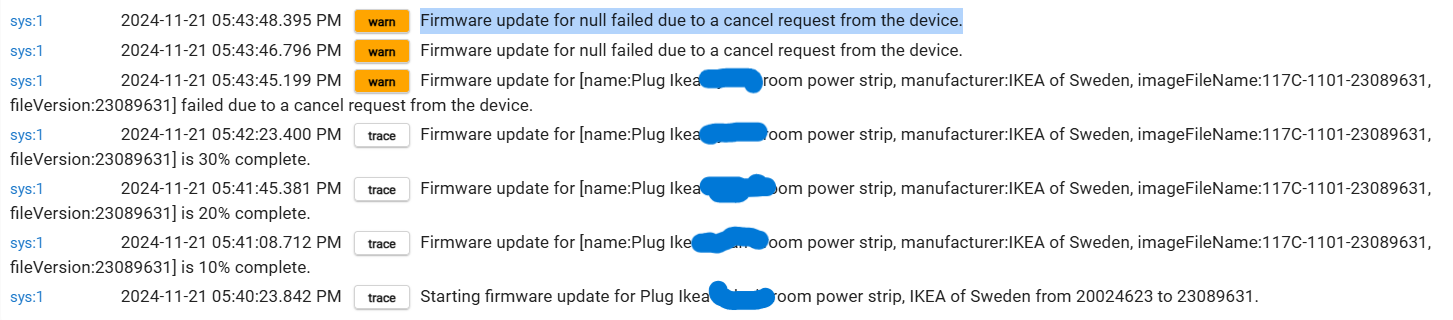
EDIT: Well, I guess not a complete happy ending (yet). The update of the fourth plug failed after 30% complete w/the message below:
Since then FW update will not start, I unplugged and plugged it in again and it persists in throwing the two warn messages, not starting the update at all. So I'm stuck for some reason. Going to reboot my hub and the plug and try again...
...and after the hub reboot and another unplug/replug of the plug, update completes normally w/out issues.