That will give an idea of the Govee API State. It is certainly having some kind of issue.

Can you try a hpm repair and see if that helps.
I was just coming here to report on that when I saw your message. I did do a HPM repair and that seems to have resolved the issue entirely.
I am glad to hear the HPM repair fixed it. I have adjusted the EA/beta update info to reload all the drivers that use the library files to see if that prevents the issue that both you and @dnickel have experienced. 
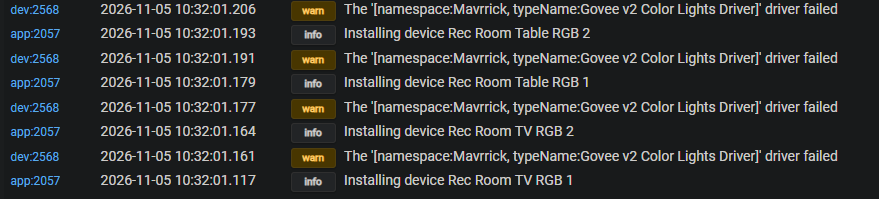
That looks like the warning when the app tries to install a device that is already installed and then the Govee Device Manager gets this error when it attempts it.
It is likely nothing to worry about. There is logic ment to prevent that from occuring. There are a few things that it tries to match against to prevent submitting devices that are already installed, it may not have detected those devices correctly to exclude them. Other then the message it isn't a issue.I will look into it though.
I found some issues with the EA/Beta release. 2 things that effect performance. The first one is a typo which is a easy fix. The second is that the use of encryption/decryption of the api key was creating a processing delay of about 400-500 ms most of the time. I already have some code improvements that will reduce that down to around 3-6ms. This was delaying submission of the API Call and causing CPU usage to be much higher then it needed to be. I will release a update to EA/Beta soon to address these two issues.
I pushed the new code to Github. You can get it by performing a repair through HPM.
I found that one of the Guardrails that should have prevented that error for the device install processes wasn't working. It wasn't properly excluding devices that where already installed. It was actually a very simple fix. It has been posted to the Beta package.
I have also found a few errors today with regards to the Govee Device Manager and MQTT connections related to my most recent api key changes. I have fixed that today as well. So performing a repair of the Integration in HPM should get you caught up.
You will also likely find that you need login again to your Govee Home account if you want to extract scenes DIY Scenes. I added the encryption to that token as well.