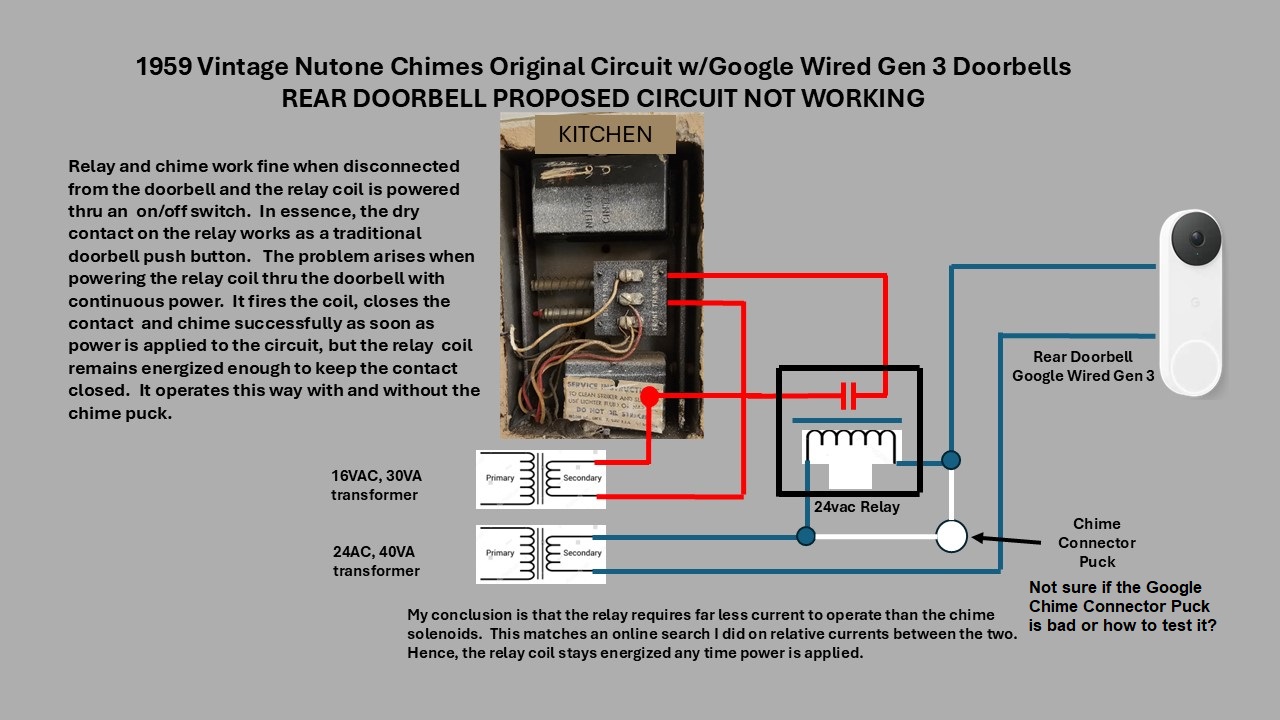
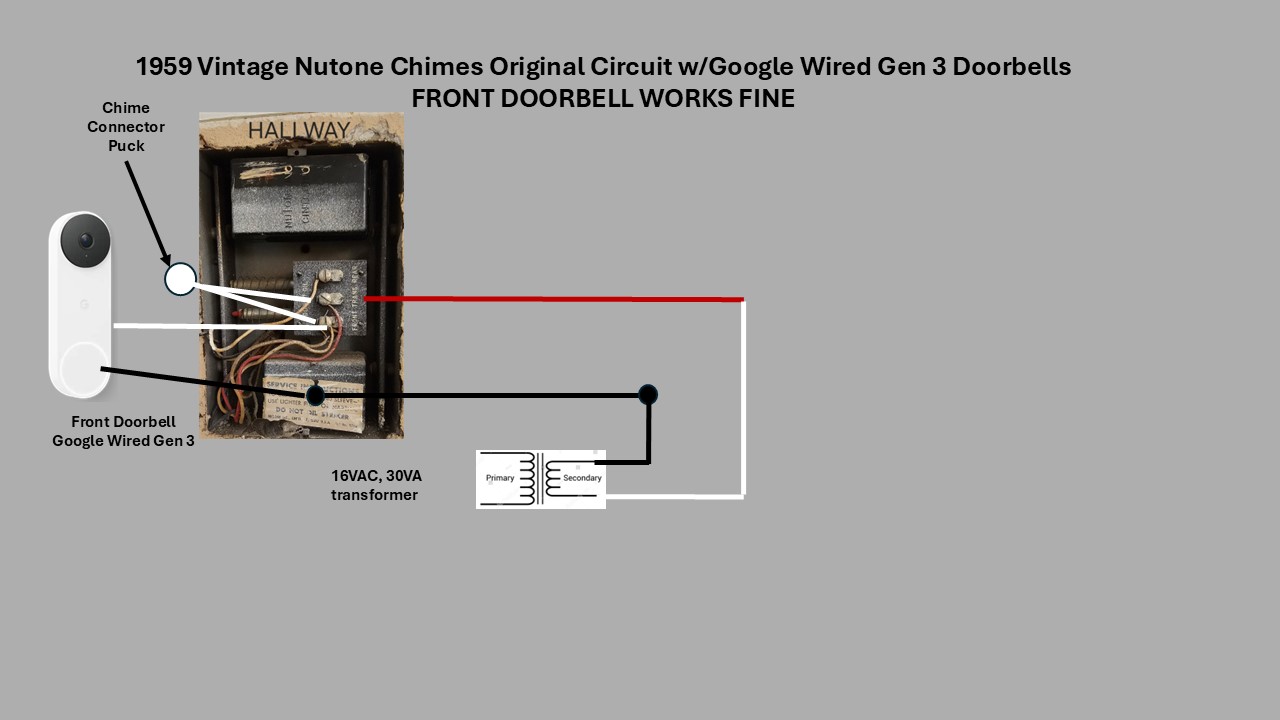
I am a new HE C8 user and have been able to transfer my 30 z-waves from my ADT Pulse system, am learning automations, linking my HE to Google home for automations w/my Google doorbells and have now been working on trying to engage my Alexa systems. Problem: I have 2 Google doorbells connected to a single 1959 Nutone traditional soloenoid chime system w/separate chimes for each doorbell. The chimes are on 16vac as is one doorbell and the other doorbell is on 24vac. I have tried to connect a relay to the 24vac doorbell using the dry contact to fire one of the 16vac chimes-simulating a simple traditional doorbell contact. By itself, the relay works fine with the chime via testing w/on-off switch. However, when powered thru the google doorbell, the relay is powered and the contact immediately closes upon connection to the circuit. (The google doorbell of course requires steady voltage/current). My limited research has implied that the relay requires much less current draw to fire than the doorbell chimes, hence the reason why the 16v doorbell circuit works on the circuit that directly fires the chime solenoid. 1) I have looked online and have not been able to find a solution including the Google Home community, 2) I found a video that proposes using a 16vac transformer to power a Ring doorbell & digital chime thru a 24vac relay, seems interesting(?) to me (https://www.youtube.com/watch?v=qaNYKyFUxBo ) and 3) I wonder if the problem is the Google door chime connector puck and it is bad, don't know how to test that. Looking thru the posts, it is clear to me that there are a lot of members with incredible experience and knowledge. So, I am wondering if anyone has ideas or might point me to another group. (I did check w/a moderator about posting this non-Hubitat question). I have posted two dwgs. One of my front door circuit working fine and per regular Google instructions and the second with what I thought would work for the rear doorbell.
Did you change the settings in the Home app for the doorbell to Electronic (Off) and Indoor Chime (on). My recollection is that if you have indoor chime off, then it doesn't break the circuit when you release the button. I did the opposite because the internal battery died on mine and I am not using a chime. Everytime I pressed the button, it would break the battery connection and the camera would reboot due to loss of power.
The chime is switched to the on position but it is grayed out. The front doorbell is in the on position but it is not grayed out. I am wondering if it has to do with the fact that there is no chime connector connected since it is directly tied to a 24vac xfmr until I figure out how to connect it to the chime? Going to research why it is greyed out.
Update: Gemini says- Yes, because your doorbell is wired directly to the transformer without a chime, it is completely normal for the mechanical/electronic chime settings to be grayed out or unavailable.
Maybe I should try to reset/reinstall it and see if the chime setting is not greyed out and try it?
So, mine is wired to a plug in transformer because I have no chime. During an update, the chime got turned on. I had to go in and turn it off when I noticed that everytime someone pushed the doorbell, it would reboot. So, I don't think it knows what it is connected to without you telling it that it is or isn't connected. And having it connected to an always on power supply did not grey that choice out for me. So, your AI might be hallucinating, or the differences between my older and your newer ones might be bigger than I was thinking.
Silly question, if the 16 V chime works in the other system, why is there a relay needed on this door? The google doorbell works on anything from 16 to 24 V doesn't it?
OK- I was waiting for the 16v/24v question. When I started this journey.... I had the ADT pulse w/underperforming zwave devices & doorbells w/cameras (720p). I upgraded to Hubitat transferred everything, declined ADT's offer to sell me Google doorbells and bought my own. Looking at power requirements online I couldn't find a clear answer to whether my upgraded 16vac/30va xfmr would handle both doorbells & chimes. There are 2 chimes that each have two solenoids and all is wired in parallel. Not getting a clear answer, I decided to split the power between the two doorbells, hence the addition of the 24vac xfmr. I also wanted to jump into trying a relay and seeing what I could do. I was able to make the rear doorbell (24vac) work fine but without the chime and my goal was to engage the chimes. So with that background, here I am. Back to your initial response to my post: "was the chime function on"? I thought about it this morning and remembered that I had tested the relay at one time and it worked but later it didn't. So, this morning, I reset the doorbell, deleted from the app and re-installed it. When I first powered it up, the relay energized immediately, stopped, reenergized and then 'turned-off' opening the contact. When I installed the doorbell in the app, it now seems to work fine. The relay dry contacts close when the doorbell is pressed, powering the chime solenoid and then opens immediately. So, I am presuming that it was an operator/installation error on my part. I do appreciate your suggestion to check the chime on function in the app. My next step would have been to have both doorbells share the 16vac/30va xfmr which I now believe would work. Again-thank you.