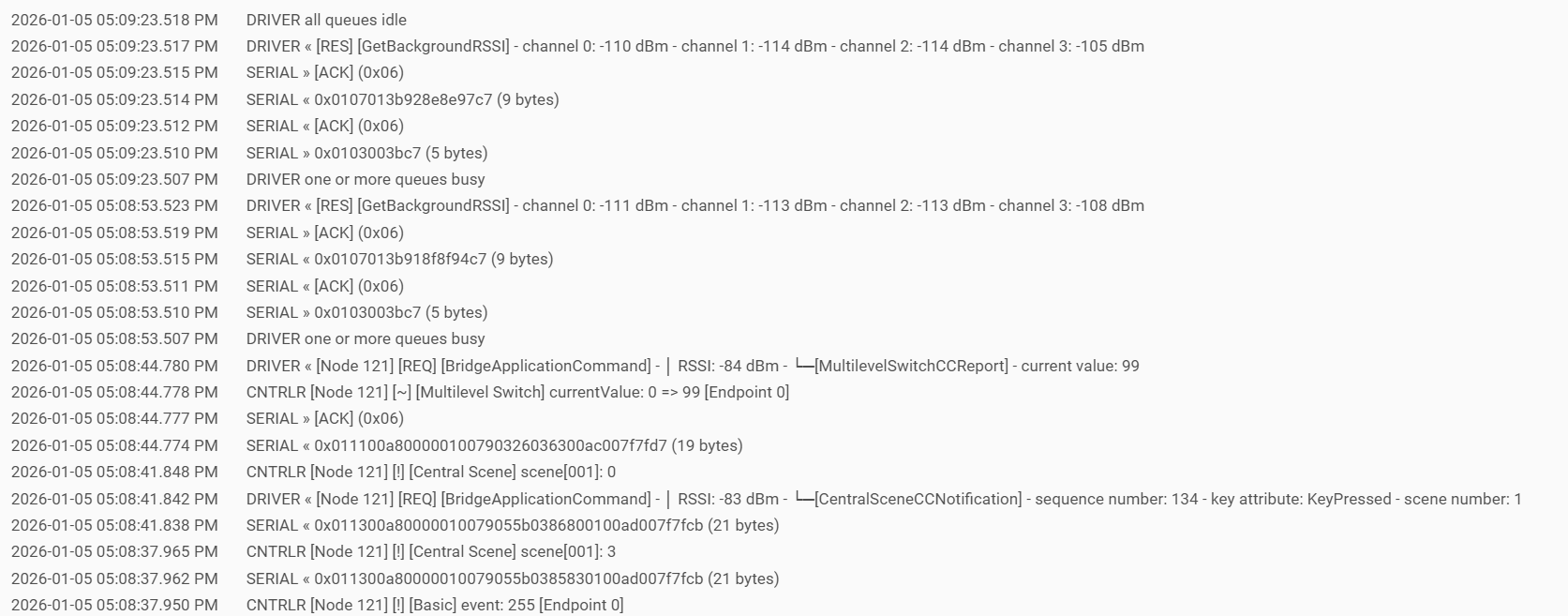
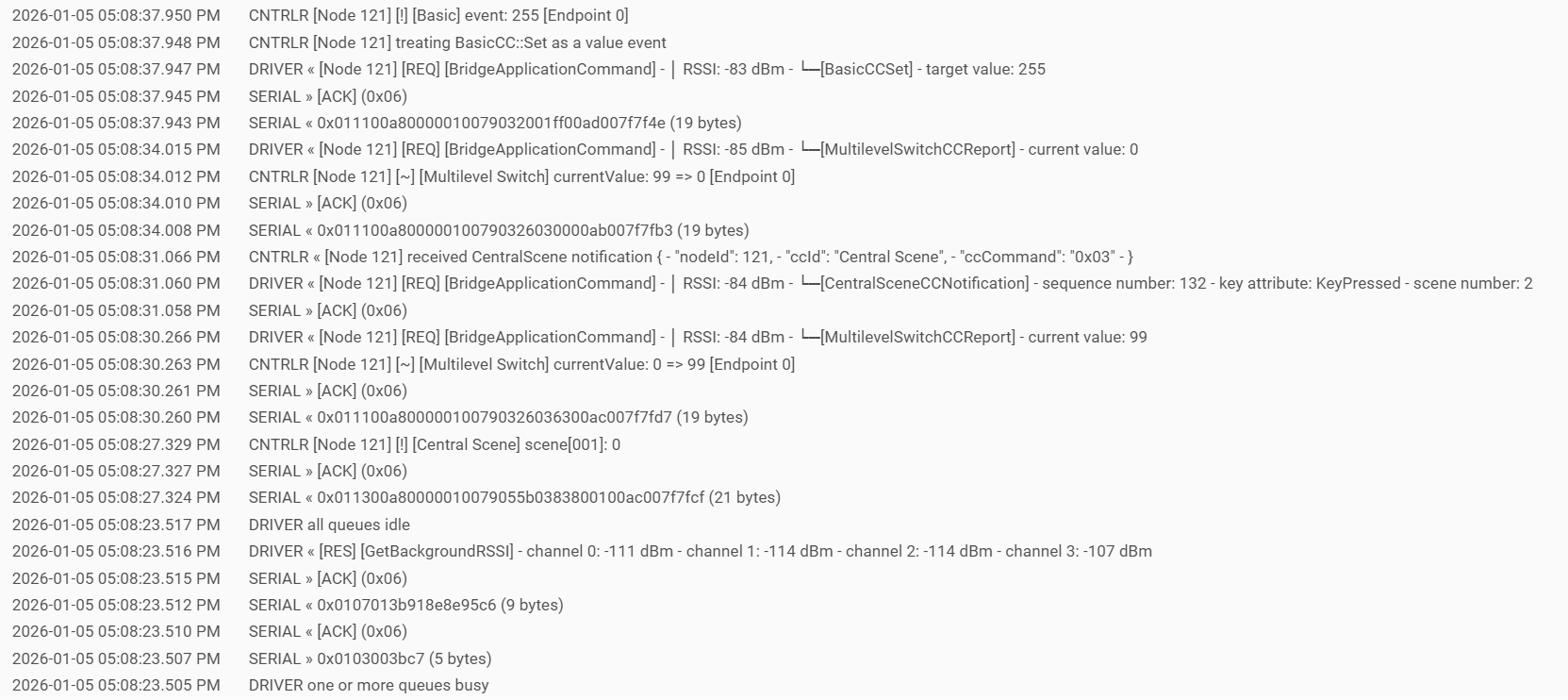
C8 Pro running Zwave JS. Tried with debug and just tried with the "device" driver, it never shows anything from the double tap in the logs. It registers single on/off taps as well as hold to dim up/down.
I think at this point I need to swap in a different one of my GE dimmers and see if it behaves the same or if there is possibly something wrong with this one.
If still having an issue open the Zwave logs from the zwave details page. Capture some logs from the double tap event. It is a constant log while open with no filters so try to refresh the page right before doing the double tap then copy or download the log file before a bunch of other junk shows up. It will possibly just look like a bunch of gibberish but I can make sense out of it. Post as TEXT here (in formatted code blocks).
Looks like the device is not sending any "central scene" events to the hub, which is what gets used for button presses. I even searched the hex for 5B03 which would be the start a central scene notification.
What's crazy is I had every single one of these dimmers setup with double tap working so I'm not understanding what's going on. They are all the same model so once I get a chance to install another one next week I'll have to see if it behaves any different.
Looks like it is sending the "central scene" events to the hub, so not an issue w/the switch setup as part of 3-way. Ruled out as a general issue, anyway.
Switch Z-wave to legacy ZIP.
There could be a bug in the current Zwave JS which is preventing the interview from picking up the central scene command class. The way Zwave JS works, is that if it does not "discover" a certain class and then messages do come in, they just get dropped before it even hits the logs. I think it is highly likely that is what the problem is.
There is a special endpoint (run against the hub IP in a browser) to use to force a re-interview with Zwave JS as well which you could try. I have these below in my notes, I forget what the node state shows exactly.
Force a re-interview, endpoint ## below is the decimal node number.
/hub/zwave2/reinterview?node=##
Get node state JSON data?
/hub/zwave2/getNodeState?node=##
Two of mine quit working when I switched to Z-Wave JS. I have an older GE Fan Controller & GE Switch (Both Z-Wave Plus, but older than some of my other GE switches and dimmers). They should be model numbers (Switch: 14291) (Fan: 14287). These two devices stopped sending double taps. My newer ones, still work with the double taps. So it is the specific combo between the older switch, dimmer, or fan control and ZWave JS. Haven't switched back to legacy, since it seemed for things to take a couple days to settle when switching from legacy the first time. Didn't feel like having things wonky for a couple days again.
I was hoping for a fix with a HE update, as I checked firmware versions for my switches, which are all up to date. Not sure if a HE update would fix though.
I may play around with the re-interview thing when I have time, and see if that helps.
When you switch the gateway the database from ZIP is preserved, so if you switch back everything should work just as it was before. Same as if you switch back to ZIP and then back to Zwave JS again later. Only newly added devices would need to settle in when you switch.
Did you try the re-intrview?
The device is probably not following the zwave spec correctly in some way around the centralscene command class or Zwave JS would be picking it up. I would say it is highly unlikely you will see a fix unless the core Zwave JS gets patched to make it work with those devices, and then Hubitat updates to the new version.
@bcopeland knows about this issue, but it didn’t sound like an easy fix. Apparently the way these switches send double tap is a bit odd. Probably why it only works with the Botched drivers and Zip gateway.
This is what Bryan told me:
Just had some time to try it, still no luck. Looks like the reinterview process worked, got the DONE status in the browser. When loading the Node State, it showed interviewStage as complete.
I can't even get the double tap feature from the Hubitat Commands page to register in the Current States view. Not a big deal though, We've gotten accustomed to not having them at this point for these two switches, and the main use for them (blind control in bedroom) I have just fully automated, so its even more reliable. If I really need to adjust the blinds manually during the day, then I just whip out my phone to adjust them.
Think I am going to stick on Z-Wave JS for now, as it has been incredibly reliable around the house. Maybe one day there will be a fix for it, but I'm not too worried about it overall.
Would be nice if we could get a device firmware update that fixes the reporting issues, but I'm guessing GE has probably given up development on these devices already