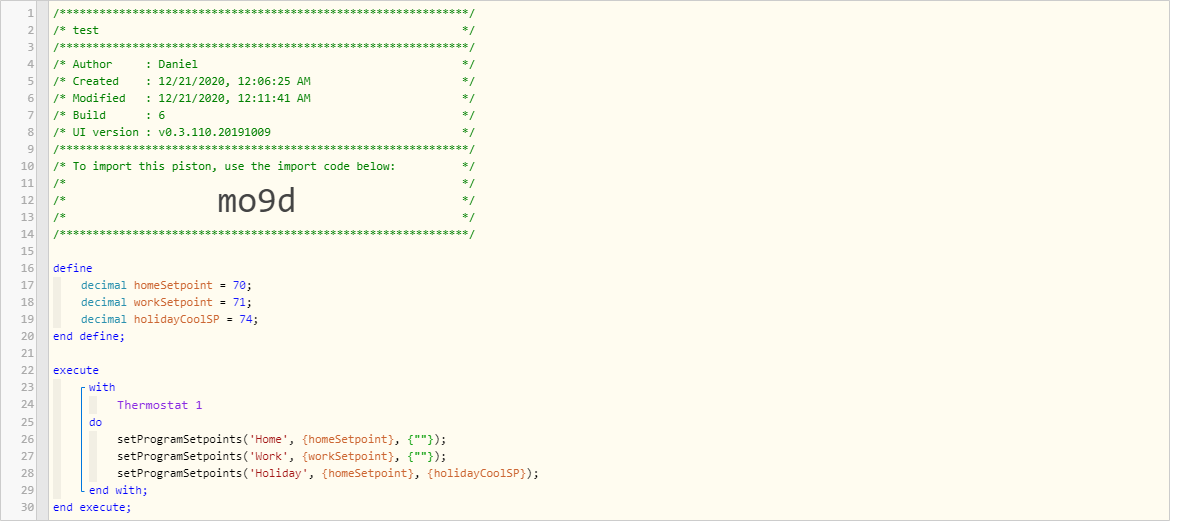
I get an exception trying to load the debug dashboard:
Unexpected Error
An unexpected error has occurred trying to load the app. Check Logs for more information.
Error: No signature of method: user_app_sandood_Ecobee_Suite_Manager_67.section() is applicable for argument types: (java.lang.String) values: [Ecobee Suite Manager, version 1.8.49 on Hubitat] Possible solutions: sendJson(java.lang.String), sectionTitle(java.lang.String), sendJson(java.lang.Object, java.lang.String), getAt(java.lang.String)
Only the results of the final call to setProgramSetpoints() persist; the others all go back to their old values. If I keep the Ecobee app open to the Comfort Settings page and watch it while I run the test, I do see the other program values change to what I expect, but then I see them change back to their previous values a couple of seconds later.
I confirmed this by playing with the order of the setProgramSetpoints() calls. It's consistent -- the last one works as expected; the others revert a couple of seconds later.
You must,wait,for the poll cycle to complete before calling setProgramSetpoints() again. This because the method has to modify the in-memory map for schedules, then send the modified map. It can’t change the map again until the server acknowledges the previous change (by updating the map). If your polling frequency is 1 minute, delay 150 seconds between calls; if it is 3 minutes, delay 390 seconds 92x frequency + 30 seconds).
Is it possible to make the function able to support modifying multiple schedules at the same time? Maybe a varargs version that takes a repeating triple of (programName, heatingSetpoint, coolingSetpoint)?
If not, is this something the app can handle automatically? (Queue up multiple calls that happen within the poll period.)
All good questions, but the easiest solution is for you to do what I do in the Smart Modes helper when it needs to change the setpoints. Basically, you wait for the climatesChanged attribute to be updated with a new date/time before you do another setpoint change.
FWIW ( and IMHO), changing program setpoints shouldn't really be a frequent thing - it is MUCH more workable to just have different programs for different setpoints. I myself use this approach to select different sets of remote sensors depending on the time of day, for example.
It's for a "keep the wife happy" use case. Depending on the outdoor temperature, the heating set points of certain programs need to be adjusted by 1 degree. The programs themselves are scheduled at the thermostat, and the schedule doesn't need to change.
Change the CURRENT program's setpoints first, wait a few minutes, then do the next one...
Change the CURRENT program's setpoints, wait for climatesChanged to be updated, then change the next one...
I can't implement multiple changes within the device itself, because called methods must return to the caller within the calling context, but it can take minutes before the in-memory maps are updated by the Ecobee Cloud. I have no choice but to modify, wait, modify...
Ecobee Suite Updated January 4, 2021 at 3:10pm EST
Enhancements & Fixes:
Ecobee Suite Manager, version 1.8.51
Fix Debug Dashboard error
Allow changing multiple programs' setpoints all together in setProgramSetpoints() (see ES Thermostat for API explanation)
Ecobee Suite Thermostat, version 1.8.20
New function call: setThermostatHoldHours(Integer hours) allows you to programmatically change the hourly hold duration (e.g., via WebCore or HE's Rule Machine)
Expanded function call: setProgramSetpoints(String Program_Name, Number heatSetpoint, Number coolSetpoint, Program_Name_2, heatSetpoint_2, coolSetpoint_2, ...)
Ecobee Suite Sensor, version 1.8.08
Changed the devices' definition metadata to show the current Temperature instead of Motion in the new Samsung SmartThings App.
Note: this change was provided by a user of Ecobee Suite. My understanding is that the new display won't be shown immediately - the app's cache must be reloaded on the mobile device before this change "takes".
Hello all. I am running the latest version 1.8.52 and just ran the package manager (VERY nice!).
I have 5 ecobee 4's (zoned) and one of them insists on keeping the heating setpoint at 73.5, even though the stat's schedule is set for 74.
I even sent 74.0 to the stat's HOME comfort setting, and it STILL indicates 73.5.
I don't know where this came from, and I am not using any of the other helpers in Suite Manager yet.
Where could this have come from and what additional info is needed to troubleshoot?
thanks!
The actual set point on all Ecobee’s is the value you choose (74 in this case) MINUS the configured heatDifferential (default is 0.5 F). This is the actual temperature at which the Ecobee will make the call for heat.
ES didn’t change anything in this respect, but it gives you the ability to see the ACTUAL values with decimal precision (the Ecobee itself rounds to the nearest whole number, an 73.5 will show as 74). You can change the differential in the thermostat settings/preferences/thresholds, but you can’t make it zero.
Thank You for the explanation! This is the first time this was explained to me.
I changed the differential to 1.5 F (it was at 1.0 F) and will see what that does and what direction the setpoint goes to.
All of my stats have a 1.0 F differential, but when this on goes to it's 74 F setpoint, I see the 73.5.
When it drops back to 66 F for sleep, the setpoint IS 66.0 so that is what was confusing me...
Thanks again for letting me know and for EB suite! VERY powerful application!
Forgot to mention....
I love the fact that the functions actually WORK!
The response time is agonizably slow, but I know it has nothing to do with EBSutie.
That is the "fault" of the stats being in the cloud and having to interface with Ecobee's api and servers, which I HATE, but I do like the stats so I just grin and bear it!
I played around with the differential settings, the heat/cool setpoints in auto, and returned the heating setpoint back to 74.0 during my Home period, and it returned to 74.0 heat setpoint!
I am next going to lower my cooling setpoint from 80.0 (it was 78.0) back to 78.0 and see if the heat setpoint stays at 74.0. The cooling setpoint might also be lowering the heat setpoint. We'll see what happens.
In the device interface, one of the vairables is "heatatsetpoint" and another is "heatingsetpoint".
What are the differences?
Is there a document that describes all the different variables of these stats?
That explains alot, thank you!
It almost seems like "heatatsetpoint" is when the call for heat will turn on given the heating setpoint and differential
Where "heatingsetpoint" is where the stat heat setpoint is set.
I am just guessing but was curious.
Thank you for the info on the documentation and the API link!
Just a little more info...
I changed the setpoint to 72 and the "heatatsetpoint" changed to 71.0 so it is tracking a 1 degree difference... that is what the differential is set to in the stat.
It looks like that is what those two variables are.
I set the differential to 1.5 F, then set the setpoint at 72F. The "heatATsetpoint" then changed to 70.5 F.
So with a 1.5 F diff, setpoint at 72 F, the ATsetpoint temp is 70.5 (a 1.5 F difference)
with a 1.0 F diff, setpoint at 72 F, the ATsetpoint tem is 71.0 (a 1.0 F difference).
That to me, explains what those variables mean.... probably the same for cooling.
Thanks again for this great suite app! REALLY handy and useful!
You have reminded me of the purpose for the ATsetpoint values - I displayed them in the UI in SmartThings Classic so that people understood why their temperature was falling below the setpoint and still not calling for heat. So, indeed, you have correctly deciphered their purpose...
Enjoy the Suite - there are lots of neat features to explore.
Oh, and if the delays for actions seem to long for you, try setting the cycle frequency to 1 minute (the minimum allowed). Most changes happen almost instantaneously, but are not reported back to the thermostat device until the next cycle (I have implemented short-cuts for many operations so that they "appear" to have been changed even though the cycle hasn't returned the updates).