I'm running 2.5.1 but I searched the 2.5.2 release notes and didn't find a reference to this issue.
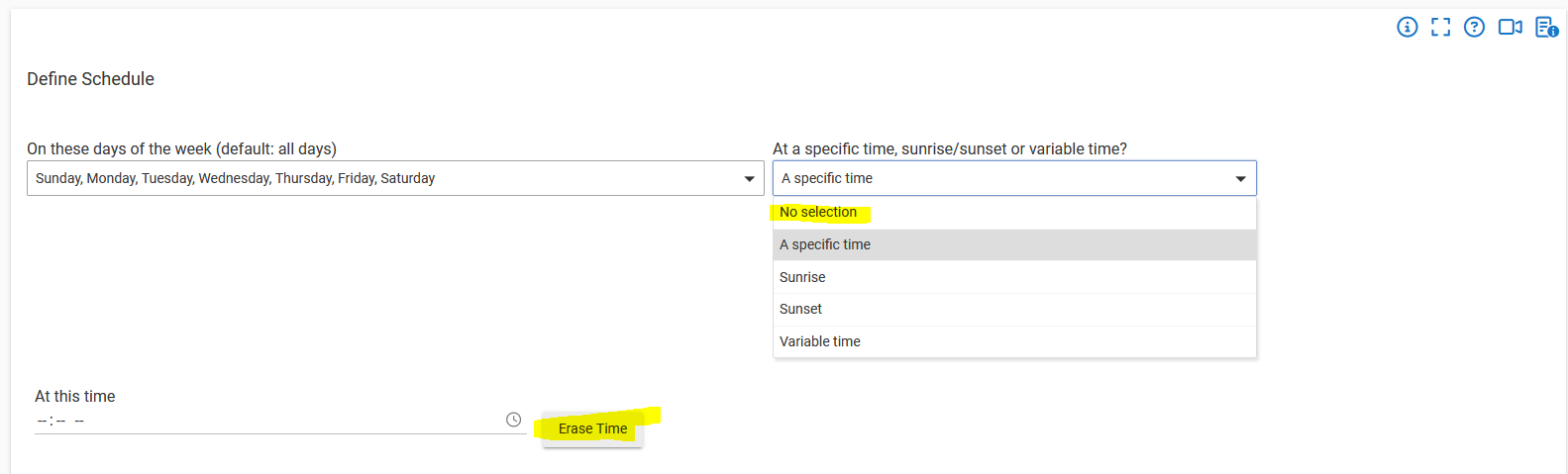
When selecting the 'No selection' The Days of Week Schedule Trigger option, it immediately reverts to 'A specific time'. Also, the Erase Time button causes Hubitat to think but then the page is re-displayed with nothing changed.
For the "At a specific time, sunrise/sunset or variable time?" dropdown, "No selection" is the default but not really something you'd need to (and probably shouldn't even be able to manually) select -- you need to choose a specific option for this to work at all -- so I'm not sure there's a problem unless there's something not apparent from your description. Can you explain what that is if so? Otherwise, selecting one of the "real" options should be all you need to do.
Regarding "Erase Time," the time is already erased/blank in your screenshot -- i.e., the button has already done its job or you just never filled in a time -- so that looks good to me. (This button applies to the "At this time" field.)
It confusing to have an option that can't be chosen. Why is 'No selection' displayed if it can't be chosen?
I was thinking the 'Erase Time' button removed the 'At this time' field and permitted the 'No selection' option but your explanation makes more sense.
Kind of an oddity of the UI framework, I suppose, but there's no default option and that's what it shows when you haven't made one yet (and it doesn't disappear on its own after).
It does do the first thing.  (Probably clear by now, but just in case...) But the second thing doesn't really make any sense to do; you'd need one of these selections for the action to do anything at all; otherwise, you should just delete the action itself.
Making 'A specific time' the default option would eliminate the confusion.