Can Hubitat Control Smartwings 'Levitate' Dual Top/Bottom Up/Down Cellular Shades Nowa - To Matter or not to Matter

Z-Wave Levitate Nowa is finally working for me:

  1. Install Damien Burke's SmartWings Day/Night Shade Driver per SmartWings support
  2. Move Hubitat to 6 feet from the shade motor
  3. 42,000 unsuccessful attempts to include it via both traditional and SmartStart methods
  4. Included with no issue the 42,001st time using SmartStart. All the SmartStart instructions I could find online started with "Remove/replace device battery" and I emulated this with entering/exiting sleep mode on the shade; no idea whether that actually helped.
  5. Showed up as "Included" In the SmartStart list, but didn't show up in the device list until a Hubitat shut down/wait 90 seconds/power up
  6. Switched the device's driver to SmartWings Day/Night Shade driver
  7. Test moving each rail--it works!

Now I want to also be able to voice-control it via Google Home, so I think I'm going to need to create virtual shades for the top and bottom rail so I can set those with a Google automation, because Google doesn't recognize dual motors either... But now I'm stumped as to how to get the virtual rail's position to control the real one--there doesn't seem to be any way to connect those values in Rule Machine.

EDIT: I figured out how variables work in Rule Machine, so Google Home integration with the two virtual rails does work the way I thought it would, but the update interval is like, 5 seconds, so I'm not sure that's the best way to do it. I suspect something like the Mirror app that supports Custom Actions would be better.

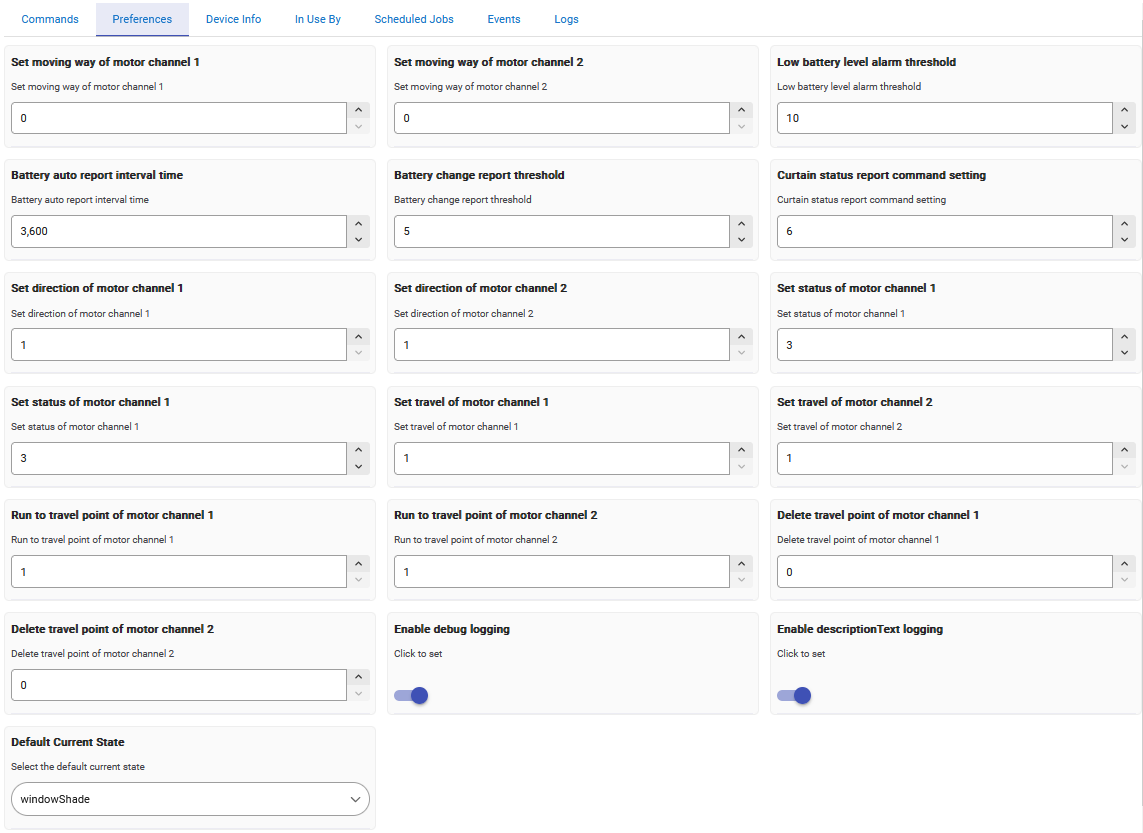
EDIT 2: I noticed the default Z-Wave Shade driver actually does have two channels, but it didn't really make it obvious (to my noob self, anyway) how to actually access and use them the way the Day/Night Shade driver does.

1 Like

What do you mean by it does actually have two channels? How is it presented?

A device using the Generic Z-Wave DT Window Covering has all these juicy-looking properties:

But then Rule Machine's Set shade/blind position can't specify a channel:

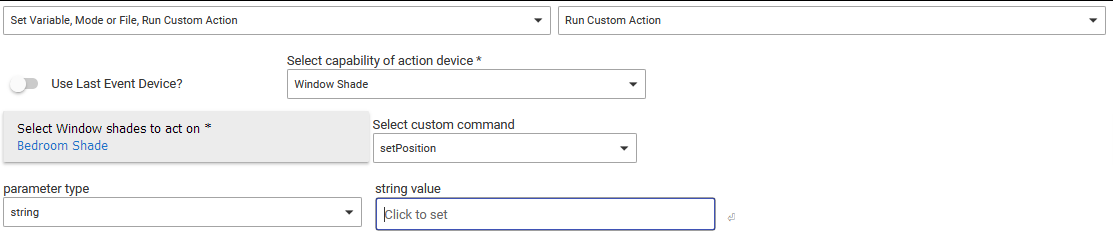
Potentially Run Custom Action → Window Shade's setPosition action could do it--but it's not obvious what the parameters ought to be in order to specify a motor channel:

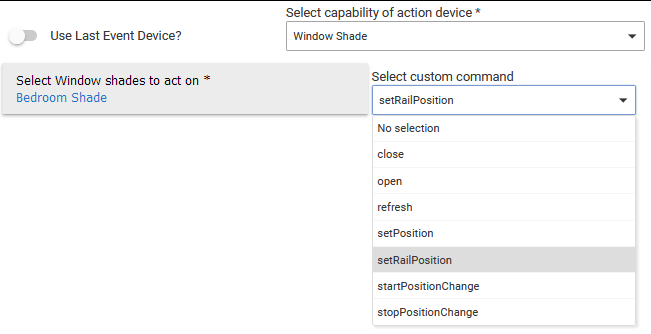
In contrast, the SmartWings Day/Night Cellular Shades device type exposes a really easy setRailPosition custom command to the Window Shade capability:
image

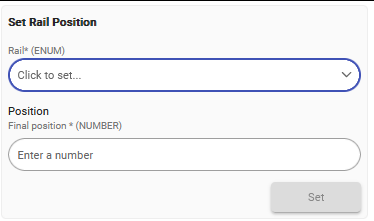
setRailPosition's parameters correspond to this, in the device's Commands tab (the dropdown list is a choice between top or bottom):
image

I have a sneaking supspicion that this SmartWings Day/Night Shades driver might be a wrapper that makes the generic one easier to use, but I could be wrong.

TL;DR - I managed to create a zwave driver for these shades. Linked at the bottom. Free feel to give it a shot if you have these shade with zwave motors. Working on my 5 shades.

So that built-in driver, is more of a diagnostic/generic driver, the screenshots are actually showing preferences/settings that the device supports. So that is why you couldn't control anything.

That driver that SmartWings provided is frankly implemented poorly or maybe basically is the better phrasing, I don't want to discredit someone's work. But it is definitely doing things in a non-standard way. I don't believe it even reports the position of the shades and controlling both bars via a command does not transfer over in the best way to other apps or smarthome ecosystems.

With all that said, I managed to cobble together a zwave driver to control these devices in a way that is more consistent with other Hubitat device drivers. I won't claim it's perfect, but I've moved over my 5 TDBU shades to Hubitat and I'm using the driver successfully.

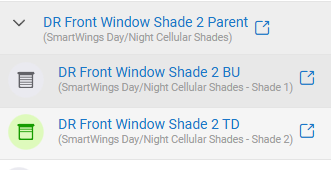
The driver will create two child devices under the parent, one to control each bar. These child devices operate like a normal shade, with the expected commands available.

The parent device has some logic to it so that it will properly report shade state based on overall positioning of both bars. So instead of some of the wonkiness with open/close with the two bars, the parent will report closed, open, and partially open based on its real state.

Open/Close in the parent will also operate both bars to ensure the shade is actually opened or closed. Open will bring both bars to the top. Closed will put bottom bar at the bottom and the top bar at the top.

A partialOpen command is also present in the parent, which will position the shade at 40% open - top down. In theory I could make this customizable, but this is the present I use on mine when I do a top down, partial opening.

I saw a couple of issues with commands getting lost in my zwave network for these devices, so in preferences in the parent device, there is an option to enable zwave supervision. This should in theory can make some of the commands more reliable. I also had an issue with position commands sent to both bars in quick succession, caused the second command to be ignored. A 2 second delay in the driver seemed to be long enough in my network. Hopefully

Thanks to jtp10181's work on his other zwave drivers and zwave libraries, without those, wouldn't have been successful.

Just to tag some of the others in this thread who I see have had expressed interest in a driver (hopefully for zwave). @artshaneadrian @KurtSanders

1 Like

Hey, that's awesome--I'll try it out as soon as I figure out why my shade is stuck. The top rail suddenly won't go above the position I'd set it, even with the Hubitat completely powered off, just using the shade's remote control. Next step is factory reset, I guess. This isn't the first or even 5th project I have going sideways right now. SIGH.

At what point does it do this? It sounds like I can't just swap the driver on my existing device? What's the proper way to use the driver? Please tell me I don't have to re-include the shade. That was like six hours of just trying over and over and not having any clue why the 42,001st attempt was the only one that succeeded.

Just change the driver on your existing device and save. Might have to click configure afterwards as well.

Sounds like your limit has changed somehow. Not too difficult to change that with the remote. Can also factory reset, you’ll just need to reset the limits for both top and bottom.

Crap--I actually wrote that I already tried that and it still won't go above that position even while in limit-setting mode but erased it and forgot to re-add it to the comment.

Turns out it's not really in limit-setting mode if you let go of the up/stop buttons after the remote says "Su" but before the motor jogs. Errr, weird--okay. And then I'm not noticing any consistent feedback for getting out of limit-setting mode, sooooo it was probably just still in limit-setting mode while I was adjusting its positions. :upside_down_face: I've had it jog twice on exit, but then it doesn't always do that, and the manual doesn't say it's supposed to, so... Not sure what to expect from it. :woman_shrugging:

@djw1191 The driver works great! And so much faster via Google Home than waiting for the shade to get around to noticing a virtual shade's position some 5-10 seconds later. You're awesome!

1 Like

I had mine get stuck in limit setting mode once and I couldn't exit. Had to factory reset. Not entirely sure what happened. But was a one time thing now that I've got those limits set.

Happy to hear it's working!

Tested it out this evening and overall seems to be working. Didn't get to dig into the details but overall open, close and partial open work great.

How can I set what position for partial open? That i couldn't seem to get to work.

Thank you a ton for this!

You can do it yourself by controlling each child device. The partial open command is just a short cut to avoid having to interact with each bar separately via the child device.

Otherwise, the command isn’t customizable as currently written. If you want to tinker with the code, line 323 is what would need to change. Change the current value of 60 to whatever position you want the top bar. (99 being top, 0 being at the bottom).

Excellent work @djw1191

@djw1191
Awesome! Thank you, I will play around with setting the position of the top bar to our "fav" position so it will open to that point.

1 Like

@djw1191
Thank you for sharing your work! I have it working in the Hubtitat app by interacting with the device entry. I can't seem to trigger it through the Rules engine. Ultimately, I'm trying to control the blinds through Google Home. But when I execute the Open command through Google Home it moves both rails. Google Home also has no idea about "Partial Open".

Which device are you interacting with? You should see a parent device and two children devices. If you want to independently control one of the bars, you will need to interact with the child device that controls that bar and not the parent.

I guess I'm interacting with the parent? So the Goggle Home integration can't drive the "Open" which controls both children? When I try to add a Routine to Google Home with the child device (Adjust Home Devices), the Add action is greyed out.

I'm not a google home user, so I don't have any insight into sharing devices to it. On the Hubitat side, your devices should be looking like this. If you have the ability, you'd want to share one of those children to Google Home and not the parent device.

image

2 Likes

Thanks for the additional info. I got it working in Hubitat to Open and Close, but have yet to dive into the partial open options, this helps to understand how it works for that next step.

This works great, was able to play with Room Lighting to update and adjust the blinds to any postion using the Child Devices.

Looking for some input on a way to trigger all the shades to go to a "favorite" postion and to control individual shades to a "favorite" positions independently.

Currently setup some shades open with Morning Mode, and close with Evening. Would like an additional option of at evening going to a favorite position (top down partly) and then to close a few hours later. I know I could create another Mode, but rather not. Just looking for ideas.

Also would like to have a way to set favorite positions, guessing a rule and a virtual button would be the best option I can think of so far.

Think I found a solution to my own request. I created a "Favorite" RL app then set up a Switch to trigger the activation. Seems to be working great and have it automatically have the activation turn off after a couple of minutes. Same with my standard RL app instance so we can switch between either depending on the time of day or desire for the shades.

1 Like