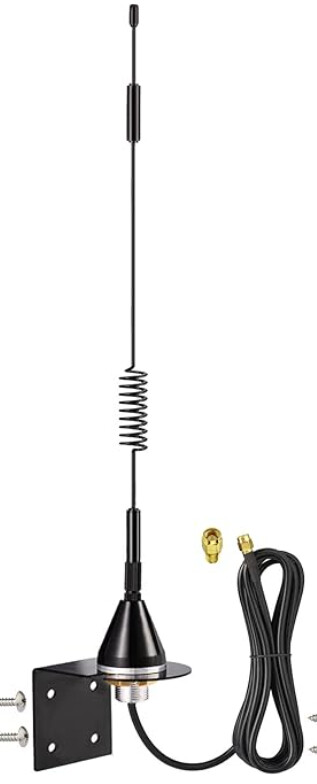
Thanks for the feedback on the antennas. IIRC others have had good luck w/@aaiyar's antenna, and a plus that it looks nice and probably has decent WAF.
I should send you one of my spare 7dB antennas (the Godzilla of antennas) for you to test at the Ritchierrich Antenna Underwriters Laboratory. Is there a certification fee?
Been working well for me, never had issues w/joining or excluding Z-Wave devices. Had it installed for months, literally, before wife noticed it on the side of a bookcase in her office. Hiding in plain sight...
Just a heads up... For some reason your link for the 2.4GHz whip is going to the SMA version rather than the RPS version, which is here: https://www.mouser.com/ProductDetail/712-ANT-2.4-OCLG-RPS. I ordered and received it, and I couldn't figure out why both the C8 and the antenna had male center pins! Mouser was kind enough to not have me send it back, they just refunded my money. So I ordered the correct one.
Thanks for the heads up. I was using the short links supplied by Mouser and they must have changed the target. I’ve fixed all the links. Yeah, Mouser is a good company.
Yes, in theory that antenna should work for both zigbee and z-wave. Any reason why you prefer this route as opposed to getting specific antennas for each radio?
I'm trying stand the unit up vertical. So my understanding of the antenna need to be parallel to reach other. I get good performance and I'm not "change too much". What are you suggesting then?
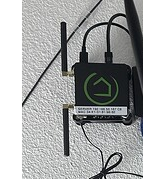
using the included antennas, place them on the left (or right) and lay the antenna's flat to the wall... the upper antenna points UP and the bottom points DOWN.
No need to buy new antennas, if wall mount is the only intent. You want the antennas to be in a vertical orientation, either table mount (both point UP), or wall mount.
It wasn't going to be wall-mounted. It would be on the desktop so that the antennas would stand up. If I can have them from side to side without any problems, I'll be happy to do so. Thanks!
The RF radiates outward in a donut shape. Imagine a sphere and that would be perfect omnidirectional radiation. But these antenna aren't that type of radiator. They have gain and that's done by squishing the sphere into a donut. The antenna body is stuck through the middle of a donut, just like you did as a kid. The RF power, when the antenna is going straight up, is radiating out flat to the earth. Lay the antenna on it's side, and the RF is radiating Up and Down, perpendicular to the earth. This would mean that Z-devices to the left and right of the Antenna would get reduced RF energy. In other words, pointing the tip of an antenna directly at the receiving device sends the LEAST amount of RF towards the device.
Thats my hub. The wire is a USB CPU fan that the hub is mounted to for cooling. The black cable in the back is fibre optic to th modem. The hub itself is on a POE splitter.

 Is there a certification fee?