This means that you were not using the latest driver version - this is a new device and the driver code was updated a week ago.
2 Likes
Thanks @kkossev
I realised some time after posting that my driver was out of date...... 
Now i have updated driver, i can see illuminance also!!
I noticed in the preferences,
Illuminance Correction Coefficient
Ignore distance reports
Is listed twice

This just a display error or do they do 2 different things?
1 Like
@kkossev Thanks for the heads-up. I'll remove this device from my production environment and wait for your follow-up. In the meantime, I’ve decided to hold off on placing any further orders.
1 Like
Besides the inability to fine-tune the min/max detection distances and the static detection sensitivity, is the device working as expected?
The default/factory settings are typically good enough for the most common use cases.
1 Like
It’s challenging to determine if the device is functioning as intended because:
- Static detection sensitivity is set to zero.
- Minimum detection distance is also set to zero.
Without the ability to adjust these key parameters, it’s difficult to assess the full performance of the device or confirm whether it’s working as designed. While the default/factory settings may work for many situations, the lack of flexibility in fine-tuning makes it harder to optimize the device for my specific use case. Additionally, is zero the default for these parameters, given how they impact the triggering of the “humanMotionState”?
I will monitor the device closely throughout the week and provide further feedback as I continue using it. Hopefully, a fix is forthcoming shortly. In any case, thank you for the work you’re doing!
1 Like
@kkossev, first off, huge thanks for all your hard work—seriously, you’re making life so much easier for the rest of us!
I’m running into a similar issue that @james8 mentioned, where webCoRE isn’t recognising the “large” motion. It’s a bit like my system is saying, “Large? Never heard of it!”  I saw that @james8 manually added “large” to the enum list and got it working. Do you think this will be sorted in the next release, or should I go ahead and follow the same path to enlighten my system?
Appreciate all the help—really makes a difference!
3 Likes
The missing 'large' motion in the 'humanMotionState' enum list is an easy fix; it will be in the next update. I will also fix the duplicated illuminance correction coefficient preference.
Much more difficult is to find out why some of the preferences for the _TZE204_7gclukjs device are not accepted...
Can you try changing line 641 in the driver code and add , tuyaCmd:04
device : [type: 'radar', powerSource: 'dc', isSleepy:false, tuyaCmd:04],
then click on the Save button within the HE code editor.
The code should look like this :
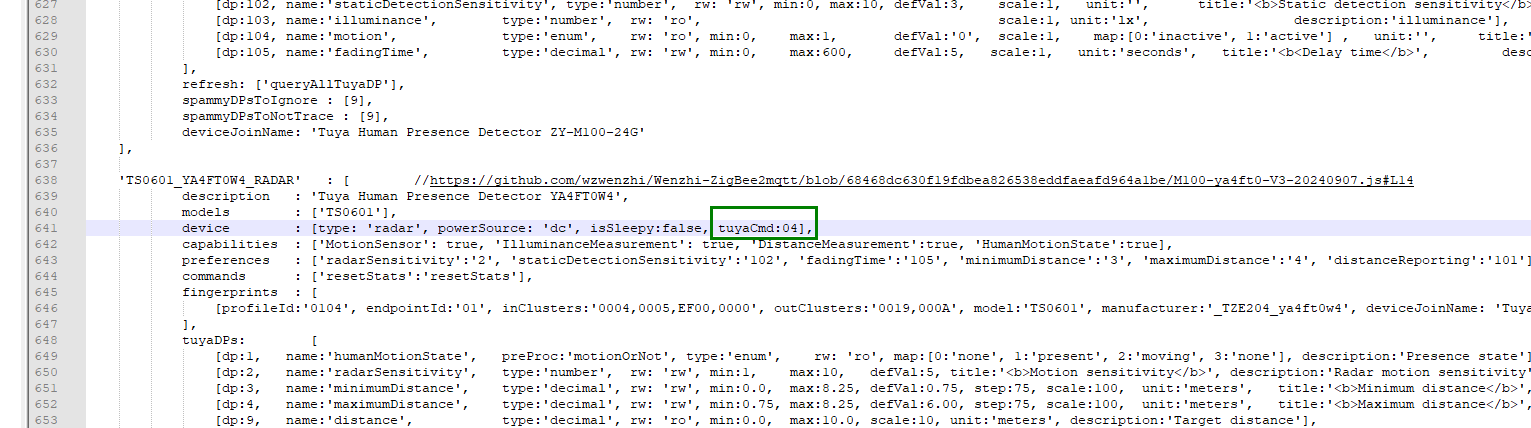
Then try changing the parameters again and let me know whether there is any change - for better or for worse.
1 Like
Thank you
Done and Saved

Before Changes
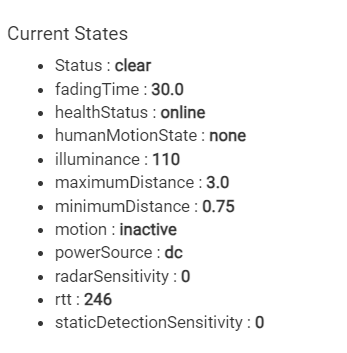
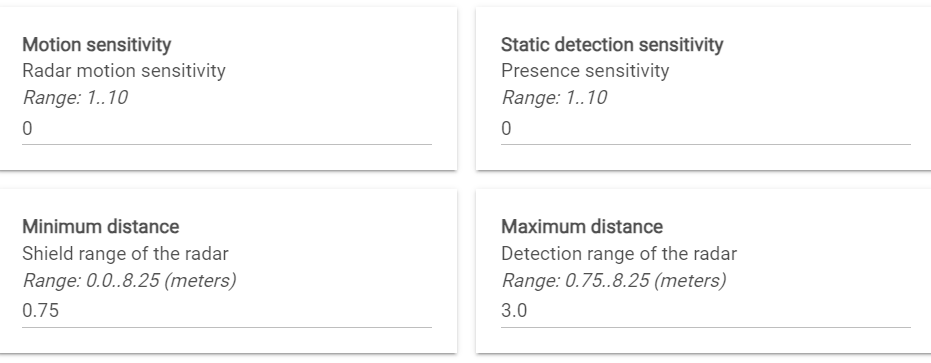
Changes
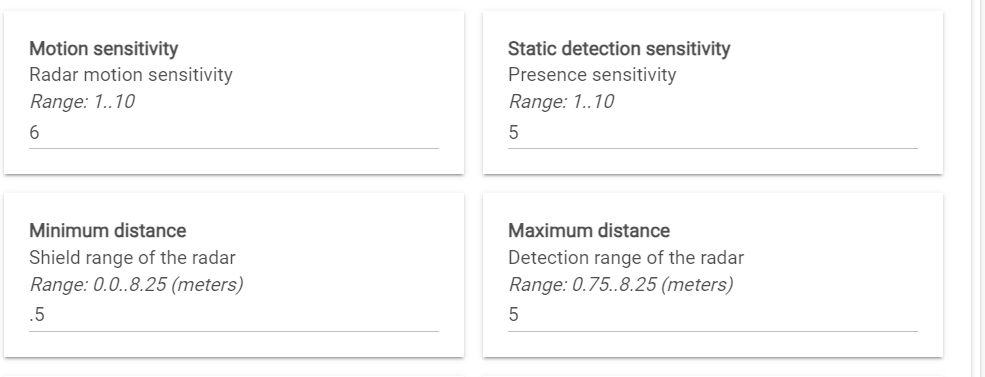
Save Preferences
The related log

However, no change made to the Current States
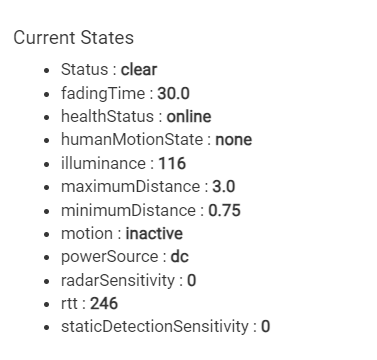
Last time the Current States showed the change for a few minutes then reverted but this time no changes at all.
Here's the debug log after trying again
Debug Log
dev:6672024-10-16 03:35:07.886 PMdebugLiving Room Presence Sensor (New) Tuya check-in (AppVersion=38)
dev:6672024-10-16 03:35:07.882 PMdebugLiving Room Presence Sensor (New) parse: descMap = [raw:B8D2010000180100204AE2FF2038E4FF2000, dni:B8D2, endpoint:01, cluster:0000, size:18, attrId:0001, encoding:20, command:0A, value:4A, clusterInt:0, attrInt:1, additionalAttrs:[[value:38, encoding:20, attrId:FFE2, consumedBytes:4, attrInt:65506], [value:00, encoding:20, attrId:FFE4, consumedBytes:4, attrInt:65508]]] description=read attr - raw: B8D2010000180100204AE2FF2038E4FF2000, dni: B8D2, endpoint: 01, cluster: 0000, size: 18, attrId: 0001, encoding: 20, command: 0A, value: 4AE2FF2038E4FF2000
app:262024-10-16 03:35:00.525 PMinfoUpdated Locks, Next Update in 5 min.
dev:3182024-10-16 03:35:00.049 PMinfoMedia Room TV (Remote)-2.3.9a: Auto Configuring changes to this TV.
dev:6672024-10-16 03:34:52.117 PMdebugLiving Room Presence Sensor (New) zigbee private cluster 0xEF00 command 0x04 response: Success
dev:6672024-10-16 03:34:52.114 PMdebugLiving Room Presence Sensor (New) parse: descMap = [raw:catchall: 0104 EF00 01 01 0040 00 B8D2 00 00 0000 0B 01 0400, profileId:0104, clusterId:EF00, clusterInt:61184, sourceEndpoint:01, destinationEndpoint:01, options:0040, messageType:00, dni:B8D2, isClusterSpecific:false, isManufacturerSpecific:false, manufacturerId:0000, command:0B, direction:01, data:[04, 00]] description=catchall: 0104 EF00 01 01 0040 00 B8D2 00 00 0000 0B 01 0400
dev:6672024-10-16 03:34:52.102 PMdebugLiving Room Presence Sensor (New) zigbee private cluster 0xEF00 command 0x04 response: Success
dev:6672024-10-16 03:34:52.099 PMdebugLiving Room Presence Sensor (New) parse: descMap = [raw:catchall: 0104 EF00 01 01 0040 00 B8D2 00 00 0000 0B 01 0400, profileId:0104, clusterId:EF00, clusterInt:61184, sourceEndpoint:01, destinationEndpoint:01, options:0040, messageType:00, dni:B8D2, isClusterSpecific:false, isManufacturerSpecific:false, manufacturerId:0000, command:0B, direction:01, data:[04, 00]] description=catchall: 0104 EF00 01 01 0040 00 B8D2 00 00 0000 0B 01 0400
dev:6672024-10-16 03:34:52.088 PMdebugLiving Room Presence Sensor (New) zigbee private cluster 0xEF00 command 0x04 response: Success
dev:6672024-10-16 03:34:52.084 PMdebugLiving Room Presence Sensor (New) parse: descMap = [raw:catchall: 0104 EF00 01 01 0040 00 B8D2 00 00 0000 0B 01 0400, profileId:0104, clusterId:EF00, clusterInt:61184, sourceEndpoint:01, destinationEndpoint:01, options:0040, messageType:00, dni:B8D2, isClusterSpecific:false, isManufacturerSpecific:false, manufacturerId:0000, command:0B, direction:01, data:[04, 00]] description=catchall: 0104 EF00 01 01 0040 00 B8D2 00 00 0000 0B 01 0400
dev:6672024-10-16 03:34:52.072 PMdebugLiving Room Presence Sensor (New) zigbee private cluster 0xEF00 command 0x04 response: Success
dev:6672024-10-16 03:34:52.069 PMdebugLiving Room Presence Sensor (New) parse: descMap = [raw:catchall: 0104 EF00 01 01 0040 00 B8D2 00 00 0000 0B 01 0400, profileId:0104, clusterId:EF00, clusterInt:61184, sourceEndpoint:01, destinationEndpoint:01, options:0040, messageType:00, dni:B8D2, isClusterSpecific:false, isManufacturerSpecific:false, manufacturerId:0000, command:0B, direction:01, data:[04, 00]] description=catchall: 0104 EF00 01 01 0040 00 B8D2 00 00 0000 0B 01 0400
dev:6672024-10-16 03:34:52.047 PMdebugLiving Room Presence Sensor (New) zigbee private cluster 0xEF00 command 0x04 response: Success
dev:6672024-10-16 03:34:52.041 PMdebugLiving Room Presence Sensor (New) parse: descMap = [raw:catchall: 0104 EF00 01 01 0040 00 B8D2 00 00 0000 0B 01 0400, profileId:0104, clusterId:EF00, clusterInt:61184, sourceEndpoint:01, destinationEndpoint:01, options:0040, messageType:00, dni:B8D2, isClusterSpecific:false, isManufacturerSpecific:false, manufacturerId:0000, command:0B, direction:01, data:[04, 00]] description=catchall: 0104 EF00 01 01 0040 00 B8D2 00 00 0000 0B 01 0400
dev:6672024-10-16 03:34:51.947 PMdebugLiving Room Presence Sensor (New) zigbee private cluster 0xEF00 command 0x04 response: Success
dev:6672024-10-16 03:34:51.943 PMdebugLiving Room Presence Sensor (New) parse: descMap = [raw:catchall: 0104 EF00 01 01 0040 00 B8D2 00 00 0000 0B 01 0400, profileId:0104, clusterId:EF00, clusterInt:61184, sourceEndpoint:01, destinationEndpoint:01, options:0040, messageType:00, dni:B8D2, isClusterSpecific:false, isManufacturerSpecific:false, manufacturerId:0000, command:0B, direction:01, data:[04, 00]] description=catchall: 0104 EF00 01 01 0040 00 B8D2 00 00 0000 0B 01 0400
dev:6672024-10-16 03:34:51.827 PMinfoLiving Room Presence Sensor (New) updated
dev:6672024-10-16 03:34:51.822 PMdebugLiving Room Presence Sensor (New) sendZigbeeCommands: sent cmd=[he cmd 0xB8D2 0x01 0xEF00 0x04 {8C2D6504000101} {}, delay 201]
dev:6672024-10-16 03:34:51.819 PMinfoLiving Room Presence Sensor (New) setPar: (2) sending parameter distanceReporting (1 (scaledValue=1))
dev:6672024-10-16 03:34:51.814 PMdebugLiving Room Presence Sensor (New) Living Room Presence Sensor (New) getTuyaCommand (dp=65 fncmd=01 dp_type=04) = [he cmd 0xB8D2 0x01 0xEF00 0x04 {8C2D6504000101} {}, delay 201]
dev:6672024-10-16 03:34:51.809 PMdebugLiving Room Presence Sensor (New) sendTuyaParameter: sending parameter distanceReporting dpValHex 01 (raw=1) Tuya dp=65 dpType=04
dev:6672024-10-16 03:34:51.805 PMdebugLiving Room Presence Sensor (New) setPar(distanceReporting, 1)
dev:6672024-10-16 03:34:51.801 PMdebugLiving Room Presence Sensor (New) updateAllPreferences: foundMap = [dp:101, name:distanceReporting, type:enum, rw:rw, min:0, max:1, defVal:0, map:[0:disabled, 1:enabled], title:Distance Reports, description:Effectively disable the spammy distance reporting!
The recommended default value is disabled]
dev:6672024-10-16 03:34:51.796 PMdebugLiving Room Presence Sensor (New) sendZigbeeCommands: sent cmd=[he cmd 0xB8D2 0x01 0xEF00 0x04 {BC7F04020004000001F4} {}, delay 201]
dev:6672024-10-16 03:34:51.793 PMinfoLiving Room Presence Sensor (New) setPar: (2) sending parameter maximumDistance (5.0 (scaledValue=500))
dev:6672024-10-16 03:34:51.790 PMdebugLiving Room Presence Sensor (New) Living Room Presence Sensor (New) getTuyaCommand (dp=04 fncmd=000001F4 dp_type=02) = [he cmd 0xB8D2 0x01 0xEF00 0x04 {BC7F04020004000001F4} {}, delay 201]
dev:6672024-10-16 03:34:51.784 PMdebugLiving Room Presence Sensor (New) sendTuyaParameter: sending parameter maximumDistance dpValHex 000001F4 (raw=500) Tuya dp=04 dpType=02
dev:6672024-10-16 03:34:51.780 PMdebugLiving Room Presence Sensor (New) setPar(maximumDistance, 5.0)
dev:6672024-10-16 03:34:51.776 PMdebugLiving Room Presence Sensor (New) updateAllPreferences: foundMap = [dp:4, name:maximumDistance, type:decimal, rw:rw, min:0.75, max:8.25, defVal:6.00, step:75, scale:100, unit:meters, title:Maximum distance, description:Detection range of the radar]
dev:6672024-10-16 03:34:51.773 PMdebugLiving Room Presence Sensor (New) sendZigbeeCommands: sent cmd=[he cmd 0xB8D2 0x01 0xEF00 0x04 {35F40302000400000032} {}, delay 201]
dev:6672024-10-16 03:34:51.769 PMinfoLiving Room Presence Sensor (New) setPar: (2) sending parameter minimumDistance (0.5 (scaledValue=50))
dev:6672024-10-16 03:34:51.723 PMdebugLiving Room Presence Sensor (New) Living Room Presence Sensor (New) getTuyaCommand (dp=03 fncmd=00000032 dp_type=02) = [he cmd 0xB8D2 0x01 0xEF00 0x04 {35F40302000400000032} {}, delay 201]
dev:6672024-10-16 03:34:51.717 PMdebugLiving Room Presence Sensor (New) sendTuyaParameter: sending parameter minimumDistance dpValHex 00000032 (raw=50) Tuya dp=03 dpType=02
dev:6672024-10-16 03:34:51.713 PMdebugLiving Room Presence Sensor (New) setPar(minimumDistance, 0.5)
dev:6672024-10-16 03:34:51.709 PMdebugLiving Room Presence Sensor (New) updateAllPreferences: foundMap = [dp:3, name:minimumDistance, type:decimal, rw:rw, min:0.0, max:8.25, defVal:0.75, step:75, scale:100, unit:meters, title:Minimum distance, description:Shield range of the radar]
dev:6672024-10-16 03:34:51.705 PMdebugLiving Room Presence Sensor (New) sendZigbeeCommands: sent cmd=[he cmd 0xB8D2 0x01 0xEF00 0x04 {2111690200040000001E} {}, delay 201]
dev:6672024-10-16 03:34:51.701 PMinfoLiving Room Presence Sensor (New) setPar: (2) sending parameter fadingTime (30.0 (scaledValue=30.0))
dev:6672024-10-16 03:34:51.698 PMdebugLiving Room Presence Sensor (New) Living Room Presence Sensor (New) getTuyaCommand (dp=69 fncmd=0000001E dp_type=02) = [he cmd 0xB8D2 0x01 0xEF00 0x04 {2111690200040000001E} {}, delay 201]
dev:6672024-10-16 03:34:51.692 PMdebugLiving Room Presence Sensor (New) sendTuyaParameter: sending parameter fadingTime dpValHex 0000001E (raw=30.0) Tuya dp=69 dpType=02
dev:6672024-10-16 03:34:51.688 PMdebugLiving Room Presence Sensor (New) setPar(fadingTime, 30.0)
dev:6672024-10-16 03:34:51.685 PMdebugLiving Room Presence Sensor (New) updateAllPreferences: foundMap = [dp:105, name:fadingTime, type:decimal, rw:rw, min:5, max:15000, defVal:10, unit:seconds, title:Delay time, description:Delay (fading) time]
dev:6672024-10-16 03:34:51.679 PMdebugLiving Room Presence Sensor (New) sendZigbeeCommands: sent cmd=[he cmd 0xB8D2 0x01 0xEF00 0x04 {EC066602000400000005} {}, delay 201]
dev:6672024-10-16 03:34:51.674 PMinfoLiving Room Presence Sensor (New) setPar: (2) sending parameter staticDetectionSensitivity (5 (scaledValue=5))
dev:6672024-10-16 03:34:51.670 PMdebugLiving Room Presence Sensor (New) Living Room Presence Sensor (New) getTuyaCommand (dp=66 fncmd=00000005 dp_type=02) = [he cmd 0xB8D2 0x01 0xEF00 0x04 {EC066602000400000005} {}, delay 201]
dev:6672024-10-16 03:34:51.664 PMdebugLiving Room Presence Sensor (New) sendTuyaParameter: sending parameter staticDetectionSensitivity dpValHex 00000005 (raw=5) Tuya dp=66 dpType=02
dev:6672024-10-16 03:34:51.660 PMdebugLiving Room Presence Sensor (New) setPar(staticDetectionSensitivity, 5)
dev:6672024-10-16 03:34:51.657 PMdebugLiving Room Presence Sensor (New) updateAllPreferences: foundMap = [dp:102, name:staticDetectionSensitivity, type:number, rw:rw, min:1, max:10, defVal:5, title:Static detection sensitivity, description:Presence sensitivity]
dev:6672024-10-16 03:34:51.652 PMdebugLiving Room Presence Sensor (New) sendZigbeeCommands: sent cmd=[he cmd 0xB8D2 0x01 0xEF00 0x04 {53650202000400000006} {}, delay 201]
dev:6672024-10-16 03:34:51.649 PMinfoLiving Room Presence Sensor (New) setPar: (2) sending parameter radarSensitivity (6 (scaledValue=6))
dev:6672024-10-16 03:34:51.646 PMdebugLiving Room Presence Sensor (New) Living Room Presence Sensor (New) getTuyaCommand (dp=02 fncmd=00000006 dp_type=02) = [he cmd 0xB8D2 0x01 0xEF00 0x04 {53650202000400000006} {}, delay 201]
dev:6672024-10-16 03:34:51.640 PMdebugLiving Room Presence Sensor (New) sendTuyaParameter: sending parameter radarSensitivity dpValHex 00000006 (raw=6) Tuya dp=02 dpType=02
dev:6672024-10-16 03:34:51.636 PMdebugLiving Room Presence Sensor (New) setPar(radarSensitivity, 6)
dev:6672024-10-16 03:34:51.632 PMdebugLiving Room Presence Sensor (New) updateAllPreferences: foundMap = [dp:2, name:radarSensitivity, type:number, rw:rw, min:1, max:10, defVal:5, title:Motion sensitivity, description:Radar motion sensitivity]
dev:6672024-10-16 03:34:51.629 PMdebugLiving Room Presence Sensor (New) updateAllPreferences: preferences=[radarSensitivity:2, staticDetectionSensitivity:102, fadingTime:105, minimumDistance:3, maximumDistance:4, distanceReporting:101]
dev:6672024-10-16 03:34:51.625 PMdebugLiving Room Presence Sensor (New) current state.deviceProfile=TS0601_YA4FT0W4_RADAR, settings.forcedProfile=Tuya Human Presence Detector YA4FT0W4, getProfileKey()=TS0601_YA4FT0W4_RADAR
dev:6672024-10-16 03:34:51.622 PMdebugLiving Room Presence Sensor (New) customUpdated: ignoreDistance is true ->deleting the distance state
dev:6672024-10-16 03:34:51.617 PMdebugLiving Room Presence Sensor (New) customUpdated()
dev:6672024-10-16 03:34:51.614 PMdebugLiving Room Presence Sensor (New) deviceHealthCheck is scheduled every 240 minutes
dev:6672024-10-16 03:34:51.583 PMinfoscheduling health check every 240 minutes by Activity check method
dev:6672024-10-16 03:34:51.525 PMinfoLiving Room Presence Sensor (New) driver version 3.3.2 2024/10/07 10:35 PM (TS0601 _TZE204_ya4ft0w4) (C-7 2.3.9.193)
dev:6672024-10-16 03:34:51.522 PMinfoLiving Room Presence Sensor (New) updated()...
Please let me know if there is anything else you would like me to try. Thanks again!
Thank you for the test and the logs. They show that this change was not successful... (in Tuya's world 'response: Success' without echoing back the changed parameter means actually 'command failed' 
You can revert to the old code.
2 Likes
That's intuitive...oh wait, no it isn't. 
I found I had to hit save multiple times for some parameters to save.
This was true for minimum distance and radar sensitivity
As for maximum distance I can get it to save after a few attempts, but I noticed this was the only parameter to revert to 2.25
@bdydrp Thanks for the suggestion!
@kkossev here's what happened: after inputting the values for motion sensitivity, static detection sensitivity, minimum distance, and maximum distance, I pressed 'Save Preferences' five times in a row between each refresh, then waited five minutes. The changes for motion and static detection sensitivities stuck, but minimum and maximum distances reverted. So, I updated the minimum and maximum distances again, repeated the 'Save Preferences' process five times in a row with each refresh, waited five minutes... but still, they didn’t stick.
2 Likes
I have updated the driver dev.branch to ver. 3.3.3 2024/10/19 10:05 AM :
- fixed the duplicated 'luxThreshold' and 'illuminanceCoeff' preferences @bdydrp
- humanMotionState 'small_move' and 'large_move' replaced by 'small' and 'large'; @bdydrp
- the soft 'ignoreDistance' preference is shown only for these old devices that don't have the true distance reporting disabling switch.
@DGBQ there is no solution yet for the _TZE204_ya4ft0w4 distance parameters changes not being retained by the device - same problem with Zigbee2MQTT.
Can you make another test (after updating the driver) - try changing the maximum distance parameter to a value multiplied by 10. I.e., if you want the maximum distance to be 5.25 meters - enter 52.5 in the preferences section and click on save. Refresh the device web page after a few seconds - will 52.5 setting be reverted to 5.25 ?
It seems that this device requires the distances to be a multiple of 75 centimeters. This means that the valid distance values (in meters) must be one of these :
0.0, 0.75, 1.5, 2.25, 3.0, 3.75, 4.5, 5.25, 6.0 ,6.75, 7.5
(for the test, use a 10 times bigger value!)
2 Likes
@kkossev
Thanks for the update
I'll do my best to describe this!!
After updating both Motion sensitivity and Static detection sensitivity were defaulted to 0. These had to be updated in order to save preferences
I set Motion sensitivity to 5 and Minimum distance to 0 - Save preferences. Refresh webpage and device - both values seem to stay put.
I set Static detection sensitivity to 1 (i dont need static in this location really) and Maximum distance to 2.5 - Save preferences, current states dont update - refresh webpage and can see new current states - Refresh device and both Static detection sensitivity and Maximum distance revert back to 0 and 2.25 Respectively
Remembering your notes on multiples of .75 i change Maximum distance to 3 and keep setting Static detection sensitivity to 1 - Save device, again states dont change, refresh web page to see states updated. Refresh device and both revert back
Set both again and follow same procedure
Now Static detection sensitivity is the only parameter that keeps reverting from 1 to 0
It seems whatever i try, it does not stick!!
Hopefully this makes sense!!
appreciate all your work on this driver
1 Like
Adam, please try to change only one parameter at a time. It may be that when one parameter is sent with incorrect value (incorrect scaling), then the setting the others will also fail?
Can you do the above test?
Then, make a second test, changing only the minimum distance parameter :
- set it to 0.3
- set it to 30.0
Will there be a change?
Please don't change more than one parameter at a time.
1 Like
At the moment my Maximum distance of 3 has stuck and stayed put - This seems to work
Static detection sensitivity is the only parameter that doesnt stick!
I can try this now
1 Like
Because Static detection sensitivity always reverts to 0, you need to change this parameter when saving other changes as you cant have it at 0. Must be minimum of 1
So in saying that set Static detection sensitivity to 1
Set minimum distance to 0.3
Save - referesh webbpage to see updated current states
Refresh device - minimum distance changed back to 0 ( which is what i want it on anyway) and Static detection sensitivity changes back to 0
So again, next time i need to change another parameter i also have to change Static detection sensitivity at the same time
I'll try and do some more testing of values for Min and Max distance in different mutiples and see how i go.
2 Likes
Hold on, there is an easier way to change only one parameter - I will write the details now.
If you click on the 'Set Par' button without entering any parameters :
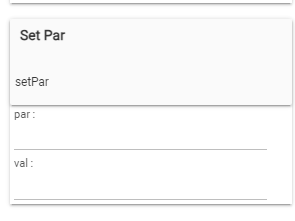
You will see in the live logs the accepted parameter names (they are different for each device)
infoRadar _TZE204_muvkrjr5 setPar: 'parameter' must be one of these : [radarSensitivity, staticDetectionSensitivity, fadingTime, minimumDistance, maximumDistance, distanceReporting]
Copy from the logs the name of the parameter that you want to change - for example minimumDistance . then paste it as a first parameter, and fill in the setting value - as example 3.0
Then click again on the button above
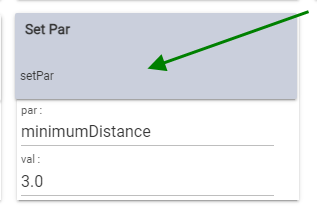
Observe the Curent States - will the parameter change?
2 Likes
@kkossev, based on your suggestions along with @bdydrp’s testing and findings, I was able to successfully retain the following values:
- Motion sensitivity
- Static detection sensitivity
- Minimum distance
- Maximum distance
The process is a bit convoluted, but here’s how I got it to work:
- Input all four values as desired.
- Ensure that minimumDistance is set according to the valid distance values provided below:
- Save Preferences
- StaticDetectionSensitivity
maywill revert to "0" at some point, but using the method of clicking the 'Set Par' button with both 'par' and 'val' completed makes it stick.
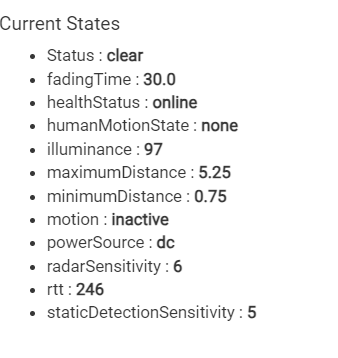
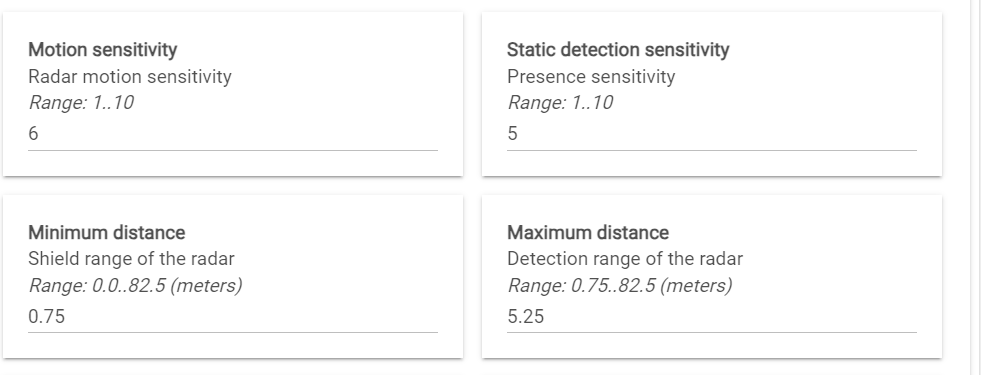
Hope this makes sense. Let me know if you need more information.
1 Like
That is a piece of good news! 
For now I will publish the code as it is, in a future update I may try to present the minimum/maximum distances as drop-downs in the Preferences section, so that only 'allowed' values are accepted.
1 Like

