I've been intermittently seeing this error. When it occurs I have no device control. In this case, the light failed to turn on through an RM rule. I went to the device page and hit "on" and everything started working again.
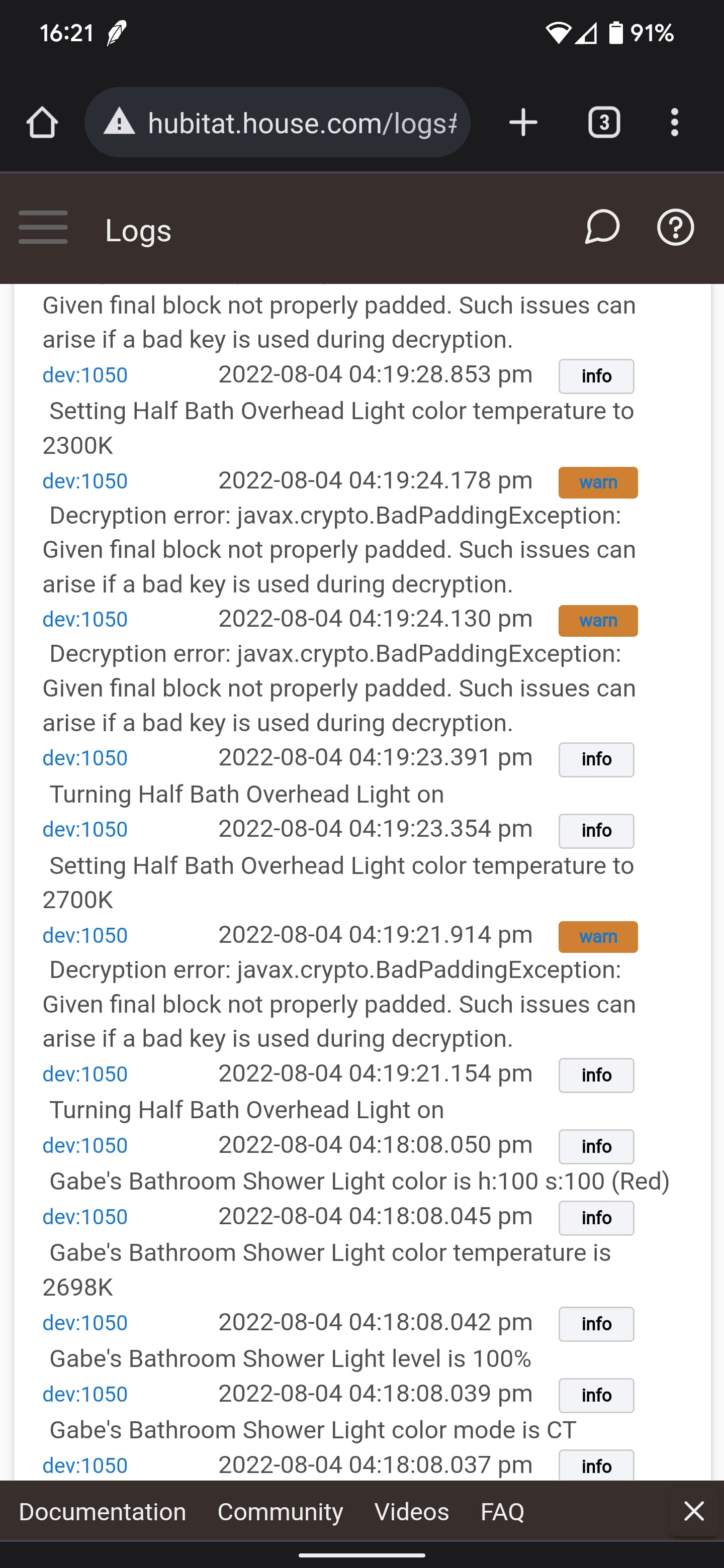
Ok, after doing some digging into that error message I think that Hubitat may be sometimes passing in a LazyMap instead of HashMap to the function effectively making it read-only so line 487 will always fail when it does that.
So, I think the easy way to fix this is simply to make level its own variable which I just updated in the development branch as follows...
        // level is optional, so fallback to the current device level if the colorMap doesn't include the level
        int level = (colorMap.level != null) ? colorMap.level : dw.currentValue('level')
        Map value = [
            h: remap(colorMap.hue, 0, 100, (int)color.h.min, (int)color.h.max),
            s: remap(colorMap.saturation, 0, 100, (int)color.s.min, (int)color.s.max),
            v: remap(level, 0, 100, (int)bright.min, (int)bright.max)
        ]
1 Like
Ok, I think the issue is I was caching the cipher object and when the key changes the old cached cipher was still being used with an invalid key. I changed the code in the development branch to remove the cipher cache which should eliminate this.
1 Like
Cool. I've flipped over to the DEV branch. I'll keep an eye on them for a few days and see what happens.
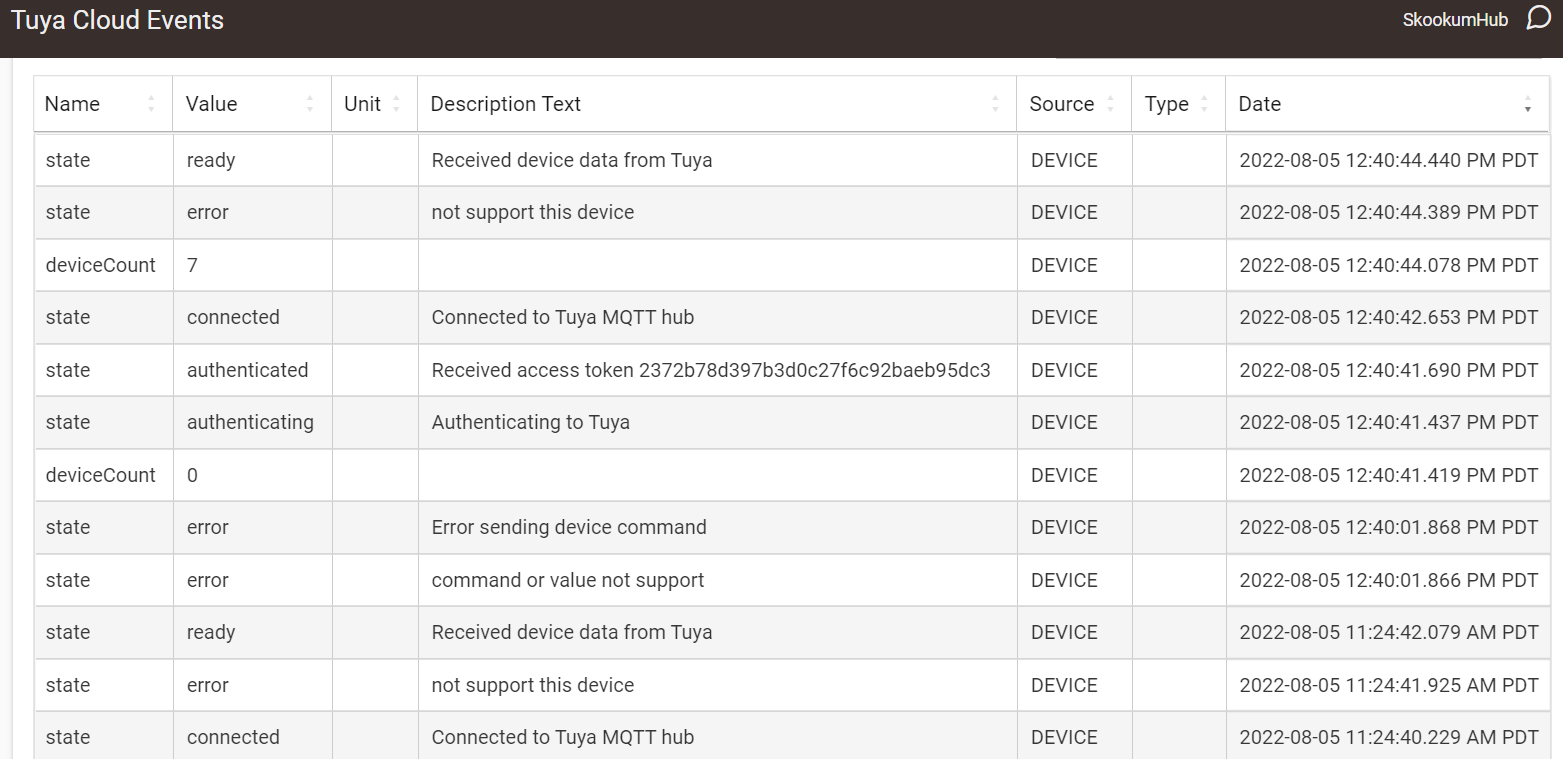
It looks like the device isn't supported in the Tuya cloud, but I can use it via Smartlife app no problem. I tried various commands (on/off/setspeed/cyclespeed etc) and only change in log I see is the error sending the device command that you see in the screenshot attached.
Was getting the following error when I was trying to activate a scene through SmartLife. It initially I chocked it up to the IR blaster not receiving but took some time to debug and found some variables that weren't parsed correctly.
Was getting this originally:
dev:4902022-08-08 04:43:23.963 pm errorgroovy.lang.MissingMethodException: No signature of method: user_driver_tuya_Tuya_IoT_Platform__Cloud__742.tuyaTriggerScene() is applicable for argument types: (java.lang.String, java.lang.String) values: [XXXXXXX, XXXXXXXX] on line 463 (method componentPush)
Change Integer HomeId to a String and that got it to work.
private ChildDeviceWrapper createSceneDevice(String homeId, Map scene)
And also here:
private void tuyaGetHomesResponse(AsyncResponse response, Map data) {
** if (tuyaCheckResponse(response) == false) { return }**
** List homes = response.json.result ?: []**
** homes.each { home ->**
** String home_id = home.home_id.toString()**
** tuyaGetScenesAsync(home_id)**
** }**
}
It's been a while since I coded...sorry if it's messy.
The IR blaster is another issue...it's having a hard time parsing the functions. But it seems like an issue with HA too.
When it's parsing the IR blaster functions from the remote, it doesn't know how to handle them. I looked them up on Tuya but it's basically whatever they key in for that button. At least the scenes work now, so I can do it using the scenes.
IR device one:
dev:4902022-08-08 05:00:42.924 pm debugTuya API result [category:infrared_amplifier, functions:[[code:Next, type:STRING, values:Next], [code:Pause, type:STRING, values:Pause], [code:Play, type:STRING, values:Play], [code:PowerOff, type:STRING, values:PowerOff], [code:PowerOn, type:STRING, values:PowerOn], [code:Previous, type:STRING, values:Previous], [code:Volume+, type:STRING, values:Volume+], [code:Volume-, type:STRING, values:Volume-]], status:[]]
dev:4902022-08-08 05:12:43.048 pm errorgroovy.json.JsonException: Unable to determine the current character, it is not a string, number, array, or object
The current character read is 'N' with an int value of 78
Unable to determine the current character, it is not a string, number, array, or object
line number 1
index number 0
Next
^ on line 1764 (method tuyaGetDeviceSpecificationsResponse)
IR device two
dev:4902022-08-08 05:12:43.022 pm debugTuya API result [category:infrared_fan, functions:[[code:NegativeIon, type:STRING, values:NegativeIon], [code:PowerOff, type:STRING, values:PowerOff], [code:PowerOn, type:STRING, values:PowerOn], [code:Speed, type:STRING, values:Speed], [code:Swing, type:STRING, values:Swing], [code:Timing, type:STRING, values:Timing]], status:[]]
dev:4902022-08-08 05:12:43.050 pm errorgroovy.json.JsonException: Unable to determine the current character, it is not a string, number, array, or object
The current character read is 'N' with an int value of 78
Unable to determine the current character, it is not a string, number, array, or object
line number 1
index number 0
NegativeIon
^ on line 1764 (method tuyaGetDeviceSpecificationsResponse)
IR device 3
dev:4902022-08-08 05:12:43.172 pm debugTuya API result [category:infrared_tv, functions:[[code:-/--, type:STRING, values:-/--], [code:0, type:STRING, values:0], [code:1, type:STRING, values:1], [code:2, type:STRING, values:2], [code:3, type:STRING, values:3], [code:4, type:STRING, values:4], [code:5, type:STRING, values:5], [code:6, type:STRING, values:6], [code:7, type:STRING, values:7], [code:8, type:STRING, values:8], [code:9, type:STRING, values:9], [code:Back, type:STRING, values:Back], [code:C, type:ENUM, values:{"min":1,"max":999,"scale":0,"step":1,"type":"Integer"}], [code:Channel+, type:STRING, values:Channel+], [code:Channel-, type:STRING, values:Channel-], [code:Down, type:STRING, values:Down], [code:Home, type:STRING, values:Home], [code:Left, type:STRING, values:Left], [code:Menu, type:STRING, values:Menu], [code:OK, type:STRING, values:OK], [code:Power, type:STRING, values:Power], [code:Right, type:STRING, values:Right], [code:Up, type:STRING, values:Up], [code:Volume+, type:STRING, values:Volume+], [code:Volume-, type:STRING, values:Volume-]], status:[]]
dev:4902022-08-08 05:12:43.342 pm errorgroovy.json.internal.Exceptions$JsonInternalException: unexpected character / on line 1764 (method tuyaGetDeviceSpecificationsResponse)
Hi Jonathan, did you have further advice or recommendations from my log reply? Would really like to get this working if I can.
Also wanted to report that these two bulbs from Lowe's also work. I presume the entire lineup of Feit and Cree WiFi bulbs will work.
This one comes with a caveat. You can add them via the Tuya app, but will have zero control of them in there. They import and function just fine via HE though.
Thanks for the event log but I'll need the debug log, that is, enable debug on the main Tuya device and then click the Logs button on the driver page (its at the top of the page next to the Events button)
Oh sorry, wrong log! I sent to you as PM because of api key exposure. Thanks so much.
@jonathanb, new to Hubitat moving from Vera. great so far and this driver is superb.
Hit one issue with some switches I have ( Smart Plug WiFi Socket TECKIN ). detected as "Generic component switch" but have power readings that seem to error in the logs alot. had hoped it would be as simple as changing the type to "Generic component metering switch".
any idea how to get the power readings showing?
Thanks and logs below.
[dev:165](<HTTP_URL>/logs?device=165#pastdev165)2022-08-16 07:47:55.695 pm [error](<HTTP_URL>/device/edit/165)java.lang.NullPointerException: Cannot invoke method getDataValue() on null object on line 861 (method parse)
[dev:165](<HTTP_URL>/logs?device=165#pastdev165)2022-08-16 07:47:55.688 pm [debug](<HTTP_URL>/device/edit/165)Groups: [null:[[code:cur_voltage, t:1660675675, 6:2422, value:2422]]]
[dev:165](<HTTP_URL>/logs?device=165#pastdev165)2022-08-16 07:47:49.699 pm [error](<HTTP_URL>/device/edit/165)java.lang.NullPointerException: Cannot invoke method getDataValue() on null object on line 861 (method parse)
[dev:165](<HTTP_URL>/logs?device=165#pastdev165)2022-08-16 07:47:49.692 pm [debug](<HTTP_URL>/device/edit/165)Groups: [null:[[code:cur_current, 4:69, t:1660675669, value:69], [code:cur_power, t:1660675669, 5:523, value:523]]]
[dev:165](<HTTP_URL>/logs?device=165#pastdev165)2022-08-16 07:47:48.146 pm [error](<HTTP_URL>/device/edit/165)java.lang.NullPointerException: Cannot invoke method getDataValue() on null object on line 861 (method parse)
[dev:165](<HTTP_URL>/logs?device=165#pastdev165)2022-08-16 07:47:48.126 pm [info](<HTTP_URL>/device/edit/165)Insect plug Switch switch is off
[dev:165](<HTTP_URL>/logs?device=165#pastdev165)2022-08-16 07:47:48.124 pm [debug](<HTTP_URL>/device/edit/165)Insect plug Switch status [1:false, code:switch, t:1660675668, value:false]
[dev:165](<HTTP_URL>/logs?device=165#pastdev165)2022-08-16 07:47:48.123 pm [debug](<HTTP_URL>/device/edit/165)Insect plug Switch workMode
[dev:165](<HTTP_URL>/logs?device=165#pastdev165)2022-08-16 07:41:48.790 pm [info](<HTTP_URL>/device/edit/165)Creating device Insect plug Switch using Generic Component Switch driver
[dev:165](<HTTP_URL>/logs?device=165#pastdev165)2022-08-16 07:41:48.745 pm [debug](<HTTP_URL>/device/edit/165)Tuya category cz driver [devices:[switch:[suffix:Switch, driver:Generic Component Switch], switch_1:[suffix:Socket 1, driver:Generic Component Switch], switch_2:[suffix:Socket 2, driver:Generic Component Switch], switch_3:[suffix:Socket 3, driver:Generic Component Switch], switch_4:[suffix:Socket 4, driver:Generic Component Switch], switch_5:[suffix:Socket 5, driver:Generic Component Switch], switch_6:[suffix:Socket 6, driver:Generic Component Switch], switch_usb1:[suffix:USB 1, driver:Generic Component Switch], switch_usb2:[suffix:USB 2, driver:Generic Component Switch], switch_usb3:[suffix:USB 3, driver:Generic Component Switch], switch_usb4:[suffix:USB 4, driver:Generic Component Switch], switch_usb5:[suffix:USB 5, driver:Generic Component Switch], switch_usb6:[suffix:USB 6, driver:Generic Component Switch]]]
I im useing a dehumidifier with this and have for a few months, it did work with out fault but just recently the on/off switch stays in the off.
I can still use the on/off and it works but its just causing havoc with my automations.
Wondering whats changed?
Im using the generic component dehumidifier driver, have tried the generic component switch and that has the same issue
I just went to my drop down and its a huge scrollable list that does still have Device Status Notification listed, are you sure that list you are showing isn't scrollable (try even without the scrollbar)
1 Like
At first thought this sounds like the MQTT feed from Tuya with status updates isn't being received or processed which is the only way those states will change.
Questions:
- Does this impact any other Tuya devices (assuming you have others using the driver)
- Are there any errors in the logs (not for the humidifier device, look at the device logs for the parent Tuya driver)
- Have you tried clicking the 'initialize' button in the parent tuya driver to see if that makes a difference?
So it's ok now? Earlier I went out (device is in garage) and double checked that my dehumidifer was turning on and off from hubitat and it was working fine..........
@jonathanb I'm having issues using this integration with Room Lighting. Whenever I try to use RL to turn the lights on, the lights go into a non-responsive state in RL. I opened a thread and after some back and forth with Bruce, it appears the issue is because the lights aren't turned on when setColor or setTemperature is set. With the deprecation of 'Groups and Scenese' this is going to become more and more problematic.
I think the fix should be straightforward. I've added the ON command as part of setcolor and setcolortemperature in the development branch to try: https://raw.githubusercontent.com/bradsjm/hubitat-drivers/development/Tuya/TuyaOpenCloudAPI.groovy
1 Like
Did anyone else experience an issue with this driver this morning? After months of working without issue (thanks again @jonathanb) and no changes I was getting errors in the logs while gathering the device list. I can't check to see if it's cleared until later today. It was most likely a Tuya server issue (a permanent change or just a hiccup) but just wanted to see if anyone else experienced any issues before I dig in any deeper. Thanks
EDIT: It's back online now, there must've been an issue with Tuya's servers this morning.
1 Like


