[BETA] Aurora Borealis Lighting

Aurora Borealis Lighting - Realistic Northern Lights Effect for Your Smart Home

I'm excited to share my Aurora Borealis Lighting app for Hubitat! This app creates a harmonious, realistic northern lights effect across all your color-capable bulbs.

What It Does

The Aurora Borealis Lighting app produces a mesmerizing aurora borealis (northern lights) effect by:

  • Smoothly transitioning through authentic aurora colors (greens, purples, blues, pinks)
  • Synchronizing all bulbs with coordinated color shifts for a cohesive display
  • Adjusting brightness levels dynamically to mimic the natural ebb and flow of real auroras
  • Using randomized timing to create an organic, ever-changing light show

Perfect for creating ambient lighting during movie nights, parties, or just enjoying a unique atmosphere in your home!

Installation Instructions

  1. Go to Apps Code in your Hubitat hub
  2. Click "New App"
  3. Paste the code below
  4. Click "Save"
  5. Go to Apps → Add User App → Aurora Borealis Lighting
  6. Select your color bulbs and configure settings

Full Code

/**
 *  Aurora Borealis Lighting
 *  
 *  Creates a harmonious, realistic northern lights effect across color bulbs
 *  
 *  Copyright 2025
 *  
 *  Licensed under the Apache License, Version 2.0 (the "License"); you may not use this file except
 *  in compliance with the License. You may obtain a copy of the License at:
 *
 *      http://www.apache.org/licenses/LICENSE-2.0
 *
 *  Unless required by applicable law or agreed to in writing, software distributed under the License is distributed
 *  on an "AS IS" BASIS, WITHOUT WARRANTIES OR CONDITIONS OF ANY KIND, either express or implied. See the License
 *  for the specific language governing permissions and limitations under the License.
 *
 */

definition(
    name: "Aurora Borealis Lighting",
    namespace: "custom",
    author: "Colin Ho",
    description: "Simulates Northern Lights by cycling colors on selected color bulbs.",
    category: "Lighting",
    iconUrl: "",
    iconX2Url: "",
    iconX3Url: "")

preferences {
    section("Select color bulbs for aurora effect") {
        input "colorBulbs", "capability.colorControl", title: "Color Bulbs", multiple: true, required: true
    }
    section("Color change speed (seconds)") {
        input "speed", "number", title: "Transition speed", required: true, defaultValue: 3
    }
}

def installed() {
    initialize()
}

def updated() {
    unschedule()
    initialize()
}

def initialize() {
    runIn(2, auroraLoop)
}

def auroraLoop() {
    if (!colorBulbs) return // nothing to do

    def speedMs = (settings.speed ?: 3) * 1000
    def bulbs = colorBulbs
    
    // Turn off all color bulbs NOT in the selected list
    def allColorBulbs = location.allDevices.findAll { it.hasCapability("ColorControl") }
    def unselectedBulbs = allColorBulbs - bulbs
    unselectedBulbs.each { it.off() }
    
    // Create a harmonious base hue for this cycle (aurora colors: green-blue range)
    def baseHue = 50 + new Random().nextInt(40) // Range 50-90 (green to cyan/blue)
    def baseSaturation = 85 + new Random().nextInt(15) // Range 85-100
    
    def randomOrder = bulbs.sort{new Random().nextInt()}
    randomOrder.eachWithIndex { bulb, idx ->
        // Create harmonious offset for each bulb (small variation from base)
        def hueOffset = (idx % 3 - 1) * (5 + new Random().nextInt(5)) // -10 to +10 degree variation
        def harmonicHue = (baseHue + hueOffset) % 100
        def harmonicSaturation = baseSaturation - new Random().nextInt(10) // Slight sat variation
        
        bulb.setColor([hue: harmonicHue, saturation: harmonicSaturation, level: 100])
        pauseExecution((speedMs / bulbs.size()).toInteger())
    }
    runIn(settings.speed ?: 3, auroraLoop)
}

GitHub Repository

For the latest updates, issues, and contributions, visit the project on GitHub:
GitHub - coolineho/Aurora-Borealis-Lighting: Aurora Borealis lighting effects for Hubitat - dynamically cycles through harmonious colors with smooth transitions

Features Summary

  • :art: Authentic aurora color palette with smooth transitions
  • :arrows_counterclockwise: Randomized timing for organic, natural effect
  • :bulb: Per-bulb color variation for depth and realism
  • :gear: Configurable brightness range and transition timing
  • :electric_plug: Optional switch control to enable/disable effect

Enjoy your own personal northern lights display! Feel free to share your setups and any feedback.

Happy automating! :sparkles:

7 Likes

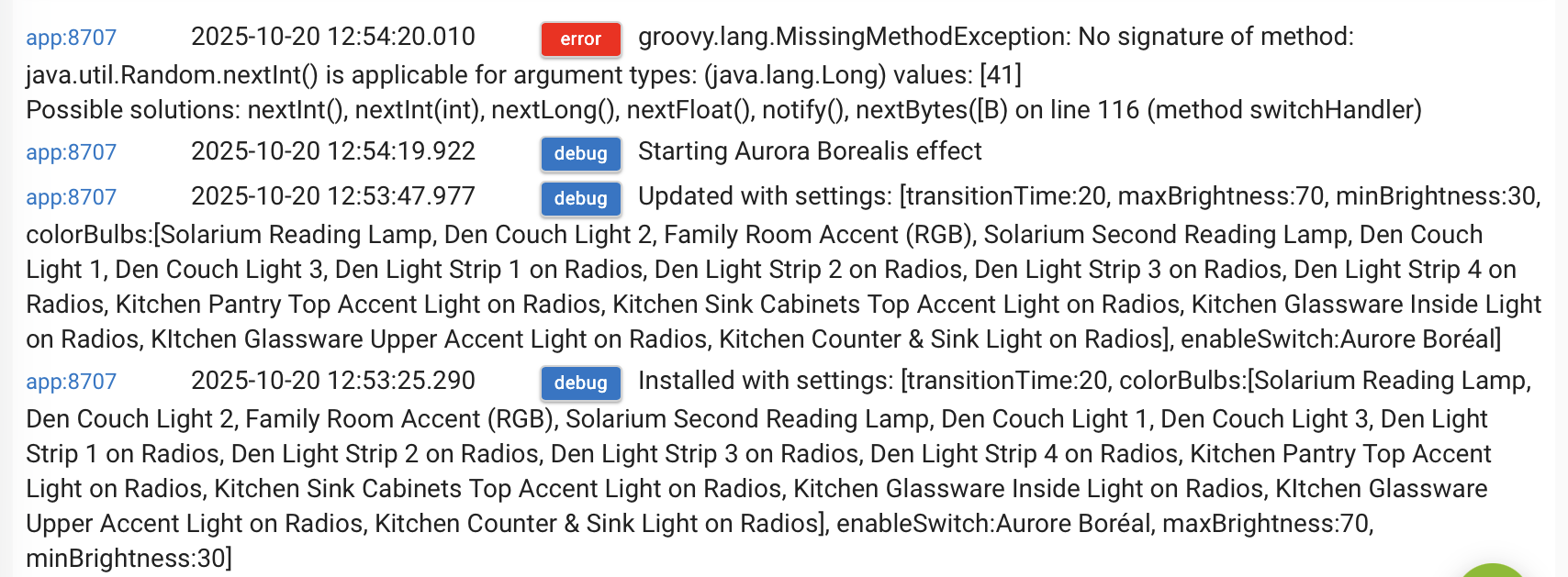
I love the idea! I just tried it, but unfortunately, it didn’t start. Getting this error:

Now time to collaborate with @blink for WLED and @mavrrick58 for Govee! :grin:

2 Likes

... and don't forget PixelBlaze.
I am sure PixelBlaze is capable to run something similar as a local pattern without any interaction with HE.

I got the same error as Sebastien.

ETA: I hard coded 41 as the argument for the nextInt() medthod on line 116 and got it to run. That calculation is returning a Long value.

Try the updated code. I posted an older script! woops

2 Likes

Govee has a aurora scene on pretty much all devices which is pretty much this already.

I made my comment tongue in cheek without any research. It seems WLED also has an Aurora effect and 2 different Aurora color palettes.

Nice app. I may end up using this every night for my foyer bulbs that currently just switch colors every 30 minutes.

Looking at the code, it looks like you're trying to turn off all other color-capable lights here:

    // Turn off all color bulbs NOT in the selected list
    def allColorBulbs = location.allDevices.findAll { it.hasCapability("ColorControl") }
    def unselectedBulbs = allColorBulbs - bulbs
    unselectedBulbs.each { it.off() }

Fortunately that doesn't seem to have any effect on my other color bulbs, but you might want to make this an option for the user. I don't want lights all over (and outside) the house turning off if I activate this in one room. I'm not sure why it isn't working, because my other bulbs are exposing the ColorControl capability when I query them via Maker API.

Also, am I missing something, or am I supposed to start the app by clicking 'Done' and then stop it by disabling the app? It would be nice if there were a device connected to the app that would allow this to be started and stopped via a rule.

I tried this with some Yeelight WiFi bulbs that are connected using the built-in Hubitat integration and some Sengled RGB bulbs. The Sengled bulbs weren't transitioning smoothly between the colors until I switched them from the generic "Advanced Zigbee RGBW bulb" driver to the Sengled Element Color Plus driver. I'm not sure why I had them on the generic driver... they probably just got automatically set to that driver when I connected them.

The two types of bulbs also handle the colors a bit differently, with the Yeelights showing something much closer to white for what I assume is showing up as the lighter blues on the Sengleds.

2 Likes

Good recommendation. I live in a condo, so if non-color bulbs are on while this effect is on, it really breaks the effect. I will add that option in the next release.

Yes, the way I made this is when you click done, the effect automatically turns on, and when you disable the app, it turns off. Adding a virtual device to control this should be pretty easy :wink: i'll look into that.

1 Like

I can confirm that it works for me now.

Adding the ability to link to a switch to turn the effect on and off would be a game changer for me!

Also, it wold be great if the bulbs could be made to revert back to where they were before the app started once the switch was turned off. Otherwise, the lights remain on with the last colour…

Great app!

Looks really nice. I just tried it out on one of my Govee lights and it looksed really nice.

I would deffinately add something for control like either Hub Variables, a Switch or some amount of day and time control.

You could also include a few color picker inputs would allow users to select the colors to transition to and just default to your default color pallet.

This can be a great tool for devices that are single Pixel RGB devices.

I did a little work on this earlier this evening (with help from CoPilot in VS Code) and just sent a PR. My fork of the code is at GitHub - youzer-name/Aurora-Borealis-Lighting: Aurora Borealis lighting effects for Hubitat - dynamically cycles through harmonious colors with smooth transitions. I haven't updated the README, but here are the changes I made:

  • Added a 'level' setting to set the bulb dim level
  • Added a debug logging switch
  • Added a 'start/stop' with a switch option
    • When using the switch to start the animation, there is a capture done, and the lights return to their previous state when the switch turns off
  • Added a start with a button option
    • When starting with a button, there is no capture/restore done. The animation runs until the lights are turned off.

As I was typing this I realized I had a major issue in the code... after starting with the button it would run until the app was completely disabled. There was no way to stop it otherwise. I think I have that fixed, but my code could use some additional testing.

The way it should work now, any change to the bulbs from another source should abort the animation. So if you turn the bulbs off or change them to a different color, the app stops.

In my use case, I have this running on the lights in the foyer by my front door. When someone approaches my front door, a rule turns those lights on and sets them to white from whatever state they're in. When that happens, my version of the app will abort the animation. This also lets you simply turn the lights off as a way of stopping the animation.

1 Like

Does this app perform transitions between colors, or does it try to use the base color and only make small increments to it. When i was looking at it on my device i saw the colors change suddenly. The hue may not have changed much, but it was enough if watched that it was sudden.

The light device I was using doesn't fade between colors when the command is submited, so i was just wondering if this is handled in the app, or is that functions expected on the device itself, or are the changes expected to be so small that it isn't noticeable.

If the expectation is the last option listed above, i don't see where it looks at the previous hue/saturation to know the change is small. You may want to have it check the device in each cycle to ensure the change in the Hue is small enough to be relatively un Noticeable.

Speaking only for my fork of the code which is now significantly different to the original:

The short answer is no, the bulbs should be set to use a transition time within the device preferences to make for the smoothest transition. I had one pair of bulbs that were making hard transitions between colors, but after setting them to use a longer transition time, the effect works.

Currently the code divides the 'speed' time by the number of bulbs and makes one change every [speed/bulb count] seconds. It then pauses for [speed] seconds. I'm playing with it now on a set of 4 bulbs (two floor lamps with 2 bulbs each). I have my speed set for 10 seconds. So what it does is:

  • Pick a random color within the palette (hue and saturation)
  • Pick a random bulb order
  • Set each bulb to a small offset from the selected hue/saturation at a 2.5 second interval
  • Pause 10 seconds
  • Repeat

Since each repeat cycle starts from a new base color, in my example case, at 10 seconds all the bulbs might be set to a greenish color. They stay that way until 20 seconds. At 25 seconds, two of the bulbs would still be that greenish color, but two others have been set to the second cycle color, say reddish. At 30 seconds, all the bulbs have been set to the reddish color. They stay that way for 10 seconds. And so on...

I'm thinking of removing the [speed] delay between the cycles and making it a separate user setting, because the math currently works very differently with different numbers of bulbs.

For example I'm playing with this on a ceiling fixture with 3 Yeelight WiFi bulbs. If I set the speed to 8 seconds, that's one change every 2.7 seconds, an 8 second pause, then repeat. But in my 4-bulb case, to get one change every 2.5 seconds I need the speed set to 10 so I get a 10 second pause between cycles.

With more bulbs, the math gets worse. If I do this with the 6 recessed WiZ lights I just installed in another room, to achieve a 2.5 second delay between changes I'd have to set the delay to 15 seconds, but that means a full 15 seconds with no change between each cycle. Probably best to let the user select both the speed within the cycle and the speed between cycles independent of the number of bulbs selected.

This should probably be called out somehwere. This should not be simply expected to be the behaviour of a light device. I can think of a few light devices that this doesn't apply to. If the app doesn't have the ability to ensure the transition is gradual then the bulbs selected could easily cause the desired effect to fail.

Not a bad idea. maybe scale the number of cycle based on the number of bulbs to prevent the size of the rotation from getting to long as the number of devices grow.

This makes me wonder if possibly this could be a good feature request to add to the Color Animations built in app. I think the main difference would be the randomizing of each bulb. It looks like that tool has most of this as well.

I supposed there could be a note added in the UI to the effect that the bulb transition time will affect the animation.

After struggling with the CoPilot assistant for a bit, I think I have a more stable version of the code in my fork now. The user can select the time between changes within a cycle and the time between cycles separately.

I was having a lot of issues with it self-canceling because some of my bulbs were reporting their state late and the app thought it was an external state change. It is now using a 2-step method to prevent that.

First, there is a 1-second window where it will ignore any updates from the bulb it just commanded. After that window, it will only abort if the hue changes significantly (> 5 on the hue scale of 0-100), the switch state turns off, or the mode switches to color temperature from RGB.

So the loop can be canceled by turning any bulb off, setting any bulb to CT mode, or setting any bulb to a hue different enough from the last commanded hue.

I have this running on two separate fixtures... a 3-bulb lamp with Yeelight WiFi RGB bulbs (which transition very nicely between colors with a 1-second transition set in the device) and two 2-bub lamps that each have one Sengled Zigbee bulb and one Sengled WiFi over Matter bulb (which require a longer transition time in their config to do smooth effects). The Sengled bulbs were the ones that were causing the self-canceling behavior, but I think I have that handled now.

Out of curiousity how much of that was created by copilot?

I was being lazy, so nearly all of it. I had to take over when it got stupid once in a while. I also ran the finished code through a different LLM to ask it to find places to make it more concise which led to a bunch of the reusable functions at the bottom. I probably could have written this the old fashioned way, but it would have taken me at least 10x as long.

I've been on a bit of a coding spree since learning how to wrestle with the LLMs. I've been doing a lot of my automation rules in NodeRED lately, and have been creating new nodes with LLM assistance. Now that I know that CoPilot will always start with a malformed HTML file, it's much easier to get started. Definitely faster than coding by hand, but once the basic structure is there, I've found you have to do line-item edits or the LLM will just break things that were previously working.

Today I asked CoPilot to create a reusable function like I referenced above... it added the new function and then deleted a major block of completely unrelated code that would have entirely broken the app. It's like asking a contractor to paint your front door and you get home and the front door looks great, but they demolished the garage. :slight_smile:

I finally went in and tried to update the README to reflect my changes. I guess I never really read the original version that closely, because the original README has some major discrepancies from the original app code. The way it described the app functioning (using a specific list of 10 colors, switching through them in a non-random order) doesn't match the original app code.