So why are you upgrading? What's not working for you now?
UniFI just released new 8 port 2.5GE switches (finally). The non-POE version is currently available in the US store and the POE version is supposed to be available on 1/16/2025.
https://store.ui.com/us/en/category/switching-utility/products/usw-flex-2-5g-8
2 Likes
Good question...couple of reasons. First my Netgear managed switches are all at EOL, no longer getting security updates. Second, I would like to be able to manage everything from within the Unifi Network app/ecosystem - not have to move between the Unifi app and the Netgear switch UIs (there are two different verions of the UI in the switches I have). Going to UI switches def a "nice to have" - I could just get some new Netgear switches. 
What are you using for running Unifi Network? is it a VM, does the EdgeRouter12 have it, or are you getting a cloud gateway/udm to run it on?
The reason i ask is that could affect what route you want to go. Honestly i got the Lite 8 PoE because I needed to get away from injectors. I would of preferred the new Flex 2.5 POE to go with my UCG-Cloud Max since all ports on it are 2.5gbe. I am now pondering ways to sell the Lite 8 PoE i just got to repurchase the Flex 2.5 PoE.
Yea, it doesn't make allot of since to speed 3x the cost just to eliminate a injector or two, but 
Honestly depending on the number of ports you need you may be able to get a few Flex Mini's and be good.
And is there some misguided person who thought this is only about logic?! 
I was hoping the same, but when I looked at my current configuration all but one of my switches has five or more connections, and the least I have is four on one, and I do want to leave some room to grow. So unfortunately that's not going to work for me.
I have an EdgeRouter 12 which has my VLAN set up on it, and then the two APs (U6-LR and Nano) for Wi-Fi.
I'm telling your wife you're spending money...
1 Like
Yea. With the Flex 2.5 PoE I could power my Flex mini 2.5, a U7 Pro In-Wall, a U6+, and a AI Port and maintain the 2.5Gbe Speed throughout. Then have room to add a few cameras. The only things that use 2.5Gbe in my house are two computers, the U7 Pro Inwall and the Flex Mini 2.5. Now do i really use 2.5Gbe enough to justify it probably not. The USW Lite 8 POE was just a way to get some POE without injectors because i was running out of power outlets in the location allot of this stuff resides. It is nice.
So that means the Ultra or the Lite 8 POE at $100 or $109, or you could jump to the Flex 2.5G at $159. On additional thing that is nice about the Flex 2.5G is that it gives you a dedicated uplink ports. One is a 10GB SFP+ Port while the other is a 1,2.5,5,10GB combo port. Only one can be used at a time, but it at least gives you that for future use if you are thinking that way. So you get 8 ports for actual use and don't have to sacrifice one for uplink. If you need much PoE budget though the Ultra and the Flex 2.5G have additional costs.
Right but does that run your Unifi network App. I don't know about the EdgeRouter line but the UCG Max runs the Unify Network management software as well as Protect and other Unifi software. There is also a similar product called the UXG Max which doesn't run any of the software and is just a gateway and switch device with the same 5 2.5GB ports and router functionality. To manage that device with Unifi Network it needs to run on a VM or be hosted in Unifi's cloud.
Don't forget some of these switches can also be powered via PoE. Depending on your network layout and POE needs you could possibly power some of the switches from a central point. Even the Lite 8 POE has 54 watts of budget and can put out POE+ each of its ports. The Ultra and the Flex 2.5G POE can be setup with a power supply to allow around 190 Watts of power budge. The Ultra can output PoE+ or 30 watts to all of it's ports while the Flex 2.5G can do PoE++ 60 watts to each port as long as the have the overall power budget.
The flex mini 2.5GE does not do POE output. You can power it via POE, but no POE to connected devices.
Note they assume most people will be powering the Flex 2.5 POE with another switch, so it doesn't come with a power supply. It's another $79.
That is what i said. I would use the Flex 2.5 PoE to power the Flex Mini 2.5 as well as the other devices.
I like : Ubiquiti Networks Cloud Gateway Ultra < 129.00
With a cheap 8 port poe+ < 30-50.00
Ubiquiti Networks UniFi U6+ < 129.00
It can be powered with a POE+, POE++ Injector, or the 210W AC Adapter. They actually dropped the price of the AC Adapter because yesterday it was showing 99 on their site. I think the POE+ injectors are fairly affordable. You won't get much Power budget, but that is the case no matter how you are doing it if it is powered via POE.
1 Like
Oh sorry I misunderstood your question. I run the Unifi network app on a Pi4. The EdgeRouter doesn't have that capability.
You. Shut up.


2 Likes
I didn't know it could run on a Pi4. One thing to consider is if you started to look at the Flex 2.5 PoE you would need the latest version of Unifi Network, 9.0.108.
I'm probably not going to go with the Flex 2.5, I run a very basic network and we do very little with it that even challenges what I would get from a speedy dial-up connection. Seriously, anywhere between 100 and 200 is more than enough for what we do, which is primarily some streaming of content from Netflix etc., browsing the interweb, email, etc. Very boring around here.  But don't tell my wife I said that, because I justify all the unifi gear by telling her I need it for high security and smooth network operation.
2 Likes
Yeah I've only ever had it on a Pi, and it's worked great. There is this fantastic Ubuntu/Debian script on the UI forum that a user there created, that installs the app (and you can choose which release, early access, etc.)...just kick it off and it provides an option to back up current state, and then install/upgrade the network app. Just such a cool guy and excellent tool.
I'm looking at the 9.x release, but will wait a bit before I dive into that one. Want other people to shake it out for me. Zone-based firewalls do look cool.
1 Like
I don't understand the benefit.
I haven't really looked into it, but watched a couple minutes of a video and it looked it is supposed to provide ease of use benefits in setting and managing firewalls. Below is UI's pitch when you click the button to upgrade to zone-based firewalls in the app:
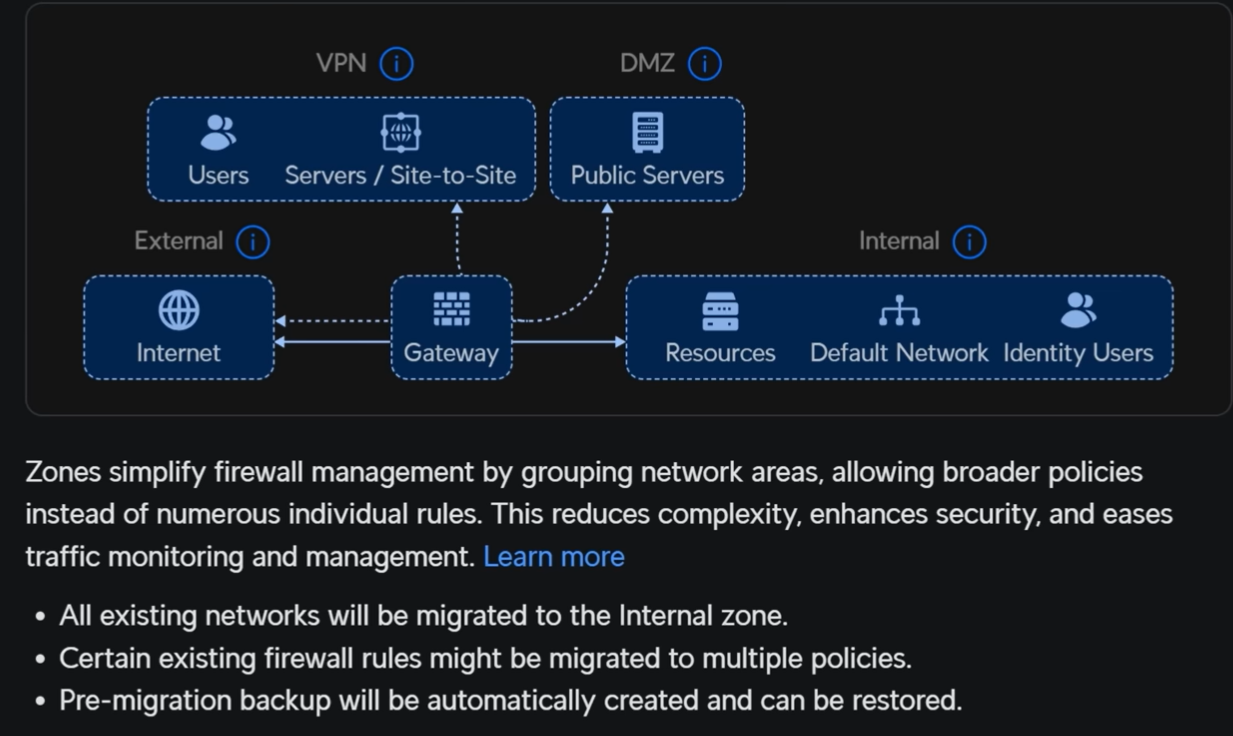
Proof will be in the pudding...
@danabw
Would you be mad at me if I sent your wife a link to this forum, specifically a link to all of your comments involving spending money?
How much would it be worth to you for me not to do that?
1 Like
