What type of light is "Couch Light - Living Room" (e.g., what brand/model) and what driver ("Type:" on the device page) are you using for it with Hubitat?
It's a Sylvania Smart+ LED strip, showing as a Generic Zigbee RGBW Light. All of these strips are using the same driver. It's worth noting I've seen this behavior on some of my other bulbs (Sylvania Smart+ bulbs, same driver).
does it work as expected when you run the "Set Color Temperature" command manually--assuming you see one there at all?
I have several of these, and most are working fine. One sometimes isn't set right - but that seems like a scene issue as well. I just tested sending the color temp manually, and this light indeed showed azure on the setColor area. When I entered 3003 in the setColorTemperature box, then clicked the button, the light changed. This further points to some issue with the scene - and not the light itself (or seemingly the driver).
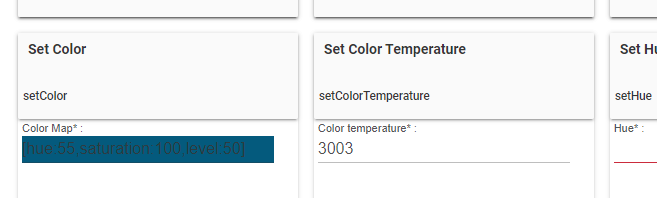
If all else looks good, one thing I did see recently is that "Set Color Temperature" and "Set Level" commands issued in quick succession, as a scene might do, may cause of of them to be lost.
What would even be the fix here, other than a special driver. I have the exact light in my bedroom and so far it's never had an issue. The only difference? It's on a different scene.
Nothing should really set this to "azure" unless that was the last color you were using on the bulb and it's simply reporting that after being turned on but not set to the correct CT.
That may have indeed been the last color set. If I enable debug logging on this device will I see the signal that's actually being sent? My only other thought is to delete and re-create the scene (which will be fun since it's referenced quite a few times, but oh well).
Thanks